Fluxer
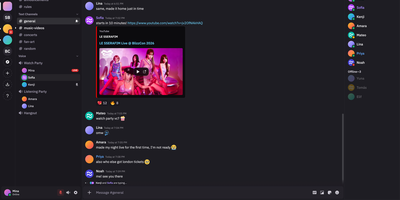
Fluxer gives friends, gaming groups, and private communities their own self-hosted instant messaging and VoIP platform that replaces Discord with private text channels, voice rooms, video calls, and screen sharing. Members can chat one-on-one in direct messages, form multi-person group conversations, or organize large community servers into categorized text and voice channels with threaded replies, reactions, and typing indicators. When a conversation moves to voice, participants can join low-latency audio and video rooms from multiple devices simultaneously, share application windows or full screens, and rely on built-in noise suppression and echo cancellation for clear calls. Rich media support allows users to share file attachments, preview embedded links, search animated GIFs through KLIPY, and upload custom community emojis and stickers. Server administrators control access through role-based permission hierarchies, member timeouts, kicks, bans, and detailed moderation audit logs that track every configuration change across the community. Integrated full-text search lets members quickly locate historical messages, code snippets, and shared files across every channel they can access. Running on a dedicated VPS on RepoCloud with guaranteed CPU, RAM, and SSD, full root SSH access, and a browser serial console. AGPL-3.0 licensed.
Sharkord
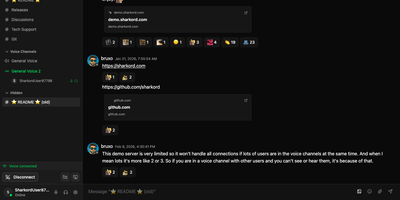
On game night Sharkord carries voice, webcams, and screen sharing, and on Monday morning it carries the team's threaded chat, all from one server you control. For the gaming crowd, voice rooms offer noise suppression, echo cancellation, webcams up to 2160p, and screen sharing in VP8, VP9, H264, or AV1, with optional simulcast layers for slow viewers. An experimental Bridge app keeps push-to-talk and mute hotkeys working with a game in focus, and plugins add a music bot or a soundboard. For a family group, invite links can carry a role, a use limit, and an expiry, and replies, reactions, custom emoji, pins, and direct messages keep conversation casual, with uploads up to 2 GB each. For a small team, text channels sit in categories with threads, mentions, and search, roles stack with per-channel permissions for private rooms, and OpenID Connect sign-in works with Authentik, Keycloak, Zitadel, Entra ID, or Google Workspace. Admins cap storage per user or role and can sign upload URLs. There is no premium tier, no member cap, no ads, and no tracking, and a built-in marketplace installs plugins in one click. Running on a dedicated VPS on RepoCloud with guaranteed CPU, RAM, and SSD, full root SSH access, and a browser serial console. MIT licensed.

OpenVidu
For online classes, telehealth visits, and support calls, OpenVidu Meet is a video meeting app that anyone with a link can join from a browser, with no account or download. A room needs only a name, and an optional wizard adds limits on participants (up to 30) and meeting length (up to a day), plus microphone and camera defaults. A shared Moderator or Speaker link admits anonymous guests, a personal link identifies each invited guest, and registered users sign in with their accounts. Developers can embed a room with an iframe or web component, and webhooks report meeting events to as many endpoints as needed. A smart mosaic favors recent speakers and counts the participants it hides, and a status rail shows the recording light, an encryption badge, and the time left. Moderators mute one participant's microphone, camera, or screen share, switch them off for everyone, remove people, and promote others. Virtual backgrounds blur the room or swap in an image, before joining or mid-call. Recordings start by hand or when the first participant, the second participant, or a moderator joins, in grid, speaker, or single-speaker layout. Permitted members can play, download, delete, or share saved recordings by link. End-to-end encryption protects audio, video, chat, and names behind a shared passphrase, though encrypted rooms cannot be recorded. Running on a dedicated VPS on RepoCloud with guaranteed CPU, RAM, and SSD, full root SSH access, and a browser serial console. Apache-2.0 licensed.
Dispatcharr
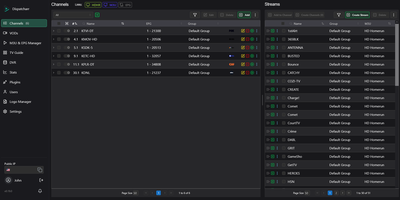
Dispatcharr is a self-hosted IPTV stream proxy, electronic program guide manager, and DVR server that consolidates multiple M3U playlists and Xtream Codes providers into a unified live television and video-on-demand hub. Through its web dashboard, you can import and filter thousands of channels from unlimited upstream sources, automatically match XMLTV or Schedules Direct guide data to your lineup, and organize movies and series enriched with IMDb and TMDB metadata. The proxy streaming engine shares a single upstream provider connection across multiple local clients, switches seamlessly to backup stream URLs when buffering or drops occur, and routes backend traffic through FFmpeg, VLC, or Streamlink profiles with custom fMP4 or MPEG-TS output transcoding. To integrate with home media servers, Dispatcharr exports curated lineups as M3U playlists, XMLTV feeds, Xtream Codes API endpoints, or emulated HDHomeRun network tuners that Plex, Jellyfin, Emby, and Channels DVR discover automatically, while also offering a built-in DVR with series recording rules, Comskip commercial stripping, and timeshift catch-up playback. Running on a dedicated VPS on RepoCloud with guaranteed CPU, RAM, and SSD, full root SSH access, and a browser serial console. AGPL-3.0 licensed.
neTV
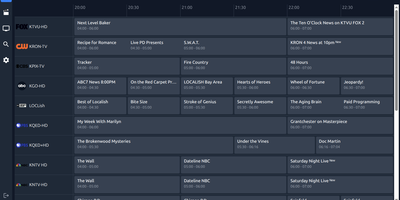
neTV turns any Xtream Codes or M3U IPTV subscription into a clean, fast player that you host yourself and open from a browser, iPhone, iPad, Apple TV, Mac, or Chromecast. The EPG grid guide shows what is on now and next, and catchup lets you browse earlier listings, replay a program from the beginning, or start over a show already airing, with timeline seeking whenever your provider keeps an archive. Intelligent Handoff lets you switch off the living room TV mid-match and resume on your phone from the exact moment you stopped, because the server keeps the stream going until the program ends. Movies and series arrive with metadata, seasons, episodes, and resume points, while search accepts regular expressions and favorites support drag-and-drop ordering alongside playlists that you build on the web and see in every app. Smart passthrough remuxes h264 and AAC streams without re-encoding, and NVENC or VAAPI hardware transcoding serves low-latency HLS to clients that need it. Owners of an NVIDIA GPU can switch on real-time 4K AI upscaling that lifts 1080p channels above 70 frames per second on an RTX 5090. A separate gateway port exposes your live sources as an Xtream-compatible endpoint for other native players, with per-user source access and stream limits. Running on a dedicated VPS on RepoCloud with guaranteed CPU, RAM, and SSD, full root SSH access, and a browser serial console. Apache 2.0 licensed.
MyTube
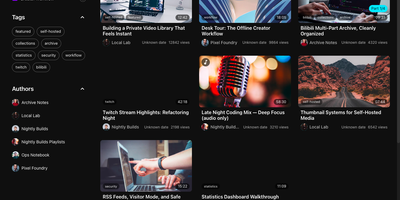
For video enthusiasts and media archivers who want complete ownership over their online video subscriptions, MyTube provides a self-hosted video downloader, library organizer, and streaming portal. Paste a single link or queue a batch of URLs from YouTube, Bilibili, Twitch, MissAV, and over one thousand yt-dlp compatible sites to archive videos directly to your disk. Subscribe to your favorite creators so new uploads download automatically in the background alongside their default language subtitles. Local video uploads automatically generate thumbnails and pull movie or television posters, cast details, release years, and ratings from TMDB. Curate custom collections, filter your catalog by tags or authors, and generate private RSS feed links for external podcast and feed readers. Built-in playback tools include keyboard shortcuts, cinema mode, Canvas-based in-car playback, and optional real-time audio translation with live subtitles via Google Gemini. You can sync finished recordings to Alist or OpenList cloud storage, trigger custom shell scripts on task completion, and receive instant Telegram bot alerts when downloads finish or fail. Share your library safely using read-only visitor accounts while protecting admin controls with WebAuthn passkeys or a 3x3 gesture lock. Running on a dedicated VPS on RepoCloud with guaranteed CPU, RAM, and SSD, full root SSH access, and a browser serial console. MIT licensed.
HomeTube
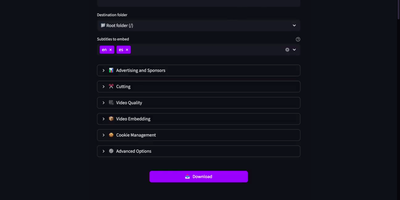
Archiving online videos, creator channels, and curated playlists directly into a personal Plex, Jellyfin, or Emby library becomes effortless with HomeTube, a self-hosted web downloader supporting more than 1,800 streaming platforms. Users paste a single video or playlist URL into the web interface, where an intelligent format analyzer evaluates available codecs and automatically selects the highest resolution video and audio streams such as 4K AV1 or VP9 paired with Opus audio. Built-in SponsorBlock integration detects crowd-sourced sponsor segments, intros, outros, and self-promotions during the download process so saved videos play back completely ad-free without manual editing. When synchronizing playlists, the engine tracks entries by unique video ID rather than mutable titles, downloads only newly added items, preserves upstream ordering with customizable filename templates, and optionally moves removed videos into an archive folder. A visual processing panel lets operators trim specific time ranges with keyframe or frame-precise cutting, embed primary and secondary subtitle tracks alongside chapter markers, and create nested destination directories directly from the browser. Browser cookie file support unlocks age-restricted or member-only streams, while custom yt-dlp argument pass-through accommodates proxy routing and filesize caps. Once processing finishes, completed files move into watched media folders and can trigger an immediate Jellyfin library rescan via API key. Running on a dedicated VPS on RepoCloud with guaranteed CPU, RAM, and SSD, full root SSH access, and a browser serial console. AGPL-3.0 licensed.
Viseron
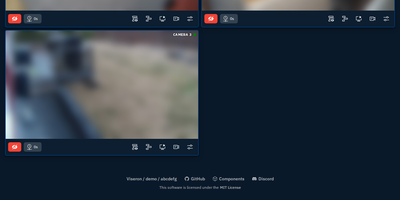
Homeowners and facility operators deploy Viseron to turn standard RTSP and ONVIF security cameras into a self-hosted network video recorder with local AI object detection, face recognition, and license plate reading. Instead of uploading private camera feeds to subscription cloud services, you monitor low-latency WebRTC live streams, scrub through an interactive event timeline, and review 24/7 continuous recordings directly from a responsive web dashboard. You can draw custom detection zones and privacy masks in the visual camera tuning editor to filter out street traffic, while lookback buffering captures footage several seconds before motion or an object triggers an event. Pluggable computer vision pipelines connect your cameras to YOLOv7 Darknet, Google Coral EdgeTPU, CompreFace, dlib, and CodeProject.AI to classify people, vehicles, known faces, and license plates in real time. Tiered storage policies automatically migrate older video segments from fast NVMe drives to high-capacity archival disks based on age and quota rules. Bidirectional MQTT integration and Home Assistant auto-discovery let you toggle cameras on demand, ingest external motion sensors, and dispatch instant snapshot alerts to Telegram or Discord. Running on a dedicated VPS on RepoCloud with guaranteed CPU, RAM, and SSD, full root SSH access, and a browser serial console. MIT licensed.