DooTask
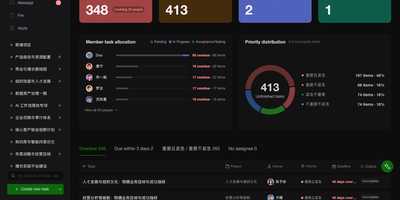
Open a project in DooTask and your tasks appear as a Kanban board, a list, a Gantt timeline, or a calendar, with team chat and file sharing beside them. Start from a project or task template and set a task to repeat so each new occurrence links back to the original. Mention colleagues in project and task chats, add emoji, and keep messages protected with asymmetric encryption. Files from chats and tasks gather in a Collaboration Files section, and WebDAV lets you manage My Files and Shared Files from Finder or Explorer. Check the dashboard for what is overdue, due today, or coming up, while department heads switch to a team view charting overdue and incomplete tasks per member. Visit the App Store to install official apps for approvals, OKRs, AI assistants, OnlyOffice, Minder mind maps, and Drawio diagrams. Administrators can add custom apps from an archive, a URL, or a GitHub repository. Add an API key for ChatGPT, Claude, Gemini, DeepSeek, or Grok, or point to Ollama or any OpenAI-compatible URL, then type @AI Robot in a project chat to draft tasks. Log in on the web by scanning a QR code with the mobile app, or use an LDAP or Active Directory username. The free Open Source Edition covers three users; paid editions raise that to ten or unlimited. Running on a dedicated VPS on RepoCloud with guaranteed CPU, RAM, and SSD, full root SSH access, and a browser serial console. AGPL-3.0 licensed.
Deploy