Home Assistant
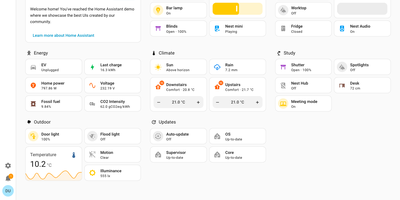
Your house already has lights, locks, sensors, thermostats, and speakers from many brands, and Home Assistant gives them one local control room with no vendor cloud in the loop. To close the shutters when the outdoor temperature holds above 25 °C, or to be alerted when the garage door is left open, build the routine in the visual editor: When, And if, Then do. Scenes, scripts, and blueprints package it for reuse, and run traces show what it did. More than 1,500 integrations cover Zigbee, Z-Wave, Matter, Thread, MQTT, ESPHome, Bluetooth, Hue, and Sonos, and network discovery offers known devices for one-step setup. To see the house at a glance, drag tile, thermostat, gauge, graph, and map cards into a dashboard, then put it on a TV with Home Assistant Cast. The Energy dashboard answers where the power goes, drawing solar, grid, battery, gas, and water as one distribution diagram with cost totals and per-appliance tracking. To talk to the house, use Assist: natural-language commands, wake words, and custom sentences run locally or through Home Assistant Cloud. The map panel shows who is home, plotting people against zones such as Home, Work, and School from the iOS and Android companion apps. Areas and labels keep large setups tidy, and multi-factor authentication guards each account. Running on a dedicated VPS on RepoCloud with guaranteed CPU, RAM, and SSD, full root SSH access, and a browser serial console. Apache-2.0 licensed.
Domoticz
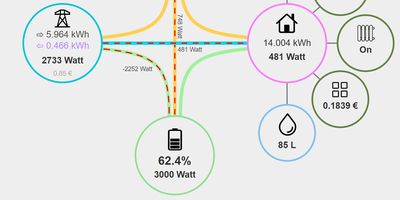
Domoticz takes charge of lights, switches, sensors, and meters around the house from hardware in your own home, with no cloud account, subscription, or internet connection needed to switch on a lamp. Connect the gear you already own: Z-Wave and Zigbee sticks, RFXCOM transceivers, Philips Hue bridges, P1 smart meters, 1-Wire sensors, and MQTT devices are among the 150-plus supported hardware families, and new sensors and switches can teach themselves to the system. The web dashboard arranges favourite devices on one screen, floorplans place controls on a plan of your rooms, and switches, scenes, temperature, weather, and utility pages keep every reading a tap away. Automate with schedules, sensor triggers, or scripts: visual Blockly blocks for quick rules, dzVents and Lua for richer logic, and Python when you need it. The energy dashboard draws live flows between solar panels, grid, battery, and home, and long-term charts track temperature, rainfall, and consumption. Push notifications reach your phone when a door opens or a meter spikes, and selected devices can be shared with other Domoticz installs. It runs happily on a Raspberry Pi Zero, an old laptop, or a proper server, with the same interface on desktop and mobile. Running on a dedicated VPS on RepoCloud with guaranteed CPU, RAM, and SSD, full root SSH access, and a browser serial console. GPL-3.0 licensed.
Zigbee2MQTT
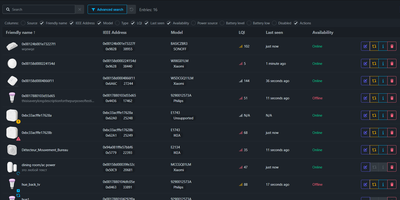
Zigbee2MQTT bridges a Zigbee smart home network to MQTT so bulbs, switches, sensors, and locks from hundreds of vendors work with your own automation server instead of each manufacturer's cloud bridge. It supports 5,798 devices from 608 vendors, so a Philips Hue bulb, an IKEA TRÅDFRI switch, an Aqara sensor, and a Tuya plug can all join one coordinator and speak one protocol. The built-in frontend on port 8080 shows every paired device with its link quality, battery level, and live state, and lets you rename, reconfigure, bind, or remove devices without editing YAML. A network map view charts which routers carry traffic for which end devices, making weak spots and dead zones visible before automations start failing. Groups collect devices that should act together, scenes capture lighting states for a room, and bindings let a switch talk directly to a bulb even when the server is briefly offline. Firmware stays current through over the air updates you can trigger or schedule per device from MQTT topics or the frontend, including downgrades when a new release misbehaves. Home Assistant picks everything up automatically through MQTT discovery, while openHAB, Domoticz, and Node-RED flows subscribe to the same plain JSON topics. The coordinator plugs into the host by USB or joins over the local network, while the bridge, frontend, and broker traffic run headlessly beside Mosquitto or EMQX. Running on a dedicated VPS on RepoCloud with guaranteed CPU, RAM, and SSD, full root SSH access, and a browser serial console. GPL-3.0 licensed.
Manage My Damn Life
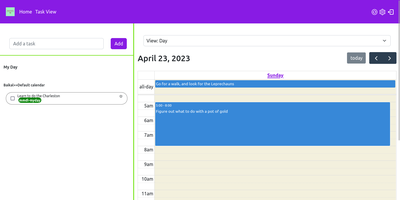
Manage My Damn Life is a personal productivity platform and CalDAV task manager that gives individuals and teams a full-featured web workspace for coordinating todos, calendar agendas, and project schedules without relying on proprietary productivity software. Users can connect multiple CalDAV server backends including Nextcloud, Radicale, and Baikal to synchronize tasks, events, and subtasks across their self-hosted infrastructure. The interface offers multiple interactive perspectives, letting planners switch between nested task checklists, full monthly calendar grids, and dynamic Gantt chart roadmaps with customizable timeline scales. Keyboard-driven operators can rapidly log action items via intuitive Quick Add syntax that parses due dates, priority tiers, and category labels from inline text triggers. A versatile filter manager allows users to save custom query views matching due dates, completion statuses, parent task hierarchies, and color-coded labels. Team members can establish reusable task templates for recurring administrative workflows, assign multi-level checklist items, and manage individual calendar visibility across shared workspaces. System administrators can configure user authentication through native accounts or integrate enterprise Single Sign-On using OpenID Connect providers like Keycloak, Authentik, and Google. Client-side state caching accelerates navigation while background sync preserves CalDAV compliance. Running on a dedicated VPS on RepoCloud with guaranteed CPU, RAM, and SSD, full root SSH access, and a browser serial console. GPL v3 licensed.
Z-Wave JS UI
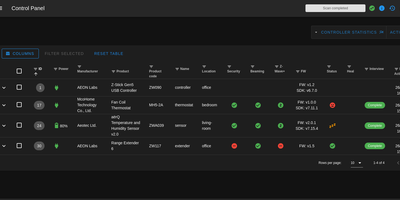
Managing dozens of smart locks, dimmers, thermostats, and sensors across a Z-Wave mesh often leaves homeowners blind to routing hops, sleepy battery devices, and firmware bugs; Z-Wave JS UI solves this by delivering a comprehensive browser control panel and MQTT gateway for your USB or network Z-Wave controller. Provision new devices with SmartStart QR scanning or S2 authenticated inclusion, inspect every Command Class parameter, and push over-the-air manufacturer firmware updates straight to switches and sensors. Interactive network topology graphs map live routing neighbors, link quality, and background RSSI signal strength, while built-in health checks and an integrated Zniffer packet analyzer pinpoint RF interference before automations fail. Operators can configure direct node-to-node association groups and multicast broadcast groups so wall switches trigger lights even when the central hub is offline. Scheduled Non-Volatile Memory controller backups and pre-inclusion restore points protect your mesh against hardware failure, and the configurable MQTT Discovery and WebSocket server bridges every entity seamlessly into Home Assistant, OpenHAB, Domoticz, Jeedom, and ioBroker. Running on a dedicated VPS on RepoCloud with guaranteed CPU, RAM, and SSD, full root SSH access, and a browser serial console. MIT licensed.
WebThings Gateway
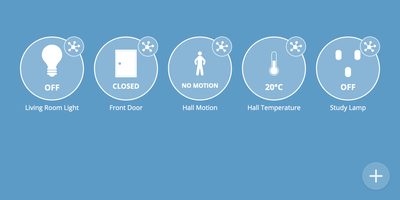
WebThings Gateway is a self-hosted smart home hub that puts monitoring and control of your whole house in one private web interface, with no vendor cloud in the middle. Lights, plugs, locks, thermostats, and sensors appear as live Things you can watch and operate from any browser, at home or remotely through your own server. Devices from different ecosystems meet here: adapter add-ons bridge a wide range of protocols into a standardized Web of Things API, so gear that never spoke the same language shares one dashboard. A drag and drop rules editor automates the house with if-this-then-that logic, turning motion into light, schedules into climate, and events into actions without code. Sensor history is logged and visualized over time, which makes energy use, temperature drift, and occupancy patterns visible instead of guessed. An interactive floorplan lays devices out on a plan of your home for at-a-glance status and control room by room. Add-ons extend compatibility with more devices and protocols as your setup grows, and everything runs locally, so the house keeps working on your terms and your data stays in the building. It installs from a Docker image and serves its interface over the web from your own hardware. Running on a dedicated VPS on RepoCloud with guaranteed CPU, RAM, and SSD, full root SSH access, and a browser serial console. Mozilla Public License 2.0 licensed.
Gladys Assistant
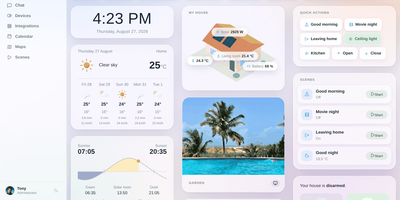
If cloud-dependent smart home hubs and YAML-heavy configuration files leave your household at the mercy of vendor outages and broken scripts, Gladys Assistant puts your entire home under clean, point-and-click local control. Zero YAML required. Pair thousands of lights, thermostats, smart plugs, locks, and sensors directly through native Zigbee2MQTT, Matter, Z-Wave, and MQTT support, or install hundreds of sandboxed community integrations for Philips Hue, Shelly, Sonos, TP-Link Tapo, Netatmo, and Reolink cameras in a single click. Visual scenes make automation effortless. Trigger multi-step routines from motion sensors, sunrise schedules, house presence, calendar events, or electricity tariff changes, and chain conditional actions with delays, HTTP webhooks, and Telegram alerts. Customizable room dashboards display live RTSP camera streams, climate charts, weather forecasts, and interactive dimmer controls. Built-in energy monitoring tracks real-time wattage, historical kWh consumption, and utility contract costs across every circuit. Running on a dedicated VPS on RepoCloud with guaranteed CPU, RAM, and SSD, full root SSH access, and a browser serial console. Apache-2.0 licensed.

OpenHAB
Over 400 technologies and thousands of smart devices from any manufacturer, unified under one roof: openHAB is the vendor-neutral home automation platform with a pluggable binding architecture. Each binding translates a device or service into openHAB's clean abstraction: Things expose Channels, Channels link to Items, and Items feed a rules engine that runs your home. That engine meets you at your skill level: Blockly gives non-programmers drag-and-drop visual logic, JS Scripting (GraalJS with the openhab-js library) is the modern text-based standard, the classic Rules DSL remains supported, and JSR223 opens the door to Python, Ruby, and Groovy. Time- and event-based triggers, scripts, notifications, and voice control compose into automations of any complexity, and users report decade-old rule sets still running rock solid. The Main UI handles configuration, semantic modeling, and now built-in charting - no external Grafana required. Built in Java on Apache Karaf's OSGi runtime and stewarded by the non-profit openHAB Foundation, it requires no cloud to function: everything runs locally, talking directly to your devices. Optional connectors bridge to Alexa, Google Assistant, and HomeKit, with iOS, Android, and web apps for control from anywhere.
HomeGenie
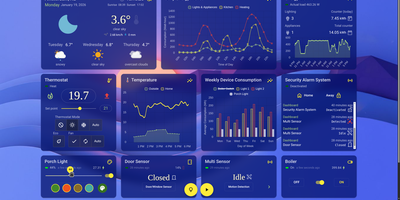
HomeGenie runs your whole smart home locally, controlling lights, sensors, cameras, and automations from hardware in your own house, so everything keeps obeying you even with the internet cable pulled. The dashboard is your control room: watch energy consumption, security zones, and environmental conditions in real time, then customize layouts, themes, and charts until the view matches your household. Automations suit every skill level, from a visual editor where scenarios assemble without code, to full programs in C#, JavaScript, or Python against a documented API. The built-in AI assistant, Lailama, runs locally: speak or type natural-language commands and it reasons about your home's context, orchestrates multiple devices, and shows the exact code it executed, so nothing happens by opaque magic. Voice works locally too, with Whisper recognizing speech and Piper answering through the browser. Cameras gain brains through VisionCore, which detects people, vehicles, and objects in real time, records buffered event clips, and feeds what it sees into your automations. A data browser turns months of sensor history into interactive charts with filters like moving averages, so "why did heating spike Tuesday" gets an answer. Virtual modules let you prototype sensors before buying hardware, and the interface speaks more than 90 languages. Running on a dedicated VPS on RepoCloud with guaranteed CPU, RAM, and SSD, full root SSH access, and a browser serial console. AGPL-3.0 licensed.
OpenTodo
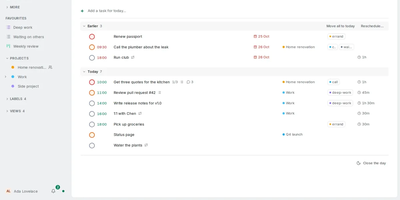
Plan the day in the morning, capture tasks in your own words as they appear, and let every device settle on the same list by evening: that rhythm is what OpenTodo is built around. The Today view opens with a briefing, a daily limit, and morning, afternoon, and evening sections, with time blocking and meetings counted against the day's real capacity. Quick add understands natural language in six languages, a pasted list becomes tasks in one step, and the command bar, inbox processing, email-to-task, and dictation keep capture fast. Projects organize work with sections, boards whose cards carry notes, timelines, sub-projects, and areas, while recurring tasks and sequential projects handle routines and ordered work. Lists can be shared with the people you live and work with, invited by link once the owner account exists. Every device keeps a full copy and works offline; changes are stamped per field and merge cleanly through your server when you reconnect, with history and undo preserving earlier values. CalDAV and calendar feeds connect your calendars, GitHub and GitLab issues flow in, and webhooks plus ntfy, Pushover, and Gotify send notifications out. Scheduled backups go to a folder, S3-compatible storage, or WebDAV, and the whole server is one container around one SQLite file. Running on a dedicated VPS on RepoCloud with guaranteed CPU, RAM, and SSD, full root SSH access, and a browser serial console. AGPL-3.0 licensed.
ioBroker
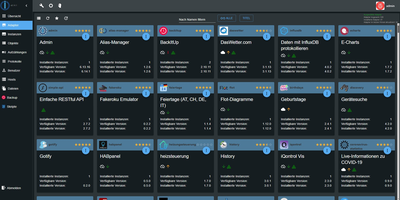
Every device in a smart home speaks a different language, and ioBroker is the open-source home automation platform that translates Zigbee lamps, cloud-tied heating, and Modbus solar inverters into one system under your control. Adapters do the translating: more than 800 of them connect devices, protocols, and online services, from Philips Hue, Shelly, and HomeMatic hardware to MQTT, KNX, Telegram, and weather feeds. Everything an adapter learns lands in one shared structure of objects and live states, so a motion sensor from one brand can switch lights from another without either vendor knowing the other exists. Automations start simple: the rules editor clicks triggers, conditions, and actions together from lists, and the same logic grows into Blockly diagrams or full JavaScript and TypeScript scripts when a routine outgrows the form. Dashboards are yours to design in the vis-2 editor, where switches, sliders, gauges, and floor-plan views are dragged onto pages and bound to any data point in the tree. The whole installation is managed from the browser admin interface: install adapters, configure instances, browse the object tree, watch live states, read logs, and manage users without editing a single configuration file. Voice control joins through Alexa, Google Home, and Matter bridges, remote access works over VPN or the optional ioBroker.pro link, and because automations execute locally, the house keeps behaving when the internet drops. Running on a dedicated VPS on RepoCloud with guaranteed CPU, RAM, and SSD, full root SSH access, and a browser serial console. MIT licensed.