Pascal Editor
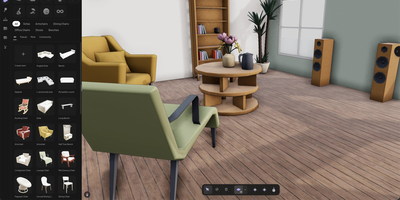
Architecture, engineering, and construction teams can sketch a floor plan, watch the building rise in 3D, and hand the same scene to an AI agent, all inside Pascal Editor in a browser. Draw walls, slabs, ceilings, roofs, stairs, elevators, doors, windows, and columns. Split view keeps a flat plan of the active level beside the live 3D model, the same tools work in both panes, snapping and live measurements guide the walls you draw, and a level selector adds and reorders floors. Trace over an uploaded floor plan image or 3D scan, furnish room by room from a catalog sorted by category, paint surfaces with materials, and name rooms as zones. Walk through the result at eye level, then export GLB, USDZ, a floor plan PDF, or 3D-print parts. IFC files import as editable nodes wherever their parameters can be recovered, and an MCP server lets Claude Code, Cursor, Codex, or any MCP client inspect, edit, validate, and save projects locally with no account. Plugins add node types and sidebar panels, a public share link serves a read-only embeddable viewer, and self-hosting takes one container, one data volume, and one admin password. Running on a dedicated VPS on RepoCloud with guaranteed CPU, RAM, and SSD, full root SSH access, and a browser serial console. MIT licensed.
House Planner
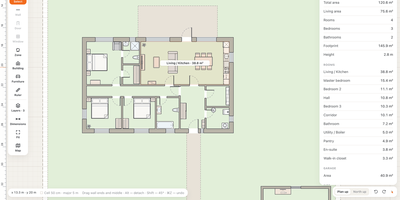
House Planner holds the design of your house in one browser workspace, from true-scale floor plans drawn over a satellite photo of your plot to costed wiring, plumbing, sewer, and heating layouts. Draw walls at true scale in millimetres with thickness and materials, add doors, windows, garage gates, and furniture with true dimensions, and watch room areas and plot coverage total as you work. Flip into 3D for a massing model or the house finished with material textures and facade colours, with cut-down walls for reading the layout from above. Every utility network gets an engineering layer: route sewer lines to a septic tank with slopes and cleanouts, auto-route electrical circuits with breaker and voltage-drop checks, and run water piping from well and boiler to each fixture. Underfloor heating loops lay out room by room, split before 80 metres, and balance flow against heat loss. The bill of materials computes quantities from the plan and networks, producing a priced estimate you can print, tick off as you buy, or export to CSV. Every save is a numbered version with restorable snapshots, tabs cannot overwrite each other, and the JSON plan can be edited by an AI assistant through the same API. One password guards the project, phones get a read-only view for on-site checks, and the whole thing runs in one Docker container with no database. Running on a dedicated VPS on RepoCloud with guaranteed CPU, RAM, and SSD, full root SSH access, and a browser serial console. MIT licensed.
OpenPencil
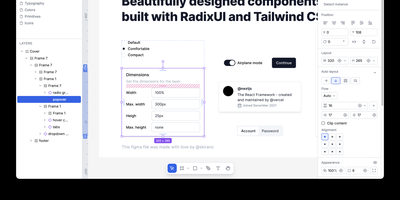
OpenPencil is the open-source design editor that reads and writes native Figma .fig files using the same Kiwi binary format — enabling bidirectional copy-paste between Figma and OpenPencil without data loss. The built-in AI assistant provides 90+ design tools through a chat interface, creating and modifying shapes, fills, strokes, auto-layout, components, variables, and boolean operations from natural language prompts, with BYOK support for Anthropic, OpenAI, Google AI, OpenRouter, Z.ai, MiniMax, and compatible endpoints. A Skia CanvasKit WASM renderer paired with Yoga WASM layout engine delivers Figma-parity rendering with flex and CSS Grid support including gap, padding, and alignment. The headless CLI inspects node trees via XPath queries, lints naming and accessibility, converts between document formats, analyzes color and typography patterns, extracts design tokens, and exports to PNG, SVG, JSX/Tailwind, and HTML. An MCP server exposes all design operations over stdio and HTTP, connecting Claude Code, Cursor, Windsurf, and Gemini CLI for AI-assisted design automation. Real-time P2P collaboration via WebRTC with Yjs CRDT synchronization requires no server and no account. The Vue SDK provides headless components for embedding the editor into custom applications. Ships as a 7 MB Tauri v2 desktop app for macOS, Windows, and Linux, or runs in any browser as a PWA. Running on a dedicated VPS on RepoCloud with guaranteed CPU, RAM, and SSD, full root SSH access, and a browser serial console. MIT licensed.
Kitsu
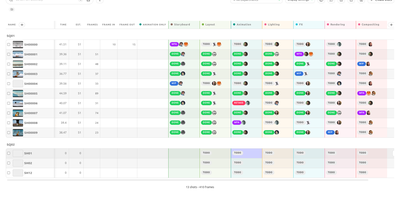
Built for animation, VFX, and game studios, Kitsu ties production tracking to frame-by-frame review so every asset, shot, task, and approval lives in one place. Coordinators follow assets, shots, sequences, episodes, and edits in spreadsheet pages with a status per task type, assignees, estimates, and custom metadata columns, and status automations ready the next task once an upstream one is done. Artists attach previews as images, MP4 or MOV video, or GLB 3D files with HDR lighting and request approval. Supervisors comment, draw or type annotations over frames, and compare two task types or versions side by side. Review Rooms keep playback and drawings synchronized during dailies. Public playlist links let guests comment without an account, and client permissions limit what outside reviewers see. Breakdown pages cast assets into shots. Producers plan with Gantt schedules, quotas, timesheets, and budget forecasts that support multiple versions and salary scales. Sign-in supports two-factor authentication through TOTP, email codes, or FIDO keys, plus OpenID Connect. Imports cover CSV files for shots, assets, and people and edit decision lists that create shots with frame ranges, and developers script pipelines with the Gazu Python client, a JavaScript SDK, and a REST API described in OpenAPI. Running on a dedicated VPS on RepoCloud with guaranteed CPU, RAM, and SSD, full root SSH access, and a browser serial console. AGPL-3.0 licensed.