LinkWarden
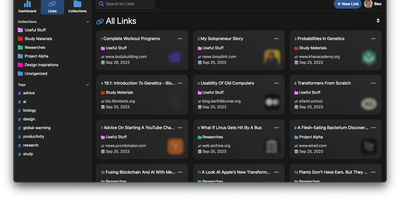
Links rot - the hard truth Linkwarden is built around, as a collaborative bookmark manager that preserves what it saves. Every page you save is fully preserved - a screenshot, a PDF, a self-contained single-file HTML archive (generated by the Monolith Rust binary), and a clean reader view - so the content survives even after the original site disappears. Think of it as a private Wayback Machine you own, with an optional one-click snapshot to archive.org on top. The reading experience matches the archival rigor: a distraction- free reader view supports text highlighting and annotation, and full-text search across everything you have saved is powered by Meilisearch. Optional AI tagging analyzes page content and auto-assigns tags - generate new ones, pick from your existing set, or constrain to predefined tags - with providers ranging from local Ollama models (fully private) to OpenAI, Anthropic, and OpenRouter. Organization is collections, sub-collections, and multiple tags per link; teams collaborate on shared collections with per-member permissions, and public collections share curated link sets (with preserved copies) to anyone. The stack is Next.js/React on TypeScript with PostgreSQL via Prisma, NextAuth supporting credentials, OAuth2, and SAML SSO, and a Playwright-driven headless Chromium worker doing the capture. Native iOS and Android apps and browser extensions feed it from anywhere.
ArchiveBox
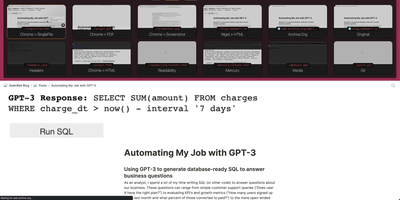
Backed by 27,700+ GitHub stars and actively developed with the v0.9.x architectural overhaul introducing an event-driven plugin ecosystem, ArchiveBox delivers the open-source self-hosted web archiving platform that preserves websites, bookmarks, social posts, media, source code, and research material in durable formats before link rot, platform shutdowns, and censorship erase them permanently. Feed it URLs one at a time or schedule automated imports from browser history, RSS feeds, Pocket, Pinboard, Instapaper, Wallabag, Shaarli, JSON, CSV, HTML bookmark exports, and browser extension captures. Each snapshot stores redundant copies as original HTML, rendered single-file HTML via SingleFile, full-page PDF, screenshot PNG, WARC archive, article text via Readability, favicons, HTTP headers, media files via yt-dlp, git repository clones, and structured metadata in SQLite. The Docker Compose deployment bundles Chrome, wget, curl, yt-dlp, SingleFile, and Readability parsers with automatic dependency management and isolation. Interact through the self-hosted web UI with search, tagging, and admin controls, the comprehensive CLI for batch operations, the REST API for programmatic access, or the Python API for custom integrations. The new abx-plugins system enables community extractors with per-plugin configuration, while the append-only-log architecture provides resumable crawls and audit trails. S3, B2, and Google Cloud storage backends sync archives to remote storage via rclone. Running on a dedicated VPS on RepoCloud with guaranteed CPU, RAM, and SSD, full root SSH access, and a browser serial console. MIT licensed.
linkding
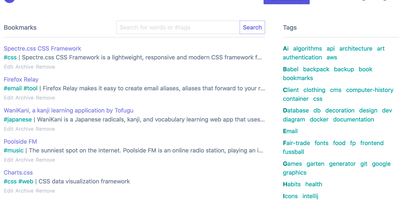
For people who found del.icio.us perfect and everything since bloated, linkding is the bookmark manager - a Django application whose entire design goal is saving and finding links with zero friction. Paste a URL and it fetches the title, description, favicon, and preview image automatically; organize with tags, search full-text across everything, mark bookmarks unread for read-it-later, attach Markdown notes, and bulk-edit whole selections at once. Its answer to link rot is archiving: bookmarked pages can be snapshotted automatically, either submitted to the Internet Archive or saved as local HTML files, and a documented SingleFile browser-extension integration uploads full self-contained page captures straight to your instance. Official Firefox and Chrome extensions (plus a bookmarklet) make saving a one-click habit, the UI installs as a Progressive Web App on mobile, and multi-user support with bookmark sharing - to users or logged-out guests - covers families and teams, with SSO via OIDC when needed. The REST API (create, search, filter by tag) has spawned a genuine ecosystem of community mobile apps and libraries. Operationally it is famously boring in the best way: one small container, SQLite by default, automated migrations, and a zero-breaking-changes policy. Import and export use standard Netscape HTML. MIT-licensed.
Shiori
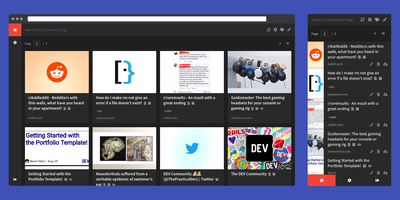
Most web links eventually break - the sobering statistic Shiori, a bookmark manager with archiving by default, is built on. Its answer is archiving by default - where possible, every bookmark you save gets a clean, readable offline copy parsed from the page, ads and navigation stripped, so the article survives even after the original URL dies. Conceived as a simple Pocket clone and written in Go, the entire server is a single binary using roughly 25-30 MB of RAM with SQLite out of the box (Postgres and MySQL supported) - genuinely the lightest archiving bookmark manager you can run. Saving is one click through the Firefox and Chrome extensions, and finding things again is where Shiori quietly outperforms its size: full-text search covers the archived page content, not just titles and tags, so you can find that article by a phrase you remember from paragraph six. Reader mode presents the cleaned text; archive mode shows the preserved page. It's dual-interface by design - a pretty web UI (installable as a PWA on mobile) and a complete CLI for terminal devotees - plus a REST API for scripting. Pocket imports work natively, and Netscape HTML handles browser imports and exports. Multi-user support included. MIT-licensed.
Wallabag
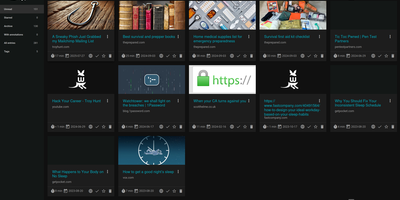
With 12,800+ GitHub stars and over a decade of active development since 2013, wallabag is the most established open-source read-it-later application — built for readers who want complete ownership of their article archive without depending on services that shut down (RIP Pocket). The Symfony-based PHP application extracts clean article content using Graby and php-readability, stripping advertisements, pop-ups, and tracking scripts to deliver a distraction-free reading experience optimized for both desktop and mobile screens. Save articles via Chrome, Firefox, or Safari browser extensions, Android and iOS native apps, REST API, or the built-in bookmarklet — all syncing to your self-hosted instance. Organize your library with tags, automated tagging rules that classify articles by content patterns, starred favorites, and archived collections. The annotation system enables highlighting extracts and attaching notes directly within articles for research and reference workflows. Import your existing reading lists from Pocket, Omnivore, Instapaper, Pinboard, Readability, and browser bookmarks. Export articles in PDF, ePUB, MOBI, JSON, CSV, TXT, or HTML for offline reading on Kindle, Kobo, and other e-readers. Full-text search with filters by reading time, domain, language, and creation date makes retrieval instant across thousands of saved articles. RSS feed output integrates with feed readers and automation services. Docker deployment with SQLite, MySQL, or PostgreSQL persistence backends takes under five minutes. Running on a dedicated VPS on RepoCloud with guaranteed CPU, RAM, and SSD, full root SSH access, and a browser serial console. MIT licensed.

Karakeep
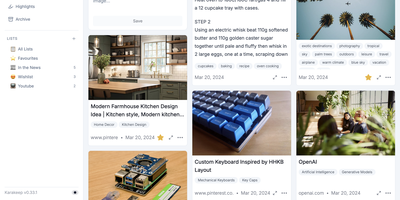
Previously known as Hoarder and now holding 28,000+ GitHub stars, Karakeep is the most popular open-source bookmark-everything application — combining AI-powered automatic tagging with full-text search, page archival, and cross-platform access for digital content hoarders who refuse to let valuable links disappear. The Next.js frontend with tRPC communication delivers a responsive interface for saving links, notes, images, and PDFs, while Puppeteer crawls bookmarked pages to fetch titles, descriptions, and images automatically. LLM-based auto-tagging supports OpenAI, Anthropic, or local models via Ollama for privacy-first deployments that never send data to external services. Meilisearch powers full-text and semantic search across all stored content including OCR-extracted text from images. A rule-based automation engine triggers custom actions based on bookmark properties — automatically sorting, tagging, or archiving content matching defined conditions. Full page archival via Monolith preserves complete page snapshots against link rot, while yt-dlp integration archives videos from YouTube and other platforms. RSS feed ingestion automatically captures new articles from subscribed sources. Collaborative lists enable teams to build shared bookmark collections, with per-list permissions and real-time sync. Native iOS and Android apps, Chrome and Firefox extensions, and browser bookmark sync via Floccus ensure capture from any device. Importers migrate data from Chrome, Pocket, Linkwarden, Omnivore, and Tab Session Manager. Running on a dedicated VPS on RepoCloud with guaranteed CPU, RAM, and SSD, full root SSH access, and a browser serial console. AGPL-3.0 licensed.
Hoarder
Hoarder (now Karakeep) is a bookmark manager that actually fights link rot: every page you save gets archived at capture time using Monolith, so the content survives even when the original URL dies. Beyond archival, an AI layer powered by OpenAI or local Ollama models auto-tags everything by analyzing page content. Prefer full privacy? Ollama keeps all inference on your server with zero external API calls. Full-text search through Meilisearch indexes the actual scraped content of every bookmark, not just titles and tags, so you find articles by what they say rather than labels you half-remember. Save links with automatic metadata extraction, plain text notes, uploaded images, and PDF documents, all organized into shareable lists with collaborative access. Browser extensions for Chrome and Firefox make saving a one-click operation from any page. Migrating is painless with importers for Chrome, Pocket, Linkwarden, Omnivore, and Tab Session Manager. LLM summarization condenses saved pages into brief overviews for quick scanning. The AI layer is entirely optional: Hoarder works perfectly as a manual bookmark manager, with intelligence adding convenience rather than imposing a requirement. SSO integration and responsive dark mode round out the package.
Grimoire
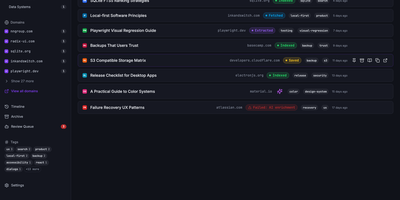
Grimoire captures, extracts, and indexes the content behind your bookmarks so you can search what pages actually say, not just their titles and URLs. The ingestion pipeline accepts links from the web UI, REST API, MCP server, browser bookmarklet, or bulk import, then fetches each page and extracts readable content using specialized parsers for GitHub repos, GitHub issues, StackOverflow threads, YouTube transcripts, PDFs, and standard web articles. Everything stores locally in SQLite with file-based content archives. Search operates in three modes: FTS5 keyword matching for exact terms, semantic embedding search for meaning-based retrieval using vector similarity, or a hybrid ranking mode combining both. Optional AI providers including OpenAI, Ollama, Anthropic, DeepSeek, and any OpenAI-compatible endpoint generate automatic tags, summaries, and embeddings without being required for core functionality. The interface built with React 18, Vite, TypeScript, Tailwind CSS, and Radix UI supports categories, nested tags, notes, archive and trash states, read-later flags, and multi-user isolated spaces. A single Bun-powered Hono process serves both the compiled frontend and the REST API on port 3210, requiring only one Docker container and a SQLite volume. Backup and restore export bookmarks, content, settings, and metadata as portable ZIP archives. Nearly 3,000 GitHub stars reflect growing adoption among developers and researchers. Running on a VPS on RepoCloud with guaranteed CPU, RAM, and SSD, full root SSH access, and a browser serial console. MIT licensed.

Huntly
Capture every article you read, RSS feed you follow, X/Twitter thread you scroll past, and GitHub repository you star into one searchable, AI-enhanced personal knowledge base with Huntly. Auto-save visited web pages through the companion browser extension, extract distraction-free article text using Mozilla Readability and Defuddle, and highlight passages with inline notes that remain anchored in your library. Reconstruct multi-post X/Twitter threads automatically with embedded media preserved intact. Subscribe to RSS and Atom feeds via OPML import, organize subscriptions into custom folders, and triage unread stories alongside your read-it-later queue and hierarchical collections. Synchronize starred GitHub repositories with their README documentation and repository tags so you can filter tools by topic without leaving your dashboard. Run custom AI shortcuts to summarize long-form essays, translate foreign articles, or query your entire archive from external AI coding agents through the built-in MCP server and Agent Skills integration. Execute boolean, phrase, and bilingual fuzzy queries across every saved document or export your entire library to portable Markdown files. Running on a dedicated VPS on RepoCloud with guaranteed CPU, RAM, and SSD, full root SSH access, and a browser serial console. Apache-2.0 licensed.
LinkAce
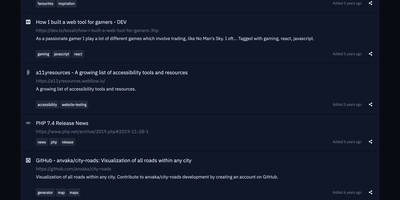
Preventing silent link rot across research libraries, LinkAce captures, indexes, and permanently archives web discoveries into searchable multi-user collections with automated Wayback Machine snapshots. Curators bookmark articles, documentation, tools, and media using custom browser bookmarklets or quick-add input fields that automatically scrape page titles and metadata descriptions. The built-in link monitor continuously checks saved endpoints for HTTP status anomalies, alerting curators whenever destinations move, throw server errors, or vanish from the live internet. For long-term preservation, the system dispatches automated backup requests to the Internet Archive Wayback Machine to capture historical copies of critical research material. Curators organize their library using nested lists and granular tag hierarchies, switching seamlessly between compact tables, detailed reading feeds, and visual card layouts. Teams and households can create separate user accounts to collaborate on shared collections, delegating read-only or editing privileges per list. The platform also generates individualized RSS feeds for public or private bookmark streams, synchronizes external data through a tokenized REST API, and dispatches automated database dumps to AWS S3 storage buckets. Running on a dedicated VPS on RepoCloud with guaranteed CPU, RAM, and SSD, full root SSH access, and a browser serial console. GPL-3.0 licensed.