NetMap
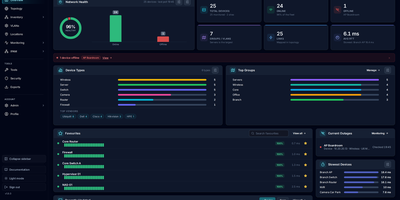
NetMap answers the four questions every homelab owner asks in four different tools: what is on my network, what address did it get, is it still up, and why is the firewall shouting about it. Devices you add appear automatically on a visual canvas where you can drag them into place, draw the links between them, and group them into VLANs or separate sites, and the layout is still there when you come back. Behind the map, every device is watched continuously: ping times graphed over history, service checks on the ports you care about, a heartbeat strip that betrays intermittent dropouts, and an uptime percentage that settles arguments. Address management stops being a spreadsheet: define subnets, import the leases your router already handed out, see used and free addresses as a grid, and get warned before a duplicate assignment causes a mysterious outage. Firewall logs stream in live and each entry links to the device it concerns, ready to search by address, port, or protocol. When something new appears, a network scan discovers hosts with their names, hardware addresses, and open ports for review before they join the inventory. Running on a dedicated VPS on RepoCloud with guaranteed CPU, RAM, and SSD, full root SSH access, and a browser serial console. GPL-3.0 licensed.
HomeLabInfo
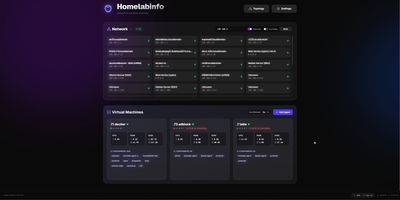
HomeLabInfo gives your homelab one dashboard where the network itself and everything running on it finally appear together, instead of scattered across router pages and terminal sessions. It watches for new devices the instant they ask the network for an address, identifies who made them, and can fire a webhook so you hear about a stranger joining your LAN before you notice it yourself. Scans keep track of which devices are online and which have gone quiet, and the interactive topology view lets you arrange the map of switches, access points, NAS boxes, and servers the way your rack actually looks. Lightweight agents installed on each machine report their containers back to the hub, so running and stopped containers, uptime, health, and host CPU, memory, and disk all show in one place without opening a separate tool per server. When an agent falls behind, its card tells you a newer version exists instead of leaving you guessing. You can add a username and password login before putting the dashboard anywhere beyond your desk, and arrange container layouts that stay put between visits. Running on a dedicated VPS on RepoCloud with guaranteed CPU, RAM, and SSD, full root SSH access, and a browser serial console. GPL-3.0 licensed.
LAN-Orangutan
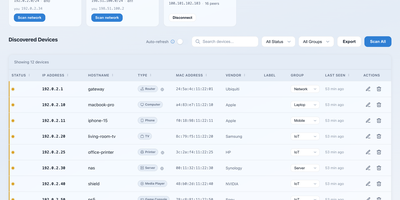
Most home and office networks quietly accumulate dozens of devices nobody can name, and LAN Orangutan answers the basic questions about all of them: what is connected, what changed since yesterday, and what should not be there at all. It scans one or several networks with nmap and merges in the host ARP table, resolving MAC addresses, manufacturers, hostnames, and device types so a phone, printer, TV, and server each show up as themselves rather than as bare IP addresses. You label devices, file them into your own groups and locations, and attach notes that survive every rescan, turning a one-off scan into a maintained inventory. Snapshots freeze the network at a moment in time, and comparing two of them shows exactly which devices appeared, vanished, or moved to a new address. Mark the devices you expect, and the dashboard flags newcomers and missing hardware, with webhook notifications to Telegram, Discord, Slack, ntfy, or Home Assistant when something changes. Tailscale peers appear next to local devices, so the laptop on your tailnet and the printer downstairs live in the same list. Risky exposures such as Telnet or FTP get flagged, scans show live progress you can cancel, and a password you create on first open guards the whole dashboard. Running on a dedicated VPS on RepoCloud with guaranteed CPU, RAM, and SSD, full root SSH access, and a browser serial console. MIT licensed.