Garage UI
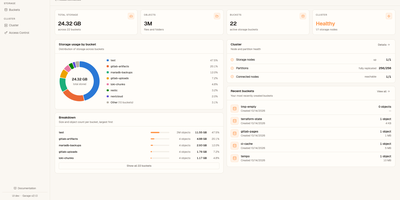
Garage UI is the web dashboard that Garage object storage never shipped, turning an admin API that speaks JSON over HTTP into screens your whole team can use. Create and configure buckets, browse objects with drag-and-drop uploads, and preview images, video, PDFs, and text inline instead of downloading files just to check what they are. A recursive search finds objects across a whole bucket, and bucket settings carry size and object-count quotas so one tenant cannot quietly eat the cluster. Access keys are created in the UI and assigned per-bucket permissions, replacing error-prone command-line key surgery. The cluster overview watches node status, layout configuration, and storage usage, so a degrading node shows up in the dashboard before it shows up as an outage. Sign-in flexes to your setup: no auth on a trusted network, basic admin credentials, the Garage admin token, or OIDC single sign-on through providers like Keycloak and Authentik. With OIDC teams enabled, access control maps token claims to bucket prefixes with named permission presets, and unmatched users are denied by default rather than promoted. Zero-config startup reads your existing garage.toml, so the first login takes minutes. Running on a dedicated VPS on RepoCloud with guaranteed CPU, RAM, and SSD, full root SSH access, and a browser serial console. MIT licensed.
RustFS
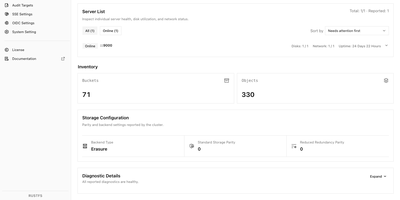
Tools and applications that already speak S3 can use RustFS as their storage backend, so backup jobs, data pipelines, and services keep working while the data stays on infrastructure you control. A built-in web console on port 9001 manages buckets, object uploads and downloads, access keys, users, groups, and IAM policies, with a status page for cluster health, capacity, and scanner activity. Versioning, Object Lock retention, bucket quotas, and server-side encryption with Vault or AWS KMS backends protect objects once they land. Lifecycle rules expire or transition data, and tiering moves cold objects to remote targets such as Amazon S3 or Wasabi. Bucket replication and site replication keep clusters in sync, and event notifications call webhooks when objects change. Single-node mode suits a lab or small server, while distributed mode adds erasure coding, bitrot protection, background healing, and pool expansion or decommissioning as capacity grows. Sign-in works with local users, OIDC single sign-on, or OpenStack Keystone, and FTPS and WebDAV are available by default, with SFTP and the Swift API as opt-in builds. A preview of S3 Tables exposes an Iceberg REST catalog for tools such as DuckDB and PyIceberg, and a documented migration path moves existing MinIO deployments across. Typical uses include backups, container registries, logs and traces, data lakes, and AI training sets. Running on a dedicated VPS on RepoCloud with guaranteed CPU, RAM, and SSD, full root SSH access, and a browser serial console. Apache-2.0 licensed.
Garage
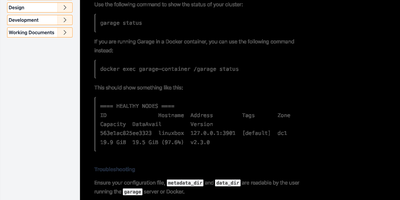
Picture your object storage scattered across a home server, a friend's rack, and a cheap VPS in another country, still answering S3 requests like nothing happened: that is exactly the deployment Garage was built for. Every object is replicated to three zones, so losing a node, a disk, or an entire site degrades the cluster instead of destroying your data. Applications talk to it with the standard S3 API: create buckets, upload objects in multiple parts, list and copy them, and hand out access keys that are scoped per bucket. A separate web endpoint serves static websites straight from buckets with CORS support, which covers personal sites, documentation, and release downloads without another server in the chain. The whole system ships as one dependency-free binary that asks for about a gigabyte of RAM and any x86-64 or ARM CPU from the last decade, second-hand hardware very much included. There is deliberately no consensus protocol to babysit: nodes gossip their cluster layout, tolerate 200-millisecond links, and keep serving reads while parts of the fleet are unreachable. Deuxfleurs runs it in production for their own hosting, and common pairings include restic or rclone backup targets, Matrix media storage, and Nix binary caches. Running on a dedicated VPS on RepoCloud with guaranteed CPU, RAM, and SSD, full root SSH access, and a browser serial console. AGPL-3.0 licensed.
Spinifex
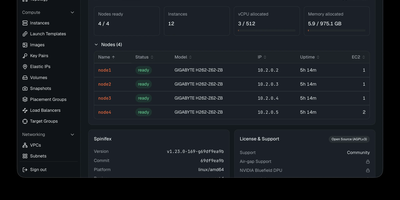
Spinifex rebuilds the AWS services your applications already call (EC2, EBS, S3, VPC, and IAM) on hardware you control, so workloads can leave the hyperscalers without a rewrite. An EC2 call boots a real KVM guest with spot instance and GPU passthrough options, attaches replicated block volumes, and places the machine inside an OVN virtual network guarded by security groups. S3 buckets land in erasure-coded object storage, container images live in a deduplicated registry, and managed Kubernetes clusters arrive with highly available control planes and node groups. Relational databases run as managed PostgreSQL or MariaDB with automated backups, load balancers terminate traffic at layer 4 or layer 7 with ACM certificates, and an authoritative DNS service manages hosted zones. Every request is authenticated with SigV4 at the gateway and routed to stateless service daemons, so capacity grows by starting more daemons on more nodes. Your existing AWS CLI profiles, SDK code, and Terraform plans point at the new endpoint and keep working, because 405 AWS API operations answer with the shapes your tooling expects. A built-in web console covers instances, volumes, buckets, networks, and IAM for operators who prefer clicks to commands. Clusters run on-premise, at air-gapped edge sites, or on GPU cloud capacity, and keep serving through disconnection because no external control plane exists. Running on a dedicated VPS on RepoCloud with guaranteed CPU, RAM, and SSD, full root SSH access, and a browser serial console. AGPL-3.0 licensed.
Alarik
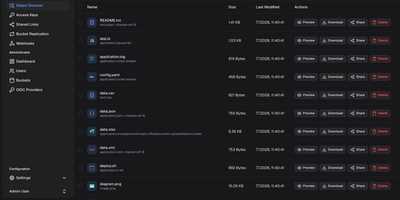
Alarik is a self-hosted S3-compatible object storage server that lets you store files, backups, media, and application data on your own hardware while keeping the S3 APIs your tools already expect. Create buckets, upload objects with multipart support for large files, and retrieve them again through core operations, range reads, presigned URLs, and bucket or object tagging. Versioning keeps earlier copies, delete markers, and listings under your control, while lifecycle rules expire old versions and clean up incomplete uploads automatically. The web console lets you drag and drop files or whole folders, search recursively across nested folders, edit metadata in place, preview individual versions, and share time limited public links. Administrators manage users, access keys, bucket policies, and public access blocks from the same console, with live charts for CPU, memory, traffic, and storage. Bucket webhooks send event notifications when objects change, and replication rules continuously copy data to remote S3 compatible targets, synchronously or asynchronously per rule. Clusters add erasure coded storage across nodes, read repair, bit rot scrubbing, and automatic rebalancing when nodes join, drain, or return. Running on a dedicated VPS on RepoCloud with guaranteed CPU, RAM, and SSD, full root SSH access, and a browser serial console. Apache 2.0 licensed.
Zenko CloudServer
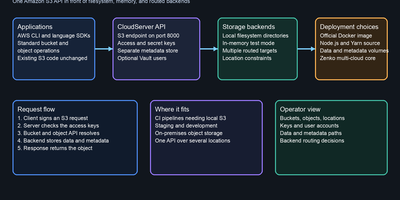
Zenko CloudServer is an open-source object storage server that speaks the Amazon S3 API, giving your applications one familiar endpoint for buckets and objects while the data itself lands on local disk or across several storage backends you choose. Developers point the standard AWS tools and SDKs at the server on port 8000, create buckets, and store objects with the same calls they would use against the public cloud, which makes it a practical stand-in for S3 in continuous integration pipelines, staging environments, and on-premises deployments that cannot send data outside the building. Single-backend mode writes to a filesystem directory you configure, an in-memory mode serves tests that need fast disposable storage, and multiple-backend mode routes each object by location constraint, so one bucket can keep hot data nearby and push colder copies to another target. Access keys and secret keys control who can read and write, metadata is stored separately from object data, and optional Vault integration handles user management for larger installations. The server ships as a Docker image for quick deployment and runs from source with Node.js and Yarn, and because it is the storage core of the Zenko multi-cloud data controller, the same API also fronts public cloud backends for teams building a single access layer over data stored in several places. Running on a dedicated VPS on RepoCloud with guaranteed CPU, RAM, and SSD, full root SSH access, and a browser serial console. Apache-2.0 licensed.