Omnara
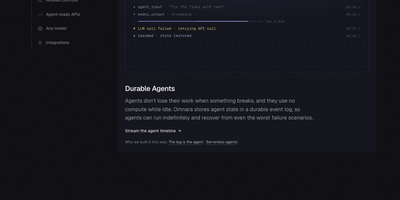
Running AI agents in production takes more than a model call: Omnara supplies the durable runtime, tools, approvals, and complete event history around any model, on your own machines. You define an agent once in a small YAML file: instructions, a model from OpenAI, Anthropic, OpenRouter, Bedrock, LiteLLM, Ollama, or your own endpoint, and the machines it may use. Launch agents from the REST API, the TypeScript SDK, the command line, or the dashboard, then stream every event live or receive it as a webhook while the agent works. Agents run shell commands and edit files on sandboxes from twelve providers, or on your own laptops, VMs, and containers through a daemon that connects outward, so no inbound ports or SSH keys are exposed. Every step is written to Postgres as an event log, which means an agent survives crashes, restarts, and disconnected machines and resumes exactly where it stopped. Tool permissions can run immediately, ask a person first, or block outright, and agents can start subagents, follow cron schedules, and keep shared memory files between conversations. Teams meet the agents where they already talk: mention the bot in Slack or Discord, or let a GitHub pull request trigger a review, with questions and approvals handled in the thread. Running on a dedicated VPS on RepoCloud with guaranteed CPU, RAM, and SSD, full root SSH access, and a browser serial console. Apache-2.0 licensed.
TrueForge
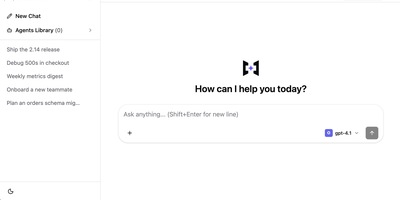
With over 2,100 GitHub stars in its first month and benchmarked at 30-75% lower cost than Claude Managed Agents on enterprise task suites, TrueForge is the open-source agent harness that provides the complete runtime layer for turning any LLM into a working production agent on your own infrastructure. The TypeScript server runs the full execution loop — streaming every step, routing tool calls through MCP servers with centralized header-auth and in-chat OAuth, delegating parallelizable work to isolated subagents, and pausing for human approval on sensitive actions. Context engineering keeps token costs low: deferred tool-schema loading delays MCP schemas until invoked, large-result offloading moves oversized outputs to files, Code Mode processes structured data through sandboxed execution, and automatic compaction summarizes older history at a configurable 50,000-token threshold while preserving the full transcript. The sandbox-as-a-tool architecture provisions isolated Daytona environments only when code execution is required, allowing one server to run many concurrent agents without idle overhead. Agents are configured from shipped YAML catalogs of models, MCP servers, git-backed SKILL.md instruction packs, and sandbox providers, then saved to an Agents Library accessible via the chat UI, TypeScript SDK, or embeddable React UI SDK. Run locally with SQLite via a single npx command, or deploy for teams with Docker Compose or Helm using Postgres and Redis with OIDC authentication. Running on a dedicated VPS on RepoCloud with guaranteed CPU, RAM, and SSD, full root SSH access, and a browser serial console. MIT licensed.
Xinference
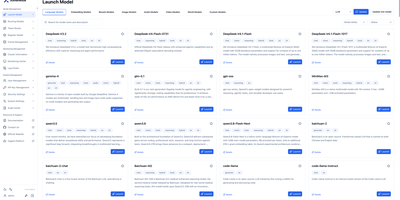
Xinference lets a team swap a hosted model API for models running on its own machines, with the same client code and a web console for managing them. The Launch Model page lists 300+ models across language, vision, embeddings, reranking, images, audio, video, and experimental world generation, and a Recommend configuration button fills in engine, size, format, and quantization for your hardware. Custom models, including traditional machine learning models, can be registered beside the built-in ones. Chat models can run on vLLM, SGLang, TRT-LLM, Transformers, llama.cpp, or MLX across CPUs, GPUs, and Apple Silicon. Workers and replicas can be added to serve one large model across several machines. Running Models shows each replica and a built-in chat window, and Performance Tests measure throughput and latency at several concurrency levels, with saved runs to compare. Endpoints speak the OpenAI and Anthropic protocols with streaming and tool calling where a model supports it. API keys, user management, and an audit center cover access control. The interface is available in five languages. Running on a dedicated VPS on RepoCloud with guaranteed CPU, RAM, and SSD, full root SSH access, and a browser serial console. Apache 2.0 licensed.
BISHENG
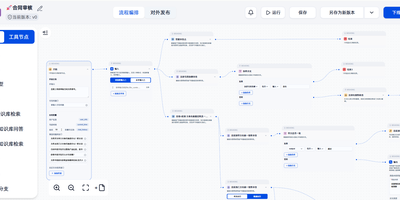
Document review, fixed-layout report generation, and multi-step research that ends in a PPT, Excel, or Word file all run inside BISHENG, a self-hosted workspace for enterprise AI applications. Review and report flows are drawn on a visual canvas where a circle becomes a loop, side-by-side nodes run in parallel, and a multi-item selection runs as a batch. A running flow can stop for a person to give input, confirm, or make changes, and chat and automation share one flow type. Research goes to Task Mode: give it a goal plus any files, knowledge bases, tools, and skills, and it writes a checklist, hands research to parallel sub-agents, and returns a report with clickable citation markers. Teams sharing documents use Knowledge Spaces, with folders, tags, keyword search, AI Q&A that shows its sources, and permissions down to a single file for people, departments, or user groups. For a daily news briefing, Channels turn WeChat official accounts and websites into topic feeds and save articles as knowledge in one click. Admins connect OpenAI-compatible APIs, Azure OpenAI, Anthropic, Qwen, DeepSeek, and local Ollama models, then govern access with approvals, audit logs, SSO, and LDAP. Private document parsing reads printed text, handwriting, tables, layouts, and seals, and a service-account Open API lets other systems call applications and knowledge bases. Running on a dedicated VPS on RepoCloud with guaranteed CPU, RAM, and SSD, full root SSH access, and a browser serial console. Apache 2.0 licensed.
LightRAG
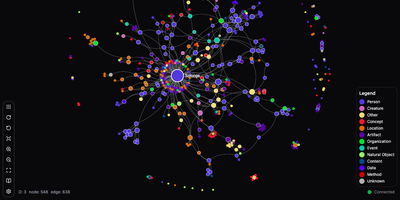
Plain chunk retrieval hands an LLM disconnected excerpts; LightRAG builds a knowledge graph from your documents so answers can join facts spread across many files. Ask about one named person, product, or clause and local mode pulls its details. Ask for themes across the whole library and global mode follows the links between entities. Hybrid blends the two, naive falls back to plain chunk search, and mix combines all three. Mix is the default. Upload text, Markdown, PDF, Word, PowerPoint, and Excel files; MinerU, Docling, or the native parser can extract images, tables, and formulas. The admin console manages documents, explores the graph visually, and debugs queries, while a query-only workspace page gives everyday colleagues a clean chat screen that works on phones. A REST API covers indexing and queries, and an Ollama-compatible endpoint lets chat front ends such as Open WebUI use the knowledge base as a model. New files merge into the existing graph without a full reindex, and deleting a document rebuilds only the entities and relationships it touched from cached results. Separate model roles let an inexpensive model extract entities while a stronger one writes answers. An API key or accounts protect the server, and named workspaces keep several knowledge bases apart. Pair it with local Ollama models and no document text leaves the server. Running on a dedicated VPS on RepoCloud with guaranteed CPU, RAM, and SSD, full root SSH access, and a browser serial console. MIT licensed.