Papyra
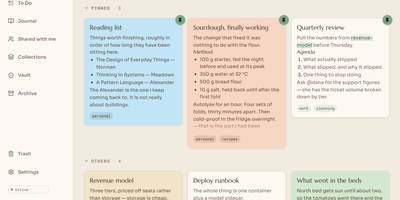
Papyra gives you a calm, private home for notes that stays as easy as sticky notes while quietly linking everything together like a wiki. Cards pin, colour, and drag into place on your desk, and opening one drops you into an editor where slash commands insert headings, checklists, tables, or maps without leaving the keyboard. Type two brackets to link another note, and backlinks gather the other direction automatically, following the note even if you rename it. Notes save themselves, and every earlier version is kept, so you can scrub back through history and restore the draft you actually wanted. Sharing a note lets several people type in it together with visible cursors, comments in threads, and mentions that bring the right person in. Private notes lock behind a PIN or your fingerprint and sit encrypted on disk, while a daily journal page collects the day with a mood and a calendar to browse the year. Search covers notes, to-dos, and attachments with highlighted matches, and image text and audio transcripts can join the index. Running on a dedicated VPS on RepoCloud with guaranteed CPU, RAM, and SSD, full root SSH access, and a browser serial console. GPL-3.0 licensed.
Sage Wiki
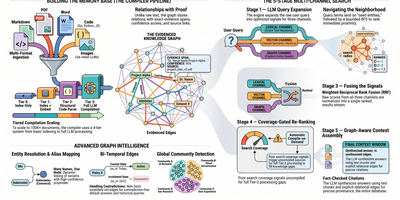
Sage Wiki turns a pile of unstructured documents into a fully interlinked, searchable wiki by running them through a five-pass LLM compiler pipeline. Inspired by Andrej Karpathy's vision of LLM-compiled knowledge bases, the pipeline processes source files through diff detection, summarization, concept extraction, image captioning, and cross-reference discovery, with parallel LLM calls and checkpoint/resume for vaults scaling to 100,000+ documents. The typed ontology graph stores entities and relations with BFS traversal, configurable relation types, multilingual synonyms, and a promotion/demotion lifecycle backed by grounding verification and consensus scoring. Multi-format ingestion handles Markdown, PDF, Word, Excel, PowerPoint, EPUB, email, CSV, images, and code files without manual tagging. LLM provider support spans Anthropic, OpenAI, Gemini, Ollama, and any OpenAI-compatible API, with per-pass model routing enabling cost optimization by assigning cheaper models to simpler tasks. The built-in MCP server exposes 17 tools over SSE transport for integration with Claude, Cursor, and any MCP-compatible agent, while native Obsidian vault overlay ensures existing note workflows remain undisrupted. Team deployment supports Git-synced shared wikis, centralized server access, and hub federation across multiple projects. Ships as a single Go binary with Docker Compose multi-arch images serving the web UI on port 3333. Running on a dedicated VPS on RepoCloud with guaranteed CPU, RAM, and SSD, full root SSH access, and a browser serial console. MIT licensed.
Zimi
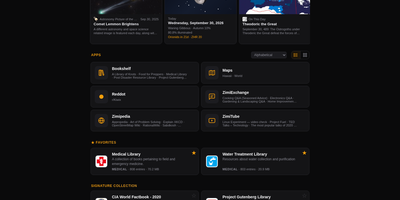
When the internet goes away, your library does not have to: Zimi serves Kiwix ZIM archives of Wikipedia, books, videos and forums through a rich web interface, with one search box querying every archive across more than 100 million articles. Each content type gets its own app: Zimipedia for wikis, the Dictionary for Wiktionary, Bookshelf for books, ZimiTube for video, ZimiExchange for Q&A, Reddot for subreddits and offline street Maps. Bookmarks, lists, likes and highlights live in every app and sync across devices when you sign in, and any article can switch into whichever language edition you hold. The library manages itself: browse the Kiwix catalog of over 1,000 archives, download with one click, let auto-updates keep editions fresh, and seed downloads over BitTorrent with a ratio cap you set. Zimi servers on the same network find each other and pass archives at LAN speed, and one offline switch turns off every internet-bound feature for air-gapped rooms. You can also make your own ZIMs from a web page, a whole site, a video playlist or a folder of files. Access ranges from public to sign-in only with per-archive allowlists, and the JSON API plus MCP server let AI agents search the same library. Docker runs Zimi on port 8899 with your ZIM files and config mounted as volumes. Running on a dedicated VPS on RepoCloud with guaranteed CPU, RAM, and SSD, full root SSH access, and a browser serial console. GPL-3.0 licensed.
Tela
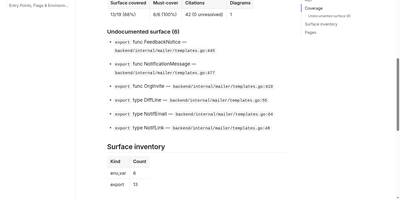
Tela keeps a team's documentation as canonical markdown in a self-hosted wiki that AI agents read, search, and write alongside humans through a built-in MCP server. People edit together with live multi-cursor collaboration, threaded comments, backlinks, and full revision history, so every page shows who changed what and why. PostgreSQL full-text search works immediately, and adding an embedder unlocks semantic retrieval and grounded ask-your-docs answers that cite their sources. Connect Claude, Cursor, or another MCP client with a personal access token and the agent can search the wiki, draft and patch pages, answer comment threads, build spreadsheets with real formulas, and assemble presentation decks exportable to PDF and PPTX. Atlas, the built-in documentation engine, points at a git repository or Jira project and drafts cited wiki pages, then keeps them fresh as the sources change. Teams organize work into spaces, invite members by email, and flip any space public to publish a login-free blog with per-author home pages. Content syncs over WebDAV and exports to zip or PDF, and optional AI features run against your own endpoint or a bundled local Ollama profile, so nothing leaves your server unless you wire it up. Running on a dedicated VPS on RepoCloud with guaranteed CPU, RAM, and SSD, full root SSH access, and a browser serial console. AGPL-3.0 licensed.
Hatchdoor
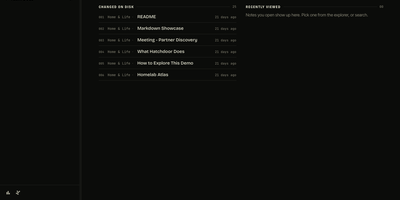
Hatchdoor gives your Markdown notes two front doors at once: a fast web interface for you, and an MCP endpoint where AI agents read and edit the very same vault. Point it at any folder of Markdown files, an existing Obsidian vault included, and it indexes everything into a disposable SQLite read model that rebuilds itself from your files if deleted. In the browser you browse folders, follow wikilinks that survive renames, explore backlinks and graph views, and search by keyword or meaning across every vault you mount. The live editor shows Markdown syntax only on the line you are editing and saves automatically, while concurrency checks refuse a save when the note changed underneath you. Agents connect with their own token and start read-only; turn writes on and Claude Code, Codex, Cursor, or Hermes can create, edit, move, and link notes through the same checked operations the interface uses. Saved queries in Obsidian's Bases syntax render as live tables, attachments preview inline, and optional git integration commits and pushes every change back to your vault's repository. Running on a dedicated VPS on RepoCloud with guaranteed CPU, RAM, and SSD, full root SSH access, and a browser serial console. AGPL-3.0 licensed.
KaaS
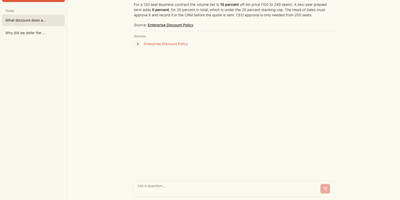
Turn scattered meeting notes, policies, postmortems, and documents into a readable wiki that your team can question in plain language. Paste text, upload a file, or point KaaS at a web page, and an AI pipeline pulls out the concepts, decisions, and people, then writes them up as Markdown articles sorted into decision, reference, guide, and concept folders. Ask a question in chat and the answer cites the exact articles it came from, so anyone can open the source and check it. Each article shows tags, a source count, and a table of contents, and every page is stored as a plain Markdown file you can read, edit by hand, or commit to version control. Adding one new document only recompiles that document, which keeps model costs predictable as the library grows. A Builds page lists every submission with its status and attempts, and a failed worker's job is picked up again instead of lost. Derive a topic knowledge base to carve a focused collection out of the wiki for one subject, and let coding agents query the same wiki through an MCP ask tool. Team handbooks, customer onboarding, incident history, and pricing rules are the knowledge that ends up scattered across a dozen files, and this is where it comes back together. Running on a dedicated VPS on RepoCloud with guaranteed CPU, RAM, and SSD, full root SSH access, and a browser serial console. MIT licensed.
Storyden
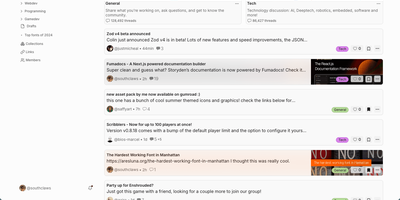
Think of Storyden as running your own small Reddit, except the knowledge your community produces does not scroll away and die in the feed. Discussion happens in threaded forums organized by categories and tags, where posts collect replies, likes, emoji reactions, and saves into personal collections. Beside the chatter sits the Library, a tree of rich pages your members build together into wikis, directories, catalogs, and guides that stay findable. Library pages carry typed properties, attached files, and table views, so a car club can track vehicles as data instead of arguing over a spreadsheet. Threads can reference Library pages and pages can link back to threads, letting a great answer graduate into permanent knowledge. Optional AI assistance helps organize titles, tags, and summaries, while the recommendation engine surfaces posts each member is likely to care about. The first account registered becomes admin, roles and permissions govern who can post or moderate, and community settings live in the admin panel rather than config files. One container starts everything with an embedded database and local file storage, and OpenAPI documentation is served from the same address. Running on a dedicated VPS on RepoCloud with guaranteed CPU, RAM, and SSD, full root SSH access, and a browser serial console. MPL-2.0 licensed.
JSPWiki
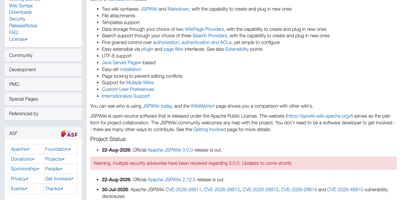
Knowledge scattered across chat threads, tickets, and shared drives gets one permanent, searchable home in JSPWiki, a wiki engine that any team member can edit from the browser. Pages can be written in classic JSPWiki markup or in Markdown, and new syntaxes plug in alongside. Every page carries its own history through the versioning file provider, so edits can be compared and rolled back, and page locking keeps two editors from colliding. Files attach directly to pages, templates restyle the whole wiki, and three interchangeable search providers, including full-text indexing, make old decisions findable again. Access stays precise: authentication and per-page access control lists decide who can view or edit each page, which suits mixed audiences of staff, partners, and the public. Plugins and page filters extend rendering with dynamic content, and one installation can host multiple separate wikis for different teams. Readers get custom preferences and internationalized interfaces. Run it as a WAR on Tomcat or pull the Docker image and open port 8080. Running on a dedicated VPS on RepoCloud with guaranteed CPU, RAM, and SSD, full root SSH access, and a browser serial console. Apache License 2.0 licensed.
W-CMS
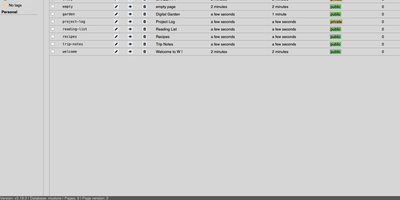
Taking notes and publishing a website usually need two different tools, but W treats them as the same act. Every page you create gets its own address, and a privacy level marks it public, private, or not yet published. The editor offers tabs for Markdown content, CSS, a custom body template, and JavaScript, with a metadata panel for title, description, tags, date, and authors. Home view lists every page with sorting, filters, search, and saved bookmarks for common queries. Two alternative views draw pages as a link graph and, for pages with coordinates, as markers on a map. A media manager organizes uploads in folders, offers a thumbnail gallery, and can optimize images for the web. Several users can work together with reader, editor, super editor, and admin roles, and optional LDAP sign-in is available in beta. Templates share layouts across pages, URL commands like add and edit speed up navigation, and an experimental API opens the data to scripts. Pages keep working even with JavaScript turned off. Everything is stored in plain files, so no database server is needed. Running on a dedicated VPS on RepoCloud with guaranteed CPU, RAM, and SSD, full root SSH access, and a browser serial console. AGPL-3.0 licensed.