Hexclave
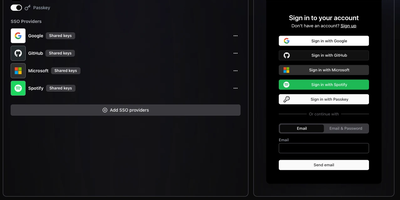
When a product needs sign-in, teams, permissions, and user analytics, Hexclave (formerly Stack Auth) delivers all of it from one admin dashboard, so nobody on your team hand-rolls another password reset flow. Sign-in methods are switches, each flipped on or off without a redeploy: email and password with secure reset, magic links, passkeys, TOTP two-factor, any of 12 OAuth providers including Google, GitHub, Microsoft, Apple, and Discord, or your own OpenID Connect provider. Sign-up rules allow, reject, or hold accounts by email domain, country, auth method, or fraud risk score. The user directory searches, filters, edits, and exports every profile, custom metadata included. Teams bring workspaces, email invites, and nested roles checked the same way on server and client. API keys belong to users or teams, auto-revoke when leaked, and reveal their secret only once. Themed templates send transactional and marketing email with open and click tracking. Analytics show live active users and session replays and store the SQL queries you write, and every user event can fire a signed webhook with automatic retries. Standard JWTs verify locally against a JWKS endpoint, and SDKs cover Next.js, React, and plain JavaScript. Self-host the dashboard and API on your own server and export your users whenever you like, with no lock-in. Running on a dedicated VPS on RepoCloud with guaranteed CPU, RAM, and SSD, full root SSH access, and a browser serial console. MIT and AGPLv3 licensed.
Homer
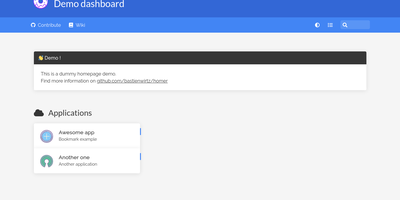
"Dead simple static HOMepage for your servER" - Homer's name is the spec. It is a fully static HTML/JS dashboard driven by one YAML file (assets/config.yml): list your services in groups with names, icons, tags, and URLs, and Homer renders a clean, fast landing page for everything you self-host. Because there is no backend, no database, and nothing to maintain, the container is tiny and effectively zero-maintenance - the entire operational surface is a text file you can version-control alongside your infrastructure. Despite the minimalism, the feature set is genuinely useful: smart cards add live data to service tiles via a type key - Pi-hole block statistics, AdGuard Home status, Jellyfin activity, Gatus and Home Assistant states, and dozens more integrations, with configurable periodic refresh. Fuzzy search jumps to any service as you type, keyboard shortcuts drive navigation, and multi-page support with item grouping keeps large homelabs organized. Theming covers built-in light and dark modes plus full custom CSS, tags get color-coded styles, and the whole dashboard installs as a PWA on phones and tablets. Icons come from Font Awesome or your own images. If Dashy is the maximalist dashboard and Homarr the drag-and-drop one, Homer is the minimalist: one YAML file, instant loads, and nothing that can break at 2 a.m.
Web-Check
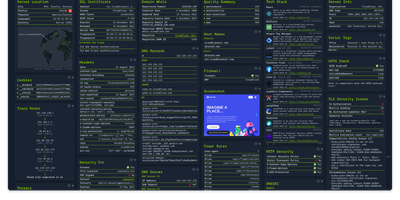
Enter a URL and get a dashboard of everything publicly discoverable about its security posture, server architecture, and technology stack: Web-Check is an all-in-one OSINT tool for analyzing any website. One scan surfaces IP info and server location, the full SSL certificate chain with issuing authority and validity, DNS records (A, MX, NS, CNAME, TXT) with DNSSEC status, HTTP response headers interpreted for security directives like HSTS, CSP, and X-Frame-Options, cookies and their flags, WHOIS domain info, robots.txt crawl rules, a sitemap-derived page map, the redirect ledger, open ports, traceroute, detected technologies, third-party trackers, associated hostnames, site performance, and even carbon footprint. Each card explains what the data means and why it matters, which makes the tool double as a security education resource - junior engineers learn headers and attack surfaces by scanning real sites. Practical uses span pre-deployment security audits (catch missing headers and misconfigurations before they ship), privacy compliance checks (identify trackers and cookie behavior for GDPR work), competitive tech-stack research, and network debugging via DNS and redirect inspection. Built by Lissy93 in TypeScript, it deploys as a single Docker container, and self-hosting keeps your reconnaissance targets and audit activity off third-party services.
Dograh
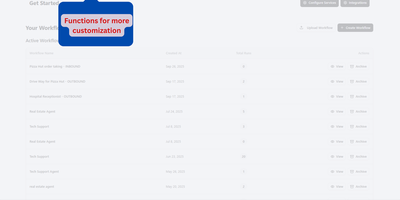
Build a voice AI agent that answers calls, qualifies leads, books appointments, and transfers to a human when needed, all from a drag-and-drop workflow builder in your browser. Dograh ships as a Docker Compose stack (API, web UI, Postgres, Redis, MinIO) that you self-host on any Linux server with automatic HTTPS provisioning via Let's Encrypt. The visual workflow builder lets you design multi-turn conversation flows by connecting nodes for greetings, intent classification, tool calls, and handoffs; describe your use case in plain English and the platform generates the LLM prompt and node graph for you. Connect your own speech-to-text, LLM, and text-to-speech providers (OpenAI, Anthropic, Gemini, ElevenLabs, Deepgram, local Whisper, Kokoro, or any OpenAI-compatible endpoint) or use the built-in Speech-to-Speech mode with Gemini Flash Live and GPT-Realtime-2 for sub-200ms latency. Telephony plugs in through Twilio, Vonage, Vobiz, or Cloudonix for inbound and outbound calling, with live agent transfer when the conversation needs a human. Webhook tool calls connect to Salesforce, HubSpot, Google Calendar, Cal.com, or any REST API without writing orchestration code. The ClonedVoice feature mixes real human voice recordings for high-frequency phrases with neural TTS fallback for dynamic content, cutting costs while improving caller trust. A built-in MCP server lets AI coding agents like Claude Code or Cursor design, test, and edit workflows through natural language. Deploy on a dedicated VPS on RepoCloud with guaranteed CPU, RAM, and SSD, full root SSH access, and a browser serial console. BSD 2-Clause licensed.

Gofer
Five mailboxes, five tabs, five passwords: Gofer folds Gmail, Outlook, iCloud, and plain IMAP accounts into one browser tab where every inbox reads as a single, searchable whole. Threads, labels, and drag and drop keep triage fast, and search still finds the receipt from three years ago. Signatures and custom senders shape outgoing mail, scheduled sends wait for Monday morning, and a thread in another language translates in place. The calendar keeps pace with your mail: Google, Outlook, and CalDAV events sync both ways, invitations land in the inbox, and an RSVP or a Meet or Teams link attaches without leaving the message. Contacts follow the same rule through Google, Outlook, and CardDAV sync, so the address book you fix once is right everywhere. One install can serve a household or a small office, with separate users, encrypted credentials, blocked remote images, and passkey or authenticator sign-in for anyone who wants it. Classic, Minimal, and retro Express themes, flexible layouts, and push notifications make the daily inbox feel personal rather than administered. Leaving stays easy too: mailboxes export as mbox, mail moves between accounts, and a whole setup imports into another Gofer. Running on a dedicated VPS on RepoCloud with guaranteed CPU, RAM, and SSD, full root SSH access, and a browser serial console. MIT licensed.
Slashdocs
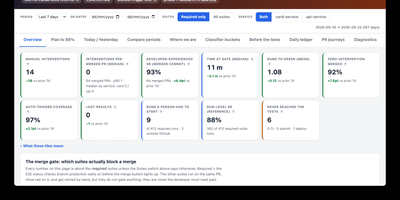
Slashdocs gives AI agents and the people who supervise them one shared home for finished work, replacing reports pasted into chat threads with reviewable HTML documents that live at a permanent address. An agent publishes a single self-contained HTML file, an architecture review, incident postmortem, product spec, data analysis, or QA report, and teammates open it in the browser to read the rendered page rather than raw markup. Reviewers anchor comments to exact words, resolve or reopen threads, and follow links straight to a heading or discussion, while Slack notifications announce new activity with personal mute controls for quieter channels. Every publish creates an immutable version guarded by optimistic concurrency, so an agent can read the feedback and push the next revision without overwriting anyone's copy. Agents connect through a remote MCP endpoint with browser OAuth or service-account keys, and people sign in through OpenID Connect with providers such as Google, Okta, Entra ID, or Keycloak. The companion CLI creates, pulls, pushes, and comments on documents with compact output or JSON for scripts, and folders plus sharing controls keep a growing library organized. Running on a dedicated VPS on RepoCloud with guaranteed CPU, RAM, and SSD, full root SSH access, and a browser serial console. MIT licensed.
EdgeQuake
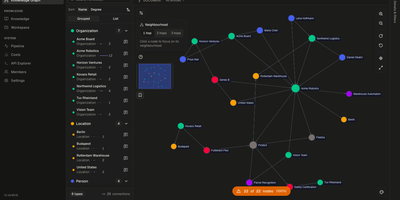
A folder of documents stops being a pile of files once EdgeQuake extracts a knowledge graph you can explore and question. Upload text, PDFs, or markdown and the pipeline extracts people, organizations, places, and the relationships between them, then shows progress and entity counts for every file. The graph viewer draws the network with color-coded entity types, a searchable entity list, and a details panel that lists descriptions, properties, and linked entities. Ask a question in the query chat and pick a retrieval mode, from keyword lookups to hybrid and global themes, and each answer arrives with numbered sources and a button that highlights the matching nodes on the graph. Workspaces keep projects separate, and each can assign a different model to extraction, answering, keywords, summaries, and embeddings. A cost dashboard breaks token use and spend down by stage with a monthly budget bar. A members page, an API explorer, and Swagger docs round out administration. Running on a dedicated VPS on RepoCloud with guaranteed CPU, RAM, and SSD, full root SSH access, and a browser serial console. Apache-2.0 licensed.

Fugleramme
Garden birdsong as a framed collage: Fugleramme draws the species heard right now as hand-cut illustrations from 1800s natural-history plates, for an e-ink panel, a TV, or any browser. The birds come from BirdNET-Go, which can listen on the same machine or elsewhere on the network, so the microphone can stay near the birds while the frame hangs in the living room. Nearly 1200 cut-outs cover over 650 species, none of them AI-generated, and each bird is sized by its real body mass, larger ones toward the centre. The page redraws only when the birds change. Heard nothing in the lookback window? A bare perch appears. Collage mode shows everything heard within a window from 15 minutes to all time, latest-bird mode changes only when a different species calls, and newest-arrival mode holds until a new species turns up. An optional spotlight puts the latest bird in the middle. Spiral or voids layouts rearrange the sheet, and a species limit keeps the most heard or the rarest. Names sit beside the birds or in a poster-style numbered key, in two languages at once from over 40, and a star flags a bird the station has never heard before for its first 24 hours. A web admin page covers display, detector address, and optional password sign-in. Running on a dedicated VPS on RepoCloud with guaranteed CPU, RAM, and SSD, full root SSH access, and a browser serial console. MIT licensed.
Stump
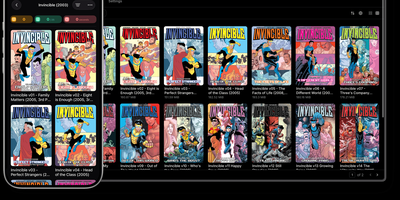
Curating digital comic archives, serialized manga, and electronic book libraries becomes effortless with Stump, a high-performance reading server that streams media collections over OPDS protocols directly to web browsers and e-reader hardware. Readers can organize extensive collections across CBZ, CBR, PDF, and EPUB formats, utilizing automated scanners that extract embedded ComicInfo XML and Calibre metadata tags. The built-in web reader renders high-resolution comic spreads, continuous vertical webtoon scrolls, and reflowable text with customizable color themes, font scaling, and reading direction toggles. Users can highlight passages, create persistent notes inside EPUB editions, and organize complex franchises into custom reading lists, oneshots, and smart filter collections. Bi-directional synchronization integrates with Kobo and KOReader hardware devices, maintaining page progression and bookmark states across handhelds and desktop sessions. Server administrators can configure multi-user access rules, enforce age restriction thresholds, and provision user-scoped API tokens for automated script pipelines and third-party companion tools. GraphQL and REST endpoints expose the entire catalog structure, allowing media collectors to integrate external metadata scrapers and trigger background library indexing tasks. Running on a dedicated VPS on RepoCloud with guaranteed CPU, RAM, and SSD, full root SSH access, and a browser serial console. MIT licensed.
TradeTally
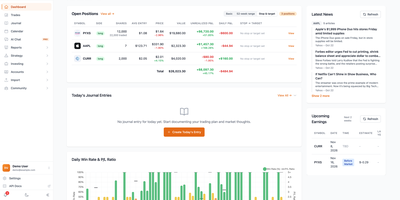
Broker exports pile up as spreadsheets nobody reads; TradeTally turns them into a trading journal that shows how you actually trade. Import trades from Lightspeed, Charles Schwab, ThinkorSwim, IBKR, E*TRADE, and ProjectX across stocks, options, and futures. Candlestick charts mark each entry and exit, and the trade list adds net and gross P&L, confidence, quality grades, and sectors. Break performance down by hold time, weekday, symbol, strategy, or trade size, and use R-multiple views to judge stop-loss discipline. A color-coded calendar shows daily and weekly results. Every session gets pinned notes, market bias, key levels, watchlists, tags, and templates. Behavioral reports flag revenge trading, loss aversion, and missed exits. Watchlists follow live prices and news, price alerts arrive by email or browser, and earnings dates are listed for the symbols you follow. AI assistants suggest improvements from your own data, achievements and leaderboards reward good habits, and a companion iOS app mirrors the web features. Running on a dedicated VPS on RepoCloud with guaranteed CPU, RAM, and SSD, full root SSH access, and a browser serial console. Apache-2.0 licensed.
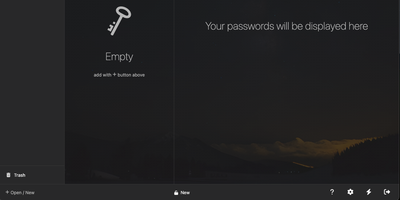
KeeWeb
Your KeePass vaults, opened from any browser: KeeWeb reads, edits, and creates standard KDBX files, so it works with the same databases as KeePass and KeePassXC without conversion or lock-in. Self-hosting the web app gives you a password manager reachable from any modern browser, including mobile, with no client installation and no third-party cloud in the loop. All KDBX cryptography runs client-side; the server just serves the static app. Open multiple vault files simultaneously and search them all from one box, with advanced options covering specific fields, password history, and regular expressions. Vaults load from local files, your own server (WebDAV), or Dropbox, Google Drive, and OneDrive, with automatic sync - and files are cached for offline use, so a dropped connection never locks you out; changes resync once you're back online. Day-to-day niceties include a configurable password generator, protected fields that stay masked and are held in memory more defensively, entry history, tags with easy input, drag-and-drop attachments, and per-entry icons with favicon fetching. The optional KeeWeb Connect extension (Chrome, Firefox, Edge, Safari) autofills credentials using the keepassxc-protocol. MIT-licensed with matching desktop apps for macOS, Windows, and Linux.
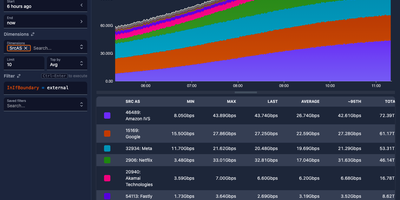
Akvorado
Point your routers at Akvorado and every NetFlow, IPFIX, and sFlow record crossing your network becomes a chart you can interrogate. The web console opens on a live summary of flows per second, exporter count, and traffic split by autonomous system, port, protocol, country, and address family. From there, the visualize page turns stored flows into stacked, line, grid, and heatmap time series, plus Sankey diagrams that show how traffic moves between networks, interfaces, and countries. Filters use a simple SQL-like syntax, so a question like which customers pulled traffic over a transit link last night becomes a query, not a support ticket to your future self. Because the outlet polls each exporter with SNMP or gNMI, flows arrive wearing real interface names, descriptions, and speeds instead of raw ifIndex numbers nobody can read. GeoIP lookups attach country and city to addresses, classification rules tag providers, peers, and connectivity types, and optional BMP sessions add AS paths and BGP communities to every flow. Retention is tiered: raw flows keep full detail for recent days while one-minute, five-minute, and hourly rollups stretch summaries across a year of history. A Grafana plugin is available too, so the same flow data can sit on the dashboards your team already watches. Running on a dedicated VPS on RepoCloud with guaranteed CPU, RAM, and SSD, full root SSH access, and a browser serial console. AGPL-3.0 licensed.
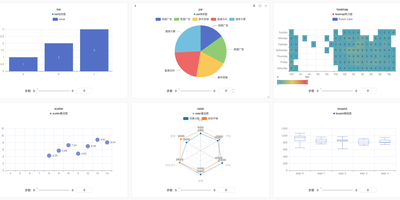
SwanLab
Training runs stop being terminal scrollback and become a board you can read at a glance. SwanLab is an open-source experiment tracking and visualization platform for AI model training that records metrics, hyperparameters, logs, and hardware signals from your training code into a modern web dashboard you can self-host. A few lines of Python start an experiment, and the dashboard follows loss curves, learning rates, and custom scalars live, with line chart configuration, smoothing, grouping, and detailed hover inspection for comparing runs. Experiments organize into projects and groups with tags, pinning, filtering, and a table view that sorts and aligns runs against a baseline with difference percentages. Media logging goes far beyond scalars: images, audio, video, text with Markdown rendering, 3D point clouds, molecular structures, and custom ECharts visualizations including PR curves, ROC curves, and confusion matrices. Hardware monitoring records GPU, CPU, memory, disk, and network behavior from NVIDIA, AMD, Ascend, and other accelerators alongside the metrics they produced. Integrations cover more than fifty frameworks, from PyTorch Lightning and Hugging Face Transformers to LLaMA Factory, veRL, and XGBoost, and existing histories migrate in through sync tools for MLflow, TensorBoard, and Weights and Biases. Teams collaborate with organizations, roles, project sharing, webhooks, and notification plugins. Running on a dedicated VPS on RepoCloud with guaranteed CPU, RAM, and SSD, full root SSH access, and a browser serial console. Apache-2.0 licensed.
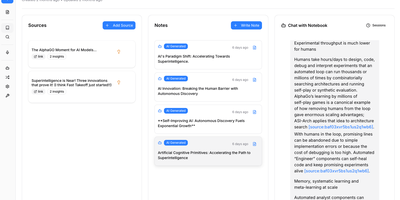
Open Notebook
The most feature-complete open-source alternative to Google's NotebookLM — a self-hosted research platform where you upload PDFs, videos, audio files, and web pages into organized notebooks, then chat with your content, generate multi-speaker podcasts, and run semantic search across everything without sending a single byte to Google's servers. The podcast engine supports 1-4 fully customizable speakers with backstories, personalities, and expertise profiles, generating professional audio dialogue through OpenAI, ElevenLabs, Google TTS, or completely local text-to-speech via Kokoro for maximum privacy. Content processing uses token-based chunking with RAG-powered retrieval grounded in your uploaded sources, while both full-text keyword search and semantic vector search via SurrealDB enable conceptual discovery across all notebooks. The 18+ supported AI providers include OpenAI, Anthropic, Google Gemini, Groq, Ollama, LM Studio, and more — configurable per task so you can route cheap models to summarization and powerful models to analysis. Content transformations extract insights, generate summaries, create study guides, and produce structured outputs from any source material. The MCP integration connects Open Notebook to Claude Desktop, VS Code, and other MCP clients for seamless workflow integration. A full REST API on port 5055 enables complete automation of notebook management, source upload, and podcast generation. Deploy via Docker Compose with the application container, SurrealDB v2 on RocksDB, and optional TTS containers. Running on a dedicated VPS on RepoCloud with guaranteed CPU, RAM, and SSD, full root SSH access, and a browser serial console. MIT licensed.
Dagu
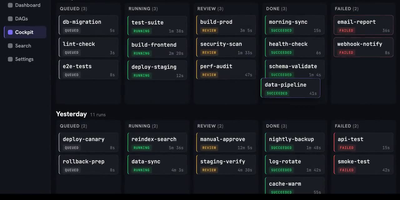
With over 3,700 GitHub stars and growing adoption among teams tired of managing complex orchestration platforms, Dagu delivers a complete workflow engine as a single Go binary that requires no external database, message broker, or framework installation. Define directed acyclic graphs in declarative YAML — specifying dependencies, schedules, retries, timeouts, approvals, and notifications — while keeping existing shell scripts, containers, and tools completely unchanged. The built-in Web UI provides live pipeline visualization, per-step log streaming, run history browsing, artifact previewing, manual retry controls, and workflow YAML editing without SSHing into servers. Execute steps as shell commands, Docker containers, Kubernetes Jobs, SSH remote commands, SQL queries, or HTTP requests, with conditional branching and parallel execution handled natively. The integrated Model Context Protocol server exposes dagu_read, dagu_change, and dagu_execute tools, enabling AI agents like Claude, Codex, and Cursor to inspect workflow state, preview YAML modifications, and control runs through authenticated endpoints. The harness.run executor lets external coding-agent CLIs operate inside DAG steps with full scheduling and approval gate support. Scale beyond a single machine with the distributed worker mode, which dispatches tasks to remote nodes via gRPC with automatic label-based routing and worker selection. Deploy with Docker, the official Helm chart for Kubernetes, or a simple binary download requiring only a Linux, macOS, or Windows host. Running on a dedicated VPS on RepoCloud with guaranteed CPU, RAM, and SSD, full root SSH access, and a browser serial console. GPLv3 licensed.

Pocket ID
Backed by over 8,700 GitHub stars and OpenID Connect certification, Pocket ID delivers what enterprise identity platforms like Keycloak provide but without the configuration complexity — a passkey-only OIDC provider purpose-built for homelabs and small deployments. The core design decision is radical simplicity: no passwords exist in the system, only WebAuthn-based passkeys using hardware security keys, TouchID, FaceID, or device PINs, making phishing attacks structurally impossible rather than merely discouraged. The Go backend built on the Gin framework serves a compiled SvelteKit frontend as static assets, running as a single Docker container with SQLite as the default database and optional PostgreSQL for larger deployments. User management supports manual creation, signup links, and open registration, with group-based access control that restricts which OIDC clients each group can access and attaches custom claims for downstream role mapping. LDAP synchronization pulls users and groups from OpenLDAP or Active Directory, while SCIM support enables automated provisioning from compatible identity sources. Federated client credentials handle machine-to-machine authentication for service-to-service communication patterns. The audit system logs every authentication event with GeoIP enrichment, sends email notifications for sign-ins from unknown devices, and provides one-time login codes for accessing accounts from devices without passkey support. TLS with HTTP/2 is built in, PKCE adds code exchange protection, and OpenTelemetry provides tracing and metrics integration. Running on a dedicated VPS on RepoCloud with guaranteed CPU, RAM, and SSD, full root SSH access, and a browser serial console. BSD 2-Clause licensed.
AMUX
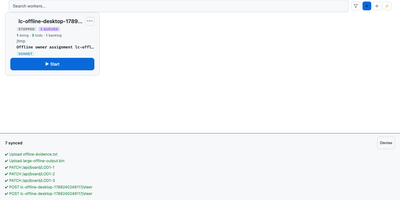
To coordinate swarms of autonomous coding agents across complex software projects, AMUX provides a concurrency-safe kanban workspace with real-time thought stream inspection and live steering controls. Engineers assign development tasks through an interactive board where autonomous worker processes claim cards using compare-and-swap mutexes to eliminate race conditions between parallel sessions. Operators monitor active reasoning streams, inspect streaming terminal outputs, and inject guidance commands mid-turn without interrupting background execution. A cryptographic origin router relays messages between agents, enabling workers to delegate sub-tasks, request automated peer code reviews, and share environment state safely. Built-in schedulers trigger recurring automated maintenance routines, dependency updates, and bug triage sweeps on cron-like timers or autonomous loop cadences. Teams can switch language models dynamically on active sessions to tackle complex architecture challenges with high-capability reasoning engines while conserving resources on routine tasks. An integrated self-healing supervisor watches over agent runtimes, automatically compacting context windows, restarting crashed terminal sessions, and resuming pending instructions seamlessly. Running on a dedicated VPS on RepoCloud with guaranteed CPU, RAM, and SSD, full root SSH access, and a browser serial console. MIT licensed.
WonderCMS
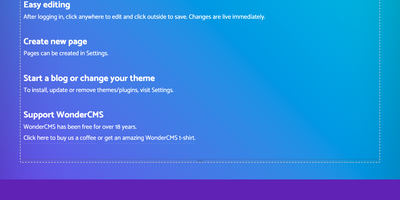
Click, type, publish: WonderCMS turns every page of your website into its own editor. Log in, click any text on the live page, type, and click away to save. A new page takes one click: type an address that does not exist yet, click, and a blank page opens ready for writing. Pages and subpages can be reordered, hidden from the menu with an eye icon, or made private, and each keeps its own title, keywords, and description. Any page can be the home page, and editable blocks keep a footer, sidebar, or banner in sync across the site. An optional plugin adds a visual editor with a formatting toolbar. Themes and plugins install, update, disable, and remove from Settings, including blog, SEO, and privacy-minded statistics modules. The Files tab uploads images, documents, audio, and video to link from any page. The login address is one you choose and answers with a 404, ten wrong passwords pause attempts for fifteen minutes, and a password change ends every session. One click downloads a ZIP backup of the whole site, and a daily update check offers a one-click update with a backup button right above it. Setup means unzipping and uploading five files, and the first visit creates the site and shows the admin password. Moving to a new folder, subfolder, or domain needs no reconfiguration. Running on a dedicated VPS on RepoCloud with guaranteed CPU, RAM, and SSD, full root SSH access, and a browser serial console. MIT licensed.