mitmproxy
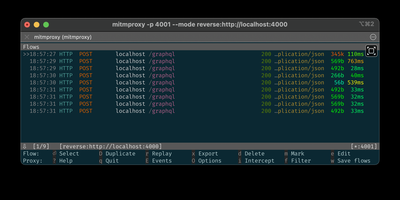
A man-in-the-middle proxy you run on purpose, mitmproxy lets developers and testers inspect, edit, and replay HTTP and HTTPS traffic from any client. Point a browser, phone, or script at it and every HTTP/1, HTTP/2, HTTP/3, WebSocket, and TLS-protected connection appears as a flow you can open, search, and filter. Content views turn payloads from HTML to Protobuf into readable text. Intercept a request or response before it moves on, change its headers, body, or status by hand, then release it, or save the flow and replay it to the client or the server later. Map local and map remote rules answer requests with files or other URLs, while blocklists, anticache, sticky cookies, and proxy authentication cover routine test chores. Choose the interface that fits the job: a keyboard-driven terminal console, mitmweb in the browser with a Capture tab that sets up WireGuard devices with a QR code, or mitmdump for unattended logging in scripts. Proxy modes include regular, local capture, WireGuard, transparent, reverse, upstream, SOCKS5, and DNS. Addons written in Python add custom rewriting, recording, and automation. Teams use it for debugging, testing, privacy measurements, and penetration testing. Running on a dedicated VPS on RepoCloud with guaranteed CPU, RAM, and SSD, full root SSH access, and a browser serial console. MIT licensed.
Browser Use WebUI
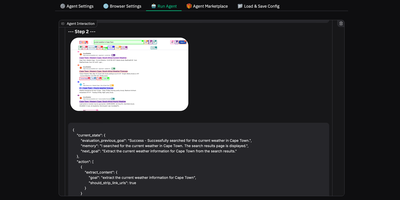
Browser Use Web UI lets you describe a web task in plain English and watch as an AI agent autonomously navigates pages, clicks buttons, fills forms, and extracts information without writing any automation code. Backed by over 16,000 GitHub stars, the Gradio-based interface supports 14+ LLM providers through a unified abstraction layer: OpenAI GPT, Anthropic Claude, Google Gemini, Azure OpenAI, DeepSeek, and local Ollama models are all configurable via dropdown menus without touching code or environment files. The BrowserUseAgent handles interactive single-task automation with step-by-step LLM decision-making and vision-based page understanding, while the DeepResearchAgent orchestrates multi-step research workflows using Langgraph state machines that spawn parallel browser instances with asyncio concurrency control. Custom browser support connects your existing Chrome profile to preserve logins, cookies, and sessions across agent runs, eliminating re-authentication overhead. Persistent browser sessions maintain complete interaction history between tasks for debugging and demonstration. The Docker deployment bundles Chrome, Playwright, and a VNC server in a single container, exposing the Gradio interface on port 7788 and a noVNC viewer on port 6080 for real-time observation of agent behavior. MCP integration via MultiServerMCPClient enables external tool access. Screen recording captures agent workflows as video for review and documentation. Running on a dedicated VPS on RepoCloud with guaranteed CPU, RAM, and SSD, full root SSH access, and a browser serial console. MIT licensed.
Zasper
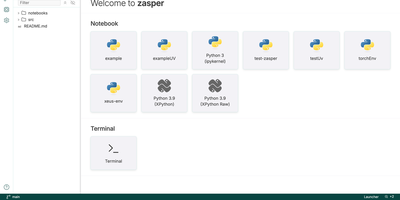
Notebook work gets a lighter home in Zasper, a browser IDE that runs any Jupyter kernel on a fraction of the memory JupyterLab needs. Plotly, ipywidgets, HTML, and Markdown with LaTeX render inline, and saved files match what Jupyter would write byte for byte. A variables panel inspects the running kernel, DataFrames open as a grid that turns into a chart, and SQL cells query the databases you connect. Edits made to the file on disk flow into the open notebook cell by cell, and a run started from another tab or an agent still reaches its cell. A code editor, terminal, and Git panel share the window, and notebook diffs compare cell by cell. Claude Code, Gemini CLI, Codex, or any agent that speaks the Agent Client Protocol can work in a side panel, with each change it makes reviewed and undone from there. A command palette searches files and commands together, trusted folders keep untrusted code from running, and light and dark themes are included. Running on a dedicated VPS on RepoCloud with guaranteed CPU, RAM, and SSD, full root SSH access, and a browser serial console. AGPL-3.0 licensed.
ToolKernel
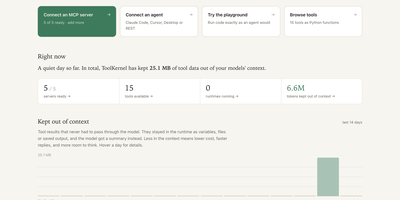
ToolKernel hands an AI agent a Python notebook wired to every MCP server you use, so big tool results stay in variables and the model reads only what it printed. Connect servers with the same mcp.json format as Claude Desktop and each tool becomes a typed function with keyword arguments and a docstring. The agent sees just seven small meta-tools and searches for a signature only when it needs one. Code runs in a persistent runtime per session, so variables stay in memory between calls, like cells in a notebook. An output guard keeps every result within a budget, turns large values into previews with shape and samples, and saves overflow for paging. Policies allow, deny, rate-limit, or hold a call until a person approves it in the web UI, and credentials never enter the runtime. The web UI records every step beside what the model saw and what stayed in the sandbox, with pages for servers, tools, a playground, approvals, and benchmarks. Claude Code and Cursor connect over MCP, stdio-only clients use a shim, and any other model can call a REST API with OpenAI or Anthropic tool formats. In the bundled benchmark, agents answered 20 of 21 data questions correctly, against 8 of 21 with tools wired in directly. Running on a dedicated VPS on RepoCloud with guaranteed CPU, RAM, and SSD, full root SSH access, and a browser serial console. Apache-2.0 licensed.