Wiki.js
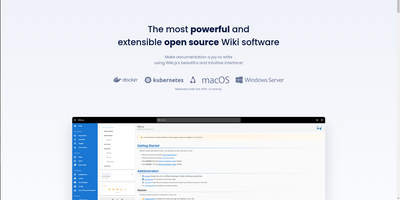
Team and product documentation on a fast Vue frontend with PostgreSQL storage: Wiki.js is a Node.js wiki engine. Its distinguishing trait is per-page editor choice: authors pick Markdown with live preview, a WYSIWYG visual builder for non-technical writers, or raw HTML, page by page. Native Git synchronization commits every page change to GitHub, GitLab, Bitbucket, Azure DevOps, or any Git remote - bi-directionally, so edits made in the repository flow back into the wiki - giving documentation version-controlled backup for free. Authentication coverage is among the broadest of any self-hosted wiki: local accounts with self-registration, social login via Google, GitHub, Discord, and Slack, and enterprise SSO through LDAP/Active Directory, SAML, CAS, Auth0, Okta, Azure AD, Keycloak, and generic OAuth2/OIDC, with optional MFA. Built-in full-text search runs on PostgreSQL with zero setup, and external engines like Algolia or Solr can substitute. Page history with visual version comparison, granular group-based permissions per path, nested navigation menus, 50+ integration modules, and full localization round it out. AGPLv3-licensed with a 28k-star community.
PilotDeck
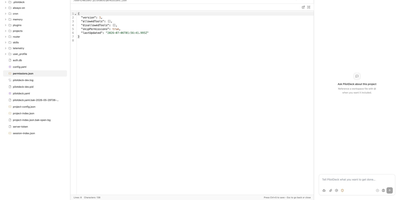
PilotDeck introduces a WorkSpace-first architecture where each project receives its own isolated file system, memory store, and skill set, preventing context bleed between parallel tasks. White-box memory makes generation, extraction, storage, and retrieval fully visible, letting users audit, edit, pin, and rollback individual entries when the agent misremembers, while Dream Mode consolidates memory fragments during idle windows. Smart Routing auto-detects task difficulty and sends complex calls to flagship models like Claude Sonnet or GPT-4o while routing simple requests to lighter models, achieving claimed 70% cost savings through on-device and cloud co-orchestration with TokenSaver tiering and sticky session binding. Always-on background execution keeps agents running after the user closes the browser, with Discovery and Cron-based scheduling for recurring workflows. The platform natively supports the Model Context Protocol for first-class MCP server integration, community skills via ClawHub on npm, lifecycle hooks intercepting PreToolUse and UserPromptSubmit events, and custom memory store providers. Multi-provider fallback automatically switches to backup providers on timeout or rate-limit errors. The WebSocket and HTTP gateway serves web, CLI, desktop, and Feishu IM channels from a single configuration. Running on a dedicated VPS on RepoCloud with guaranteed CPU, RAM, and SSD, full root SSH access, and a browser serial console. AGPL-3.0 licensed.
TriliumNext
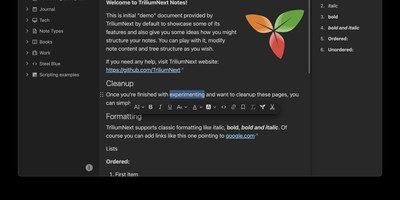
TriliumNext organizes notes in an infinitely deep tree where any single note can be cloned into multiple branches without duplication, building personal knowledge bases that mirror how ideas actually connect rather than forcing a single rigid folder hierarchy. Carrying forward the original Trilium project under active community stewardship with nearly 37,000 GitHub stars, the application is built on TypeScript with a CKEditor 5 WYSIWYG editor supporting rich text, tables, images, KaTeX math expressions, Mermaid diagrams, Excalidraw canvases, mind maps, spreadsheets with XLSX and CSV import/export, and code blocks with full syntax highlighting. A built-in JavaScript scripting engine runs on both frontend and backend, enabling custom widgets, automated workflows, scheduled tasks, and direct interaction with external REST services through a typed Script API. Full-text and fuzzy search with attribute-based queries locates any note instantly across databases tested at over 100,000 notes without performance degradation. The v0.104 release introduced importers for OneNote, Notion, Google Keep, Anytype, and Obsidian alongside 16 dedicated security fixes. Per-note AES encryption, OpenID Connect authentication, and TOTP two-factor protection safeguard sensitive content. The sync server keeps desktop clients, the progressive web app, and mobile devices in lockstep with zero third-party cloud dependency. Web Clipper captures content directly from browsers. Running on a dedicated VPS on RepoCloud with guaranteed CPU, RAM, and SSD, full root SSH access, and a browser serial console. AGPL-3.0 licensed.
Wallabag
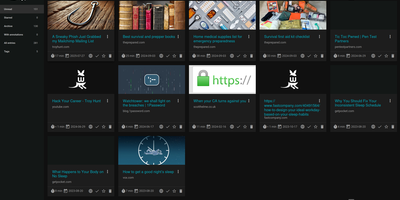
With 12,800+ GitHub stars and over a decade of active development since 2013, wallabag is the most established open-source read-it-later application — built for readers who want complete ownership of their article archive without depending on services that shut down (RIP Pocket). The Symfony-based PHP application extracts clean article content using Graby and php-readability, stripping advertisements, pop-ups, and tracking scripts to deliver a distraction-free reading experience optimized for both desktop and mobile screens. Save articles via Chrome, Firefox, or Safari browser extensions, Android and iOS native apps, REST API, or the built-in bookmarklet — all syncing to your self-hosted instance. Organize your library with tags, automated tagging rules that classify articles by content patterns, starred favorites, and archived collections. The annotation system enables highlighting extracts and attaching notes directly within articles for research and reference workflows. Import your existing reading lists from Pocket, Omnivore, Instapaper, Pinboard, Readability, and browser bookmarks. Export articles in PDF, ePUB, MOBI, JSON, CSV, TXT, or HTML for offline reading on Kindle, Kobo, and other e-readers. Full-text search with filters by reading time, domain, language, and creation date makes retrieval instant across thousands of saved articles. RSS feed output integrates with feed readers and automation services. Docker deployment with SQLite, MySQL, or PostgreSQL persistence backends takes under five minutes. Running on a dedicated VPS on RepoCloud with guaranteed CPU, RAM, and SSD, full root SSH access, and a browser serial console. MIT licensed.
Wallos
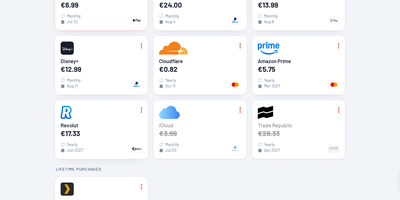
Track every recurring payment you have, from streaming services to SaaS tools, and get AI-powered recommendations on where to cut costs. Wallos manages subscriptions with automatic due date reminders delivered through email, Discord, Telegram, Pushover, Gotify, or custom webhooks so renewal charges never catch you off guard. Multi-currency support handles international subscriptions while the Fixer API converts everything to your primary currency for unified budget visibility. The statistics dashboard breaks down monthly and yearly spending by customizable categories, revealing consumption patterns and highlighting savings opportunities. AI analysis via ChatGPT, Gemini, or a locally-hosted Ollama instance reviews your subscription portfolio and suggests alternatives or consolidation strategies. Logo search automatically fetches brand imagery so your subscription list stays visually organized without manual uploads. Authentication supports OIDC with OAuth for enterprise environments, and the mobile-responsive interface works on any device with customizable themes and multi-language support. The PHP 8.3 application with SQLite backend runs from a single Docker container (bellamy/wallos image) with two persistent volumes for database and logos on port 8282. Deploy on RepoCloud with a dedicated VPS, keeping all financial data private under the GPL-3.0 license.
Journiv
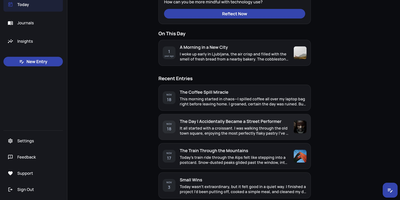
A Day One alternative that keeps your most personal writing on your own server: Journiv is journaling purpose-built for self-hosters. The FastAPI backend runs on SQLite by default with optional PostgreSQL, Redis, and Celery for background work, behind a clean, minimal web UI. Unlike general note-taking apps, it ships the features journaling actually needs: customizable moods and mood groups, activity tracking, goals with automated progress from logged activities, and daily writing prompts filterable by category and difficulty so a blank page never stalls you. Quick Log captures a moment in seconds and expands into a full entry later; "On This Day" resurfaces entries from past weeks, months, and years. Multiple journals separate work, gratitude, and personal writing, with tags and full-text search across everything, plus media uploads with automatic thumbnails and an Immich integration for linking photo-library memories. Analytics chart mood trends and writing patterns over time. Data portability is taken seriously: native import of Day One exports, JSON/Markdown/HTML export, and a standalone HTML viewer that opens your archive in any browser with no server running. OIDC single sign-on works with Authentik or Keycloak, and multi-arch images cover amd64 and arm64.

WBO
A Node.js server, a large shared canvas, and a URL - WBO (Whiteboard Ophir) is collaborative whiteboarding reduced to its essence. There are no accounts and no setup - to collaborate, you send someone the board's link, and every stroke appears for all connected users in real time over WebSockets, with cursor positions shared so you can see where collaborators are working. Board state persists automatically and continuously, so a diagram drawn in today's lesson is still there next week at the same URL. Boards come in three flavors: a public free-for-all, private boards with random unguessable names, and named boards with custom URLs shared by anyone who knows the name. The tools cover teaching and brainstorming needs - pencil, straight lines, rectangles, ellipses, text annotations, eraser, a full color palette with brush sizes - and boards export as SVG or PNG. Despite the simplicity, the server is production-minded: JWT authentication gates board access with granular capabilities (open, edit, and clear as separate permissions), rate limiting caps per-client message volume, reverse-proxy and subpath deployment are supported, and OpenTelemetry provides metrics, logs, and traces. It works on tablets and touch devices, speaks multiple languages, and consumes minimal resources. AGPL-licensed.
Shaarli
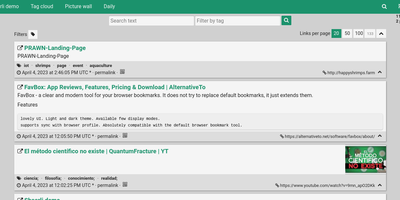
Personal, minimalist, database-free bookmarking - Shaarli is a philosophy as much as an app. Everything lives in a single compressed datastore file inside data/: no MySQL, no PostgreSQL, backup by copying one directory. That write-once/read-many file is usually served straight from OS disk caches, which is why a decade-old Shaarli instance with tens of thousands of links still responds instantly. Designed deliberately single-user, it saves URL, title, unlimited-length description, and tags (with autocomplete, renaming, and merging), marks entries public or private, and automatically strips utm_source and fb tracking parameters from saved URLs. That description field is why the community uses Shaarli as far more than bookmarks: a microblog, read-it-later queue, code-snippet base, pastebin, and shared clipboard between machines. Sharing is one click via bookmarklet or Android apps; consumption is per-tag RSS/Atom feeds plus a daily digest feed; search is full-text with tag filtering. A REST API opens it to any client, a plugin and theme system extends the PHP core (Markdown rendering, thumbnails), and import/export uses browser-standard Netscape HTML - your data enters and leaves freely. LDAP login is supported, no telemetry is sent anywhere, and the UI degrades gracefully without JavaScript. The anti-cloud Delicious.
Mission Control
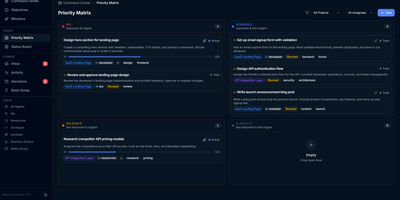
With over 600 GitHub stars and a featured Show HN launch, Mission Control is the agent-first command center that replaces the chaos of manually shepherding AI agents with structured delegation, approval workflows, and autonomous execution. The Next.js 15 web UI delivers an Eisenhower priority matrix with drag-and-drop quadrants, a Kanban board tracking tasks through Not Started, In Progress, and Done columns, and a goal hierarchy with milestone progress bars — powered by shadcn/ui, Radix UI, and @dnd-kit. Six built-in agent roles — Researcher, Developer, Marketer, Business Analyst, Tester, and You — receive tasks through a token-optimized API compressing context by 92 percent to approximately 50 tokens versus 5,400 unfiltered. The autonomous daemon polls task queues on cron schedules, spawns Claude Code sessions via the official CLI, enforces concurrency limits, and auto-retries with loop detection that escalates to human decisions after three failures. Field Ops extends execution to 64 external services across 16 categories with working X, Ethereum with MetaMask signing, and Reddit adapters, protected by AES-256-GCM encrypted vault with scrypt key derivation, per-service and global spend limits, a circuit breaker, and three autonomy levels. All data lives in local JSON files with Zod validation and async-mutex locking ensuring safe concurrent writes, backed by 193 automated Vitest tests. Running on a dedicated VPS on RepoCloud with guaranteed CPU, RAM, and SSD, full root SSH access, and a browser serial console. AGPL-3.0 licensed.
Appsmith
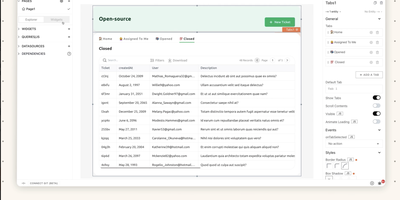
Admin panels, database GUIs, dashboards, approval flows, customer support consoles - Appsmith builds the internal tools your team keeps postponing, on an open-source low-code platform. The UI assembles from 45+ drag-and-drop widgets - tables with server-side pagination and inline editing, charts, forms, lists, buttons - which bind to data through {{ }} JavaScript expressions anywhere in the editor. Datasources cover PostgreSQL, MySQL, MongoDB, MS SQL, Redis, Snowflake, and more, plus any REST or GraphQL API, with SaaS integrations and AI query support for prompt-based steps inside apps. When the widget library falls short, custom widgets are plain JavaScript, HTML, and CSS, and external JS libraries can be imported, which keeps the platform extensible where pure no-code tools hit walls. Git-based version control enables branch-based collaboration, review, and rollback of app definitions. Queries and JS objects hold the business logic layer between datasources and UI. Self-hosted via Docker or Kubernetes, with role-based access control for published apps.
DumbBudget
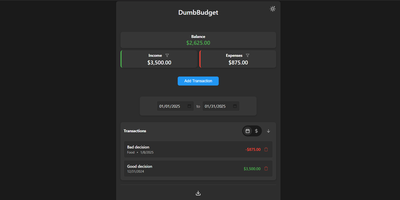
"Stupid simple software" is the entire philosophy at DumbWare.io, and DumbBudget delivers it: no over-engineering, no complexity, no accounts, no bank connections - just a clean, modern ledger for money in and money out. Log income and expenses, assign categories, and watch real-time balance calculations update as you type. Finding transactions is quick: filter by type, narrow by date range, sort by date or amount. When tax season or spreadsheet analysis calls, everything exports to CSV. Access control matches the philosophy - a single PIN (set via one environment variable) gates the app, backed by real security engineering: rate limiting on PIN attempts, temporary lockout after failures, secure session handling, and no sensitive data in browser storage. Multi-currency support covers the ISO codes, and a SITE_TITLE variable names each instance - deliberately useful, because running separate instances per account or family member is the intended pattern for multi-user needs. The responsive UI ships light and dark themes and installs as a PWA on phones, where expense logging actually happens. Configuration is five environment variables; data persists in one folder. If Actual Budget and Firefly III feel like accounting software, this is the notepad that gets used. GPL-licensed.
Planka
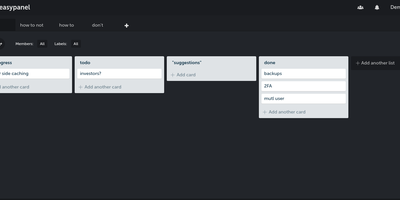
Trello's board model on your own server: Planka is an open-source Kanban project management tool. Boards organize into projects with lists, cards, labels, due dates, checklists, file attachments, and per-card stopwatch time tracking, all managed through drag-and-drop. Updates propagate over WebSockets, so a teammate moving a card or adding a comment appears instantly for everyone without a refresh - a genuine differentiator among self-hosted boards. Card descriptions use a full Markdown editor, custom fields adapt cards to your workflow, and views switch between Kanban, grid, and list layouts. Authentication supports OpenID Connect single sign-on with Google, Azure AD, Okta, or any OIDC provider - a feature Trello reserves for enterprise plans - and notifications reach 100+ channels including Slack, Discord, Telegram, and SMTP via Apprise. A REST API with 50+ webhook events supports custom integrations, and one-click board import eases migration. Built with React and Node.js on PostgreSQL, translated into 35+ languages, deployed via Docker.
Wakapi
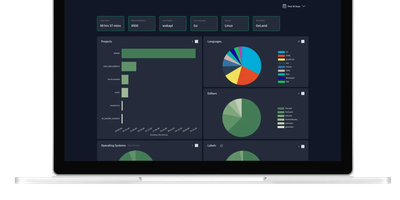
Its author, a student and WakaTime fan, didn't want to pay $9/month for data about his own keystrokes - so Wakapi was born, a self-hosted, WakaTime-compatible backend for coding statistics. The compatibility is the killer design decision: the official WakaTime plugins for VS Code, JetBrains IDEs, Vim, and dozens of other editors work unmodified - just point the plugin's API URL at your Wakapi instance with your personal key, and heartbeats flow to your server instead of a third party's. Duration inference matches WakaTime's own algorithm, with a configurable timeout (10 minutes by default). From that stream Wakapi builds statistics and plots across projects, languages, editors, hosts, and operating systems, plus the fun extras: public leaderboards (optionally login-gated, with configurable aggregation windows), badges for GitHub readmes, and weekly email reports. A REST API serves your data programmatically, Prometheus export feeds your existing Grafana, and a WakaTime relay mode can mirror heartbeats to both services during migration - with one-click import of historical WakaTime data. Written in Go, it is lightning fast and light enough for the smallest instance, storing to SQLite, PostgreSQL, or MySQL, with configurable data retention for GDPR peace of mind. Deliberately smaller than WakaTime, deliberately yours.
iDURAR
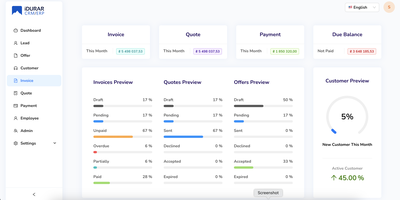
Quote to cash in one web application - create quotes, convert them to invoices, record payments, track customers: iDURAR is an open-source ERP and CRM platform for small and medium-sized businesses. Built on the MERN stack (MongoDB, Express, React, Node.js) with Ant Design components and Redux state management, it presents a clean SaaS-style interface that needs little onboarding. Core modules cover invoice management with PDF generation and email delivery, payment recording against invoices, quote and proforma handling, customer records, and accounting views over the resulting data. Multi-currency support and localization make it usable for internationally operating teams. Because the whole stack is JavaScript with an API-first backend, extending it - custom fields, new modules, integrations - is approachable for any Node/React developer rather than requiring a specialist ERP skill set. Deployment is straightforward via Docker with a MongoDB instance. Licensed under AGPL-3.0 with free commercial use; a hosted enterprise version exists but the self-hosted edition is fully functional.
Morphic
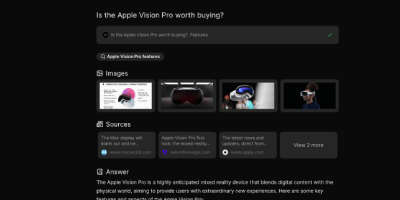
Perplexity's answer-engine experience, self-hostable and open-source: Morphic searches the web and writes cited answers. Instead of returning a list of links, it searches the web, reads the sources, and generates a complete answer with inline numbered citations. The generative UI streams rich components, source cards with thumbnails, image grids, syntax-highlighted code, and LaTeX math, rather than plain markdown. Quick mode answers fast; Adaptive mode runs deeper multi-step research. Search backends are pluggable: the Docker Compose bundle ships with a private SearXNG instance so no search API key is required, and Tavily, Brave, and Exa are supported alternatives. LLM providers include OpenAI, Anthropic, Google, Ollama, and any OpenAI-compatible endpoint, with per-mode model mapping - fast, cheap models for quick searches, stronger models for adaptive research, tuning the cost-quality trade-off per query type. An inspector panel exposes tool execution during multi-step research, and AI-suggested follow-up questions keep an investigation moving. Chat history persists in PostgreSQL, results are shareable by URL, file uploads feed context into queries, and optional Supabase authentication adds multi-user or guest access. Because the default search path is your private SearXNG instance, research topics never hit a commercial search API - and with local Ollama models the marginal cost of a query approaches zero. Built with Next.js, TypeScript, and the Vercel AI SDK under Apache 2.0.
LobeHub
With over 82,000 GitHub stars and 700,000+ downloads, LobeHub has evolved from its origins as LobeChat into a comprehensive multi-agent AI collaboration platform where humans and autonomous agent teams co-evolve. The platform's Agent Harness architecture functions as an operating system between AI models and applications, handling prompt presets, tool orchestration, lifecycle hooks, planning, filesystem access, and sub-agent management across 25+ model providers including OpenAI, Anthropic Claude, Google Gemini, DeepSeek, Mistral, Groq, AWS Bedrock, Azure OpenAI, and local models through Ollama. Agent Groups enable sophisticated collaboration with sequential, parallel, iterative, and debate orchestration modes, allowing multiple specialized agents to tackle complex workflows simultaneously. The Agent Builder creates production-ready agents from natural language descriptions with auto-configuration, drawing from a marketplace of 505+ pre-built agents and 10,000+ MCP-compatible skills and plugins. Pages provide collaborative document editing with multi-agent co-authoring, while Schedules automate agent runs around the clock without human supervision. The knowledge base leverages PostgreSQL with pgvector for RAG-powered retrieval, and Personal Memory gives agents transparent, editable context that evolves through continual learning. The full self-hosted stack deploys via Docker Compose with PostgreSQL, Redis, RustFS for S3-compatible storage, and SearXNG for private web search, all configurable through environment variables. Running on a dedicated VPS on RepoCloud with guaranteed CPU, RAM, and SSD, full root SSH access, and a browser serial console. LobeHub Community licensed.

Vexa
Vexa is the only Apache 2.0 meeting bot API that self-hosts the complete transcription pipeline, from bot dispatch to Whisper speech-to-text to knowledge agents, with zero audio leaving your infrastructure. A single POST /bots request sends a transcription bot into any Google Meet, Microsoft Teams, or Zoom call, where it captures audio, runs speaker-attributed transcription through faster-whisper or any OpenAI-compatible endpoint, and streams results to your application via real-time WebSocket with sub-second latency. The built-in agent framework watches live transcripts and your accumulated workspace context, answering mid-call questions grounded in your own meeting history and wiki. An MCP server connects Vexa to Claude, Cursor, and other compatible AI tools, turning every captured meeting into queryable context for external agents. The Terminal, a bundled Next.js web workbench, lets you send bots, watch live transcripts, manage users and API tokens, and chat with your meeting archive from a browser. Docker Compose brings the full stack up on one Linux host in five minutes; the Helm chart scales to thousands of users on Kubernetes with a Pod-per-bot architecture and built-in RBAC. Recordings persist in MinIO or any S3-compatible store, transcripts in Postgres, with Redis handling queues and scheduling. Deploy on RepoCloud for a dedicated VPS with full root SSH access and browser console. Apache 2.0 licensed.
Inbox Zero
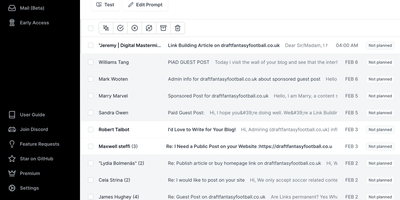
Your Gmail, Google Workspace, or Outlook inbox, worked by an AI assistant: Inbox Zero sits on top of the account you already have. Its core idea is rules written in plain English - tell the assistant "label invoices and file the PDF to Drive" or "archive cold outreach unless they mention my company" - and it executes against every incoming message. Emails that need a response arrive with a pre-drafted reply written in your tone, learned from your email history and calendar context. Reply Zero tracks what you owe responses to and what you're waiting on; the Bulk Unsubscriber surfaces newsletters you never read (with read-rate analytics) for one-click unsubscribe-and-archive; the Cold Email Blocker auto-archives unsolicited pitches based on your own definition of "cold." Smart Filing routes attachments - receipts, contracts, PDFs - into the right Google Drive or OneDrive folder, and Slack/Telegram integration lets you read, draft, and triage without opening a mail client. Email analytics show top senders and volume trends. It is not a new email client: everything happens in your real mailbox using native filters. Self-hosting means your mail content and the LLM calls that process it run on infrastructure you control.