Papermerge
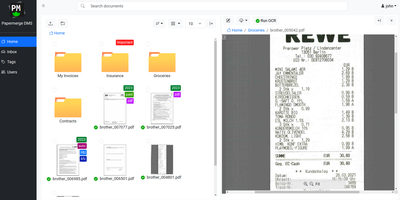
Receipts, contracts, and letters that arrive as pixels rather than text: Papermerge is a document management system built specifically for scanned documents. Upload a PDF, TIFF, JPEG, or PNG and OCR runs automatically, with a real-time status indicator beside the document title; under the hood it drives OCRmyPDF and Tesseract, supporting 130+ languages and producing a new document version with a selectable, searchable text layer you can download. Full-text search runs across everything, with multiple search-engine backends (Xapian by default). The interface deliberately mimics a modern desktop file browser: dual-panel commander, drag and drop, hierarchical folders, and colored tags on documents and folders. Page management fixes what scanners get wrong - delete blank pages, rotate, reorder, merge, extract, and move strayed pages between documents, powered by PikePDF. Document types act as categories, each with its own custom metadata fields, so invoices carry vendor and amount while contracts carry parties and dates. Versioning preserves every state of a document. Multi-user support includes groups, group ownership, permission management, and document/folder sharing between users and groups, and an OpenAPI-compliant REST API automates ingestion from scanners or scripts. Apache-licensed, ideal for long-term digital archives.
BeaverHabits
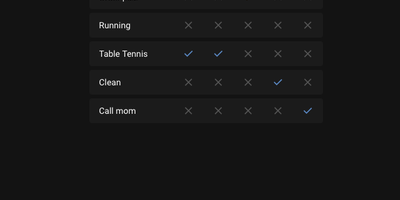
No targets, no gamification spiral, no motivational nagging: Beaver Habit Tracker is a self-hosted habit tracker deliberately built without "Goals". The core loop is honest: add habits, check them off each day, watch streaks accumulate on a calendar view. Its design follows behavioral-science basics - make it obvious (visual streak cues), make it attractive (progress is the motivator), make it satisfying (tracking becomes its own reward). Beyond the daily checklist it supports per-day notes intelligently grouped per habit, periodic habits, habit categories and tags, drag-to-reorder (manual or automatic), dark mode, and detailed streak and frequency views. Data lives where you choose: a single SQLite database or flat JSON files on a mounted volume, with JSON export and import for full portability. A REST API opens automation - community integrations already cover Stream Deck buttons, Home Assistant triggers, and CalDAV. The Python app ships as one Docker container with no external dependencies; environment variables tune everything from first day of week and index-page columns to iOS standalone PWA mode, and single-user setups can bypass the login entirely with TRUSTED_LOCAL_EMAIL. BSD-3-Clause licensed with no commercial restrictions - a well-executed single-purpose tool whose mobile PWA works anywhere a browser does.
Tinykit
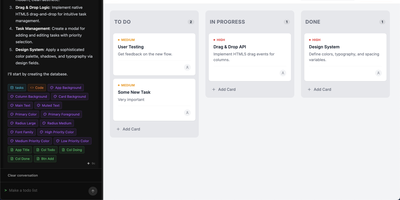
Describe the small app you keep wishing existed, and Tinykit builds it, gives it a database, and puts it live on your server. Tell it the tool you need and the agent writes the code, creates the data collections behind it, and wires the two together, then steps aside. The result is not a screenshot of an app; it is the app, served from your own server with its data syncing in real time and its files stored beside it. Open the built-in code editor to adjust the single file behind each app, or avoid code entirely: content fields let you edit text like a miniature CMS, and the design system panel restyles colors, fonts, and shadows visually. Every change takes a snapshot, so bold prompts carry an undo button and nothing is one bad idea away from lost. Hosts running errands for a household, an internal team, or a portfolio of side projects can keep adding apps, each reachable on its own domain, with token costs for every prompt shown in real money so the building budget is never a mystery. Running on a dedicated VPS on RepoCloud with guaranteed CPU, RAM, and SSD, full root SSH access, and a browser serial console. MIT licensed.
Whirl
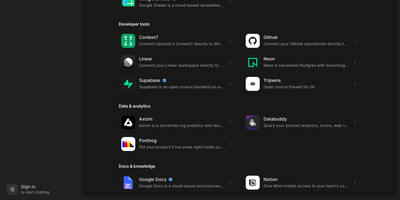
Whirl puts every top AI model in a single conversation and remembers what you were working on last week, so you can switch models mid-thought without losing the thread. Ask for a report, a chart, or a small interactive page and it appears as a living artifact in a side panel, still editable while you keep chatting, and shareable by link when it is ready to leave the conversation. Connect your own tools over MCP, with OAuth sign-in handled for you, or install skills that teach the app new tricks your team relies on. Long-term memory carries your preferences and project context from chat to chat, and live web search with page reading grounds answers in today's pages instead of the model's training data. Sensitive threads can be locked with a password that encrypts them on your device, where the server never sees the key and only zero-retention models may answer. Around those headline pieces sits the everyday kit: incognito mode, a message queue for when you think faster than the model replies, voice input, image generation, file attachments, folders, and sharing controls. An admin console manages the model catalog, integrations, and skills, and the interface itself switches between light and dark with your choice of accent color, installable as a mobile web app. Running on a dedicated VPS on RepoCloud with guaranteed CPU, RAM, and SSD, full root SSH access, and a browser serial console. MIT licensed.
DispatchMail
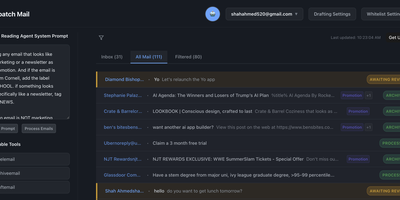
DispatchMail is an SuperHuman alternative and delivers a self-hosted AI email assistant that processes your Gmail inbox through configurable OpenAI prompts without sending data to third-party cloud services beyond the LLM API itself. The Flask backend connects to Gmail via IMAP, retrieves new messages according to your schedule, and routes them through customizable whitelist rules based on sender address, subject keywords, or natural language descriptions before AI processing begins. Two distinct prompt configurations control behavior — the Reading Prompt instructs how the AI should analyze and classify incoming messages, while the Draft Prompt defines how responses should be composed, letting you maintain consistent tone and policy across all automated replies. Whitelist filtering ensures the AI only processes messages you explicitly authorize, preventing unnecessary API costs and keeping sensitive emails out of the LLM pipeline entirely. The React web interface provides inbox management with message previews, AI-generated summaries, draft editing with human-in-the-loop approval before sending, and configuration panels for prompts and rules. Automatic labeling and archival organize processed messages into categories without manual intervention. The sender research feature uses LLM-powered deep analysis to build background profiles of email contacts. All email content, credentials, and processing results persist in a local SQLite database with zero cloud storage dependencies. Running on a dedicated VPS on RepoCloud with guaranteed CPU, RAM, and SSD, full root SSH access, and a browser serial console. Apache-2.0 licensed.
Wakapi
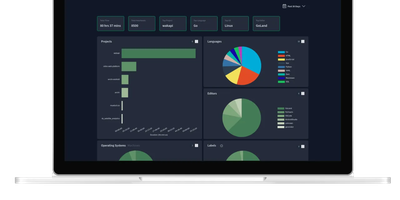
Its author, a student and WakaTime fan, didn't want to pay $9/month for data about his own keystrokes - so Wakapi was born, a self-hosted, WakaTime-compatible backend for coding statistics. The compatibility is the killer design decision: the official WakaTime plugins for VS Code, JetBrains IDEs, Vim, and dozens of other editors work unmodified - just point the plugin's API URL at your Wakapi instance with your personal key, and heartbeats flow to your server instead of a third party's. Duration inference matches WakaTime's own algorithm, with a configurable timeout (10 minutes by default). From that stream Wakapi builds statistics and plots across projects, languages, editors, hosts, and operating systems, plus the fun extras: public leaderboards (optionally login-gated, with configurable aggregation windows), badges for GitHub readmes, and weekly email reports. A REST API serves your data programmatically, Prometheus export feeds your existing Grafana, and a WakaTime relay mode can mirror heartbeats to both services during migration - with one-click import of historical WakaTime data. Written in Go, it is lightning fast and light enough for the smallest instance, storing to SQLite, PostgreSQL, or MySQL, with configurable data retention for GDPR peace of mind. Deliberately smaller than WakaTime, deliberately yours.
MIND
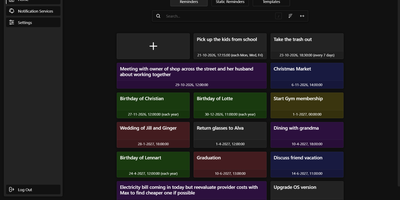
Unlike a calendar alert that rings on one phone, a MIND reminder reaches any of 100+ services, including email, Pushbullet, BlueSky, Cisco Webex Teams, and SMS gateways, from a self-hosted reminder app that you control. Normal reminders fire with second precision once or repeat every few days, once a year, on chosen weekdays, or on a custom cron schedule, while static reminders wait for a button press, so a single tap can tell the family that you are running late. Templates store colour, title, services, and text for fast creation, and the colour-coded library can be searched and sorted, with each reminder enabled, disabled, or tested on demand. Time zone changes, including daylight saving shifts, are accounted for, and sends that fail on a connection error are retried every two minutes until they succeed. Several users can share one instance: the admin panel handles accounts and registration, login lifetime, reverse-proxy URL prefix, debug logs, and scheduled database backups that can be exported and imported, and sign-in supports two-factor authentication. A documented REST API covers reminders, templates, notification services, and static triggers, and the web interface adapts to phone screens. Running on a dedicated VPS on RepoCloud with guaranteed CPU, RAM, and SSD, full root SSH access, and a browser serial console. GPL-3.0 licensed.
Hasty Paste
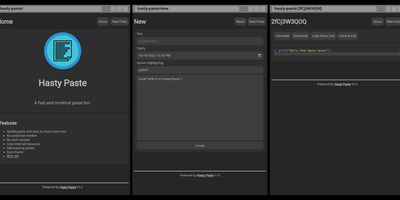
Paste some text, hit save, share the link - Hasty Paste is a fast, minimal pastebin written in Python on the async Quart framework, named, by its author's own admission, "because you use it so fast without a care in the world." No accounts, no authentication, no friction - built for the everyday case of handing a debug log, config snippet, or stack trace to someone in tech support or a chat channel. Pastes get randomly generated IDs, with an optional "long" ID mode that makes brute-force URL guessing impractical, and expiry times ensure throwaway content actually gets thrown away. Optional Pygments syntax highlighting makes code readable, a dark theme spares your eyes, and the whole interface works without JavaScript - it renders in terminal browsers and under the strictest script blockers. Storage is a custom flat-file system (no database), caching runs internally or through Redis for busier instances, and a REST API plus the companion "Hastily Paste It" CLI script enable piping command output straight into a paste from the terminal. The Alpine-based Docker image is tiny, resource usage is minimal, and the license is AGPL.
Yaade
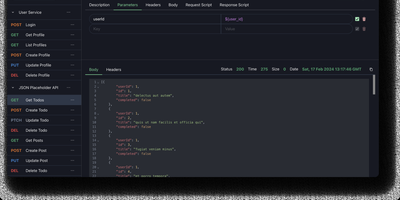
Yet Another API Development Environment delivers a self-hosted alternative to Postman designed from the ground up for teams that need secure, collaborative API development without sending sensitive credentials through third-party cloud services. The multi-user system manages team members with role-based permissions and supports external authentication through OAuth2 and OIDC providers, while all data persists in an H2 file-based database that survives container and server restarts. REST and WebSocket request testing includes environment variable substitution, request chaining, and Markdown documentation for each endpoint. The JavaScript scripting engine runs request and response scripts for automated testing and data extraction, with cron job scheduling and API-triggered execution for continuous integration workflows. Collections import directly from OpenAPI specifications and Postman exports, while outbound export generates request code in multiple languages and frameworks. The browser extension proxy for Chrome and Firefox routes requests through the user's browser to bypass CORS restrictions when testing localhost and internal APIs, with an alternative server-side proxy for headless environments. Single-file data import and export simplifies backup and migration between instances. The React and Vite frontend ships with dark mode enabled by default. Running on a dedicated VPS on RepoCloud with guaranteed CPU, RAM, and SSD, full root SSH access, and a browser serial console. MIT licensed.

OpenHabitTracker
Notes, tasks, and habits in one app, synced only to a server you run yourself. Notes are written in Markdown and render right in the list, so reading one costs no clicks. Tasks get a planned date and time, a duration, a checklist, and a timer. Weekly statistics show what got done and how long it took. Habits are measured by how overdue they are, not by an unbroken streak. A habit on a ten day interval that is two days late reads 120 percent. Charts track progress toward the target for today, this week, this month, this quarter, and this year. They also list the ten longest streaks and what you finish on each weekday. Categories and priorities span all three item types. Search reads note text and checklist items, not only titles. Filter by date, status, or how overdue a habit is, then sort with eleven keys. Pick from 26 themes in dark and light mode and 20 languages, with full keyboard and screen reader support. Import and export JSON, YAML, TSV, or Markdown, or bring in a Google Keep Takeout ZIP. Native apps for Windows, Linux, macOS, iOS, and Android sync with your server. The single-user Docker server also serves an OpenAPI spec, a Scalar UI, and a log page behind the same login. Running on a dedicated VPS on RepoCloud with guaranteed CPU, RAM, and SSD, full root SSH access, and a browser serial console. GPL-3.0 licensed.
Whiteboard
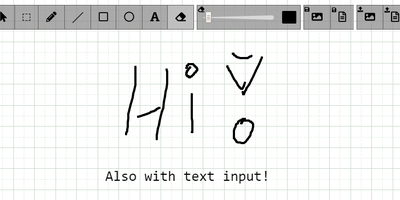
The drawing surface inside WebRTC conference tools like Meetzi and the LAMS online-learning platform is Whiteboard (by cracker0dks) - a lightweight Node.js collaborative sketchboard built to be embedded and customized, which also slots into Nextcloud via the External Sites app. Everyone opening the same whiteboardid URL parameter draws on the same board, with remote user cursors visible live, per-user undo/redo, and an indicator showing the smallest participating screen so nobody draws outside a colleague's view. Content handling goes beyond pen strokes: drag-and-drop or paste images and PDFs from any PC or browser, then resize, rotate, and draw over them on canvas or background; add text and sticky notes; hold Shift for angle-snapped lines and perfect squares. Every function has a keybinding - deliberately friendly to pen displays like Wacom and XP-Pen whose hardware buttons map to shortcuts. Boards save to image or JSON (with reload), export directly to Nextcloud via WebDAV, and persist across restarts with the file-database option. A REST API with bundled interactive docs allows full programmatic control, an optional access token locks down uploads, and YAML configuration tunes behavior and performance. MIT-licensed and reverse-proxy friendly.
Wally
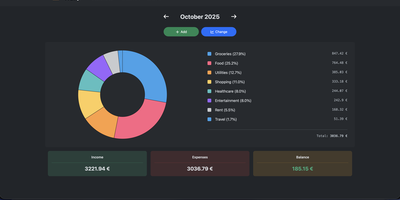
Started as an ExpenseOwl-inspired project, Wally grew into a lightweight, self-hosted expense tracker more capable in every direction its author touched. The backend is Python FastAPI over SQLite, which means every deployment ships a full REST API with interactive documentation at /api/docs - automating imports or wiring in external tools requires no reverse engineering, and when the optional login page is enabled you can mint scoped API keys from the Settings page for token-based integrations. The transactions view is built on AG Grid, bringing real search, column sorting, and per-column filtering to your ledger, with a footer totaling rows, income, and expenses for whatever slice you have filtered. Dashboards go beyond the usual monthly doughnut: a Change button swaps in year-scale line graphs so you can track a single category - restaurants, say - across time. Recurring transactions edit intelligently, letting you apply changes to all instances or only future ones. CSV import and export use a simple six-column format handled from Settings, the refined dark theme is genuinely easy on the eyes, and the interface is translated into more than ten languages. The whole thing runs from one small container with a single data volume.
Glass Keep
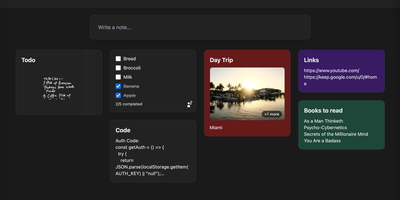
With nearly 600 GitHub stars and a feature set that rivals commercial note apps, Glass Keep is the self-hosted Google Keep alternative that wraps a full-featured notes system in a glassmorphism UI with blurred backdrops, translucent modals, and smooth transitions. The React and Vite frontend renders notes in a masonry card grid with pinning, color themes, tag chips, and drag-and-drop reordering. Text notes support Markdown with headings, bold, italic, strikethrough, blockquotes, and fenced code blocks, while checklists offer inline editing, drag-to-reorder items, and direct toggle from the grid without opening the note. A freehand drawing mode provides customizable brush sizes and colors for handwritten notes. The private AI assistant runs an optimized Llama 3.2 (1B) model entirely inside the Docker container using RAG over your own notes, answering queries like "what are my AWS commands?" without any data leaving your server. Deep search spans titles, Markdown text, tags, checklist items, and image names. Import notes from Google Keep via Takeout JSON files or export your entire vault as JSON with per-note Markdown downloads. The Express backend with better-sqlite3 requires no external database. Real-time collaboration enables shared checklists with live item toggling. Dark and light themes persist across sessions, and the PWA manifest supports installation on any device. Running on a dedicated VPS on RepoCloud with guaranteed CPU, RAM, and SSD, full root SSH access, and a browser serial console. MIT licensed.

DumbPad
With a deliberately minimalist design philosophy and zero database dependencies, DumbPad delivers a self-hosted notepad that stores notes as plain text files with real-time auto-saving every 10 seconds and keyboard-shortcut manual saves. The Node.js Express backend serves a vanilla JavaScript frontend that supports multiple named notepads with direct URL linking and shareable links for instant access to specific notes. The split-view editor displays markdown source on the left and rendered preview on the right with a draggable resize handle, while the full preview mode renders complete markdown with GitHub-style alert blocks for Note, Tip, Important, Warning, and Caution callouts, extended table formatting, fenced code blocks with syntax highlighting via highlight.js covering approximately 180 programming languages, collapsible details sections, and checklist support. Fuzzy search matches across both filenames and file contents for fast navigation across large collections. Optional PIN protection secures access with configurable 4 to 10 digit codes, constant-time comparison to prevent timing attacks, brute force lockout after 5 failed attempts with 15-minute cooldown, and IP-based tracking. The Docker container runs as non-root UID 1000 by default with multi-architecture support, CORS origin restrictions for reverse proxy deployments, and persistent data volumes. Notes can be downloaded as text or markdown files, printed with auto-expanded collapsible sections, and imported by placing text files directly into the data directory. On RepoCloud, deploy DumbPad on a dedicated VPS with Docker, root SSH access, and complete control over your note-taking infrastructure, all under the GPL-3.0 license.
DumbBudget
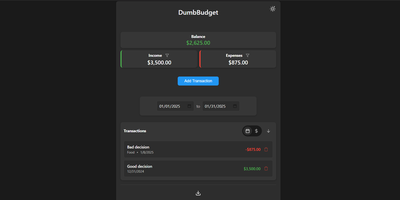
"Stupid simple software" is the entire philosophy at DumbWare.io, and DumbBudget delivers it: no over-engineering, no complexity, no accounts, no bank connections - just a clean, modern ledger for money in and money out. Log income and expenses, assign categories, and watch real-time balance calculations update as you type. Finding transactions is quick: filter by type, narrow by date range, sort by date or amount. When tax season or spreadsheet analysis calls, everything exports to CSV. Access control matches the philosophy - a single PIN (set via one environment variable) gates the app, backed by real security engineering: rate limiting on PIN attempts, temporary lockout after failures, secure session handling, and no sensitive data in browser storage. Multi-currency support covers the ISO codes, and a SITE_TITLE variable names each instance - deliberately useful, because running separate instances per account or family member is the intended pattern for multi-user needs. The responsive UI ships light and dark themes and installs as a PWA on phones, where expense logging actually happens. Configuration is five environment variables; data persists in one folder. If Actual Budget and Firefly III feel like accounting software, this is the notepad that gets used. GPL-licensed.
Mission Control
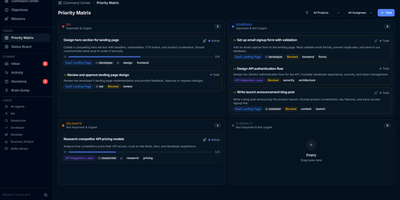
With over 600 GitHub stars and a featured Show HN launch, Mission Control is the agent-first command center that replaces the chaos of manually shepherding AI agents with structured delegation, approval workflows, and autonomous execution. The Next.js 15 web UI delivers an Eisenhower priority matrix with drag-and-drop quadrants, a Kanban board tracking tasks through Not Started, In Progress, and Done columns, and a goal hierarchy with milestone progress bars — powered by shadcn/ui, Radix UI, and @dnd-kit. Six built-in agent roles — Researcher, Developer, Marketer, Business Analyst, Tester, and You — receive tasks through a token-optimized API compressing context by 92 percent to approximately 50 tokens versus 5,400 unfiltered. The autonomous daemon polls task queues on cron schedules, spawns Claude Code sessions via the official CLI, enforces concurrency limits, and auto-retries with loop detection that escalates to human decisions after three failures. Field Ops extends execution to 64 external services across 16 categories with working X, Ethereum with MetaMask signing, and Reddit adapters, protected by AES-256-GCM encrypted vault with scrypt key derivation, per-service and global spend limits, a circuit breaker, and three autonomy levels. All data lives in local JSON files with Zod validation and async-mutex locking ensuring safe concurrent writes, backed by 193 automated Vitest tests. Running on a dedicated VPS on RepoCloud with guaranteed CPU, RAM, and SSD, full root SSH access, and a browser serial console. AGPL-3.0 licensed.
Codever
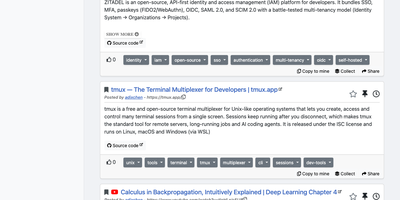
Every developer has a graveyard of browser tabs, chat messages, and stray text files holding links and code worth keeping; Codever replaces the graveyard with a bookmarks, notes, and snippets manager designed for developer workflows. Save a page in two clicks from Chrome or Firefox, drop selected text in as a snippet or note, or use the bookmarklet in any other browser, with title, description, and tags prefilled for you. From IntelliJ IDEA and Visual Studio Code you can push code straight into your library and pull it back without switching to the browser. Bookmarks carry descriptions and tags, and Pinned and Read Later lists sit beside your history so rediscovery takes seconds. Notes are written in Markdown and render with math, tables, and inline code, while snippets keep reusable code one search away with its context attached. Full text search spans bookmarks, notes, and snippets at once, with Brave, Google, Stack Overflow, and Bing one click away when the library comes up empty. Entries can be public, copied into your own collection, or gathered into curated sets for a team or topic. Accounts sign in through Keycloak with GitHub, Google, GitLab, or Stack Overflow, so a self-hosted instance fits the identity setup your team already uses. Running on a dedicated VPS on RepoCloud with guaranteed CPU, RAM, and SSD, full root SSH access, and a browser serial console. MIT licensed.

Peppermint
A deliberately simple ticketing system standing in for both Zendesk and Jira: Peppermint handles internal staff requests and external customer support alike. The stack is modern full-stack TypeScript: Next.js and React over Prisma and PostgreSQL, which makes it light to run and approachable for developers extending it. Ticket creation is straightforward - a markdown editor with file uploads, assignment, status tracking, and a logical workflow that new agents grasp without a manual. Mailbox integration converts email into tickets automatically: configure SMTP/IMAP per mailbox and incoming messages become trackable tickets. Each client accumulates an interaction history, giving agents context on every past request before replying. Two touches distinguish it from bare-bones ticketing: a built-in markdown notebook with todo lists for internal documentation and knowledge sharing, and OIDC authentication so agents sign in through your existing identity provider - Keycloak, Okta, Authentik, or Azure AD. Configurable webhooks and email notifications push ticket events to third-party services. The UI is responsive from mobile to 4K, and everything works fully offline in air-gapped environments. Docker-native and scalable via Kubernetes, with an active community of 3,000+ GitHub stargazers.