Freshrss
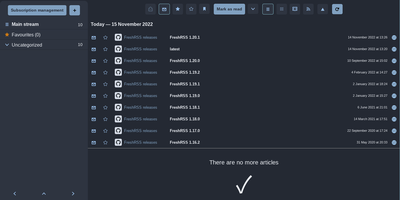
Where Miniflux strips reading down, FreshRSS gives you knobs - the feature-rich pole of self-hosted RSS, comfortable with thousands of feeds. It's a multi-user PHP aggregator (host family and friends on one instance, with an anonymous reading mode) with the reading workflow refined over a decade: favorites, custom tags, powerful filter and search queries, three reading views, and statistics that reveal each site's publishing frequency - useful for pruning subscriptions. Two properties make it the standard choice. First, the Google Reader-compatible API (plus a Fever API) syncs with virtually every serious RSS client - Reeder, NetNewsWire, ReadYou, FeedMe, Fluent Reader - so your phone reads from your server. Second, native WebSub support means compatible sources (WordPress, Blogger, Medium, Friendica) push new articles instantly instead of waiting for polling. A 50+ extension ecosystem adds what truncated feeds omit - full-text content fetching, reading-time estimates, trending views, auto-unsubscribe for dead feeds - alongside community themes and custom CSS. OPML import/export keeps subscriptions portable, a CLI handles administration, and article sharing posts to many services. AGPL-licensed, running on SQLite, MySQL, or PostgreSQL. Feedly Pro's feature set, minus Feedly's subscription and its algorithms.
Papermerge
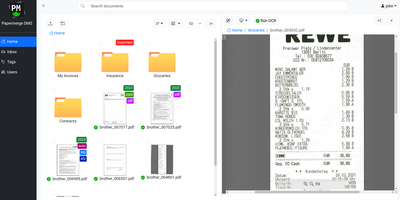
Receipts, contracts, and letters that arrive as pixels rather than text: Papermerge is a document management system built specifically for scanned documents. Upload a PDF, TIFF, JPEG, or PNG and OCR runs automatically, with a real-time status indicator beside the document title; under the hood it drives OCRmyPDF and Tesseract, supporting 130+ languages and producing a new document version with a selectable, searchable text layer you can download. Full-text search runs across everything, with multiple search-engine backends (Xapian by default). The interface deliberately mimics a modern desktop file browser: dual-panel commander, drag and drop, hierarchical folders, and colored tags on documents and folders. Page management fixes what scanners get wrong - delete blank pages, rotate, reorder, merge, extract, and move strayed pages between documents, powered by PikePDF. Document types act as categories, each with its own custom metadata fields, so invoices carry vendor and amount while contracts carry parties and dates. Versioning preserves every state of a document. Multi-user support includes groups, group ownership, permission management, and document/folder sharing between users and groups, and an OpenAPI-compliant REST API automates ingestion from scanners or scripts. Apache-licensed, ideal for long-term digital archives.
HedgeDoc
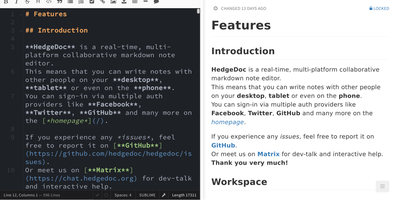
Real-time collaborative Markdown behind your own firewall: HedgeDoc (formerly CodiMD, descended from HackMD's open-source edition) keeps team notes on team infrastructure. Share a note's URL and collaborators are editing together instantly - live cursors, changes appearing keystroke by keystroke - in a three-mode interface that toggles between raw Markdown, rendered preview, and side-by-side split. The Markdown dialect is extended where engineers need it: Mermaid, Graphviz, and Vega-Lite diagrams, MathJax for equations, syntax-highlighted code blocks, embedded content, and a presentation mode that turns a note into reveal.js slides with a single YAML header. A dropdown permission system controls each note - freely editable, limited to signed-in users, or locked read-only - and published notes become clean read-only pages for wider distribution. Revisions track every change with the ability to revert to any earlier version. The AGPL-3.0 codebase is light enough to run on a Raspberry Pi and deploys via Docker with PostgreSQL, MySQL, or SQLite. Authentication covers LDAP, SAML, OAuth2, and email. It deliberately stays a focused document editor - no page trees or kanban - and does that one job with excellent keyboard-first ergonomics for meeting notes, RFCs, runbooks, and shared scratchpads.
DispatchMail
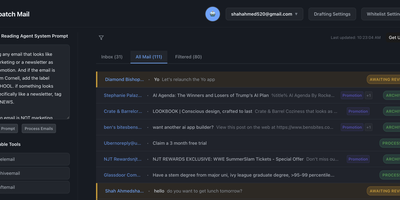
DispatchMail is an SuperHuman alternative and delivers a self-hosted AI email assistant that processes your Gmail inbox through configurable OpenAI prompts without sending data to third-party cloud services beyond the LLM API itself. The Flask backend connects to Gmail via IMAP, retrieves new messages according to your schedule, and routes them through customizable whitelist rules based on sender address, subject keywords, or natural language descriptions before AI processing begins. Two distinct prompt configurations control behavior — the Reading Prompt instructs how the AI should analyze and classify incoming messages, while the Draft Prompt defines how responses should be composed, letting you maintain consistent tone and policy across all automated replies. Whitelist filtering ensures the AI only processes messages you explicitly authorize, preventing unnecessary API costs and keeping sensitive emails out of the LLM pipeline entirely. The React web interface provides inbox management with message previews, AI-generated summaries, draft editing with human-in-the-loop approval before sending, and configuration panels for prompts and rules. Automatic labeling and archival organize processed messages into categories without manual intervention. The sender research feature uses LLM-powered deep analysis to build background profiles of email contacts. All email content, credentials, and processing results persist in a local SQLite database with zero cloud storage dependencies. Running on a dedicated VPS on RepoCloud with guaranteed CPU, RAM, and SSD, full root SSH access, and a browser serial console. Apache-2.0 licensed.
Nanote
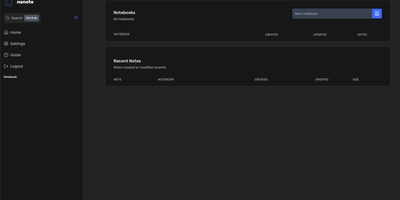
100% portability is Nanote's one non-negotiable principle as a self-hosted note-taking app. There is no database - notebooks are plain folders and notes are plain Markdown files on your filesystem, so the same notes remain fully manageable from a terminal, Notepad, or any other editor, and walking away from Nanote costs nothing because your data was never in a proprietary format to begin with. Built with Nuxt and TypeScript around the Milkdown editor, it layers modern conveniences on that plain-file foundation: fast content search across all notes using OS-optimized tooling (ugrep), native Markdown rendering, image and file attachments, and a mobile-friendly layout for reading and editing on a phone. Clever remark directives make plain text interactive - typing ::file inserts an inline upload picker, while ::today, ::now, and ::tomorrow expand to live dates and times. A fully typed REST API with validation covers automation, and access is protected by a configurable secret key. Deployment is one container with three env vars: paths for notes, uploads, and config, all bind-mountable so your Markdown lives wherever you want it - including inside an existing sync setup. AGPL-licensed and actively daily-driven by its author.
Silicon Notes
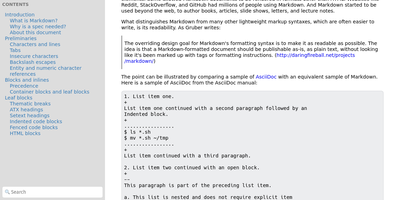
"Somewhat lightweight, low-friction" is how Silicon Notes' author describes the personal knowledge base - written after DokuWiki's editor "drove me mad" and no existing wiki quite fit. The philosophy is that small frequent annoyances compound into cognitive load with no return, so everything here is optimized for frictionless daily use. Notes are written in plaintext Markdown and rendered as clean HTML with Pygments syntax highlighting for code blocks; pages get bi-directional relationships (backlinks), so the knowledge base becomes a connected web rather than a folder tree; and full-text plus title search retrieves anything fast. A table of contents lives in the left sidebar - "where it belongs" - editable while you read without scrolling away. Page history tracks revisions for auditing and rollback, JSON export/import keeps everything portable, and the mobile layout is genuinely usable. The stack is deliberately minimal: Python and Flask with Mistune for Markdown and SQLite for storage - no big frameworks, just a few small dependencies. One honest caveat: there is no built-in authentication, so deploy it behind a VPN, private network, or reverse-proxy auth layer. For a solo engineer's brain, it is exactly enough.