BankMCP
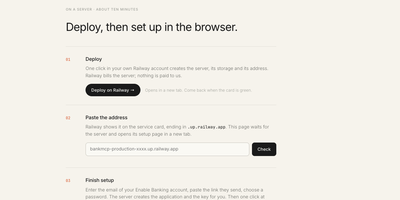
Ask your assistant what you spent on groceries last month, and let it answer from your actual bank accounts instead of a spreadsheet you never update. BankMCP is a small server you run yourself that connects your European banks to Claude, ChatGPT, Cursor, or any MCP client, so questions about balances and spending get real answers. Ask for a balance and it fetches the booked and available figures live; ask where the money went and it searches transactions across every connected account by merchant or invoice number; ask for the month and it totals money in and out while leaving transfers between your own accounts out of the picture. Background watches keep an eye out between conversations: get a webhook when a balance crosses a line, a large debit lands, a named payment arrives, or an expected payment has not shown up by its date. Ready-made prompts cover connecting a bank, building a budget, scanning savings, auditing subscriptions, and spotting unusual transactions. The server is deliberately boring about your data: it keeps consents, account labels, watches, and your login, fetches balances and transactions only when asked, and stores none of them. It is read-only by design, with no payment tools to abuse. Running on a dedicated VPS on RepoCloud with guaranteed CPU, RAM, and SSD, full root SSH access, and a browser serial console. MIT licensed.
Espial
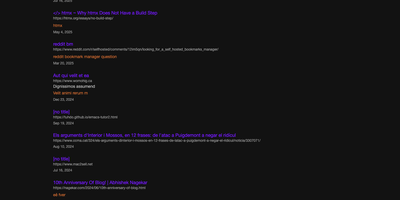
Espial gives your links one permanent address, a bookmarking server you host, reachable from any browser where you can log in instead of vanishing into whichever profile, device, or dead laptop you happened to save them on. Saving a page takes one click on the bookmarklet while you are reading it; a small popup arrives with the URL, title, and any text you selected already filled in, ready for tags and a quick save. Back at the server, bookmarks organize with tags and descriptions so that article from March is findable by what it was about, not by which machine you were sitting at. Years of accumulated browser bookmarks do not need re-saving one by one: import tools bring in Pinboard exports and Firefox bookmark files wholesale, and a sample file makes testing painless. Multiple user accounts keep each person's collection separate on a shared instance, which suits a household or a small team perfectly. Anything that can send an HTTP request can add bookmarks too, through an API endpoint guarded by a personal key you generate in settings, so scripts and automations file links alongside your manual saves. The whole thing stores its data in a single SQLite database, which makes backups a one-file copy and keeps the operational burden near zero. Internationalization support means the interface is not limited to English-speaking households either. Running on a dedicated VPS on RepoCloud with guaranteed CPU, RAM, and SSD, full root SSH access, and a browser serial console. AGPL-3.0 licensed.
Nametag
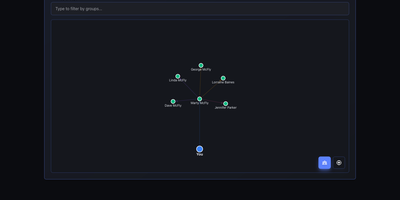
CRM mechanics applied to your actual relationships instead of a sales pipeline: Nametag is a Personal Relationship Manager (PRM). It exists to fix the things you keep forgetting: when you last talked to an old friend, their kids' names, the birthday you missed twice. Contacts are tracked with flexible attributes - names, birthdays, important dates, and free-form notes for everything else - and organized into custom groups. Where it goes beyond a contacts app is relationship mapping: you define how people connect to each other (family, friends, colleagues, or custom relationship types), and an interactive D3.js-powered graph renders your entire personal network so you can see clusters and connections at a glance. Staying in touch is automated: scheduled reminders fire for birthdays, important dates, and reach-out nudges, with optional email delivery via a Resend API key for password resets and reminder notifications. Built with Next.js, it is mobile-responsive, ships with full dark mode, and supports multiple languages including English and Spanish. Because it is self-hosted, there are no account tiers or contact limits - unlimited people and relationships, with every note about your personal life stored on your own server rather than a social-graph company's cloud. A lightweight, single-container deployment makes it one of the easiest personal tools to run.
Black Candy
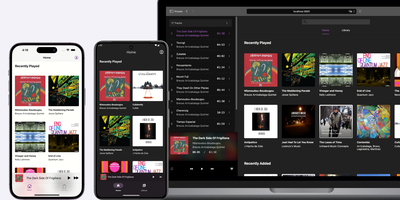
With 4,300+ GitHub stars and native mobile apps on three platforms, Black Candy transforms any VPS into a private Spotify-style streaming service for your personal music collection. The Ruby on Rails 7 backend with Hotwire Turbo and Stimulus delivers a responsive single-page-feeling web player supporting album browsing, artist views, playlists, favorites, and queue management without full page reloads. Point it at a media directory containing MP3, FLAC, OGG, AAC, or WAV files and Black Candy indexes metadata, fetches album artwork from Discogs API, and begins streaming immediately with on-the-fly transcoding that adapts bitrate to client bandwidth. Multi-user support gives each account independent playlists, favorites, and listening history while sharing the same music library — ideal for families or shared households. Native iOS, Android, and F-Droid apps maintained as separate repositories provide offline caching, background playback, and server discovery for mobile listening. The admin panel manages user accounts, configures media paths, and sets Discogs API tokens for automatic cover art retrieval. Deployment requires one Docker command — `docker run -p 80:80 ghcr.io/blackcandy-org/blackcandy:latest` — with persistent storage volumes for the SQLite database and media directory. For larger deployments, switch to PostgreSQL via environment variables with dedicated database URLs for ActionCable, SolidQueue, and SolidCache. Running on a dedicated VPS on RepoCloud with guaranteed CPU, RAM, and SSD, full root SSH access, and a browser serial console. MIT licensed.
Jetlog
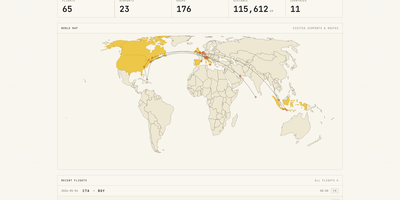
A personal flight logbook you host yourself, Jetlog draws every route you have flown on a pannable world map and turns the totals into charts. The home page opens with counts of flights, airports, hours, distance, and countries above that map, where dots mark visited airports and lines trace each trajectory. Settings let markers and lines grow with visit frequency and shade the countries where you have landed. Logging a flight takes only two airports and a date. Type a flight number and press Fetch to pre-fill the origin, destination, and airline, and a utility links connection flights automatically. Duration and distance are calculated for you and stay editable, with an option to use airport time zones. The All Flights table lists route, times, duration, distance, seat, class, and airline with filters and configurable columns, and each flight opens a detail page with airport data, a route map, tail number, and aircraft. A Statistics page charts flights per month, cumulative distance, most visited airports, most common airlines, ticket class, and seat for any time frame. History arrives through MyFlightRadar24 or custom CSV imports and leaves as CSV or iCal. Family members can share one install with separate logbooks, an admin manages the accounts, and the responsive layout works on a phone at the gate. Running on a dedicated VPS on RepoCloud with guaranteed CPU, RAM, and SSD, full root SSH access, and a browser serial console. GPL-2.0 licensed.
Mere Medical
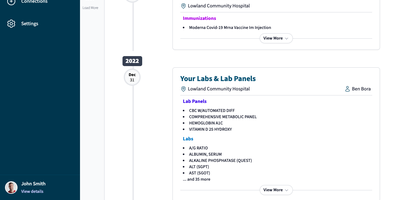
Mere Medical pulls the records from every hospital and clinic patient portal you use into one date-ordered timeline, so lab panels, immunizations, and procedures from different systems sit side by side. Each timeline card shows its facility and, when recorded, the provider, and expands with View More; a Jump To index leaps between years. The Summary tab condenses bookmarked labs, medications, conditions, immunizations, care plans, and allergies onto one dashboard whose cards can be dragged into any order or hidden. Lab results are graphed over time wherever the units line up, and a search bar finds specific entries by keyword. Connections sync from Epic MyChart, Oracle Health (Cerner), Veradigm, DrChrono, eClinicalWorks Healow, athenahealth, and NextGen, and several sources can feed one profile at once. Everything lives on your device, so records stay searchable offline and no account sign-in is needed; an optional password encrypts them at rest. Separate user profiles hold each person's records, and JSON export and import make backups simple. Experimental AI features add semantic search that links a phrase like high blood sugar to related labs, plus a Mere Assistant that answers plain-language questions about your records using local Ollama models or an OpenAI key. Install it on a phone or desktop home screen for quick access in the waiting room. Running on a dedicated VPS on RepoCloud with guaranteed CPU, RAM, and SSD, full root SSH access, and a browser serial console. MIT licensed.
Monetr
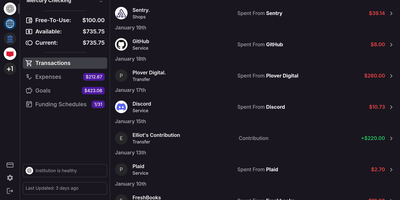
After the bills are covered, how much is actually safe to spend? monetr organizes an entire budgeting application around that one question. Inspired by the defunct Simple bank, it budgets paycheck by paycheck rather than month by month. Funding schedules encode when you get paid - including multiple schedules per account and a weekend-exclusion option for deposits that land early - and every expense or savings goal is tied to one. monetr then calculates how much of each recurring obligation (rent, car payment, subscriptions, on any repeat interval) to set aside from each paycheck, so a large bill never has to come out of a single check. What remains after allocations is surfaced as Free-To-Use, and a forecasting timeline projects contributions, due dates, and leftover funds forward so low-balance periods are visible before they happen. Transactions arrive either as OFX uploads from your bank or automatically through a Plaid connection using your own API credentials, keeping balances and transactions synced without manual entry. The app is mobile-friendly and installable as a PWA on desktop or phone. Self-hosting via Docker Compose is completely free, with all source code public and your financial data on your own hardware.
Ignidash
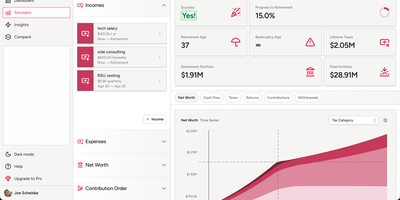
Ignidash answers the big retirement question, will my money last, with simulations you can run on your own server. Describe incomes, expenses, accounts, and contribution order, and the simulator reports your retirement age, portfolio at retirement, lifetime taxes, and final balance. Run hundreds of Monte Carlo trials to see your probability of success, or replay your plan against real historical market data to see how it would have fared. US tax estimation shows how withdrawals, asset location, and income changes move your tax bill, with tabs for net worth, cash flow, taxes, returns, contributions, and withdrawals. A net worth tracker lists assets like checking, 401(k), brokerage, and real estate beside liabilities. Several plans can live side by side, for instance a standard plan and an early retirement plan, each with its own results. Ask the AI chat about Roth conversion ladders or early withdrawal rules and it answers with your plan in mind, and AI insights write plain-language overviews of taxes, required distributions, and withdrawal strategy. Light and dark themes are included. Running on a dedicated VPS on RepoCloud with guaranteed CPU, RAM, and SSD, full root SSH access, and a browser serial console. AGPL-3.0 licensed.
LiftTrace
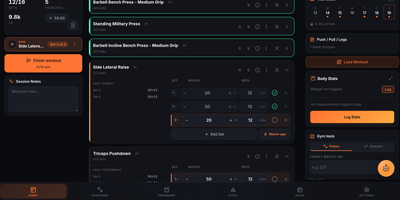
LiftTrace is a self-hosted weightlifting tracker that keeps your entire training history, programs, personal records, and progress photos on your own server in a single Docker container. Log every set with weight, reps, RPE, warm-up markers, and supersets, or type a line like bench 3x5 at 225 and let the Smart Log parser turn plain text or a voice note into structured sets. Follow multi-week programs where each week prescribes its own sets, reps, tempo, rest, and load, and watch the diary prefill today's session from the active template. Browse an exercise library merged from wger, Free Exercise DB, and ExerciseDB, add custom movements, or bulk import your own catalog from a spreadsheet. Automatic PR detection, estimated one-rep maxes, volume and frequency charts, and dated progress photos with a drag-to-compare view show how training is trending. The built-in Trace AI coach reads your workouts, programs, records, and body stats to answer questions, log sessions, and adjust plans through Claude, OpenAI, Gemini, or a local Ollama model. Coaches can prescribe workouts, leave notes on individual sets, and review filmed set videos with comments stamped at the moment that matters, all with explicit consent from the athlete. Import years of history from Strong, Hevy, FitNotes, Jefit, or Garmin FIT files, keep logging offline in the gym, and sign in with OIDC through Authentik, Keycloak, or Authelia. Running on a dedicated VPS on RepoCloud with guaranteed CPU, RAM, and SSD, full root SSH access, and a browser serial console. AGPL-3.0 licensed.
Bluesky PDS
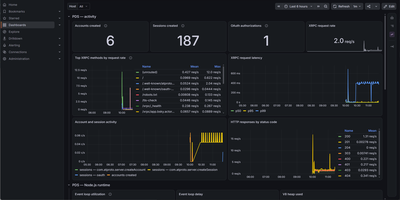
Bluesky PDS is the official Personal Data Server for hosting your own account on the AT Protocol network, so your posts, follows, and media live on infrastructure you control and still appear across the whole federated Bluesky social graph. An interactive installer sets up the container stack with the Caddy web server handling HTTPS for your domain and wildcard subdomains, creating the data directory, generating secrets, and registering the service with the network's identity directory. You create accounts directly or by invite code, sign in from the standard Bluesky web, iPhone, and Android apps by pointing them at your server address, and brand the sign-in, sign-up, and account screens with your own service name, logo, colors, and background images. Email verification and password resets go through your SMTP provider, rate limiting and blob upload limits are configurable, and the data directory holds everything needed to back up or migrate the instance to a new host later. Built-in tooling covers day-to-day operation: an admin command updates the service, automatic updates run through Watchtower, logs stream to Docker or a file, health and firehose WebSocket endpoints confirm the network can reach you, and an optional Prometheus and Grafana stack tracks accounts, sign-ins, and request latency. Account migration moves an existing identity onto your server when you are ready to leave a hosted provider. Running on a dedicated VPS on RepoCloud with guaranteed CPU, RAM, and SSD, full root SSH access, and a browser serial console. MIT and Apache-2.0 licensed.
NextClaw
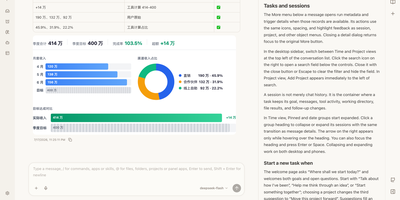
NextClaw is an AI workspace where a request for a report, a chart, or a small tool becomes organized research, files, and steps, with the result shown beside the conversation. Pick the engine for each task from Native, Claude Code, Codex, Hermes, or OpenCode, and the agent keeps its memory, skills, and workspace. A right-hand browser opens code, Markdown, HTML, Word, Excel, and PowerPoint files without losing the task that produced them. Connect providers like OpenRouter, OpenAI, Anthropic, Gemini, DeepSeek, or any OpenAI-compatible endpoint, and message the same agents from Telegram, Discord, Slack, WhatsApp, Feishu, or email. Scheduled tasks start from templates like a daily AI news brief or a competitor change tracker, and finished reports land in an AI Inbox you can read later or continue as a chat. A skill market installs new abilities, MCP servers extend tools, and Panel Apps keep the small pages an agent builds for you. Dedicated agents get their own role, home directory, and memory. Running on a dedicated VPS on RepoCloud with guaranteed CPU, RAM, and SSD, full root SSH access, and a browser serial console. MIT licensed.
Flight Finder
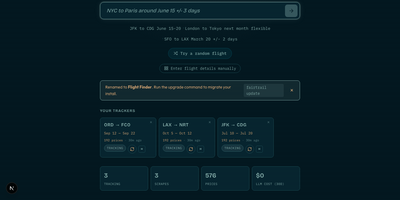
Flight Finder is a self-hosted tracker that watches flight, hotel, and car rental prices for you and alerts you when a fare you care about drops. Search in plain language, such as NYC to Tokyo next month under a set budget, and the app turns that request into tracked routes with flexible date ranges. Price evolution charts show how fares move over days and weeks, so you can see whether a price is genuinely cheap or just pretending. Click any point on a chart to jump straight to the airline booking page, or share the chart through a public link that needs no login. Compare carriers side by side to spot which airlines are softening prices and which are climbing. Test whether browsing from another country changes the quote with the optional VPN comparison. Track hotels by dates, rooms, and guests, follow a specific room rate or the cheapest qualifying offer, and set a target price that triggers a notification. Do the same for car rentals, comparing verified totals before you commit. Alerts arrive through Telegram, email, ntfy, webhooks, Pushover, or WhatsApp, with rules for target prices and percentage drops. Households can share one instance while each person keeps separate trackers and administrators manage assignments. Running on a dedicated VPS on RepoCloud with guaranteed CPU, RAM, and SSD, full root SSH access, and a browser serial console. MIT licensed.
PayMe
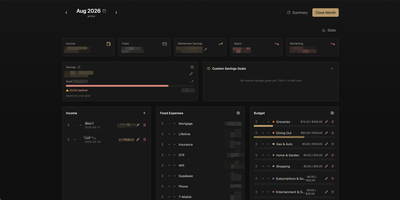
PayMe is a privacy-first personal finance dashboard that runs entirely on your own hardware with zero third-party service dependencies. The Rust backend compiled to a single binary serves a React 19 frontend built with Vite, TypeScript, and Tailwind CSS 4, storing all financial data in a local SQLite database that auto-migrates on startup. Monthly dashboards track income entries, fixed expenses like mortgage and utilities, and budget categories with real-time progress bars showing spending against configurable limits. The savings module includes goal tracking with percentage-based progress indicators, custom savings goals for targeted objectives, retirement savings projections with breakdown analysis, and projected savings calculations. Variance analysis compares actual spending against budgets across categories. Drag-and-drop reordering powered by dnd-kit lets you arrange income sources, expenses, and budget items to match your workflow. The interactive charts rendered by Recharts visualize spending trends, income patterns, and savings trajectories. Month-by-month navigation tracks financial history over time, while the Summary and Stats views aggregate data across periods. JWT-based authentication secures access, and the full OpenAPI Swagger documentation at the /swagger-ui endpoint exposes every API route for automation and integration. Docker Compose deployment creates a minimal image with the compiled Rust binary and static frontend assets, running on port 3001 behind nginx, Caddy, or Traefik reverse proxy with HTTPS. On RepoCloud, deploy PayMe on a dedicated VPS with persistent SQLite storage, root SSH access, and complete privacy over your household financial data, all under the MIT license.

Hatchdoor
Hatchdoor gives your Markdown notes two front doors at once: a fast web interface for you, and an MCP endpoint where AI agents read and edit the very same vault. Point it at any folder of Markdown files, an existing Obsidian vault included, and it indexes everything into a disposable SQLite read model that rebuilds itself from your files if deleted. In the browser you browse folders, follow wikilinks that survive renames, explore backlinks and graph views, and search by keyword or meaning across every vault you mount. The live editor shows Markdown syntax only on the line you are editing and saves automatically, while concurrency checks refuse a save when the note changed underneath you. Agents connect with their own token and start read-only; turn writes on and Claude Code, Codex, Cursor, or Hermes can create, edit, move, and link notes through the same checked operations the interface uses. Saved queries in Obsidian's Bases syntax render as live tables, attachments preview inline, and optional git integration commits and pushes every change back to your vault's repository. Running on a dedicated VPS on RepoCloud with guaranteed CPU, RAM, and SSD, full root SSH access, and a browser serial console. AGPL-3.0 licensed.
Cozy Cloud
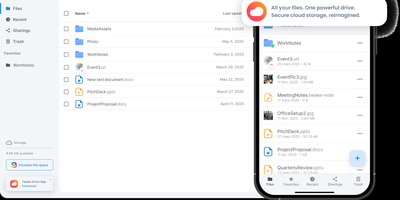
With over 1,200 GitHub stars, 12,000+ commits, and more than a decade of active development distributed under the AGPL-3.0 license, Cozy Cloud operates as a comprehensive personal data hub that goes far beyond file storage by connecting your documents, contacts, calendars, banking transactions, energy bills, and productivity tools into a single self-hosted platform where no third party profiles you. The cozy-stack Go binary handles file storage, CouchDB document management, job scheduling, app serving, and the REST API in a single process consuming approximately 150MB of RAM idle. Sandboxed konnectors import data from 50+ external services — banks, utility providers, telecom operators, cloud drives — running as isolated jobs via nsjail to prevent untrusted code from accessing other user data. The built-in app store serves web applications in subdomain-isolated environments with Content Security Policy headers, each app communicating exclusively through the documented REST API. Real-time synchronization via PouchDB replication and WebSocket keeps files, contacts, and documents consistent across desktop clients, mobile apps for iOS and Android with automatic photo backup, and the web interface. Security features include automatic Let's Encrypt TLS certificates, Argon2id password hashing, optional TOTP two-factor authentication, and GDPR-compliant data export via the CLI. Each user receives their own isolated instance with independent storage, database, and application configuration. Running on a dedicated VPS on RepoCloud with guaranteed CPU, RAM, and SSD, full root SSH access, and a browser serial console. AGPL-3.0 licensed.
Edi Life OS
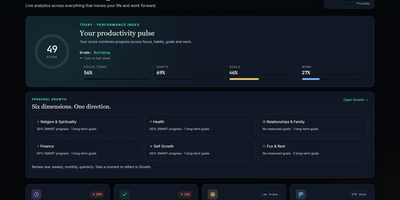
Edi Life OS puts the habits, goals, projects, money, focus sessions, and notes that usually live in five separate apps into one calm dashboard on your own server. Start the day from an Overview that rolls focus, habit trends, goals, finances, and the week ahead into one readable score. Connect long-term goals to six life areas, drive progress from a checklist, a measure, or a habit you actually keep, and use weekly, monthly, or quarterly reviews to choose the next honest step. Log daily habits with streaks and monthly progress, run timed focus sessions with short and long breaks, and keep a history of the deep work you finished. Track expenses, income, budgets, debts, and credits in your chosen currency, including recurring entries that land straight in the ledger. Plan projects on draggable Kanban boards with labels, priorities, due dates, checklists, comments, and attachments, then see card deadlines and money dues together in one calendar. Capture Markdown notes with preview and export, pin sticky notes with colors and connections, and give each account its own private workspace, theme, and currency. Ask an AI assistant through the optional MCP server to read your dashboard, create goals, log habits, or record expenses through a token-protected API that never touches the database directly. Running on a dedicated VPS on RepoCloud with guaranteed CPU, RAM, and SSD, full root SSH access, and a browser serial console. MIT licensed.
Kresus
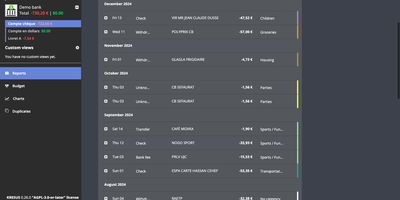
Kresus is a self-hosted personal finance manager that fetches your bank transactions overnight and turns them into categorized history, budgets, and charts, with no third-party aggregator holding your bank login. Banks with an open-source Woob connector sync automatically (mostly French ones), and each night Kresus re-reads the previous month so late postings are not missed; everything else works through manual accounts or OFX and JSON imports. Transactions can be renamed, sorted into color-coded categories, and moved to the previous or following budget month, and auto-categorization rules handle repeat merchants. The Budget page compares planned amounts with actual spending per category. Charts plot spending by category, balance over time, and monthly money received, spent, and saved. Recurring transactions like rent appear every month to preview your future balance. The Duplicates page lists suspected double imports for manual merging. Search by period, category, amount, or date, and group same-currency accounts into custom views. Email reports, balance and transaction alerts, and Apprise notifications to Telegram, Slack, or Gotify switch on once your administrator enables them. The interface comes in English, French, Spanish, and Turkish. The whole instance exports as JSON without bank passwords or, when enabled, as a password-encrypted file. Running on a dedicated VPS on RepoCloud with guaranteed CPU, RAM, and SSD, full root SSH access, and a browser serial console. AGPL-3.0-or-later licensed.

Bloglite
Most blogging platforms demand a database server, a cache layer, and a healthy slice of RAM before you publish a single sentence; Bloglite runs a complete personal microblog in a few megabytes of memory. You write and edit posts directly in the web interface from a phone or a desktop browser, see the rendered result within seconds, and skip the commit, build, and deploy cycle that static site generators impose on every small update. Posts are written in Markdown with built-in syntax highlighting for code and rendered LaTeX for math expressions, so technical notes, recipes, snippets, and reading highlights all sit comfortably in the same public notebook. Upload images and files to embed them in posts, follow RSS feeds from inside the service, and retrieve anything later through the built-in search or an external search engine. Share posts through short numeric links or longer descriptive slug URLs, and keep ownership of everything: posts live in one SQLite database on your server, and automatic backups export the whole site to plain text files that can be downloaded through the API and committed to a Git repository on a schedule. Running on a dedicated VPS on RepoCloud with guaranteed CPU, RAM, and SSD, full root SSH access, and a browser serial console. MIT licensed.