DumbBudget
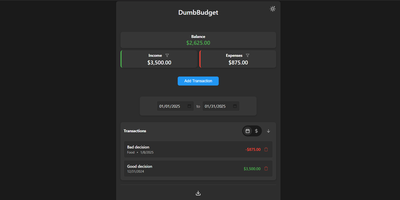
"Stupid simple software" is the entire philosophy at DumbWare.io, and DumbBudget delivers it: no over-engineering, no complexity, no accounts, no bank connections - just a clean, modern ledger for money in and money out. Log income and expenses, assign categories, and watch real-time balance calculations update as you type. Finding transactions is quick: filter by type, narrow by date range, sort by date or amount. When tax season or spreadsheet analysis calls, everything exports to CSV. Access control matches the philosophy - a single PIN (set via one environment variable) gates the app, backed by real security engineering: rate limiting on PIN attempts, temporary lockout after failures, secure session handling, and no sensitive data in browser storage. Multi-currency support covers the ISO codes, and a SITE_TITLE variable names each instance - deliberately useful, because running separate instances per account or family member is the intended pattern for multi-user needs. The responsive UI ships light and dark themes and installs as a PWA on phones, where expense logging actually happens. Configuration is five environment variables; data persists in one folder. If Actual Budget and Firefly III feel like accounting software, this is the notepad that gets used. GPL-licensed.
Sonarr
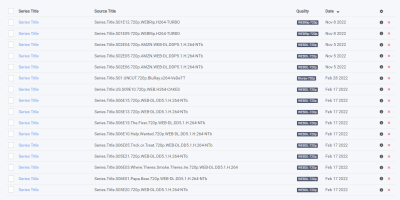
Add a series once, set a quality profile, and everything downstream is automated: Sonarr is the smart PVR for Usenet and BitTorrent users. It monitors RSS feeds from your indexers, detects new episodes the moment they release, sends matching grabs to SABnzbd, NZBGet, qBittorrent, Deluge, or another download client, then renames files with fully configurable templates, sorts them into consistent folder structures, and notifies Plex, Kodi, or Jellyfin to update the library. Quality profiles define what's acceptable (HDTV, WEB-DL, Blu-ray, up to 4K) and an upgrade cutoff - when a better release appears, Sonarr replaces the existing file automatically, stepping from HDTV to WEB-DL to Blu-ray until the cutoff is met. Custom formats add weighted scoring for finer-grained release selection, with community-maintained TRaSH Guides presets as the widely accepted defaults. Failed downloads are handled without intervention: Sonarr retries with another release, and manual search shows every candidate with the reasons any was rejected. It scans existing libraries for missing episodes, fully supports specials, multi-episode files, and daily and anime series types, and a calendar view shows upcoming episodes across every tracked show. Runs on Linux, Windows, macOS, and Raspberry Pi, and pairs naturally with Prowlarr for centralized indexer management.
Milvus
With over 45,000 GitHub stars and 100 million Docker pulls, Milvus is the most widely adopted open-source vector database, powering production AI systems at NVIDIA, Salesforce, eBay, Airbnb, and DoorDash. The distributed architecture separates compute and storage with stateless microservices on Kubernetes, horizontally scaling query nodes for read-heavy workloads and data nodes for write-heavy ingestion independently. Milvus 3.0 introduces lake-native retrieval that builds and serves indexes directly over vector data in object storage and open formats including Parquet, Lance, Iceberg, and Vortex without maintaining separate copies. Native hybrid search unifies lexical BM25 full-text retrieval and semantic vector search in a single engine with metadata filtering, eliminating the need for separate search infrastructure. Hardware-accelerated ANN indexing supports IVF, HNSW, DiskANN, and GPU-based indexes with BitQ 1-bit quantization cutting memory usage by 72 percent. SDKs for Python, Go, Node.js, and Java provide programmatic access, while Milvus Lite offers lightweight embedding for local development via pip install. Server-side aggregation, sorting, faceted search, StructArray for nested document structures, and ColBERT multi-vector scoring move ranking and result processing into the engine. The Path Index enables 100x faster JSON filtering with support for 100,000+ collections per cluster for multi-tenant deployments. Self-hosting deploys via Docker Standalone or Kubernetes with Helm charts using S3-compatible, GCS, or Azure Blob storage backends. Running on a dedicated VPS on RepoCloud with guaranteed CPU, RAM, and SSD, full root SSH access, and a browser serial console. Apache 2.0 licensed.
HumHub
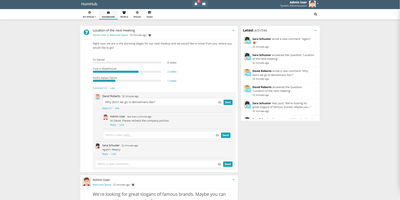
Workplace and Yammer's pattern on your own server, with GDPR compliance by construction rather than contract: HumHub is an open-source enterprise social network from Germany. Built in PHP on Yii2, it organizes everything around four concepts. Users get rich profiles with follows and interactions. Spaces are the structural unit - rooms for departments, projects, events, or clubs, with per-Space permissions, notification settings, and email summaries, and operators can auto-map users into the right Spaces. Content covers posts, wiki pages, photos and video, events, and tasks, with multi-level comments, versioning, archiving, moderation reporting, and filterable full-text search across everything. Modules make it a platform: roughly 80 install-and-activate extensions including Calendar, Wiki, Polls, Tasks, Gallery, News, direct-message Mail, OnlyOffice document editing, Advanced LDAP, SAML and JWT SSO, a RESTful API, mass user import, Translation Manager, and a Theme Builder with custom pages - every one optional and toggleable at runtime. That module economy is why HumHub serves such varied deployments: corporate intranets, city governments, universities, political parties, and nonprofits all configure the same core differently. Requirements are a plain LAMP stack - PHP 8.1+ and MySQL/MariaDB - making it one of the easiest community platforms to operate long-term.
SearXNG
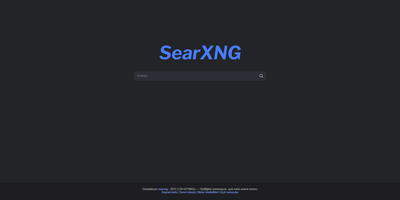
Up to 280 search services - Google, Bing, DuckDuckGo, Brave, Qwant, Startpage - aggregated without tracking or profiling: SearXNG is a privacy-respecting metasearch engine (AGPL-3.0, successor to Searx). Your instance queries the upstream engines on your behalf: your IP address, cookies, and search history never reach them, tracker parameters are stripped from result URLs, and an optional image proxy fetches thumbnails server-side so result pages leak nothing. It can even route outbound queries through Tor for full anonymity. Search is organized into categories - general, images, videos, news, maps, music, IT, science, files - with bang shortcuts for targeting specific engines, and every source can be enabled, disabled, or weighted per category in settings.yml. A plugin system adds calculators, hash tools, tracker removal, and unit conversions inline, and preferences (themes, safe search, languages, engine selection) persist in cookies rather than server-side accounts. The real argument for running your own instance rather than trusting a public one is control: you decide the logging policy (none), the engine mix, rate limiting, and who gets access - making it the default search backend for browsers, families, and teams that want Google-quality results without the profile.
Nextcloud
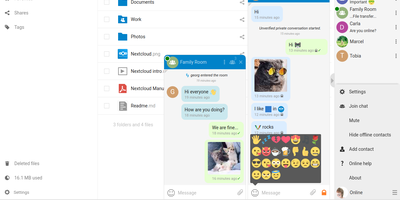
Google Workspace and Microsoft 365, replaced by a platform you actually control: Nextcloud is the self-hosted digital workspace. Files is the core: file storage and sync across desktop, mobile, and web clients, with sharing, versioning, and collaboration built in. Around it, Talk provides private text chat, audio/video conferencing with screen sharing, SIP integration, and persistent voice rooms; Groupware bundles calendar, contacts, and mail with delegation support; and Office offers two collaborative suites - the Collabora-based option with deep ODF support, and Euro-Office, whose local-processing architecture delivers strong Microsoft Office compatibility and fast browser rendering with reduced server load. The Nextcloud Assistant threads AI through the platform via a context-aware sidebar, Whiteboard covers visual collaboration, Flow handles automation, and an app ecosystem of hundreds of extensions adds everything from Kanban boards to end-to-end encryption. Hub 26 brings a lighter UI with a unified app switcher and Nextcloud Governance for organizations under strict regulatory requirements. This is the flagship of data sovereignty: your files, chats, calendars, and documents live on your server, under your jurisdiction, with GDPR compliance by architecture rather than by contract.
Apprise-API
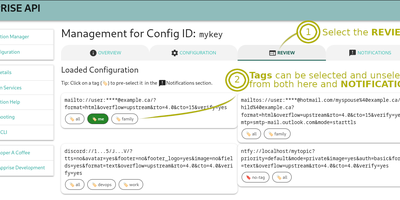
One REST call, 130+ notification services: Apprise API wraps the well-known Apprise library in a lightweight Django/Gunicorn microservice, so "send an alert" works the same whether it goes to Slack, Discord, Telegram, Teams, email, SMS, Pushover, or PagerDuty - each addressed by a simple URL scheme. It solves the credential-sprawl problem cleanly: instead of embedding provider tokens in every app, cron job, and CI pipeline, you centralize them here and everything else just POSTs a body and title. Two modes cover every workflow. Stateless calls to /notify carry target URLs in the payload (or fall back to a default set via APPRISE_STATELESS_URLS); stateful mode stores named configurations server-side under keys, so /notify/{KEY} fans out to everything registered - with tag-based routing (comma for OR, space for AND) selecting which endpoints fire per message. Messages take info, success, warning, or failure types in text, Markdown, or HTML, with attachments up to a configurable size. A built-in web UI manages and tests configurations, APPRISE_CONFIG_LOCK makes the store read-only, service allow/deny lists restrict which schemes work, webhook remapping adapts third-party payloads, and a Prometheus /metrics endpoint watches the gateway itself.

LubeLogger
Vehicle maintenance records shouldn't live in a homemade spreadsheet and a shoebox of receipts - LubeLogger exists because of exactly that. It's a self-hosted .NET web application (from Hargata Softworks) that gives every vehicle in your garage a complete digital history: service, repair, and upgrade records categorized and searchable, with invoices and receipts attached as documents; fuel fill-ups that compute economy in MPG, UK MPG, L/100KM, or KM/L without spreadsheet tedium; taxes, odometer logs, inspections, equipment, and supplies inventory for tracking the parts and fluids on your shelf. The reminder system is what saves engines: recurring reminders trigger by date, odometer reading, or whichever comes first - exactly how real service intervals work - so oil changes and timing belts stop relying on memory. A dashboard summarizes expenses by year, month, and category, a planner tracks to-dos by type, priority, and progress, and professional vehicle reports print a full history - genuinely useful when selling a car. Collaboration is built in: invite household members as collaborators on shared vehicles, with single sign-on support. Custom fields adapt records to your needs, CSV import/export moves data freely, an API enables automation, and the mobile-tested UI installs as a PWA on iOS and Android. MIT-licensed.
Web-Check
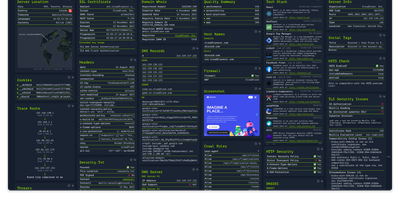
Enter a URL and get a dashboard of everything publicly discoverable about its security posture, server architecture, and technology stack: Web-Check is an all-in-one OSINT tool for analyzing any website. One scan surfaces IP info and server location, the full SSL certificate chain with issuing authority and validity, DNS records (A, MX, NS, CNAME, TXT) with DNSSEC status, HTTP response headers interpreted for security directives like HSTS, CSP, and X-Frame-Options, cookies and their flags, WHOIS domain info, robots.txt crawl rules, a sitemap-derived page map, the redirect ledger, open ports, traceroute, detected technologies, third-party trackers, associated hostnames, site performance, and even carbon footprint. Each card explains what the data means and why it matters, which makes the tool double as a security education resource - junior engineers learn headers and attack surfaces by scanning real sites. Practical uses span pre-deployment security audits (catch missing headers and misconfigurations before they ship), privacy compliance checks (identify trackers and cookie behavior for GDPR work), competitive tech-stack research, and network debugging via DNS and redirect inspection. Built by Lissy93 in TypeScript, it deploys as a single Docker container, and self-hosting keeps your reconnaissance targets and audit activity off third-party services.
PsiTransfer
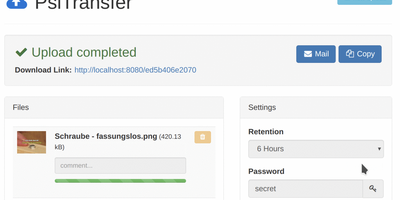
Upload files, get a share link, let it expire: PsiTransfer is a self-hosted WeTransfer with no accounts, no logins, and no third-party cloud with size caps and metadata harvesting. The engineering focus is large files over imperfect networks. Uploads use the tus.io resumable protocol, so a dropped connection on a multi-gigabyte video resumes exactly where it stopped once you're back online; downloads support HTTP range headers for the same resilience, and everything streams, so file size is bounded by your disk rather than memory. Files organize into upload buckets with retention you control: expire after a set time (up to weeks) or after a one-time download, with automatic cleanup when links lapse. Recipients need nothing installed - they open the link, preview files in modal views, and grab everything as a zip or tar.gz archive with one click. Buckets can be password-protected (AES-encrypted download lists), and security-through-obscurity is done properly: bucket URLs use hashed UUID tokens and stored filenames are replaced with UUIDs. An optional admin page (enabled by setting an admin password) lists bucket information and storage. The Vue.js frontend ships under 100 KB gzipped and is fully responsive. Honest caveat from the author: no end-to-end payload encryption yet. BSD-licensed, Docker-ready.
Leantime
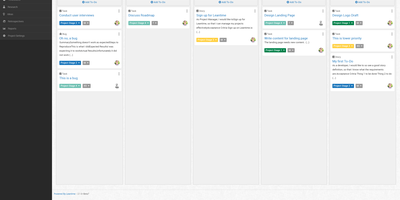
"As simple as Trello but as feature-rich as Jira" is how the Leantime team frames its goals-focused project management system for non-project managers - built from the ground up with ADHD, autism, and dyslexia in mind, with behavioral science shaping customizable dashboards, time blocking, low-cognitive-load prioritization, and Kanban, list, table, Gantt, and calendar views so each person works the way their brain does. The PHP application (AGPL, Laravel Blade frontend) connects strategy to execution: tasks with unlimited subtasks and dependencies roll up into milestones on a timeline, sprints and retrospectives handle iteration, and strategy-level blueprint boards - Lean Canvas, SWOT, risk analysis, goal and metric tracking - keep the "why" attached to the work. Knowledge lives alongside: wikis and docs, idea boards, comments on everything, file storage on S3 or local disk, even screen and webcam recording. Time tracking with timesheets supports estimation and client billing. Admin features are serious for an OSS tool: per-project permissions, two-factor auth, LDAP and OIDC single sign-on, Slack, Mattermost, and Discord integrations, a plugin system, and an expanding API that now powers a mobile app. Recent releases added multi-collaborator task assignment and low-vision accessibility improvements. Available in 20+ languages.
EverShop
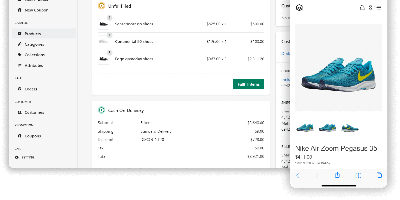
Magento's extensibility without PHP, Shopify's polish without the platform tax: EverShop is the TypeScript-first e-commerce platform built on that promise. Architected as a modular monolith on Node.js, it organizes every piece of business logic - catalog, checkout, customers, your custom extensions - into modules that plug in without touching core code, extended through a disciplined set of mechanisms: registry processors for transforming data across modules, hooks that wrap function calls, async event subscribers (product created, order placed), and route middleware. The storefront and the fully-featured admin panel are both React with server-side rendering and hydration, giving fast first paint and SEO-friendly pages, while a typed GraphQL API (plus REST endpoints) serves exactly the data each view needs - the same API that powers headless and PWA builds. Standard commerce is covered: product management with variants and attributes, category navigation, cart and checkout, order and customer management, coupons, and a theme system built on React components and Tailwind for deep storefront customization. PostgreSQL is the default database, deployment is Docker-friendly with near-zero configuration, and the GPL-3.0 license means the entire stack - types, resolvers, and checkout flow included - is yours to read and modify.
Nzbget
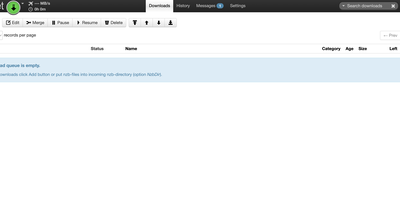
Written in optimized C++ where competitors use Python or Java, NZBGet saturates fast connections while idling on CPU and RAM - which is why the performance-obsessed Usenet downloader has long been the client of choice for NAS boxes, Raspberry Pis, and routers as much as full servers. The engineering shows in the recovery pipeline. Instead of shelling out to par2cmdline, NZBGet integrates the par2 source directly and exploits its knowledge of exactly which articles failed - quick par-verification checks only what needs checking, and its own multicore repair implementation runs 2-3x faster than the external tool on the same hardware. Fast par-rename deobfuscates scrambled filenames in seconds without a full verification pass, and rar-rename recovers names for multivolume archives even when no par2 files exist. DirectWrite assembles articles straight into sparse destination files, skipping temporary-file churn entirely, with an article cache and queue-pausing options to eliminate disk contention. Automation is complete: a remote web interface, full JSON-RPC API, RSS feeds with duplicate detection, scheduling and prioritization, and an extension manager for Python and Bash scripts triggered by download events. Sonarr, Radarr, and every major indexer integrate natively.
Bookstack
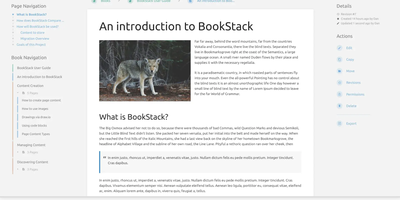
Most wikis die of flat page-and-tag sprawl; BookStack's defining decision is enforced structure - an MIT-licensed PHP/Laravel platform (over MySQL) where content lives in a hierarchy of shelves, books, chapters, and pages, the way a physical library works. A shelf maps to a department, a book to "Engineering Runbooks," a chapter to "Database Procedures," a page to the actual document. That opinionation removes the "where does this go?" friction and keeps knowledge bases tidy as they grow. Editing works both ways: a clean WYSIWYG editor for most users, a Markdown editor with live preview for those who prefer it - switchable per page. Full-text search spans all books or scopes to one, with direct links to individual paragraphs, and include tags let you embed one page's content inside another so shared blocks update everywhere at once. Every edit creates a diffable, revertible revision. Page templates standardize recurring formats, tags add cross-cutting categorization, and built-in diagrams.net integration draws architecture diagrams in place. Authentication covers email/password plus OIDC, SAML2, LDAP, and social login; a full role and permission system locks content down per shelf, book, or page. Pages and books export to PDF, HTML, plain text, and Markdown, a REST API automates content, and the whole thing runs happily on the cheapest VPS you can find.
Documize
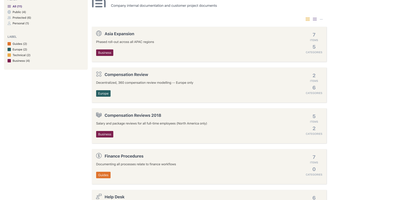
Enterprise documentation discipline without enterprise infrastructure: Documize Community is the Confluence alternative built on exactly that trade. The entire platform - Go backend, Ember.js frontend - compiles to a single executable binary for Linux, Windows, and macOS with zero runtime dependencies: no Elasticsearch, no Redis, no JVM. Point it at PostgreSQL, MySQL, MariaDB, Percona, or Microsoft SQL Server (rare in open source, decisive in Microsoft shops), and schema migrations run on launch with native full-text search on whichever engine you chose. Content organization rejects nested-folder sprawl for Spaces, categories, and labels, and the section-based composable editor mixes rich text, Markdown, code blocks, PDFs, diagrams, and embedded Jira or Trello content in one document, with reusable blocks and templates so teams start from standards rather than blank pages. It deliberately unifies internal team docs and customer-facing documentation in one system with granular space-, document-, and action-level permissions deciding who sees what. Where wikis stop, Documize continues: content approval workflows (draft, review, approve, publish), version management, lifecycle control, feedback capture, PDF export, analytics showing what gets read and ignored, activity streams, and audit logs. Keycloak, LDAP, and SSO integrate for enterprise auth. AGPL-licensed.
Freescout
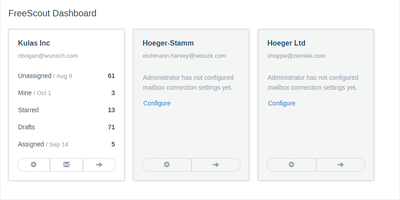
Unlimited agents, unlimited tickets, unlimited mailboxes, forever, on a $4 VPS - FreeScout's pricing inversion is why it became the most popular self-hosted Help Scout alternative, a PHP/Laravel help desk and shared inbox developed from scratch over eight years. The inbox deliberately behaves like Gmail or Outlook, so new support agents need close to zero training. The email-support core is genuinely complete: seamless IMAP/SMTP integration including modern Microsoft Exchange authentication, collision detection that warns when two agents open the same conversation, canned responses, auto-replies, internal notes, open tracking, starring, forwarding, merging, and moving conversations between mailboxes, phone-call logging, push notifications, and an auto-refreshing conversation list - plus screenshot pasting straight from the clipboard into replies. It's 100% mobile-friendly, fully screen-reader accessible, and translated into 28 languages. Beyond the core, an ecosystem of 100+ modules (mostly one-time $12-20 purchases) adds knowledge base, workflows with Gmail-filter-style automation rules, satisfaction ratings, time tracking, tags, custom fields, LDAP, Slack, WhatsApp and Telegram channels, and an API with webhooks - pay only for what your team needs. Web installer and updater included. AGPL-licensed.
Komga
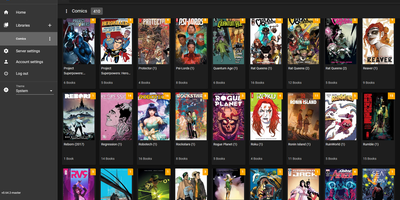
What Jellyfin is for video, Komga is for comics, manga, BDs, magazines, and eBooks: point it at folders of CBZ, CBR, CBT, PDF, and EPUB files and it becomes a proper library with cover art, embedded metadata import, and per-user reading progress. The responsive web reader handles multiple reading modes - left-to-right for western comics, right-to-left for manga, webtoon scrolling - while collections and read lists organize crossovers and story arcs, with ComicRack .cbl read list import for existing curation. Its openness is the real differentiator: OPDS v1.2 and v2.0 feeds serve virtually every reader app (Panels, Moon+ Reader, Mihon/Tachiyomi, KyBook), with OpenSearch and page-streaming extensions so mobile apps fetch pages on demand instead of whole archives. E-ink support is built in, not bolted on - Kobo devices sync directly against Komga instead of Kobo's servers, with two-way read progress, on-the-fly KEPUB conversion via Kepubify, and optional proxying so official Kobo purchases still work; KOReader sync covers everything else. Multi-user management brings per-library access control, age restrictions, and label restrictions for family setups. Housekeeping tools detect duplicate files and duplicate pages, and a REST API feeds a healthy ecosystem of community scripts. Runs from a single Docker container with embedded SQLite.
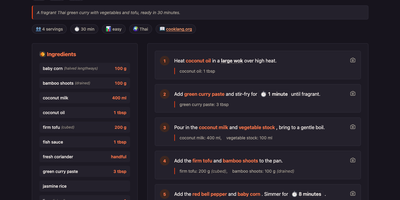
CookCLI
Plain-text recipes in, a phone-friendly recipe site out: CookCLI reads Cooklang files and serves them with scaling, search, shopping lists, meal plans, and pantry tracking. Write ingredients, cookware, and timers inline. Open any recipe from a phone or laptop on your network. Change the serving count and the quantities recalculate. Search by ingredient or by text. Plan a week in a .menu file and get one shopping list, merged across recipes, grouped by store aisle from your own aisle configuration, with pantry items already subtracted. The pantry file holds quantities, expiry dates, and low-stock thresholds. Ask which items are depleted or expiring, or which dishes you can cook right now, near matches included. In the terminal, print any recipe as Cooklang, JSON, or Markdown, run template-driven reports, and let a doctor command check your files. Import a recipe from a web page with an OpenAI API key. Switch on sign-in so everyone can browse but only signed-in users can edit recipes, the pantry, or the shopping list. A documented HTTP API feeds other tools. The whole collection also builds into a static website. Running on a dedicated VPS on RepoCloud with guaranteed CPU, RAM, and SSD, full root SSH access, and a browser serial console. MIT licensed.