Nojoin
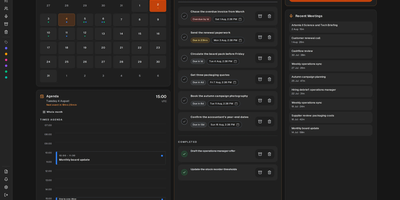
Nojoin takes notes on your Meet, Teams, and Zoom calls without sending a bot into the meeting: it records from your browser and transcribes on your own server. Nothing extra joins the call and nothing announces itself to the room; you meet as usual, press record, and the browser captures the audio. Transcription runs locally with Whisper or Parakeet, so the audio never leaves your hardware, and speaker recognition matches voiceprints across calls, so a person you name once is labelled correctly in later meetings too. AI notes can come from an API provider, your existing Claude or ChatGPT subscription, or Ollama on the same machine for fully local processing. During the call, Meeting Edge suggests questions, flags points you may have missed, and explains unfamiliar terms in real time. Afterward, analytics measured from the audio report talk-time share, turn-taking, and overlapping speech. A built-in MCP server hands Claude or ChatGPT 32 tools over your library, 19 of them writable, so an assistant can search every meeting, correct a misheard line, turn action items into tasks, and reconcile attendees with your CRM. Google and Outlook calendars sync automatically, every meeting carries its own chat, and finished notes export to PDF, Word, or plain text. Stored credentials are encrypted with a key you control, and anonymous telemetry can be switched off entirely. Running on a dedicated VPS on RepoCloud with guaranteed CPU, RAM, and SSD, full root SSH access, and a browser serial console. AGPL-3.0 licensed.
Papyra
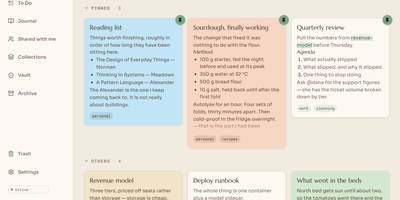
Papyra gives you a calm, private home for notes that stays as easy as sticky notes while quietly linking everything together like a wiki. Cards pin, colour, and drag into place on your desk, and opening one drops you into an editor where slash commands insert headings, checklists, tables, or maps without leaving the keyboard. Type two brackets to link another note, and backlinks gather the other direction automatically, following the note even if you rename it. Notes save themselves, and every earlier version is kept, so you can scrub back through history and restore the draft you actually wanted. Sharing a note lets several people type in it together with visible cursors, comments in threads, and mentions that bring the right person in. Private notes lock behind a PIN or your fingerprint and sit encrypted on disk, while a daily journal page collects the day with a mood and a calendar to browse the year. Search covers notes, to-dos, and attachments with highlighted matches, and image text and audio transcripts can join the index. Running on a dedicated VPS on RepoCloud with guaranteed CPU, RAM, and SSD, full root SSH access, and a browser serial console. GPL-3.0 licensed.
Nanote
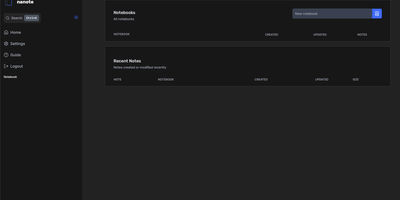
100% portability is Nanote's one non-negotiable principle as a self-hosted note-taking app. There is no database - notebooks are plain folders and notes are plain Markdown files on your filesystem, so the same notes remain fully manageable from a terminal, Notepad, or any other editor, and walking away from Nanote costs nothing because your data was never in a proprietary format to begin with. Built with Nuxt and TypeScript around the Milkdown editor, it layers modern conveniences on that plain-file foundation: fast content search across all notes using OS-optimized tooling (ugrep), native Markdown rendering, image and file attachments, and a mobile-friendly layout for reading and editing on a phone. Clever remark directives make plain text interactive - typing ::file inserts an inline upload picker, while ::today, ::now, and ::tomorrow expand to live dates and times. A fully typed REST API with validation covers automation, and access is protected by a configurable secret key. Deployment is one container with three env vars: paths for notes, uploads, and config, all bind-mountable so your Markdown lives wherever you want it - including inside an existing sync setup. AGPL-licensed and actively daily-driven by its author.
HedgeDoc
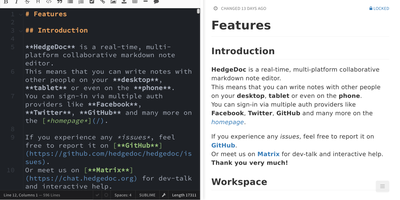
Real-time collaborative Markdown behind your own firewall: HedgeDoc (formerly CodiMD, descended from HackMD's open-source edition) keeps team notes on team infrastructure. Share a note's URL and collaborators are editing together instantly - live cursors, changes appearing keystroke by keystroke - in a three-mode interface that toggles between raw Markdown, rendered preview, and side-by-side split. The Markdown dialect is extended where engineers need it: Mermaid, Graphviz, and Vega-Lite diagrams, MathJax for equations, syntax-highlighted code blocks, embedded content, and a presentation mode that turns a note into reveal.js slides with a single YAML header. A dropdown permission system controls each note - freely editable, limited to signed-in users, or locked read-only - and published notes become clean read-only pages for wider distribution. Revisions track every change with the ability to revert to any earlier version. The AGPL-3.0 codebase is light enough to run on a Raspberry Pi and deploys via Docker with PostgreSQL, MySQL, or SQLite. Authentication covers LDAP, SAML, OAuth2, and email. It deliberately stays a focused document editor - no page trees or kanban - and does that one job with excellent keyboard-first ergonomics for meeting notes, RFCs, runbooks, and shared scratchpads.
Inkling
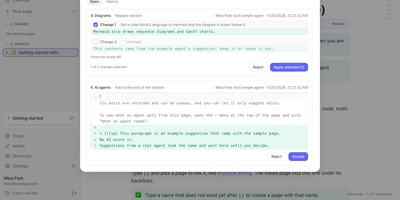
Built for small teams whose members each bring their own AI agent, Inkling keeps one shared set of notes that agents read by the section and change only through edits people can review. An agent asks a question and receives just the sections that answer it, packed into a token budget. It then edits one section against the version it read; if a teammate changed that section meanwhile, the agent gets the current text to merge instead of overwriting it. Edits can wait as suggestions that people accept in part or reject, and anything an agent changed can be reverted, one change or everything a connection touched on a page. A comment or database cell can hand a task to one member's agent, and a Team agents board shows what each connection is working on. The notes themselves cover Notion-style databases with table, board, calendar, gallery, timeline, chart, form and list views, plus wikilinks, backlinks, a graph, JSON Canvas whiteboards, Dataview-style query blocks and daily notes. Live co-editing shows cursors and presence, while roles, guests, edit locks and expiring password links control who sees what. Claude, Cursor and VS Code connect through OAuth to a built-in MCP server with 48 tools, and Slack or webhooks announce changes. Running on a dedicated VPS on RepoCloud with guaranteed CPU, RAM, and SSD, full root SSH access, and a browser serial console. MIT licensed.
Luna AI Engine
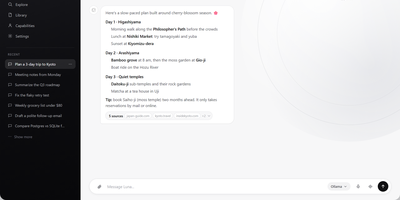
Chat, voice and files meet in Luna, an AI assistant that remembers your preferences, writes meeting minutes and answers through a local Ollama model or any cloud model you choose. Claude, Gemini, OpenAI, Groq, Mistral, Cohere, NVIDIA NIM and OpenRouter work through a setting, and several Ollama servers can be ranked ahead of a cloud fallback. Attached PDFs, Word files, spreadsheets, slides and code land in a searchable Library, and persistent memory carries facts and a learned style between chats. Wake-word and push-to-talk voice let Luna listen and answer back with local text-to-speech. Meeting mode records audio, transcribes it locally and writes minutes with decisions, action items and open questions. A skill is a JSON file plus a Markdown file, with built-ins for research, coding, documents, datasets, job search, news, papers and store-price comparison. Google Workspace, Microsoft 365, GitHub and Spotify connect as integrations, and six MCP servers hand memory, web research and workspace files to Claude Desktop and other clients. Fitbit, Oura, Garmin and Apple Health data sync into local metrics for questions such as how last week's sleep went. A business variant adds multi-user sign-in, rate limits and Telegram, Discord, Slack and webhook channels. The desktop, Android and home-screen iPhone apps reach the server privately over Tailscale. Running on a dedicated VPS on RepoCloud with guaranteed CPU, RAM, and SSD, full root SSH access, and a browser serial console. MIT licensed.