CommaFeed
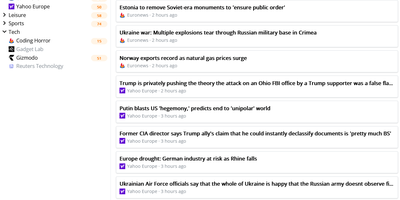
CommaFeed delivers the Google Reader experience on your own infrastructure with modern performance characteristics. The Quarkus-based Java backend compiles to native code via GraalVM, achieving sub-second cold starts and 50MB memory footprint — a fraction of traditional JVM RSS readers. Four distinct layouts (title-only, expanded, magazine, and card) with light and dark themes adapt to any reading style, while comprehensive keyboard shortcuts cover navigation, marking, starring, and feed management without touching a mouse. The Fever-compatible API and newly added Google Reader API connect native iOS and Android apps (Reeder, Unread, FeedMe, ReadKit) directly to your instance. Per-feed push notifications through ntfy, Gotify, or Pushover alert you to new articles instantly. The visual query builder for automatic read-marking rules replaces raw expression syntax with an intuitive condition editor supporting title, content, author, and URL matching. OPML import and export enable seamless migration from any RSS service. Custom CSS and JavaScript injection let power users completely restyle the interface, while the browser extension adds one-click subscription from any website. Docker images for linux/amd64 and linux/arm64 with H2 embedded database require zero configuration to start. Running on a dedicated VPS on RepoCloud with guaranteed CPU, RAM, and SSD, full root SSH access, and a browser serial console. Apache-2.0 licensed.
Glean
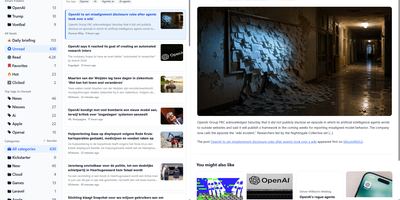
Information overload is the default state of the modern internet, and Glean exists to tame it by pulling every blog, newsletter, and news source you follow into a single, organized reading experience with an interface that prioritizes clarity over clutter. Subscribe to RSS and Atom feeds, import your existing subscriptions via OPML, and organize everything into multi-level folders with a flexible tagging system that lets you slice your reading list by topic, priority, or mood. A three-pane layout presents your feed list, article summaries, and full content side by side, with one-click actions for marking articles as read, saving them for later, bookmarking favorites, or archiving what you have already processed. Background workers fetch new articles every 15 minutes so your feeds stay current without manual refreshes. The preference learning engine (backed by Milvus vector embeddings) scores incoming articles against your reading history and surfaces a personalized Smart Feed of content you are most likely to care about, reducing the time spent scrolling past irrelevant posts. A built-in MCP server lets AI assistants like Claude Desktop search and interact with your feed library directly. The admin dashboard on a separate port provides user management, system monitoring, and configuration controls for multi-user deployments. Bookmark external URLs from any browser with the Chrome extension, or access your feeds on mobile through the Progressive Web App. Running on a dedicated VPS on RepoCloud with guaranteed CPU, RAM, and SSD, full root SSH access, and a browser serial console. AGPL-3.0 licensed.
RSSMonster
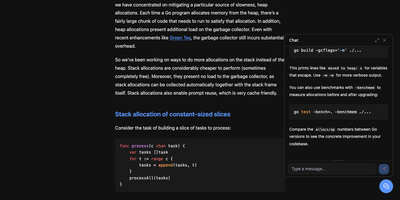
Staying on top of hundreds of RSS feeds is impossible when every reader just dumps articles in chronological order. RSSMonster takes a different approach: it evaluates, scores, and prioritizes every article so the signal rises above the noise. The three-pane reading interface automatically marks articles as read when you scroll past them, while the built-in quality scoring engine rates content by freshness, originality, trust, and attention metrics. Compose advanced search expressions using field operators like star:true, quality:>0.6, hot:true, and date filters like @today or @lastweek, then save those expressions as persistent Smart Folders for one-click access to curated views. Semantic event clustering groups related articles across sources so you see one coherent story instead of fifteen duplicates. Connect your favorite mobile client through the Fever API (supporting Reeder for iOS) or the Google Reader API (compatible with News+, FeedMe, Vienna RSS, and ReadKit). The AI chat assistant powered by the Model Context Protocol lets you ask questions about your feed content and get summarized answers. Import your existing subscriptions via OPML, switch between light and dark themes, and install the app as a Progressive Web App for offline reading. On RepoCloud, deploy RSSMonster on a dedicated VPS with root SSH access, full data ownership, and persistent storage under the MIT license.
Oksskolten
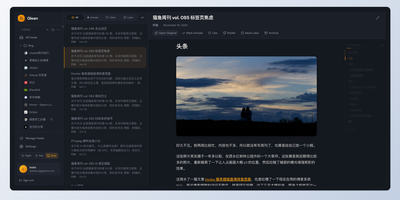
Subscribe to a feed and Oksskolten fetches the complete text of every new article, cleans it, and files it as Markdown in a library you can read without leaving the app. About 500 cleanup patterns strip ads, navigation, and tracking, with no per-feed toggles or selectors to maintain. No feed on the site? Auto-discovery goes first, then RSS Bridge, then LLM-inferred CSS selectors, while FlareSolverr gets past bot protection. Every feed is checked on its own schedule, somewhere between every 15 minutes and every 4 hours. Inbox, Read Later, Liked, and Read views keep the queue tidy. Clip any URL as a standalone article. Likes and bookmarks feed an engagement score that shapes search ranking and recommendations. One click summarizes or translates an article through Anthropic, Gemini, OpenAI, Ollama, or vLLM, with Google Translate and DeepL as translation engines. Ask the chat questions about your archive, or point Claude Code or Codex at the built-in MCP server to use the same tools. Search forgives typos and covers every stored article. Login works with a password, a passkey, or GitHub. Pick from four layouts and fourteen color themes, import custom themes as JSON, rebind keyboard shortcuts, and keep reading offline as a progressive web app. Running on a dedicated VPS on RepoCloud with guaranteed CPU, RAM, and SSD, full root SSH access, and a browser serial console. AGPL-3.0 licensed.
FeedMe
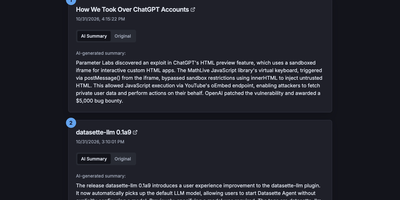
Most RSS readers hand you a pile of headlines and make you do the reading; FeedMe reads first and hands you the pile already digested. It aggregates every feed you configure into one clean, ranked stream, and for each article an LLM writes a short summary you can scan in seconds, with the full original text one tab away when a story earns a deeper look. Sources organize into categories like Tech News, Finance News, Personal Blogs, Company Blogs, Open Source, Research, and Podcasts, and a global search finds stories across all of them. The reader never sleeps on stale content: a built-in cron refreshes feeds and regenerates summaries on your schedule (every three hours by default in Docker), so the page you open in the morning already covers the night. Summaries answer to you, not a vendor: point FeedMe at any OpenAI-compatible endpoint and tune the prompt, input truncation, temperature, and token budget, with output in the languages you choose. There are no accounts, no forced logins, and no app to install; the responsive page works on phone and desktop in light or dark themes. Because the whole application is a static site, it stays fast and cheap to run, and the same build can live on GitHub Pages or Vercel if you ever want a public edition next to your private one. Running on a dedicated VPS on RepoCloud with guaranteed CPU, RAM, and SSD, full root SSH access, and a browser serial console. MIT licensed.