PancakeSlicer
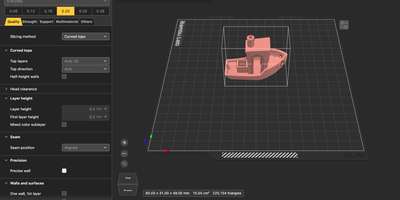
Hosting PancakeSlicer once gives every laptop, tablet, and phone in the workshop the same non-planar 3D printing slicer, with the same printers, filaments, and profiles. Load a model, pick a printer such as a Bambu Lab A1 mini or a Prusa MK4, and choose how the layers run: flat, curved tops, smooth morph, conformal layers, or slant, with Auto keeping the cleanest result of several styles. Curved paths are checked against print-head models for listed Bambu Lab, Prusa, Creality, Voron, and other printers, and the angle steps down before the nozzle would collide. The preview offers a layer slider, playback, a line-type legend with time per type, and a G-code viewer, while Compare overlays estimate top-surface error in microns for each method. Four dynamic profiles, Draft, Everyday, Fine Detail, and Strong, adapt to any printer, nozzle, and layer height, and projects keep a version history you can restore. The Device page shows camera, filament slots, temperatures, and recent jobs, and sliced files can go to Bambu Lab, Klipper, OctoPrint, PrusaLink, Duet, Flashforge, or Elegoo Link printers the server can reach. Non-planar slicing is experimental: review the G-code, supervise test prints, and set the bearer token before exposing the service. Running on a dedicated VPS on RepoCloud with guaranteed CPU, RAM, and SSD, full root SSH access, and a browser serial console. AGPL-3.0 licensed.
ProductFlow
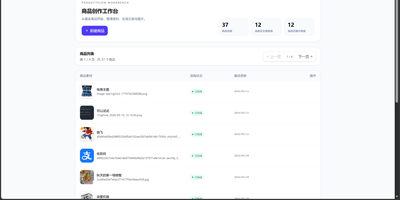
ProductFlow turns a product photo and a few facts into finished selling material, giving solo merchants and small teams one workspace for copy, posters, and repeatable image generation. You start by creating a product record, attaching original and reference images, then arranging product data, copy nodes, and image nodes on a zoomable canvas with drag, pan, multi-select, and connections. Copy nodes generate editable structured text that you can review, confirm, and keep in history before downstream image nodes read it. Poster generation runs in template mode with local rendering or generated mode through an image provider, and completed results can be downloaded, saved as product references, or promoted to the main product image slot. A separate image session view supports text-to-image and image-to-image runs with base image selection, candidate comparison, queue position, progress, cancel, and retry. Every finished image can move into the gallery with its source session, linked product, prompt, size, and model recorded for later reuse. Runtime settings cover provider profiles, model bindings, image tool parameters, prompt templates, upload limits, and concurrency, guarded by a separate settings token. The built-in help pages document the canvas, gallery, image sessions, and configuration in searchable sections. Running on a dedicated VPS on RepoCloud with guaranteed CPU, RAM, and SSD, full root SSH access, and a browser serial console. MIT licensed.
FlyReq Image Studio
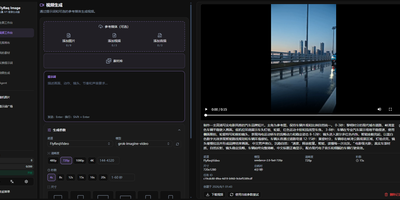
FlyReq Image Studio replaces a pile of model-specific tabs with one workbench for generating images, videos, and animated GIFs from whichever API you plug in. Type a prompt or drop in up to sixteen reference pictures, then pick resolution, aspect ratio, and model; the form adapts to what the chosen model supports. Video mode takes reference images, clips, and audio with duration and size controls. Agent mode is a conversation: describe the goal, read the analysis and optimized prompt, and watch it pick a model and render the picture, with optional web search. Reverse Prompt turns any uploaded image into a written prompt. The GIF workspace renders a frame grid and stitches it into a looping animation in the browser. An infinite canvas wires image, text, and prompt nodes into generation chains. A prompt plaza offers searchable community prompts, and My Materials keeps every result, reference, and prompt in one library with backup and restore. Tasks queue persistently, update live over WebSocket, and survive reconnects. Running on a dedicated VPS on RepoCloud with guaranteed CPU, RAM, and SSD, full root SSH access, and a browser serial console. AGPL-3.0 licensed.
Thingport
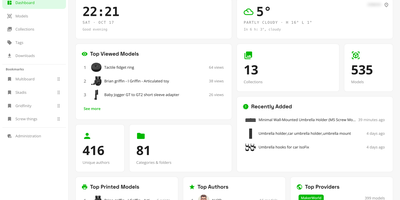
Authors delete listings, and the 3D models go with them, so Thingport stores its own copy of every printable file you import, in a self-hosted library you control. Ten sites feed the library, including MakerWorld, Printables, Thingiverse, and MyMiniFactory: paste a link or use the browser extension, and a model arrives with its files, photos, description, tags, author, and source link. Synced collections add newly bookmarked models as often as every hour. Files you already own come in as STL, 3MF, STEP, OBJ, or LightBurn uploads, ZIPs, folder trees, or drops into a watched consume folder. Each model gets an interactive 3D viewer with a thumbnail for every plate of a multi-plate 3MF. On first open, a check flags surface holes, non-manifold edges, flipped faces, and loose fragments before you slice. Sort with nested categories, collections, and tags, mark favourites, and find anything with full-text search. Optional AI sorts imports into your categories and tidies descriptions, using a local Ollama model or a cloud API. Open any file in Bambu Studio, OrcaSlicer, PrusaSlicer, Cura, or Creality Print, or download a model, tag, or collection as one ZIP. Every user gets a separate library, with invite-only registration, email verification, and single sign-on. A dashboard shows library statistics, profiles show a year-long activity heatmap, and MCP lets an AI assistant work with the collection. Running on a dedicated VPS on RepoCloud with guaranteed CPU, RAM, and SSD, full root SSH access, and a browser serial console. AGPL-3.0 licensed.
OctoPrint
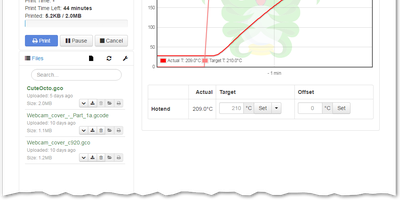
Over a million active instances make OctoPrint the standard web interface for consumer 3D printers - Gina Häußge's Python application, the center of the printing world since 2012. It talks to your printer over USB serial and turns every browser into a control panel: upload, organize, and start G-code prints; watch hotend and bed temperature graphs in real time; drive the print head manually; adjust feed rate, flow, and fan speed mid-print; and hit an emergency stop if things go wrong. The G-code visualizer renders the current layer in sync with the job, and a connected webcam adds a live feed plus automatic timelapse recording of every build. What keeps OctoPrint ahead is its plugin ecosystem - 300+ community plugins installable from the built-in manager. Highlights include Obico's AI spaghetti detection that pauses failed prints automatically, OctoEverywhere for tunnel-based remote access, Bed Level Visualizer's 3D mesh of your bed surface, PrintTimeGenius for accurate time estimates, Exclude Region to abandon one failed object mid-print while others continue, and Firmware Updater to flash Marlin or Klipper without SD-card shuffling. Event hooks fire notifications when prints finish or fail, and a full REST API supports slicer integration and custom automation. AGPL-licensed.
GyroidVault
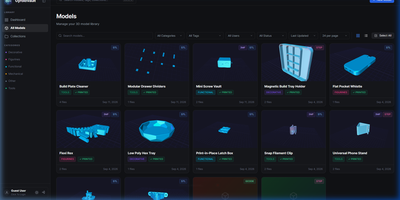
The bracket you printed last spring sits in some folder, on some drive, under a filename you no longer remember; GyroidVault is the searchable library that ends the hunt, where every model can be inspected in 3D, tracked through its prints, and sent to a printer without touching a slicer queue. Point it at your existing folders on a NAS or server and it indexes STL, 3MF, STEP, OBJ, G-code, binary BGCODE, and even Fusion 360 files non-destructively, generating thumbnails and 2x2 collages while a duplicate finder flags identical copies by SHA-256 hash. Opening a model launches Studio 2.0: orbit the mesh, jump between isometric, top, front, and side cameras, switch between solid, wireframe, and X-ray shading, try filament colours live, arrange multi-part assemblies on one build plate, and snapshot your favourite angle as the cover. Sliced files give up their secrets too, with layer-by-layer toolpath previews plus infill, temperatures, filament weight, and estimated cost extracted automatically. From the same page you can fire G-code straight to a Moonraker or Klipper printer, open the file in OrcaSlicer, Bambu Studio, PrusaSlicer, Cura, or Creality Print, log each print with its material and outcome, and share a model through an expiring public link. Collections, version histories, custom metadata fields, and role-based accounts keep a growing print farm library tidy for everyone who uses it. Running on a dedicated VPS on RepoCloud with guaranteed CPU, RAM, and SSD, full root SSH access, and a browser serial console. AGPL-3.0 licensed.
PrintStash
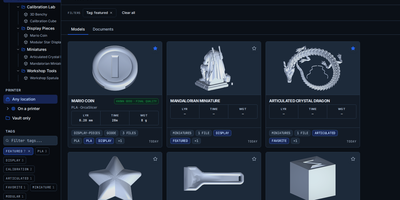
Every printing household eventually drowns in files named final_v3_REAL.gcode, and PrintStash is the library that brings order to your models, G-code, and print history. Upload STL, 3MF, OBJ, STEP, and other formats directly, or point it at a folder or NAS share and let it index everything in place without overwriting originals. Each model page pairs a 3D preview with its recommended G-code, the slicer settings behind it, and one-click actions to open files in your slicer. Revisions carry needs-test and known-good labels, so the version that printed beautifully is never confused with the experiment that delaminated. Connected printers report live temperatures and progress, accept sent G-code, and take queued copies across printer groups, with material or nozzle mismatches blocking automatic routing before they waste filament. Print outcomes feed time and cost tracking per model, and an optional Spoolman integration keeps filament inventory honest. Collections, tags, filters, favorites, and saved views keep a growing vault browsable, and optional AI search with local models finds models by description. Verified backups, file audits, trash recovery, user permissions, API keys, and OIDC single sign-on round out the administration side. Running on a dedicated VPS on RepoCloud with guaranteed CPU, RAM, and SSD, full root SSH access, and a browser serial console. AGPL-3.0 licensed.
MakersVault
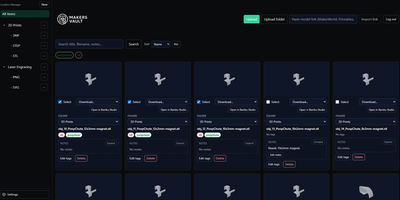
MakersVault gives your scattered 3D print files and creative artwork one searchable home, so you stop loading models into a slicer just to remember what they are. You create folders and subfolders for projects, then drag and drop single files, batches, or whole folders straight into the library from your browser. Every model tile carries a rendered preview, and double-clicking opens an interactive 3D view you can rotate and inspect before downloading anything. Tags attach to any file, batch tagging covers many selected models at once, and tag tabs plus sorting by name, size, type, or folder keep large collections browsable. Notes on individual files record print settings, filament choices, or assembly reminders right beside the model they describe. Imports pull models directly from MakerWorld, Thingiverse, and Printables links, and zip archives prompt you to keep only the files you actually want. Supporting documents ride along with each model and travel inside its ZIP downloads, and prepared print data surfaces printer, material, nozzle, and time estimates on the card. The Open in Slicer button hands a model to your configured slicer through the desktop bridge, and themes from light and dark to neon accents restyle the whole workspace. Running on a dedicated VPS on RepoCloud with guaranteed CPU, RAM, and SSD, full root SSH access, and a browser serial console. MIT licensed.
PrettyPleasePrint
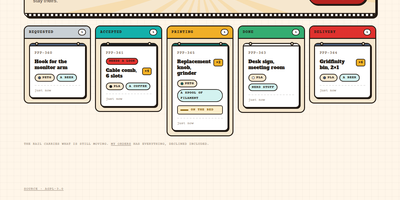
Pretty Please Print turns one office's shared 3D printer into an invite-only request board: colleagues upload a model and follow it from request to delivery. Requesters upload an STL or 3MF file, or start from a Printables link the owner enabled, and the mesh renders in the browser, auto-framed and draggable, so everyone checks the geometry first. Every request becomes a ticket that the printer owner moves through Requested, Accepted, Printing, and Delivery, or declines with a reason, and requesters can withdraw their own print before it reaches the bed. Slicer specifics like layer height, infill, supports, and temperatures ride along as notes on the ticket, a low, medium, or high priority keeps the owner's queue ordered, and a conversation thread on each ticket replaces lost chat threads. The owner curates the materials and colours on the shelf, with swatches and a rainbow whatever option, and defines the tips requesters can offer, preferred ones starred. Finished jobs collect in a filterable history: Print again reopens the form with the model copied server-side and fields adjustable, and one click sends a model straight to PrusaSlicer. Accounts are invitation-only; access can be revoked with a global sign-out, every change lands in an audit trail that cannot be edited, and the same tickets are exposed over a JSON API documented in OpenAPI 3.1 with a Swagger console. Running on a dedicated VPS on RepoCloud with guaranteed CPU, RAM, and SSD, full root SSH access, and a browser serial console. AGPL-3.0 licensed.
Fab-manager
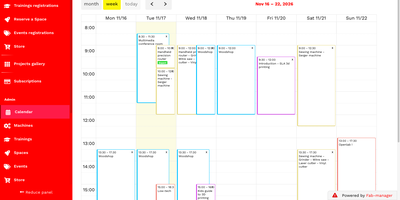
Fab-manager runs the booking desk, cash register, and bookkeeping of a FabLab or makerspace from a single web application. Pick a machine. Pick a slot. Book it. Time slots are opened, moved, or closed by administrators, and cancellation settings decide when a booking may still change. Validating attendance at a training opens its associated machines. Pay by card through Stripe or PayZen. Or on a payment schedule. Or on site by cheque or cash. Pricing bends to the lab: subscription plans per user group, prepaid hour packs, discounts, promo codes, and an electronic wallet. A numbered PDF invoice follows every sale. Refunds become credit notes. Accounting periods can be closed. Exports feed an external ERP. An online store sells consumables, with categories, stock alerts, and separate internal and public inventory. A personal space holds each member's bookings and invoices, projects with steps and collaborators appear in a public gallery, and children can be registered for kids' sessions. Members can be imported from CSV, tagged, grouped, and asked for supporting documents. Statistics track bookings and revenue. Sign-in works through OAuth2, OpenID Connect, or SAML. A token-based OpenAPI exposes bookings, events, and invoices to other tools. Plugins, CSS themes, and translations adapt the platform to each lab. Running on a dedicated VPS on RepoCloud with guaranteed CPU, RAM, and SSD, full root SSH access, and a browser serial console. AGPL-3.0 licensed.