a13n Agent Foundation
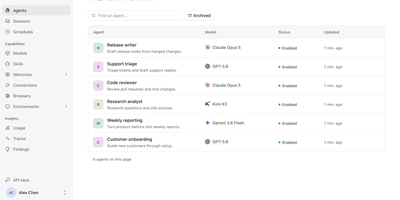
Agents that keep working after you close the tab: a13n gives a team one shared place to define them, run them, and watch what they did. In the Console, an administrator adds models from OpenAI, Anthropic, Gemini, Bedrock, Azure, OpenRouter, DeepSeek, Ollama, and others, then creates agents with instructions, skills, memories, connections, browsers, and sandbox environments. A Try agent button opens a conversation, and the Debug view lays out every run step by step, with model calls, tool calls, token counts, cache rates, and durations. Sessions and schedules keep a history of conversations and recurring jobs. The Usage page charts spend, runs, requests, and tokens by agent, model, or member across a time range. Findings analyzes traces, flags answer quality and tool failures, and lets reviewers confirm or dismiss each one with a suggested improvement. Each agent has a Connect to app screen with its ID, service URL, and API key, so applications can call it over an HTTP API or SDK. Workers lease runs from PostgreSQL and save checkpoints to object storage, so interrupted work resumes. Customer support teams, internal platform groups, and product builders use it to ship agent features without writing their own orchestration layer. Running on a dedicated VPS on RepoCloud with guaranteed CPU, RAM, and SSD, full root SSH access, and a browser serial console. Apache-2.0 licensed.
PiClaw
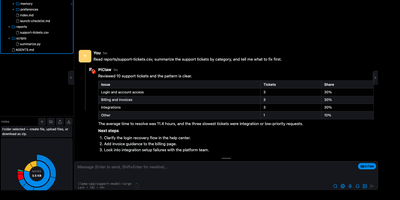
Chat, files, editor, and shell share one browser window, so nothing the agent does happens out of sight. PiClaw streams replies from the model provider you configure, hosted or a local OpenAI-compatible server, and you can steer a running turn, queue follow-ups, or branch a side question with /btw. The workspace sidebar shows a file tree with folder sizes. Open a Markdown note for a live preview with checklists and tables, a CSV for a table view, or a script in the code editor with syntax highlighting and an optional Vim mode. A detachable terminal runs shell commands in the same workspace, and the agent's own file and shell tools work there too. Scheduled tasks run on cron timings, chat history stays searchable between visits, and nightly Dream memory consolidates notes into plain files. Settings pages cover providers, models, MCP servers, keychain secrets, budgets, and session recordings. Optional add-ons bring Draw.io, kanban boards, and Proxmox or Portainer tools. Browser sign-in supports authenticator codes and passkeys, and the layout adapts to phones. A homelab server, a laptop, and a phone can all open the same private agent workspace, which suits solo developers and small teams. Running on a dedicated VPS on RepoCloud with guaranteed CPU, RAM, and SSD, full root SSH access, and a browser serial console. MIT licensed.