Mix Studio
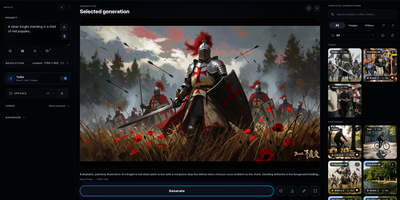
Mix Studio gives ComfyUI a calm, touch-friendly workspace where image and video generation happens through focused controls instead of a fresh node graph for every job. The Create view runs curated families including Krea 2, Flux 2 Klein, and Qwen Image with exact resolution, seed, batching, LoRA, and prompt enhancement controls. Region mode places aspect-correct boxes on the canvas, each carrying an independent prompt, LoRA stack, and reference image, then resolves them into one coherent generation. Edit mode combines whole-image editing, identity editing, and multi-reference Remix flows with masks, inpainting, outpainting, and source preservation. Video workspaces cover text-to-video, first and last frame control, reference-to-video, character animation, face lipsync, and motion transfer driven by a trimmed performance clip. An experimental photo-to-3D path turns a picture into an orbit video and a Gaussian splat you can view interactively and export. Upscaling pairs synchronized pan and zoom with a movable before-and-after divider for detail inspection. The Library keeps generations and uploads searchable with folders, groups, metadata, reusable settings, recoverable trash, and ZIP export, and separate profiles can carry PIN access. Live queue progress, cancellation, guided setup with dependency checks, and automatic backups keep daily operation orderly. Running on a dedicated VPS on RepoCloud with guaranteed CPU, RAM, and SSD, full root SSH access, and a browser serial console. GPL-3.0 licensed.
Moocup
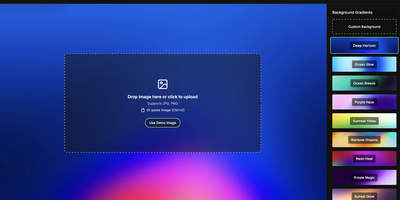
Drop your screenshot, a base style is applied, style it however you wish, and export - "that's basically it," says Moocup's own author, and the description holds. The workflow is genuinely seconds long. Drag an image in and it lands on an attractive backdrop immediately; from there you adjust backgrounds, gradients, padding, borders, shadows, and framing with live preview until it matches your taste, then export a high-quality image ready for a portfolio page, README, blog post, tweet, or slide deck. There are no accounts, no watermarks, and no upload to anyone's cloud - as a self-hosted static app, your screenshots never leave your infrastructure, which matters when the screenshot shows a proprietary dashboard or unreleased product. It runs entirely in the browser from a tiny nginx container, works on any device, and requires zero design skill: the smart defaults do the heavy lifting, and everything else is optional tinkering.