Kurrier
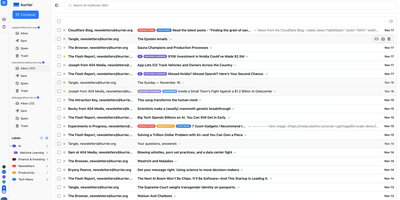
Kurrier unifies email, calendars, contacts, and file storage in a single web interface that connects to any email provider you already use. The Next.js frontend with Nitro API worker deploys via Docker Compose on PostgreSQL and Redis, delivering a cohesive workspace where IMAP/SMTP mailboxes from Gmail, Outlook, or corporate servers sit alongside transactional providers like AWS SES, SendGrid, Mailgun, and Postmark. Automatic inbox building handles threads, attachments, sent items, and deletion sync through persistent background polling. The CalDAV backend enables full two-way calendar synchronization with iOS, macOS, Android via DAVx5, and Thunderbird, supporting event invitations, RSVP processing through the inbox, timezone-aware scheduling, and contact-aware attendee linking. CardDAV contacts sync bidirectionally across all devices with unified name, avatar, and email resolution. Kurrier Drive provides integrated file storage through WebDAV locally or S3-compatible backends for cloud storage. Multiple identities and domains let you manage several email accounts from different providers in one interface, with fast local search indexing subjects, senders, and content without dependency on external APIs. The API-first architecture exposes clean endpoints for automation and custom integrations. Running on a dedicated VPS on RepoCloud with guaranteed CPU, RAM, and SSD, full root SSH access, and a browser serial console. AGPL-3.0 licensed.
Senlo
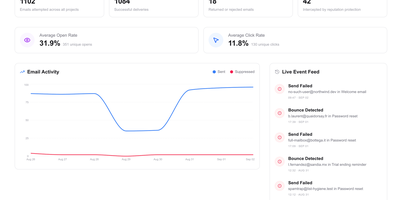
Product teams get a visual home for the transactional and lifecycle emails their application sends with Senlo, which sits on top of the delivery provider they already use instead of replacing it. A drag-and-drop editor builds responsive templates without hand-written HTML, exports to MJML or plain HTML when needed, and keeps templates versioned so edits can be reviewed and rolled back safely. Event-triggered automations turn product activity into onboarding sequences, trial reminders, and win-back flows: your app feeds contact events through the API, and Senlo decides which message goes out next. The transactional API sends a rendered template in one call, so receipts, password resets, and alerts stop living as scattered strings in your codebase. Delivery stops being a black box, with sends, deliveries, bounces, and engagement tracked per workspace, a live feed of failures, and suppressions that block bad addresses before they damage sender reputation. Because sending stays with Resend, Postmark, SES, Mailgun, or your own SMTP server, switching providers never means rebuilding a template. Running on a dedicated VPS on RepoCloud with guaranteed CPU, RAM, and SSD, full root SSH access, and a browser serial console. AGPL-3.0 licensed.
E2A
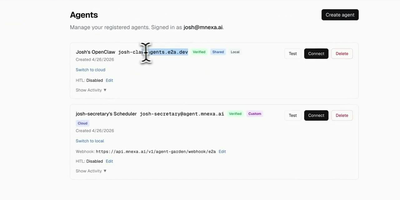
E2A is an open-source email API that lets any application send transactional email and gives AI agents real two-way inboxes of their own, so an assistant can hold a conversation over email without borrowing a person's mailbox. Register an agent and it gets a working address on a shared domain in seconds, or verify your own domain for branded addresses, then connect through the hosted MCP server, a coding-agent plugin with browser OAuth, signed webhooks, a WebSocket stream, REST polling, or the TypeScript and Python SDKs. A local agent behind a firewall needs no public URL at all: it listens over WebSocket and replies in-thread with conversation identifiers keeping multi-turn exchanges coherent across humans and other agents. Every inbound message arrives with structured SPF, DKIM, and DMARC evidence, with the DMARC alignment verdict included, so your agent can judge how far to trust a sender instead of trusting the From header. Flip on the human-in-the-loop gate per agent and outbound messages pause for a person to approve, edit, or reject from the dashboard, the SDK, MCP tools, or magic links in their own inbox, with expiry rules and recipient allowlists narrowing which sends get held. Inbound content screening flags prompt-injection payloads before the agent ever sees them. Support bots triage intake, scheduling agents coordinate meetings, and commerce agents answer order questions from one persistent address. Running on a dedicated VPS on RepoCloud with guaranteed CPU, RAM, and SSD, full root SSH access, and a browser serial console. Apache-2.0 licensed.
AbuseBox
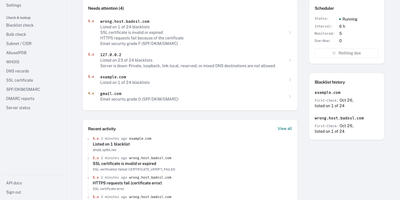
AbuseBox is a self-hosted monitor for the mail servers you operate, checking your IPs and domains against 24 DNS blacklists on a schedule and alerting you when a listing appears, disappears, or is about to matter. A listing is never just a red flag. AbuseBox decodes each list's return codes into a plain meaning and a severity, links the removal page, and folds the result into a risk score out of 100 for every asset, with each factor and its contribution shown. Before any verdict is trusted, the list itself is tested against its RFC test addresses, so a resolver being refused reads as No answer rather than clean. The same asset page grades SPF, DKIM, and DMARC from A to F, parses DMARC aggregate reports, and tracks certificate validity, domain expiry, DNS records, WHOIS details, and server reachability with response times. Assets arrive one at a time, in bulk lists of up to 300, or as an entire subnet, each with its own owner, check selection, and interval. The activity log records every change, history charts show the trend, and email, Slack, Discord, or webhook alerts carry the news. A public quick-check page answers one-off lookups without an account, and the REST API covers the rest. Running on a dedicated VPS on RepoCloud with guaranteed CPU, RAM, and SSD, full root SSH access, and a browser serial console. MIT licensed.
Dobase
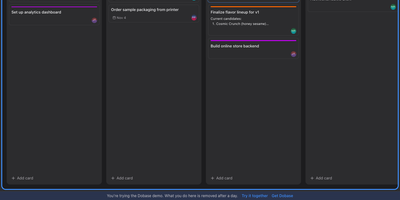
Dobase replaces the scattered pile of team subscriptions with one self-hosted workspace where mail, kanban boards, documents, chat, to-do lists, files, a calendar, and video rooms live side by side. Install only the tools your team needs, and share each one with exactly the collaborators you choose; a board for the whole company and a private todo list can sit in the same window. Several people can type in the same document at once, watching each other's colored cursors while the text merges cleanly, and presence faces in the sidebar show who is inside every tool right now. Open tools arrange themselves as tiles in a wide window, so chat can sit next to the board it discusses and the calendar under the mail you are answering. Pressing Cmd+K searches cards, todos, documents, files, chat, events, and mail in one motion, and nearly everything also works from the keyboard alone. Mail threads conversations and lets you accept calendar invites from the message, files get public links guarded by a password and an expiry, and the calendar syncs with CalDAV services or runs on its own. Video rooms with screen sharing join the same workspace, mentions and notifications follow you, and an email digest catches up anyone who was away. Running on a dedicated VPS on RepoCloud with guaranteed CPU, RAM, and SSD, full root SSH access, and a browser serial console. MIT licensed.
Owlmail
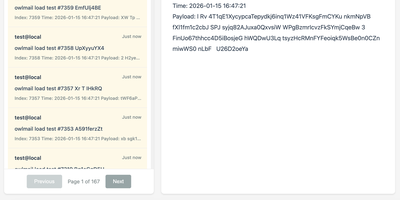
Every email your app sends while you build and test it lands in OwlMail's browser inbox instead of a customer's mailbox. Point any application's SMTP settings at OwlMail and every message is ready to open as rendered HTML, plain text, headers, or raw source. Attachments and inline images sit beside the body, and seven preset preview widths show how the message lays out on phones, tablets, and desktops before anyone real sees it. A Verify panel checks subject, body, and link hosts against expectations, while CI pipelines use the REST API with delivery cursors to wait for exactly the messages their test run produced, assert on them, and clean up afterwards. Coding agents get the same inbox read-only over MCP, so an assistant can confirm a signup email arrived without touching your mail server. When a message proves itself, relay it onwards to a real SMTP server, by hand or automatically under filtering rules, or fire webhooks with HMAC signatures and retry queues into the rest of your automation. Everything stores as plain .eml files on disk, with optional SQLite indexing, S3 attachment storage, and ZIP exports for archiving. Running on a dedicated VPS on RepoCloud with guaranteed CPU, RAM, and SSD, full root SSH access, and a browser serial console. MIT licensed.
OpenMail
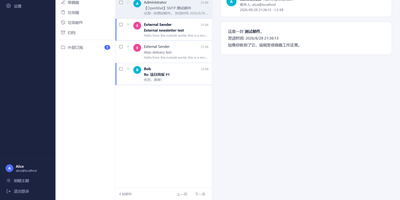
Your entire mail system can live in one self-hosted suite with OpenMail, from SMTP, IMAP, and POP3 delivery to three-pane webmail and the admin console that runs it. Standard clients such as Thunderbird, Apple Mail, and phone apps connect over SMTP ports 25, 587, and 465, IMAP ports 143 and 993, and POP3 ports 110 and 995, while people use the three-pane webmail with folder tree, conversation list, and reading pane at port 3000. You read, write, reply, forward, batch-organize, drag messages between folders, filter stars, search sender, subject, and body text, and follow conversations threaded automatically by their References headers. The rich-text composer autocompletes recipients, accepts dragged attachments and pasted screenshots, saves drafts every 12 seconds, sends on a schedule, and inserts reusable templates imported from HTML or generated with AI. Any OpenAI-compatible endpoint can draft replies, translate mail into twelve languages, and summarize messages, with provider keys encrypted on your server. Administrators get real-time mail statistics with 14-day send and receive trends, user quotas and bans, multi-domain aliases and catch-all addresses, outgoing queue visibility, and audit logs. Adding a domain generates DKIM keys and copy-ready SPF, DKIM, and DMARC DNS records with one-click checks, while rule-based spam scoring, TOTP two-factor authentication, and role-based permissions protect accounts in ten interface languages including right-to-left Arabic and Urdu. Running on a dedicated VPS on RepoCloud with guaranteed CPU, RAM, and SSD, full root SSH access, and a browser serial console. MIT licensed.
LIA
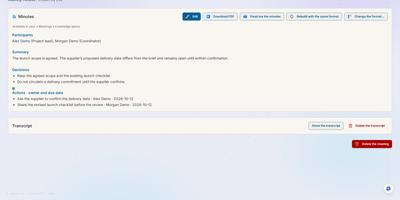
LIA is a self-hosted AI assistant that works out what you agreed with each person from your own mail, calendar, files, and meeting minutes, then drafts the follow-up for you to approve, edit, or refuse. Connect Google, Apple, or Microsoft accounts, and the Tools area opens mail, calendars, tasks, and contacts for hand browsing without a model call. Relations gathers each person's recent exchanges, debrief, and open commitments on one card. Record or import a meeting and LIA writes minutes from thirty built-in templates, with decisions and owners listed. Knowledge spaces index your documents in more than fifteen formats for hybrid search, memory keeps pinned rules and preferences you can edit or delete, and routines, reminders, and a daily briefing anticipate what is due. Administrators assign a provider and model to each pipeline stage, set per-user token and cost limits, and cap daily instance spend, with Grafana dashboards for monitoring. The interface covers six languages, with voice mode and a Telegram channel as options. Running on a dedicated VPS on RepoCloud with guaranteed CPU, RAM, and SSD, full root SSH access, and a browser serial console. AGPL-3.0 licensed.
WildDuck
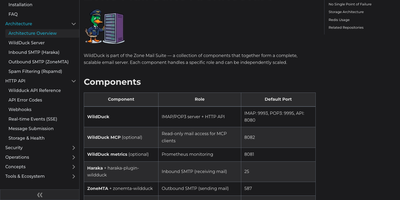
For operators running email at real scale, WildDuck moves accounts and messages into MongoDB and scales by adding stateless servers behind a load balancer. Any standard mail app connects over IMAP with IDLE push, CONDSTORE sync, compression, quota reporting, and special-use folders, or over POP3 for simple download-and-delete reading. International addresses and folder names work natively, so mailboxes written in Cyrillic, Arabic, or Chinese scripts are first-class citizens rather than encoding errors. Everything an operator touches is an API call: create users, set quotas, edit filters and auto-replies, publish DKIM keys, read audit logs, and move messages between mailboxes without editing a config file. Accounts defend themselves with two-factor authentication by authenticator app or security key, application passwords for older clients, and optional PGP encryption of stored mail. Pair it with Haraka to receive SMTP mail and ZoneMTA to send it, and the three services form a complete mail platform with no single point of failure. Attachments spill into GridFS or S3 storage and Redis keeps sessions and queues moving, so a failed node interrupts nothing that a replica cannot resume. Running on a dedicated VPS on RepoCloud with guaranteed CPU, RAM, and SSD, full root SSH access, and a browser serial console. EUPL-1.2 licensed.
Spameater
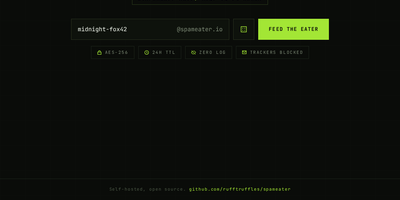
SpamEater gives you a disposable inbox on your own domain that burns itself down 24 hours after you create it. Type any name, or roll the dice for a random one, and mail sent to that address lands in a clean web inbox that refreshes itself every few seconds. Open a message and HTML mail renders faithfully, adapted to the dark interface, with inline images embedded and remote images blocked until you ask for them, so tracking pixels never fire behind your back. A live countdown in the corner tells you exactly how long the inbox has left, and a copy button grabs the address for the form you are about to fill. There are no accounts to create, no passwords to remember, and nothing to recover once the timer ends: the inbox, the messages, and the paper trail vanish together. Behind the scenes the service takes its own security seriously, with a web application firewall, intrusion prevention, rate limits, and mail bodies encrypted at rest. Dark and light themes switch with one toggle. Developers use it to test signup flows and password resets, and everyone else uses it to keep a real address out of reach of newsletters. Running on a dedicated VPS on RepoCloud with guaranteed CPU, RAM, and SSD, full root SSH access, and a browser serial console. MIT licensed.
DispatchMail
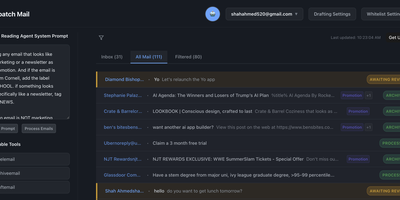
DispatchMail is an SuperHuman alternative and delivers a self-hosted AI email assistant that processes your Gmail inbox through configurable OpenAI prompts without sending data to third-party cloud services beyond the LLM API itself. The Flask backend connects to Gmail via IMAP, retrieves new messages according to your schedule, and routes them through customizable whitelist rules based on sender address, subject keywords, or natural language descriptions before AI processing begins. Two distinct prompt configurations control behavior — the Reading Prompt instructs how the AI should analyze and classify incoming messages, while the Draft Prompt defines how responses should be composed, letting you maintain consistent tone and policy across all automated replies. Whitelist filtering ensures the AI only processes messages you explicitly authorize, preventing unnecessary API costs and keeping sensitive emails out of the LLM pipeline entirely. The React web interface provides inbox management with message previews, AI-generated summaries, draft editing with human-in-the-loop approval before sending, and configuration panels for prompts and rules. Automatic labeling and archival organize processed messages into categories without manual intervention. The sender research feature uses LLM-powered deep analysis to build background profiles of email contacts. All email content, credentials, and processing results persist in a local SQLite database with zero cloud storage dependencies. Running on a dedicated VPS on RepoCloud with guaranteed CPU, RAM, and SSD, full root SSH access, and a browser serial console. Apache-2.0 licensed.
LetterSpace
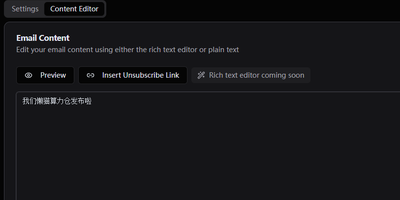
Keep your newsletter audience on infrastructure you own with LetterSpace, a self-hosted platform for subscriber lists, campaigns, and email analytics. Organize subscribers into lists inside your organization, enrich each address with metadata pairs, and use those values as placeholders inside the mail you send. Campaigns begin as drafts where subject, content, template, target lists, and tracking choices stay editable until you deliberately start the send. A test copy goes to your own inbox first, and a future schedule time holds the campaign until the moment arrives. Reusable HTML templates wrap every campaign in your house style, with the content injected at send time and an unsubscribe link in the footer. Once mail flows, the dashboard follows subscriber growth across six months, recent campaign delivery rates, and open and click performance compared between the last thirty days and the period before. Delivery itself runs through your SMTP settings with per-organization rate limits, retries, and concurrency controls, and provider webhooks can report bounces and confirmations back into message statuses. Signup forms and external tools connect through a REST API guarded by keys, with double opt-in available for new subscribers. Running on a dedicated VPS on RepoCloud with guaranteed CPU, RAM, and SSD, full root SSH access, and a browser serial console. MIT licensed.
Gray Duck Mail
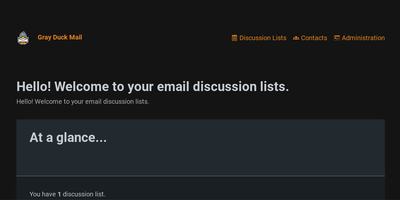
Email discussion lists - the venerable listserv pattern where one address relays to a whole group - without the notorious setup pain of Mailman or Sympa: that is Gray Duck Mail. Its architectural trick is requiring no mail server of your own: the C#/ASP.NET Core app monitors a POP3 inbox at any external email host supporting POP3/SMTP and aliasing, relays each incoming message to all list members via SMTP, and archives it for browsing in the web interface. Replies route back to the entire group automatically. The tedious parts of list management are handled by convention: dedicated aliases process join requests, subscription confirmations, and unsubscribes, while a bounce alias in the return-path catches delivery failures so dead addresses get handled instead of silently rotting. The web administration interface creates and removes lists, manages contacts, browses message archives, and imports or exports the local database for backup. GPLv3-licensed, Docker-distributed, and fully code-documented, it targets exactly the groups email still serves best - neighborhoods, schools, congregations, workplaces, and families - where one message keeping everyone in the loop beats yet another app nobody wants to install.