Tugtainer
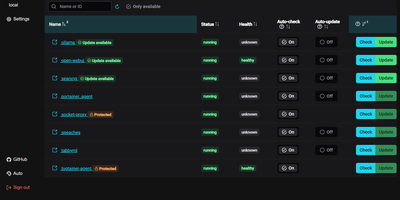
Tugtainer delivers a visual command center for Docker environments that automates container image updates, monitors registry releases, and manages application lifecycles across multiple servers without command-line intervention. System administrators can inspect running containers across all connected hosts, trigger immediate image pulls, and configure automated cron schedules for recurring health and registry checks. Flexible update policies allow teams to flag production databases as notification-only while automatically updating stateless web applications whenever new image tags publish. When updating linked services, the platform analyzes Docker Compose project definitions and custom dependency labels to stop and restart containers in strict dependency order, preventing broken network links and orphaned volume mounts. Administrators can authenticate private container registries, browse image layers and tags, and view real-time container log streams directly within the browser console. Automated pruning jobs continuously reclaim server disk space by deleting obsolete, untagged images and dangling build layers after successful deployments. Multi-channel alerting integrates with over fifty notification providers, delivering real-time update summaries and error warnings directly to Discord, Telegram, Slack, and email webhooks. Running on a dedicated VPS on RepoCloud with guaranteed CPU, RAM, and SSD, full root SSH access, and a browser serial console. MIT licensed.
Cup
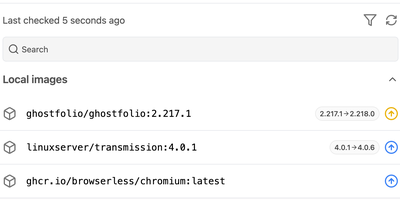
A fast, read-only radar for outdated Docker images. Cup reads the images behind your running Docker or Podman containers, asks each registry whether a newer digest or tag exists, and flags every result as a major, minor, or patch bump, a plain digest change, or up to date. Docker Hub, ghcr.io, Quay, lscr.io, and Gitea-style registries are supported, private ones through token authentication, and checks are designed not to exhaust registry rate limits. The browser dashboard on port 8000 counts monitored, outdated, up-to-date, and unknown images, adds search and filters, and opens any image to show its update type, check time, and a copyable pull command. Prefer automation? Schedule refreshes with a cron expression, trigger one through the API, or run the cup check command from a cronjob for table or JSON output. Rules in cup.json exclude images, ignore registries, and skip chosen update types, even per image. The JSON API feeds Homepage widgets, Home Assistant, and custom dashboards, one dashboard can aggregate several Cup servers, and agent mode serves the API without the interface. Cup only reports, so deciding when to update stays with you. Running on a dedicated VPS on RepoCloud with guaranteed CPU, RAM, and SSD, full root SSH access, and a browser serial console. AGPL-3.0 licensed.
Labby
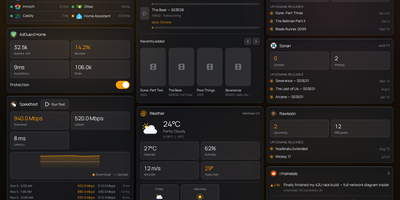
Labby gathers a whole homelab onto one live dashboard you host yourself, covering services, containers, downloads, and media servers. Widgets watch your service monitor, Docker containers, qBittorrent or Transmission queues, SABnzbd, AdGuard Home, Jellyfin, Emby, Plex, Beszel, Radarr, Sonarr, plus weather, calendar, speedtest, bookmarks, Reddit, and Hacker News, and the server pushes every change to your browser over server-sent events so nothing waits on a refresh timer. The dashboard is not a read-only poster: start and stop containers, pause and resume torrents, and toggle AdGuard protection straight from its widgets. Everything configures from the in-app Manage Services page, where service URLs, API keys, poll intervals, and multiple instances of the same integration (two Radarr servers, say) live in a small SQLite database instead of scattered environment files. Named color schemes restyle the board and save with the config, and icon sources span dashboard-icons, selfh.st, Lucide, or your own URLs. Login is off by default for trusted home networks, with a clear warning to keep it behind a LAN, VPN, or forward-auth proxy, and optional OIDC sign-in through Authentik, Authelia, Keycloak, or Pocket ID when you want a real front door. One container, one volume, and your lab finally explains itself at a glance. Running on a dedicated VPS on RepoCloud with guaranteed CPU, RAM, and SSD, full root SSH access, and a browser serial console. MIT licensed.

Nanocl
One server, treated properly: Nanocl runs your containers and full virtual machines from a single declarative Statefile, reconciling what is running against what the file says, so a lone host gets cluster discipline without cluster ceremony. Containers group into Cargoes with replica counts, ordered init containers, and health-aware restarts; finite jobs run to completion and stop. When a workload needs a real kernel or a custom disk image, it boots as a QEMU virtual machine beside the containers instead of forcing a second platform. Publishing is built in: the proxy controller terminates TLS and routes HTTP and TCP traffic, and the DNS controller keeps service names resolving while workloads come and go. Secrets for registries, certificates, and environment variables attach where they are used, never inside the file itself. The daily loop is a CLI and an API: list processes, follow logs, exec into a container, watch events, and back up the entire deployment state before you change it. Namespaces keep projects apart on the same host, and Statefile arguments, templates, and sub-states carry one definition from staging to production. Running on a dedicated VPS on RepoCloud with guaranteed CPU, RAM, and SSD, full root SSH access, and a browser serial console. MIT or Apache-2.0 licensed.
OmniSight
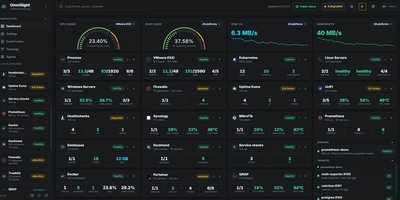
OmniSight ends the homelab ritual of a dozen admin panels open in a dozen tabs, each with its own login and its own idea of what healthy looks like. It folds all of them into one page that answers the only question you actually have: is everything fine? Watch Proxmox nodes with their VMs, containers, backup status, and Ceph health next to VMware hosts and datastores, Linux and Windows servers, and Kubernetes pods with live log viewing. Add Docker hosts and see container status, ports, resource use, and image updates, check OPNsense firewalls, TrueNAS and QNAP storage, and PostgreSQL, MySQL, and MongoDB databases without leaving the dashboard. A small push agent installs with one copied command and self-registers within seconds, needing no inbound firewall rules, so machines behind NAT report in on their own. Follow relationships on the topology map, restart a service from the detail view, export a full backup, and publish a read-only public status page for anyone who asks how things are running. Running on a dedicated VPS on RepoCloud with guaranteed CPU, RAM, and SSD, full root SSH access, and a browser serial console. GPL-2.0 licensed.
dyrector.io
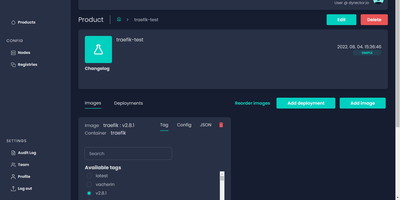
dyrector.io gives teams a visual web interface for deploying and managing containerized applications across Docker, Kubernetes, and Podman environments, replacing repetitive CLI commands and YAML editing with point-and-click configuration. Lightweight Go agents installed on target infrastructure communicate with the central TypeScript platform, enabling deployments to AWS, GCP, Azure, and on-premises servers without requiring infrastructure migration. Unified configuration screens eliminate redundant YAML editing across environments with support for all three container runtimes. Version management lets teams configure OCI-compatible container images once and deploy them as versioned releases with auto-generated changelogs and release notes. Multi-instance deployment enables simultaneous rollouts to multiple nodes with environment-specific configuration overrides, secret management, and instant test environment provisioning from any branch. The fine-grained RBAC system controls user access at project and environment levels, while audit logging tracks every deployment action. Registry integrations support Docker Hub, GitLab, GitHub, Google, and Azure container registries for image sourcing. ChatOps notifications integrate with Slack, Discord, and Microsoft Teams for deployment status alerts. Scheduled releases and workflow support enable automated deployment pipelines triggered by CI events via the REST API with JWT authentication. Running on a dedicated VPS on RepoCloud with guaranteed CPU, RAM, and SSD, full root SSH access, and a browser serial console. Apache 2.0 licensed.
AutoXpose
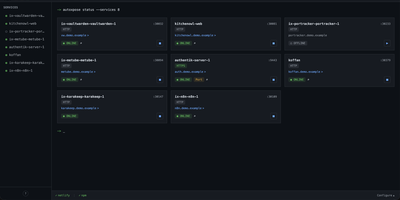
Tag a Docker container with two labels, and AutoXpose turns it into a published service with a DNS record, a reverse proxy route, and HTTPS, without you opening a single provider dashboard. From the web dashboard you connect one of six DNS providers, Cloudflare, Netlify, DigitalOcean, Porkbun, Aliyun, or Tencent DNSPod, and point it at the Nginx Proxy Manager or Caddy instance you already run. It watches your containers continuously after that: a new label creates the record, propagation is verified before the service shows as live, and removing the container removes its public entries too. Auto-expose mode publishes containers the moment they appear, while manual mode stages them in the dashboard for approval first. Color-coded service tags sort what you run into web, database, and media groups at a glance, and dashboard warnings flag misconfigurations before they become broken links. Nginx Proxy Manager access lists attach by label, so an admin panel stays reachable only from the networks you trust. When containers vanish, orphaned cleanup hunts down the stale DNS records and proxy hosts they left behind. Settings and state live inside the same single container, so the publishing pipeline for a homelab or a small fleet stays one compose service you can back up as a unit. Running on a dedicated VPS on RepoCloud with guaranteed CPU, RAM, and SSD, full root SSH access, and a browser serial console. MIT licensed.
Simon
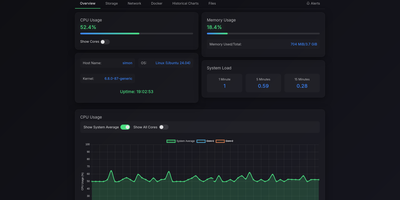
Simon is a lightweight self-hosted system monitor that shows live CPU, memory, disk, and network metrics for your server and its Docker containers in one web dashboard, with threshold alerts and a built-in file browser. Open the dashboard to watch real-time gauges alongside historical charts, so a slow memory leak becomes visible hours before it takes a service down. Every running container appears with its own CPU and memory stats, and its logs open in a searchable viewer, so routine diagnosis never needs a terminal session on the host. The file browser lets you navigate the directories you choose to expose, preview file contents, upload with drag and drop, create folders, and move or delete items. Downloads support range requests, which means large files resume cleanly after a dropped connection and media files stream instead of failing halfway. Alert rules fire when CPU, memory, disk, or network activity crosses thresholds you set, and notifications arrive through Telegram, ntfy, Gotify, Pushover, Pushbullet, Matrix, or any custom webhook. Prebuilt notification templates get common setups running in minutes, and password authentication keeps the dashboard private on a public server. Resource-constrained machines benefit most: the monitor runs comfortably on single-board computers and small instances where heavier monitoring stacks would consume the very memory they exist to watch. Running on a dedicated VPS on RepoCloud with guaranteed CPU, RAM, and SSD, full root SSH access, and a browser serial console. MIT licensed.
Docker Updater
Docker Updater puts you back in charge of container updates: it watches your registries for newer images, and nothing updates until you approve it, so no database restarts itself at dinner. Polls run on a schedule you set, and each container card shows the newer image waiting before anything is pulled. The check costs nothing: it compares the digest your container runs against the registry manifest without pulling a byte, across Docker Hub, GHCR and other Bearer-token registries. Read the last five GitHub releases for an image before committing, update one container or a batch, and watch the pull percentage, layer count and recreation step stream live on the card. If the new container fails to start, the old one returns automatically, and you can keep a backup even after a clean update. Not ready? Defer an update for 7, 14, 30 or 90 days, or indefinitely, and it leaves your notifications alone until then. Several Docker hosts join the same dashboard over SSH or TCP with health indicators, and Compose stacks restart together so services find new addresses. Notifications arrive through an auto-generated ntfy topic or your own Apprise URL, every update keeps a persistent log, and a reclaimable-images view shows what disk space old images hold. The dashboard serves on port 9090 in English or Simplified Chinese, with optional login. Running on a dedicated VPS on RepoCloud with guaranteed CPU, RAM, and SSD, full root SSH access, and a browser serial console. MIT licensed.
InfraCanvas
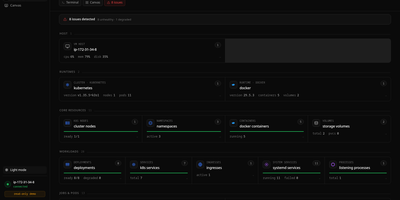
InfraCanvas draws the picture ten terminal commands cannot: a live map in your browser of every container, pod, service, volume and network on a machine, showing what runs where, what talks to what, and what is broken in one glance. Nodes turn green, amber or red from real state, including container health, pod phases, ready replicas, zombie processes and host thresholds, and real connection edges appear between processes, like your app server talking to Postgres on port 5432, read straight from the machine. It works where workloads already live: Docker and Podman containers, full Kubernetes object graphs from nodes to ingresses, LXD and Incus containers, and plain systemd or PM2 services on VMs with no container runtime. From any node you can shell into the container, pod or host, tail logs, restart or stop a service, scale a deployment, run a rolling restart, change an image or kill a process, with secrets masked before anything reaches the screen. A second machine joins through an outbound-only agent, and clusters connect by dropping in a kubeconfig with nothing installed inside them. The self-hosted binary needs no account, sends no telemetry and opens no inbound port: it binds localhost on port 7777 behind a random per-install token, with an optional read-only mode, and every action is audit-logged. Running on a dedicated VPS on RepoCloud with guaranteed CPU, RAM, and SSD, full root SSH access, and a browser serial console. AGPL-3.0 licensed.
Compose Craft
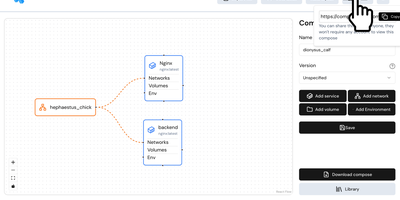
Compose Craft is an open-source visual diagramming and management platform that transforms raw Docker Compose configuration files into an interactive canvas of interconnected service nodes. Developers can drag and drop container services to map complex microservice architectures, automatically wiring port mappings, internal bridge networks, volume mounts, and dependency relationships. The real-time synchronization engine reflects every node repositioning, environment variable adjustment, and resource constraint directly into standard docker-compose syntax alongside a live editable code preview pane. Teams can import existing configuration files to diagnose routing conflicts, auto-format tangled service trees, and generate clean architectural documentation for operational handoffs. Engineers can generate shareable read-only public links to demonstrate infrastructure topologies to teammates and external reviewers without forcing them to register accounts. The built-in playground lets administrators experiment with container restart policies, healthcheck definitions, build contexts, and secret keys before deploying to production hosts. Running on a dedicated VPS on RepoCloud with guaranteed CPU, RAM, and SSD, full root SSH access, and a browser serial console. MIT licensed.
VolumeVault
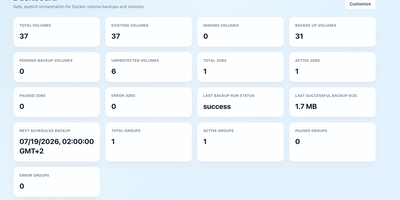
VolumeVault turns Docker volume backups into a routine you can prove: it schedules them, stores them off the box, and restores them into brand-new volumes so original data is never the test subject. A guided web dashboard discovers every Docker volume on the host and shows backup coverage per volume or per Compose and Swarm stack, including the size of the latest known backup, so gaps are visible before they matter. Each job runs on an hourly, daily, weekly or cron schedule with retention by days or archive count, include and exclude filters, and a choice of whether containers stop during the run. Archives land where you keep them: AWS S3, Cloudflare R2, any S3-compatible store, WebDAV, SFTP, Azure Blob, Dropbox, Google Drive or a local path, with credentials encrypted at rest. Restores download and verify the archive first, then unpack it into a new volume by default; overwriting the original demands an explicit confirmation. Several volumes can ride one grouped schedule that reports once for the whole set, and containers can volunteer themselves for backup through Docker labels. Small agent containers extend the same jobs to other Docker hosts, including encrypted cross-host restores into fresh volumes, while API tokens let scripts and dashboards drive everything the UI can. Running on a dedicated VPS on RepoCloud with guaranteed CPU, RAM, and SSD, full root SSH access, and a browser serial console. Apache-2.0 licensed.
LLemonStack
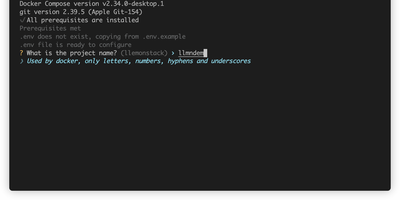
One CLI command deploys a complete AI development environment: n8n, Flowise, Supabase, Ollama, Qdrant, LiteLLM, Langfuse, Open WebUI, LightRAG, Browser-Use, Firecrawl, Crawl4AI, and more, all pre-wired with networking, credentials, and database connections. LLemonStack eliminates the hours of Docker Compose configuration that typically precede any local AI agent project. The llmn CLI initializes isolated project environments with auto-generated secure credentials, starts services in dependency order (databases first, then middleware, then apps), and displays a dashboard showing every service URL and access token. n8n brings 400+ workflow integrations, Flowise provides visual agent building, Ollama runs local LLMs like Llama and Mistral, Qdrant stores vectors at high performance, Open WebUI offers ChatGPT-style model interaction, and LiteLLM proxies requests to any provider with cost tracking. Langfuse automatically logs traces for every LiteLLM query, providing full observability. Each project maintains isolated Postgres schemas preventing data collision across parallel stacks. Firecrawl and Crawl4AI extract web content into LLM-ready formats for RAG pipelines feeding LightRAG or Qdrant. Dozzle streams live container logs for debugging. Import/export tooling migrates workflows between projects with automatic credential reconfiguration. Running on a dedicated VPS on RepoCloud with guaranteed CPU, RAM, and SSD, full root SSH access, and a browser serial console. AGPL-3.0 licensed.
HomeLabInfo
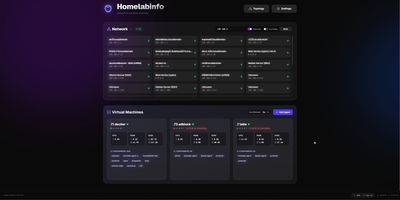
HomeLabInfo gives your homelab one dashboard where the network itself and everything running on it finally appear together, instead of scattered across router pages and terminal sessions. It watches for new devices the instant they ask the network for an address, identifies who made them, and can fire a webhook so you hear about a stranger joining your LAN before you notice it yourself. Scans keep track of which devices are online and which have gone quiet, and the interactive topology view lets you arrange the map of switches, access points, NAS boxes, and servers the way your rack actually looks. Lightweight agents installed on each machine report their containers back to the hub, so running and stopped containers, uptime, health, and host CPU, memory, and disk all show in one place without opening a separate tool per server. When an agent falls behind, its card tells you a newer version exists instead of leaving you guessing. You can add a username and password login before putting the dashboard anywhere beyond your desk, and arrange container layouts that stay put between visits. Running on a dedicated VPS on RepoCloud with guaranteed CPU, RAM, and SSD, full root SSH access, and a browser serial console. GPL-3.0 licensed.