Monetr
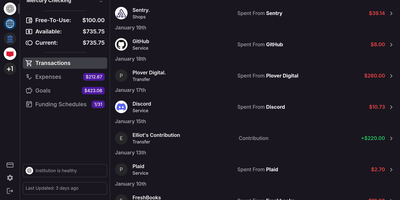
After the bills are covered, how much is actually safe to spend? monetr organizes an entire budgeting application around that one question. Inspired by the defunct Simple bank, it budgets paycheck by paycheck rather than month by month. Funding schedules encode when you get paid - including multiple schedules per account and a weekend-exclusion option for deposits that land early - and every expense or savings goal is tied to one. monetr then calculates how much of each recurring obligation (rent, car payment, subscriptions, on any repeat interval) to set aside from each paycheck, so a large bill never has to come out of a single check. What remains after allocations is surfaced as Free-To-Use, and a forecasting timeline projects contributions, due dates, and leftover funds forward so low-balance periods are visible before they happen. Transactions arrive either as OFX uploads from your bank or automatically through a Plaid connection using your own API credentials, keeping balances and transactions synced without manual entry. The app is mobile-friendly and installable as a PWA on desktop or phone. Self-hosting via Docker Compose is completely free, with all source code public and your financial data on your own hardware.
Zublo
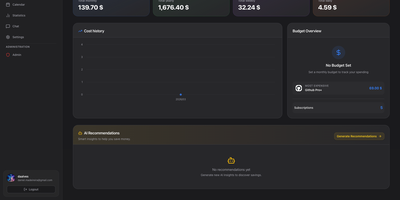
Zublo rounds up every recurring payment quietly draining your accounts and puts them all in one place where they cannot surprise you anymore. Add each subscription once with its amount, billing cycle, next due date, and the card it charges, and the dashboard keeps the running total visible instead of letting fifteen small charges pretend to be no money at all. A calendar shows the month ahead as actual payment dates, so the week when the annual domain, the streaming bundle, and the cloud bill all land together stops being an ambush. Reminders arrive before renewals while cancelling is still an option, and statistics break spending down by category and trend so you can see which corner of your digital life keeps growing. Subscriptions in other currencies convert at synced rates, keeping foreign services honest in the totals. When you want a second opinion, an optional assistant can chat about your spending, flag subscriptions worth reviewing, and point at patterns, using a provider you choose, including a local model that never phones home. Scoped keys open the data to your own scripts, and two-factor sign-in guards the vault. Running on a dedicated VPS on RepoCloud with guaranteed CPU, RAM, and SSD, full root SSH access, and a browser serial console. Apache-2.0 licensed.
MoneyMatter
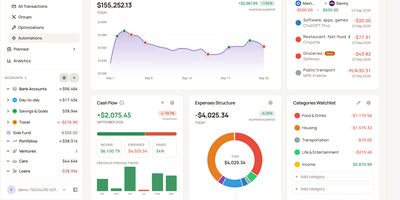
Your bank balance is only part of what you own, and MoneyMatter adds the rest: cash accounts, brokerage portfolios, cars, loans, and private deals roll into one net worth figure in your base currency. Add transactions by hand, import CSV, OFX, QFX, YNAB, Wallet, or Microsoft Money files, or let an AI model you provide parse a statement, while Monobank, SimpleFIN, Lunch Flow, and Walutomat connections sync accounts automatically. Each transaction can carry categories, tags, payees, notes, attachments, and splits, transfers and refunds link to their counterparts, and automation rules tidy new entries. Envelope-style budgets assign money to lines with Assigned, Activity, and Available columns and rollover rules, savings goals read progress from account balances, subscriptions and bills send reminders, and loans show payoff projections. Stocks, ETFs, and crypto are priced daily, vehicles depreciate along a curve, and a FIRE planner estimates years to Lean, Regular, Fat, Barista, and Coast FIRE. A customizable dashboard, cash flow, money flow, net worth history, trends comparison, and pivot table chart the results. Share accounts with a household member, export JSON, CSV, or XLSX, back up everything, or connect Claude, ChatGPT, or Claude Code through the built-in MCP server. Running on a dedicated VPS on RepoCloud with guaranteed CPU, RAM, and SSD, full root SSH access, and a browser serial console. AGPL-3.0 licensed.
Yuvomi
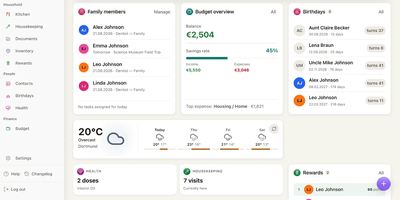
Replace a dozen household subscriptions with one app that keeps your family's tasks, calendars, meals, budget, and shopping in a single private place you control. Nineteen modules cover the daily rhythms of a household: assign chores with deadlines and priorities, plan the week's dinners and push the ingredients to a shared shopping list in one tap, track income and expenses by category with automatic subscription renewal warnings, and log health activities from vitals to medications. Two-way sync connects to Google Calendar via OAuth, iCloud and Nextcloud via CalDAV, and Outlook via Microsoft Graph, so every family member's phone shows the same schedule without switching apps. CardDAV keeps contacts in sync with external address books. The budget module handles accounts, loans, split expenses, and per-category planning with savings goals and month-over-month comparisons. Documents attach to tasks, receipts link to transactions, and a checked-off grocery item books itself back into the pantry inventory with its quantity. A Kanban board, recurring task schedules, and a rewards ledger that pays out points for completed chores keep kids and adults accountable. Wall mode turns a kitchen tablet into a glanceable family dashboard, and the Immich screensaver shows your own photos when the screen goes idle. API tokens and a built-in MCP endpoint let AI agents and third-party tools interact with every module programmatically. Deploy on a dedicated VPS on RepoCloud with guaranteed CPU, RAM, and SSD, full root SSH access, and a browser serial console. MIT licensed.
Whisper Money
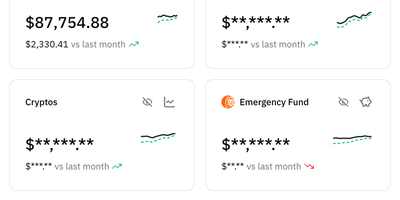
Ditch the spreadsheet for good: Whisper Money is a privacy-first personal finance app you host yourself to see exactly where your money goes, without your data being sold or profiled for ads. Connect multiple bank accounts in one place, fill them by hand or CSV import, and watch transactions categorize themselves automatically. Automation rules handle the repetitive sorting: rent, subscriptions, and transfers land in the right buckets every time. Brokers and exchanges including Indexa Capital, Coinbase, Binance, Bitpanda, Wise, and Interactive Brokers connect with your own API keys, so investments sit beside everyday spending. Optional open banking through EnableBanking can pull a year of movements and keep them current, and it stays switched off until you configure it. AI features suggest categories and rules and summarize your stats reports, and you choose the provider: Gemini by default, or OpenAI, Anthropic, Groq, DeepSeek, Mistral, any OpenAI-compatible endpoint, or a local Ollama server so nothing leaves your infrastructure. Spending pattern insights turn raw transactions into an honest picture of your habits, month after month. Running on a dedicated VPS on RepoCloud with guaranteed CPU, RAM, and SSD, full root SSH access, and a browser serial console. CC BY-NC 4.0 licensed.
Paisa
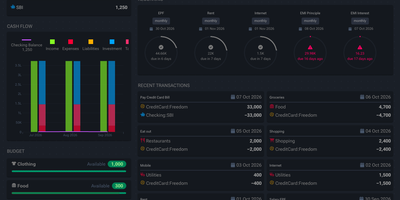
A plain text journal is all Paisa needs to put your net worth, cash flow, expenses, and investment returns on one set of dashboards. Write entries in the built-in editor. It brings syntax highlighting, auto completion, error checking, and auto formatting to double-entry journals. Bank and credit card statements in CSV, Excel, or PDF import through reusable templates that categorize every transaction. Price providers track mutual funds, NPS holdings, and stocks. Manual prices revalue a house, a car, or a plot of land. Budgets set a limit for each category and track spending against it. Allocation targets show how far a debt and equity split has drifted. Goals compute a completion date from monthly savings. The retirement planner works from a safe withdrawal rate and yearly expenses. A calendar marks recurring bills as cleared, late, past due, or upcoming, and Liabilities pages cover credit cards, loan repayment, and interest. Live Sheets calculate taxes and EMIs from ledger data. Journals and settings stay in plain text files that can be version controlled or shared, and ledger, hledger, and beancount are all supported. Running on a dedicated VPS on RepoCloud with guaranteed CPU, RAM, and SSD, full root SSH access, and a browser serial console. AGPL-3.0-or-later licensed.
Kresus
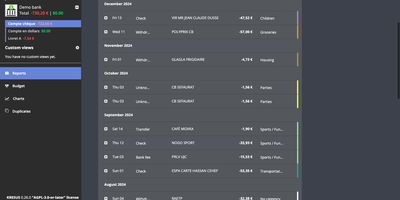
Kresus is a self-hosted personal finance manager that fetches your bank transactions overnight and turns them into categorized history, budgets, and charts, with no third-party aggregator holding your bank login. Banks with an open-source Woob connector sync automatically (mostly French ones), and each night Kresus re-reads the previous month so late postings are not missed; everything else works through manual accounts or OFX and JSON imports. Transactions can be renamed, sorted into color-coded categories, and moved to the previous or following budget month, and auto-categorization rules handle repeat merchants. The Budget page compares planned amounts with actual spending per category. Charts plot spending by category, balance over time, and monthly money received, spent, and saved. Recurring transactions like rent appear every month to preview your future balance. The Duplicates page lists suspected double imports for manual merging. Search by period, category, amount, or date, and group same-currency accounts into custom views. Email reports, balance and transaction alerts, and Apprise notifications to Telegram, Slack, or Gotify switch on once your administrator enables them. The interface comes in English, French, Spanish, and Turkish. The whole instance exports as JSON without bank passwords or, when enabled, as a password-encrypted file. Running on a dedicated VPS on RepoCloud with guaranteed CPU, RAM, and SSD, full root SSH access, and a browser serial console. AGPL-3.0-or-later licensed.
PayMe
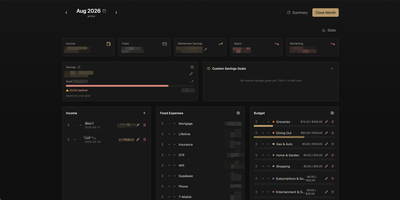
PayMe is a privacy-first personal finance dashboard that runs entirely on your own hardware with zero third-party service dependencies. The Rust backend compiled to a single binary serves a React 19 frontend built with Vite, TypeScript, and Tailwind CSS 4, storing all financial data in a local SQLite database that auto-migrates on startup. Monthly dashboards track income entries, fixed expenses like mortgage and utilities, and budget categories with real-time progress bars showing spending against configurable limits. The savings module includes goal tracking with percentage-based progress indicators, custom savings goals for targeted objectives, retirement savings projections with breakdown analysis, and projected savings calculations. Variance analysis compares actual spending against budgets across categories. Drag-and-drop reordering powered by dnd-kit lets you arrange income sources, expenses, and budget items to match your workflow. The interactive charts rendered by Recharts visualize spending trends, income patterns, and savings trajectories. Month-by-month navigation tracks financial history over time, while the Summary and Stats views aggregate data across periods. JWT-based authentication secures access, and the full OpenAPI Swagger documentation at the /swagger-ui endpoint exposes every API route for automation and integration. Docker Compose deployment creates a minimal image with the compiled Rust binary and static frontend assets, running on port 3001 behind nginx, Caddy, or Traefik reverse proxy with HTTPS. On RepoCloud, deploy PayMe on a dedicated VPS with persistent SQLite storage, root SSH access, and complete privacy over your household financial data, all under the MIT license.
OpenBudgeteer
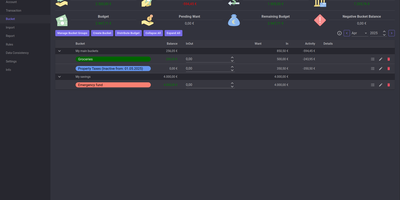
Allocating every incoming dollar into purposeful spending and savings buckets before transactions occur, OpenBudgeteer gives households complete financial control through a self-hosted zero-based envelope budgeting platform. Users can organize expenditures into customizable bucket hierarchies, grouping everyday living costs, debt repayments, and sinking funds into distinct categories with target balances. Financial planners can import bank statement files via flexible CSV mapping profiles that parse transaction descriptions, clean up merchant strings, and auto-assign records to corresponding expense buckets. The transaction registry provides split-transaction functionality, allowing shoppers to divide a single department store receipt across grocery, household, and clothing envelopes with exact currency precision. Interactive progress bars display bucket health throughout the billing month, signaling when spending velocity threatens allocated limits and calculating suggested contributions for forthcoming paychecks. Advanced forecasting reports plot multi-month net worth trajectories, track category expenditure patterns, and calculate burn rates against long-term retirement and emergency savings goals. Account balances synchronize across multiple physical checking accounts, credit cards, and cash wallets, ensuring total bucket balances reconcile perfectly against real bank reserves. Running on a dedicated VPS on RepoCloud with guaranteed CPU, RAM, and SSD, full root SSH access, and a browser serial console. AGPL v3 licensed.
DumbBudget
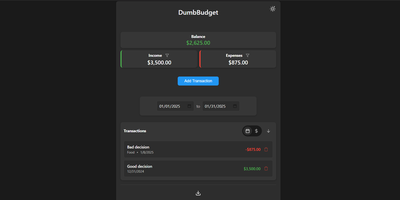
"Stupid simple software" is the entire philosophy at DumbWare.io, and DumbBudget delivers it: no over-engineering, no complexity, no accounts, no bank connections - just a clean, modern ledger for money in and money out. Log income and expenses, assign categories, and watch real-time balance calculations update as you type. Finding transactions is quick: filter by type, narrow by date range, sort by date or amount. When tax season or spreadsheet analysis calls, everything exports to CSV. Access control matches the philosophy - a single PIN (set via one environment variable) gates the app, backed by real security engineering: rate limiting on PIN attempts, temporary lockout after failures, secure session handling, and no sensitive data in browser storage. Multi-currency support covers the ISO codes, and a SITE_TITLE variable names each instance - deliberately useful, because running separate instances per account or family member is the intended pattern for multi-user needs. The responsive UI ships light and dark themes and installs as a PWA on phones, where expense logging actually happens. Configuration is five environment variables; data persists in one folder. If Actual Budget and Firefly III feel like accounting software, this is the notepad that gets used. GPL-licensed.