BlogFactory
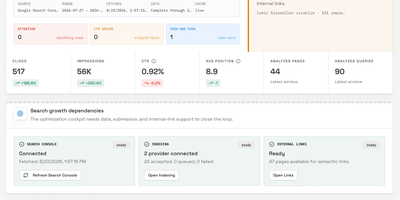
BlogFactory is the first open-source agent control plane purpose-built for multi-site content operations, shipping 16 distinct capabilities across four operational pillars — Operate, Grow, Control, and Deliver — in its v0.1.0 release. The platform keeps source evidence, AI-generated drafts, revisions, SEO metadata, human review, preflight checks, and CMS delivery destinations in one workspace while enforcing a server-side authority ceiling that prevents agents from ever publishing live content, accessing credentials, or performing administrative actions. AI agents connect through a Streamable HTTP MCP endpoint with OAuth authentication and site-scoped tool discovery, compatible with Codex, ChatGPT, and any MCP-capable client. Content creation supports single articles from keywords, titles, URLs, PDFs, text, or YouTube sources, batch campaigns, and programmatic content via reusable templates with structured data rows. The Search Growth module connects Google Search Console complete-day data to ranked optimization opportunities, 30-day growth plans, content classification by signal type (growing, low-CTR, almost-ranking, page-two, zero-click), indexing checks, and semantic internal-link suggestions. Brand Voice separates global voice rules, writer profiles, knowledge context, and brand guidelines from article mechanics. Approved drafts are delivered as CMS drafts to WordPress, Ghost, Wix, or Framer through idempotent, optimistic-locking-protected handoffs with explicit destination selection and preflight validation. The stack runs on React/Vite, a Hono/TypeScript API, PostgreSQL, and MinIO via Docker Compose, with providers including OpenRouter, OpenAI, and Google services under a bring-your-own-AI model. Running on a dedicated VPS on RepoCloud with guaranteed CPU, RAM, and SSD, full root SSH access, and a browser serial console. AGPL-3.0 licensed.
DispatchMail
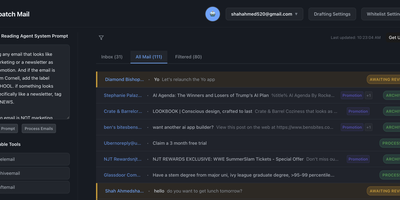
DispatchMail is an SuperHuman alternative and delivers a self-hosted AI email assistant that processes your Gmail inbox through configurable OpenAI prompts without sending data to third-party cloud services beyond the LLM API itself. The Flask backend connects to Gmail via IMAP, retrieves new messages according to your schedule, and routes them through customizable whitelist rules based on sender address, subject keywords, or natural language descriptions before AI processing begins. Two distinct prompt configurations control behavior — the Reading Prompt instructs how the AI should analyze and classify incoming messages, while the Draft Prompt defines how responses should be composed, letting you maintain consistent tone and policy across all automated replies. Whitelist filtering ensures the AI only processes messages you explicitly authorize, preventing unnecessary API costs and keeping sensitive emails out of the LLM pipeline entirely. The React web interface provides inbox management with message previews, AI-generated summaries, draft editing with human-in-the-loop approval before sending, and configuration panels for prompts and rules. Automatic labeling and archival organize processed messages into categories without manual intervention. The sender research feature uses LLM-powered deep analysis to build background profiles of email contacts. All email content, credentials, and processing results persist in a local SQLite database with zero cloud storage dependencies. Running on a dedicated VPS on RepoCloud with guaranteed CPU, RAM, and SSD, full root SSH access, and a browser serial console. Apache-2.0 licensed.
db-ui
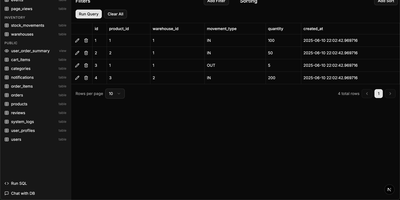
Traditional database management tools like pgAdmin and phpMyAdmin were built for DBAs, not for the rest of the team that just needs to look up a record or run a quick query. db-ui strips away the complexity and gives you a clean, modern interface that anyone can use. Browse tables in a paginated grid view with inline editing, filtering, and sorting built right into the column headers. The sidebar lists every table and view across all schemas with fuzzy search (Cmd+K to focus) that filters results as you type. Click any table to see its data, or switch to the schema introspection view to visualize columns, types, constraints, and relationships without writing a single query. The SQL editor provides syntax highlighting, result visualization in tabular format, and one-click CSV export for downstream analysis. For questions about your data model, the integrated AI chat assistant has full access to your database schema and can help you understand table relationships, write complex queries, suggest indexes, and provide optimization recommendations with streaming responses. Connect to PostgreSQL, MySQL, or Microsoft SQL Server through environment variables and deploy the whole application as a single Docker container. On RepoCloud, deploy db-ui on a dedicated VPS with root SSH access and direct connectivity to your database servers under the MIT license.