
InnoShop
InnoShop runs your entire online store on your own server, from a multilingual storefront and checkout to orders, shipments, and returns, and it even lets an AI assistant operate the shop alongside you. Set up products with SKUs, attributes, brands, and categories, then sell through a responsive storefront that speaks your customers' languages and prices in their currencies. Orders flow into the admin panel with status updates, shipment tracking, and return handling, while customers pay through PayPal, Stripe, bank transfer, or payment and shipping plugins you install. A built-in media library keeps product photos and files organized and reusable across the whole catalog. Visit analytics show who is browsing the store, with bot detection and geographic aggregation separating real shoppers from crawler noise. The unusual part is the AI door: a built-in MCP server exposes more than 45 store operations as tools, so an assistant can list products, check inventory, update an order status, or pull a sales report in plain conversation. That door is disabled by default, opens only with an admin token, stays read-only until you explicitly enable write tools, and never exceeds the permissions of the account behind the token. Plugins extend the store without forking it, and themes reshape the storefront without touching the catalog underneath. Running on a dedicated VPS on RepoCloud with guaranteed CPU, RAM, and SSD, full root SSH access, and a browser serial console. OSL-3.0 licensed.
GlitchTip
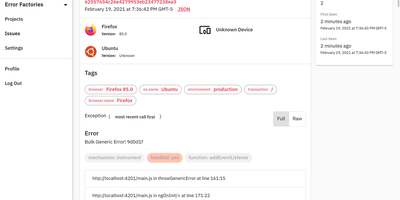
GlitchTip speaks Sentry's protocol without Sentry's operational weight - open-source error tracking that your existing SDKs already understand. The pitch is pragmatic: instrument your application with the official Sentry SDKs you already know - any language they cover - and point the DSN at your own GlitchTip instance instead. Errors, exceptions, log messages, and Content Security Policy violations flow into one place for triage, grouped into issues with stack traces, with alerts delivered by email or webhook the moment things break. Where self-hosted Sentry has ballooned into a docker-compose stack of twenty-plus containers, GlitchTip is a deliberately lean Django and PostgreSQL application a small team can actually run. Beyond errors, it bundles three more monitoring concerns: performance monitoring takes a works-out-of-the-box approach - no dashboard building, just your slowest web requests, database queries, and transactions surfaced automatically; uptime monitoring pings your sites and alerts on failures, or runs in reverse as a dead-man's-switch heartbeat for cron jobs that must check in on schedule; and log search puts application logs alongside errors for faster debugging. Unlimited projects and team members, MIT-licensed, built by Burke Software - your event volume is limited only by your own hardware.
RSSBox
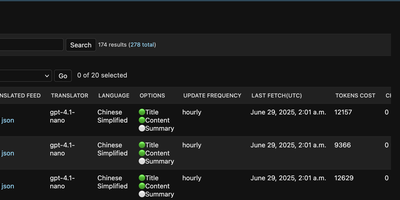
Foreign-language feeds are where good information usually goes to be ignored, and RSSBox fixes that by translating, filtering, and merging RSS sources, then republishing them as clean feeds your existing reader can subscribe to. Add a feed, pick a translation engine, and RSSBox republishes it with titles, full articles, or summaries translated, optionally showing both languages side by side. Each feed can use a different engine, from DeepL to any OpenAI-compatible model endpoint, and the admin shows translation status plus the tokens or characters each source has consumed. Update schedules are set per feed, so a fast-moving news source refreshes hourly while a quiet personal blog checks in once a day. Keyword filters quietly drop the recurring topics you never open, and AI filtering goes further by judging items against what you actually read. Tag several related sources and RSSBox merges them into a single unified feed, translations and filters applied, ready to follow as one stream. Full-text fetching pulls complete article bodies from feeds that only publish excerpts, so the translation covers the whole story rather than the teaser paragraph. Your reader app never changes: it simply subscribes to the translated feed URL like any other source. Running on a dedicated VPS on RepoCloud with guaranteed CPU, RAM, and SSD, full root SSH access, and a browser serial console. GPL-3.0 licensed.
Omnom
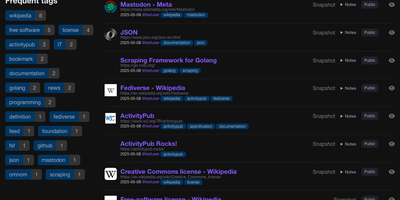
Omnom saves the pages you bookmark as full rendered snapshots, so the article, thread, or documentation page you kept is readable years later even if the original site changes or disappears. Bookmarks accumulate multiple snapshots over time, and the compare view shows two side by side or as a unified diff, revealing what an edited page used to say. Images and other media are downloaded and stored alongside each snapshot, keeping saved pages complete offline. The Firefox and Chromium extensions send pages exactly as your browser rendered them, capturing dynamic content a simple link saver would lose. A built-in reader aggregates your RSS and Atom subscriptions into one stream, where you can archive items individually or page by page and search feeds and bookmarks together. Through ActivityPub, other people can follow your public bookmarks from Mastodon or Pleroma, and you can follow Fediverse accounts in the same stream. Bookmarks can stay private or be shared publicly, organized with tags and nested collections, and filtered by date, domain, owner, or free text across saved content. Your dashboard tracks weekly, monthly, and yearly bookmark counts beside your most used tags, while a documented API and command line tools handle imports, tokens, and feed updates. Sign-in relies on one-time email tokens, OAuth, or a trusted Remote-User header from your reverse proxy, so no password is ever stored. Running on a dedicated VPS on RepoCloud with guaranteed CPU, RAM, and SSD, full root SSH access, and a browser serial console. AGPL-3.0 licensed.
Snitch
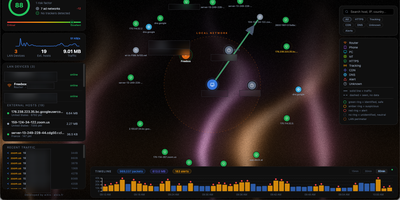
Snitch is a self-hosted network monitor and outbound firewall that shows every connection your server makes, which process opened it, and where in the world it goes, then lets you block it on the spot. A live force graph puts your machine at the center with each remote host as a node, while a world map plots geolocated destinations and a sliding timeline keeps the last day of traffic searchable. Every alert is actionable: block the IP, kill or suspend the process, or write a rule that firewalls matched hosts automatically by address, domain, port, country, or ASN. Detection covers port scans, beaconing, DNS tunneling, ICMP tunnels, cleartext ports, and self-signed or mismatched TLS certificates, and an isolation-forest model learns your normal flows and flags outliers. A lockdown switch cuts all public outbound traffic while the LAN stays up, for the moment something looks wrong. Findings can stream to Wazuh, Splunk, or Elastic as syslog and ECS events, or land in Discord, Slack, and Telegram as webhook alerts. Everything stays on your machine: history lives in a local database, geolocation works fully offline, and the interface speaks eight languages. Running on a dedicated VPS on RepoCloud with guaranteed CPU, RAM, and SSD, full root SSH access, and a browser serial console. AGPL-3.0 licensed.
Call-Me
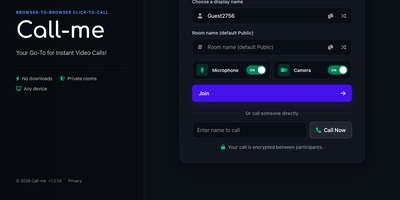
Call-Me puts a click-to-call video button on your website so a visitor can start an encrypted one-to-one video call with your team right in the browser, with no downloads, no accounts, and no phone numbers. A shared link carries everything: send a customer to a named room such as Support or Reception, or link straight to one person so the call rings them directly, which suits support desks, telehealth check-ins, tutoring, and sales consultations. Everyone in a room sees who else is present and available, and one click on a name starts the call. During the call you can chat in real time, share your screen, send files, switch between cameras, microphones, and speakers, hide your video, or mute yourself. Web push notifications flag an incoming call even when your tab sits in the background, so a staffed room never silently misses a visitor. An optional host password keeps the operator side of the room private. A REST API reports connected users, rooms, availability, and active calls, and can start a call for you, while webhooks post join, leave, and call start and end events to your other systems. The interface speaks multiple languages and adapts to phones and desktops alike. Running on a dedicated VPS on RepoCloud with guaranteed CPU, RAM, and SSD, full root SSH access, and a browser serial console. AGPL-3.0 licensed.
Wastebin
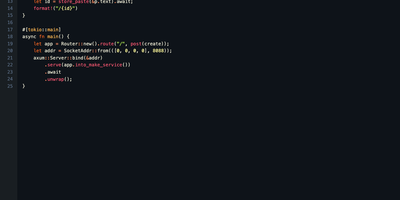
Wastebin is a self-hosted pastebin that turns any text or code snippet into a shareable link with syntax highlighting, optional password encryption, and expiration you control. Code pastes are highlighted for more than 170 languages, and nine built-in color themes in light and dark variants keep long listings readable. Markdown pastes render as formatted HTML with tables, task lists, and admonitions, and a single keystroke flips between the rendered page and the highlighted source. Sensitive snippets can be locked behind a password, and links can expire after a set time or burn after a single reading, which makes it a clean way to hand over credentials, tokens, and one-off secrets. Every paste view can show a QR code that opens the same page on your phone, and keyboard shortcuts cover raw view, URL copying, line wrapping, and the rendered toggle without touching the mouse. There are no accounts to create: you paste anonymously, and an owner cookie lets you delete your own entries later. Scripts and terminals are first-class citizens through a small JSON API, and a Neovim plugin pastes the current buffer without leaving the editor. The whole service is one small program with almost no upkeep, and stored pastes are compressed on disk so a busy instance stays lean for years. Running on a dedicated VPS on RepoCloud with guaranteed CPU, RAM, and SSD, full root SSH access, and a browser serial console. MIT licensed.
Neohabit
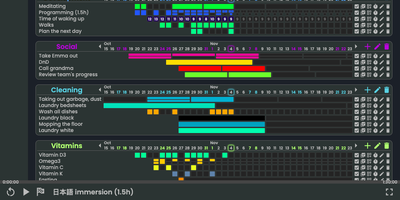
Most habit trackers punish a single missed day, so Neohabit lets you build routines that happen X times in Y days, like three workouts in five days or one deep-work session every three days, and adjust the target mid-streak as the habit gets easier. Your progress renders as GitHub-style contribution heatmaps in three styles: monochromatic grids for simple check-ins, numeric grids that record values such as calories, spending, reps, or hours up to two billion, and fractured grids that split each period into up to sixteen segments for habits done many times a day. Related habits group into projects with a one-dimensional daily view, and skill trees let you plan progressions, for example raising a reading target from twenty minutes to an hour in planned steps. You can ease into a new routine by starting at once in four days instead of daily, track things you want to reduce as well as build, hover any cell for period details, and rearrange projects and habits by dragging them. Multiple accounts, light and dark themes, keyboard shortcuts, and a polished mobile browser interface round out daily use, and a single command brings the whole thing up with prebuilt images ready to go. Running on a dedicated VPS on RepoCloud with guaranteed CPU, RAM, and SSD, full root SSH access, and a browser serial console. AGPL-3.0 licensed.
Tamari
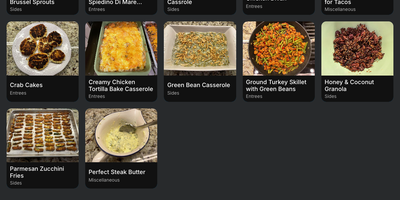
Recipes scattered across bookmarks, screenshots, and open browser tabs become one searchable cookbook with Tamari, which adds meal planning, per-store shopping lists, and one-click imports from a built-in library of over 400,000 recipes. Save each dish with its photo, ingredients, instructions, servings, time estimates, and nutrition information, then find it again through search, categories, or your favorites list. The Explore collection gathers more than 400,000 recipes from 300 cooking websites, and any of them moves into your personal cookbook with a single click. Pick a recipe and its full ingredient list lands on a shopping list at once, organized per store so a supermarket run and a farmers market run stay separate. Check items off as you shop, or scan a barcode to add something the moment you notice it running out at home. The meal planner assigns recipes to specific dates up to 30 days ahead, turning the weekly what-is-for-dinner debate into a settled schedule. Adjust how your cookbook displays, with large photos to show dishes off or compact photos to fit more on screen, sorting by title or date added, and light or dark themes for late-night cooking sessions. Share recipes with family members, reset a forgotten password by email, and manage everything programmatically through the REST API from scripts or other tools. Running on a dedicated VPS on RepoCloud with guaranteed CPU, RAM, and SSD, full root SSH access, and a browser serial console. GPL-3.0 licensed.
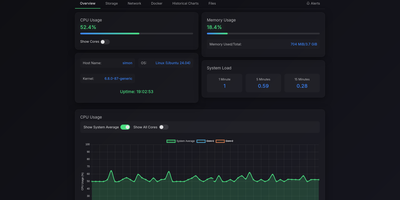
Simon
Simon is a lightweight self-hosted system monitor that shows live CPU, memory, disk, and network metrics for your server and its Docker containers in one web dashboard, with threshold alerts and a built-in file browser. Open the dashboard to watch real-time gauges alongside historical charts, so a slow memory leak becomes visible hours before it takes a service down. Every running container appears with its own CPU and memory stats, and its logs open in a searchable viewer, so routine diagnosis never needs a terminal session on the host. The file browser lets you navigate the directories you choose to expose, preview file contents, upload with drag and drop, create folders, and move or delete items. Downloads support range requests, which means large files resume cleanly after a dropped connection and media files stream instead of failing halfway. Alert rules fire when CPU, memory, disk, or network activity crosses thresholds you set, and notifications arrive through Telegram, ntfy, Gotify, Pushover, Pushbullet, Matrix, or any custom webhook. Prebuilt notification templates get common setups running in minutes, and password authentication keeps the dashboard private on a public server. Resource-constrained machines benefit most: the monitor runs comfortably on single-board computers and small instances where heavier monitoring stacks would consume the very memory they exist to watch. Running on a dedicated VPS on RepoCloud with guaranteed CPU, RAM, and SSD, full root SSH access, and a browser serial console. MIT licensed.