Exameow
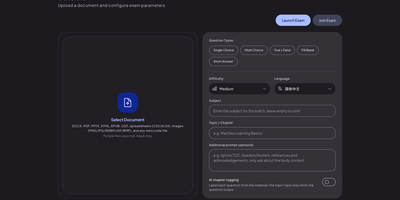
Upload a PDF, a slide deck, or a stack of lecture notes, and Exameow turns the material into exam questions you can actually practice with. The generator reads PDF, DOCX, XLSX, PPTX, EPUB, ODT, TXT, CSV, HTML, and image files, then writes single-choice, multiple-choice, true/false, fill-in-the-blank, and short-answer items through any OpenAI-compatible API you point it at. Counts per type, difficulty, output language, and chapter filters shape each batch, and large documents split automatically with duplicates removed. Practice runs sequentially, shuffled, as a timed mock exam assembled from type quotas, or against your wrong-question list, which clears items after repeated correct answers. Exam mode hides answers for honest attempts; flashcard mode reveals them for review, and AI grades short answers against reference answers with manual regrading available. Teachers publish a bank to the online exam relay and share a six-digit code: students join from any browser, sit a timed session, and get instant scores on objective questions. Question banks import and export as XLSX or CSV with smart column mapping, and practice records stay in your own database. Running on a dedicated VPS on RepoCloud with guaranteed CPU, RAM, and SSD, full root SSH access, and a browser serial console. Apache-2.0 licensed.
CLIProxyAPI Dashboard
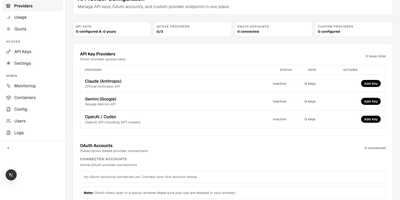
CLIProxyAPI Dashboard puts a web console in front of CLIProxyAPI so you manage AI providers, keys, quotas, and containers through forms instead of YAML files. Connect Claude Code, Codex, xAI, Antigravity, Kimi, and Devin accounts with OAuth, then add Gemini CLI, GitHub Copilot, Kiro, and Cursor through plugins you install and configure from the settings store. Any OpenAI-compatible endpoint can join as a custom provider with model mappings, and admins can mark a provider as shared so the whole team uses it. You create, revoke, and track API keys with per-user ownership, manage dashboard users and admin rights, and stream live logs beside container health. Quota views track rate limits per provider and per model, and Telegram alerts fire when remaining quota drops below your threshold. Usage analytics break down request counts, provider share, model statistics, error rates, and estimated cost. Configuration syncs to OpenCode automatically, model configurations travel as share codes, and backups can be created, scheduled, previewed, and restored from settings. One-click updates refresh the dashboard and proxy images, containers start and stop from the panel, and automatic TLS keeps the console reachable under your domain. Running on a dedicated VPS on RepoCloud with guaranteed CPU, RAM, and SSD, full root SSH access, and a browser serial console. MIT licensed.

Saki Panel
Saki Panel is a self-hosted operations console that manages your game servers, containers, and background processes across multiple Linux machines, with an AI assistant sitting inside the workspace when something breaks. Start, stop, restart, and monitor nine kinds of instances, from Minecraft and Steam game servers to Docker containers, Compose stacks, Node and Python apps, and plain shell commands. Remote nodes connect over SSH and report CPU, memory, and disk metrics to a cluster dashboard, so every machine is visible in one place. When an instance crashes, Saki Watch records the exit and its error fingerprint, then helps diagnose the cause from live logs, files, and metrics instead of making you copy text between a terminal and a chat window. Proposed fixes appear as diffs that need your approval, are graded by risk level, and can roll back automatically if verification fails after a patch. Day to day work happens in the same console: a web terminal, a file manager with an editor and archive support, database tools for SQLite, MySQL, PostgreSQL, and Redis, and cron-scheduled tasks with full run history. Role-based access with dozens of permission codes, audit logs, and incident notifications through webhooks or Telegram keep a small team in control. Running on a dedicated VPS on RepoCloud with guaranteed CPU, RAM, and SSD, full root SSH access, and a browser serial console. Apache-2.0 licensed.
Overclick
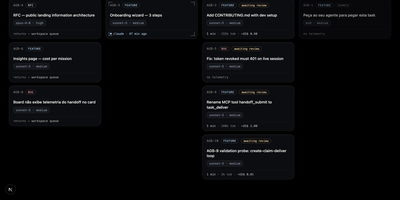
OverClick is the task board where your AI agents clock in: you write the assignments, they claim the work, and you stamp what actually got done. A card here is a contract, not a ticket: what should happen, why it matters, and a plain-language test script that says how to confirm it, all written before anyone starts. You tell your agent to grab the next task, and it claims the card over MCP, declares the CLI and model it really runs on, receives a self-contained briefing with the mission context and branch convention, and the card slides into progress. When it finishes, the handoff lands with a summary, evidence, branch and pull request links, and measured telemetry, the tokens per model and minutes the run actually took, read from the session transcript rather than guessed. Every card keeps three roles straight, who asked, who executed, and who reviews, and only a human can mark it validated; reopening with a comment puts your note in front of the agent's next claim. Big decisions can start as RFC cards whose approval spawns the execution cards, and insights roll up what each project, mission, and model consumed. Running on a dedicated VPS on RepoCloud with guaranteed CPU, RAM, and SSD, full root SSH access, and a browser serial console. MIT licensed.
OpenMail
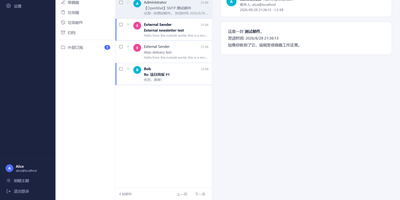
Your entire mail system can live in one self-hosted suite with OpenMail, from SMTP, IMAP, and POP3 delivery to three-pane webmail and the admin console that runs it. Standard clients such as Thunderbird, Apple Mail, and phone apps connect over SMTP ports 25, 587, and 465, IMAP ports 143 and 993, and POP3 ports 110 and 995, while people use the three-pane webmail with folder tree, conversation list, and reading pane at port 3000. You read, write, reply, forward, batch-organize, drag messages between folders, filter stars, search sender, subject, and body text, and follow conversations threaded automatically by their References headers. The rich-text composer autocompletes recipients, accepts dragged attachments and pasted screenshots, saves drafts every 12 seconds, sends on a schedule, and inserts reusable templates imported from HTML or generated with AI. Any OpenAI-compatible endpoint can draft replies, translate mail into twelve languages, and summarize messages, with provider keys encrypted on your server. Administrators get real-time mail statistics with 14-day send and receive trends, user quotas and bans, multi-domain aliases and catch-all addresses, outgoing queue visibility, and audit logs. Adding a domain generates DKIM keys and copy-ready SPF, DKIM, and DMARC DNS records with one-click checks, while rule-based spam scoring, TOTP two-factor authentication, and role-based permissions protect accounts in ten interface languages including right-to-left Arabic and Urdu. Running on a dedicated VPS on RepoCloud with guaranteed CPU, RAM, and SSD, full root SSH access, and a browser serial console. MIT licensed.
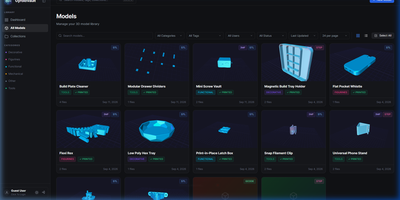
GyroidVault
The bracket you printed last spring sits in some folder, on some drive, under a filename you no longer remember; GyroidVault is the searchable library that ends the hunt, where every model can be inspected in 3D, tracked through its prints, and sent to a printer without touching a slicer queue. Point it at your existing folders on a NAS or server and it indexes STL, 3MF, STEP, OBJ, G-code, binary BGCODE, and even Fusion 360 files non-destructively, generating thumbnails and 2x2 collages while a duplicate finder flags identical copies by SHA-256 hash. Opening a model launches Studio 2.0: orbit the mesh, jump between isometric, top, front, and side cameras, switch between solid, wireframe, and X-ray shading, try filament colours live, arrange multi-part assemblies on one build plate, and snapshot your favourite angle as the cover. Sliced files give up their secrets too, with layer-by-layer toolpath previews plus infill, temperatures, filament weight, and estimated cost extracted automatically. From the same page you can fire G-code straight to a Moonraker or Klipper printer, open the file in OrcaSlicer, Bambu Studio, PrusaSlicer, Cura, or Creality Print, log each print with its material and outcome, and share a model through an expiring public link. Collections, version histories, custom metadata fields, and role-based accounts keep a growing print farm library tidy for everyone who uses it. Running on a dedicated VPS on RepoCloud with guaranteed CPU, RAM, and SSD, full root SSH access, and a browser serial console. AGPL-3.0 licensed.

Narralume
NarraLume is a writing studio for long novels where the AI proposes and you dispose, so a book stays yours across tens of thousands of words. Everything lives around the story bible: your stated intent, outline, entities, confirmed facts, relationships, chronology, and foreshadowing, kept as the single source of truth that planning, drafting, and review all read from. You can write chapters by hand in the studio, save versions and comments, ask for a selection edit, or delegate a chapter, a run of chapters, or a whole quick-creation plan to a model; whatever comes back arrives as a candidate with diffs, never as silent edits to your manuscript or canon. Review findings come with evidence you can accept, reject, or mark as false positives, and when generated prose collides with a locked fact the task stops and waits for your ruling instead of improvising around it. The run center keeps every AI job's steps, model calls, and checkpoints recoverable, the long-form lab searches story memory and previews plot impact without touching the book, and delivery ends with quality checks, exports, snapshots, and full-library backups. Running on a dedicated VPS on RepoCloud with guaranteed CPU, RAM, and SSD, full root SSH access, and a browser serial console. Apache-2.0 licensed.
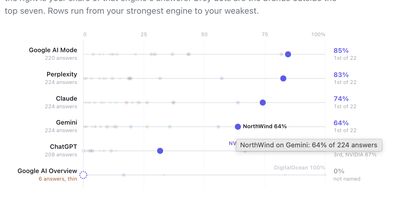
Limelit Open
When a buyer asks ChatGPT, Claude, or Perplexity which product to choose, Limelit Open shows whether your brand appears in the answer, where it ranks, and which sources the engines trusted. You define the prompts your market actually asks, register your competitors, and the tracker runs every prompt against seven engines on a schedule you control: ChatGPT, Claude, Perplexity, and Gemini through vendor APIs with web search on, plus Google AI Overviews, Google AI Mode, and Bing Copilot through scraper providers, each result labeled by how it was collected. Every stored answer is searched for your brand and each competitor with the rank of the list item they appear in, so visibility, share of voice, average position, and citation share rest on readable evidence rather than a black-box score. Click any number and you land on the full answer text with matches highlighted, the searches the engine ran, the brands it named, and every cited URL classified as yours, a competitor's, social, informational, or other. A prompt by engine grid makes weak spots obvious, and the built-in MCP server lets Claude or another assistant query the same data in plain language. Runs are capped by a daily ceiling you set, prompts and answers live in one SQLite file, and a single export command dumps the whole instance as JSON or CSVs for your own reporting. Running on a dedicated VPS on RepoCloud with guaranteed CPU, RAM, and SSD, full root SSH access, and a browser serial console. Apache-2.0 licensed.
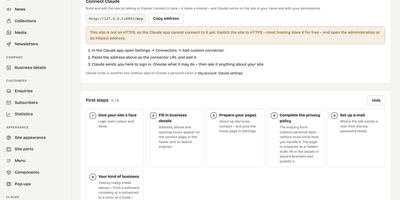
KaletaCMS
Kaleta is a business-website CMS where the page you edit is the page your visitors get, not a preview of it. The visual builder works on the live canvas: add sections, drag elements, edit text in place, and style every element separately for desktop, tablet, phone, and hover before you publish. Forty-six elements and forty ready-made sections cover pricing tables, timelines, before-and-after sliders, galleries, accordions, carousels, maps, and mega menus. Consistency comes from a design-token system: change one colour, font, spacing, or radius token and the whole site follows, with a WCAG contrast check on every colour pair and export in the W3C token format. Blocks you reuse become components edited once and updated everywhere, and each page carries its own search title, sharing image, and visibility, with the last twenty publications kept as versions. Moving in is a first-class feature: importers take WordPress exports including WooCommerce products and Polylang or WPML translations, plus Ghost, Blogger, Joomla, Drupal, and Webflow, creating a redirect from every old address so rankings survive. An optional AI assistant connected through MCP builds pages and handles chores only as drafts you approve. Forms, booking, enquiries, media folders with focal-point cropping, multilingual publishing, and GDPR duties such as automatic personal-data deletion are built in rather than bolted on. Running on a dedicated VPS on RepoCloud with guaranteed CPU, RAM, and SSD, full root SSH access, and a browser serial console. GPL-2.0 licensed.
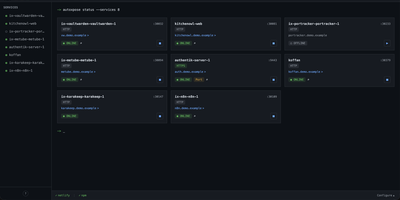
AutoXpose
Tag a Docker container with two labels, and AutoXpose turns it into a published service with a DNS record, a reverse proxy route, and HTTPS, without you opening a single provider dashboard. From the web dashboard you connect one of six DNS providers, Cloudflare, Netlify, DigitalOcean, Porkbun, Aliyun, or Tencent DNSPod, and point it at the Nginx Proxy Manager or Caddy instance you already run. It watches your containers continuously after that: a new label creates the record, propagation is verified before the service shows as live, and removing the container removes its public entries too. Auto-expose mode publishes containers the moment they appear, while manual mode stages them in the dashboard for approval first. Color-coded service tags sort what you run into web, database, and media groups at a glance, and dashboard warnings flag misconfigurations before they become broken links. Nginx Proxy Manager access lists attach by label, so an admin panel stays reachable only from the networks you trust. When containers vanish, orphaned cleanup hunts down the stale DNS records and proxy hosts they left behind. Settings and state live inside the same single container, so the publishing pipeline for a homelab or a small fleet stays one compose service you can back up as a unit. Running on a dedicated VPS on RepoCloud with guaranteed CPU, RAM, and SSD, full root SSH access, and a browser serial console. MIT licensed.

LearnBuddy
Tell LearnBuddy what you want to learn, in one conversation, and it works out where to start, what to do each day, and when yesterday's material needs another look. You describe the goal, whether that is a language, programming, nutrition, writing, or a career change, and three to five adaptive questions measure your actual baseline instead of making you pick a level from a dropdown. From there it builds a personalized path of four to twenty-four weeks and tells you daily what to study and what to review, so opening the app answers the question instead of raising it. Forgetting is treated as a scheduling problem: reviews resurface at spaced intervals, weekly self-checks test whether the plan still fits, and the roadmap replans dynamically when you race ahead or fall behind. Two editions run from the same codebase: try the hosted Cloud experience, or settle into Personal mode with your own model API key and your learning data stored on your own server. Optional OpenClaw and Feishu integration can bring the daily guidance into the chat tools you already live in. Running on a dedicated VPS on RepoCloud with guaranteed CPU, RAM, and SSD, full root SSH access, and a browser serial console. MIT licensed.
AGenUI Studio
AGenUI Studio turns a written description into a working interface card: an AI agent generates the UI, binds it to your APIs and data, and packages it so it runs anywhere, no Studio required. Bring your own model by entering any OpenAI-compatible or Anthropic Messages endpoint and key in the console settings, and generation proceeds contract-first, steered by design rules you publish as versioned Markdown revisions. You preview each card live as it is generated, then refine it over multiple turns while every component, binding, and action you did not target stays protected from accidental edits. The console also manages the supporting cast: a local knowledge base, API definitions, and reusable operators, all starting from bundled demo data you can swap for real services whenever you are ready. When a card is finished, download it as a self-contained Runtime Package carrying its data sources, bindings, actions, and operators, and execute it with the bundled Card Runtime inside your own application, or register a delivery target and publish straight from the workbench over a callback or a message queue. Applications subscribe to native run events over HTTP and SSE, and production deployments can replace the local defaults piece by piece, MySQL for storage, Redis for hot state, MCP services for knowledge and data, while the packages keep the same contracts. Running on a dedicated VPS on RepoCloud with guaranteed CPU, RAM, and SSD, full root SSH access, and a browser serial console. Apache-2.0 licensed.
PayMe
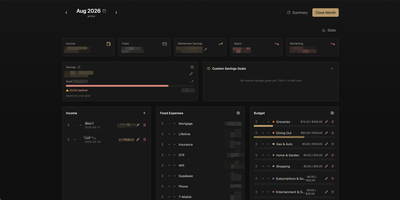
PayMe is a privacy-first personal finance dashboard that runs entirely on your own hardware with zero third-party service dependencies. The Rust backend compiled to a single binary serves a React 19 frontend built with Vite, TypeScript, and Tailwind CSS 4, storing all financial data in a local SQLite database that auto-migrates on startup. Monthly dashboards track income entries, fixed expenses like mortgage and utilities, and budget categories with real-time progress bars showing spending against configurable limits. The savings module includes goal tracking with percentage-based progress indicators, custom savings goals for targeted objectives, retirement savings projections with breakdown analysis, and projected savings calculations. Variance analysis compares actual spending against budgets across categories. Drag-and-drop reordering powered by dnd-kit lets you arrange income sources, expenses, and budget items to match your workflow. The interactive charts rendered by Recharts visualize spending trends, income patterns, and savings trajectories. Month-by-month navigation tracks financial history over time, while the Summary and Stats views aggregate data across periods. JWT-based authentication secures access, and the full OpenAPI Swagger documentation at the /swagger-ui endpoint exposes every API route for automation and integration. Docker Compose deployment creates a minimal image with the compiled Rust binary and static frontend assets, running on port 3001 behind nginx, Caddy, or Traefik reverse proxy with HTTPS. On RepoCloud, deploy PayMe on a dedicated VPS with persistent SQLite storage, root SSH access, and complete privacy over your household financial data, all under the MIT license.
GymCoach
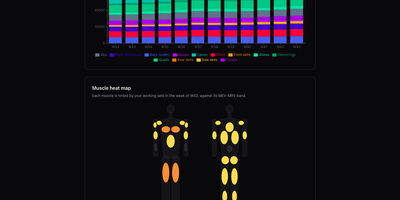
Strength training, cardio, and body metrics land in one workout log on your own server, backed by an optional AI coach that explains its advice from your real numbers. Quick entry such as 100x8@9 logs weight, reps, and effort in one line, with a rest timer, plate-loading calculator, and warm-up ramp beside the set table. A weight picker offers only loads your equipment can build, and a readiness check-in adjusts the suggested load and says why. Templates for 5/3/1 BBB, GZCLP, nSuns, PPL, and Upper/Lower run as written and edit like any custom program. Progress pages chart estimated 1RM, weekly volume per muscle group against MEV and MRV bands, a muscle heat map, bodyweight goals, and a training calendar. Garmin FIT, TCX, and GPX imports need no cloud account and add heart-rate charts and aerobic decoupling to each run or ride. The coach writes a weekly debrief, chats in a streaming conversation, and drafts a full program from a one-sentence goal, using your own Anthropic or OpenRouter key. History imports from Strong or Hevy CSV files with a dry-run preview and exports to CSV or TCX, and an MCP connector lets ChatGPT or other agents analyse it. The app installs as an offline-capable PWA, speaks English, French, Russian, and German, and keeps every user's data separate. Running on a dedicated VPS on RepoCloud with guaranteed CPU, RAM, and SSD, full root SSH access, and a browser serial console. MIT licensed.