TriliumNext
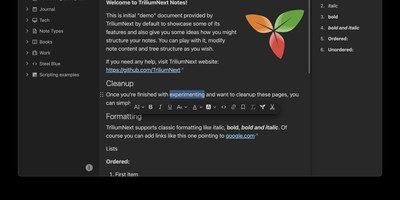
TriliumNext organizes notes in an infinitely deep tree where any single note can be cloned into multiple branches without duplication, building personal knowledge bases that mirror how ideas actually connect rather than forcing a single rigid folder hierarchy. Carrying forward the original Trilium project under active community stewardship with nearly 37,000 GitHub stars, the application is built on TypeScript with a CKEditor 5 WYSIWYG editor supporting rich text, tables, images, KaTeX math expressions, Mermaid diagrams, Excalidraw canvases, mind maps, spreadsheets with XLSX and CSV import/export, and code blocks with full syntax highlighting. A built-in JavaScript scripting engine runs on both frontend and backend, enabling custom widgets, automated workflows, scheduled tasks, and direct interaction with external REST services through a typed Script API. Full-text and fuzzy search with attribute-based queries locates any note instantly across databases tested at over 100,000 notes without performance degradation. The v0.104 release introduced importers for OneNote, Notion, Google Keep, Anytype, and Obsidian alongside 16 dedicated security fixes. Per-note AES encryption, OpenID Connect authentication, and TOTP two-factor protection safeguard sensitive content. The sync server keeps desktop clients, the progressive web app, and mobile devices in lockstep with zero third-party cloud dependency. Web Clipper captures content directly from browsers. Running on a dedicated VPS on RepoCloud with guaranteed CPU, RAM, and SSD, full root SSH access, and a browser serial console. AGPL-3.0 licensed.
Jotty
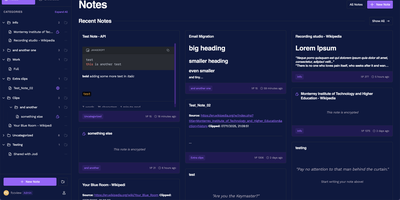
No external database cluster to babysit, no proprietary cloud lock-in, and no bloated workspace hierarchy: Jotty stores every note, checklist, and Kanban board as plain Markdown and JSON files inside a single folder on your server. Need a quick grocery list with nested categories, progress bars, and drag-and-drop reordering? Spin one up in seconds, or flip any list into a multi-column Kanban project board with custom statuses, due-date calendar views, and a built-in time tracker. Write technical documentation in a TipTap-powered WYSIWYG and Markdown editor featuring syntax-highlighted code blocks, GitHub-flavored callouts, embedded Draw.io and Excalidraw diagrams, and OpenPGP client-side encryption for sensitive records. Connect ideas across your workspace using Obsidian-compatible wikilinks, inline mention suggestions, backlinks, and an interactive 2D and 3D knowledge graph that maps relationships between tasks and notes. Share individual notes or live Kanban boards publicly via customizable read-only links, or start the optional Model Context Protocol (MCP) companion container so AI assistants like Claude and Cursor can query your notes and check off items through your scoped REST API key. Running on a dedicated VPS on RepoCloud with guaranteed CPU, RAM, and SSD, full root SSH access, and a browser serial console. AGPL-3.0 licensed.
Poznote
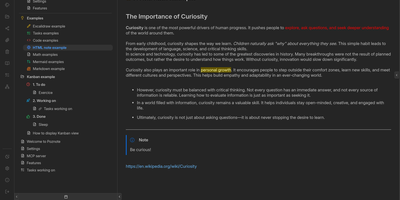
Poznote serves as an all-in-one personal knowledge base and digital workspace designed to bridge unstructured thinking and structured documentation. The platform pairs a responsive Markdown editor with live side-by-side rendering, KaTeX mathematical notation, and interactive Mermaid diagram compilation. Creative thinkers can switch instantly to an embedded Excalidraw infinite canvas to sketch system architectures, design mind maps, and create interface wireframes alongside their written notes. Every directory within the workspace can be toggled into an agile Kanban board where nested folders become customizable workflow columns and notes transform into draggable task cards. Task management views aggregate checklists across documents into unified priority queues with due date reminders and completion filters. An integrated bi-directional Git synchronization engine connects user workspaces directly to personal GitHub or Forgejo repositories, versioning edits automatically on save. The software also provides an integrated Model Context Protocol server that enables AI coding assistants to search notes, create documents, and query knowledge repositories securely. Running on a dedicated VPS on RepoCloud with guaranteed CPU, RAM, and SSD, full root SSH access, and a browser serial console. MIT licensed.
Silicon Notes
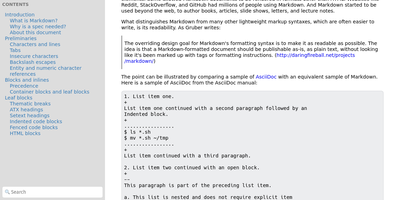
"Somewhat lightweight, low-friction" is how Silicon Notes' author describes the personal knowledge base - written after DokuWiki's editor "drove me mad" and no existing wiki quite fit. The philosophy is that small frequent annoyances compound into cognitive load with no return, so everything here is optimized for frictionless daily use. Notes are written in plaintext Markdown and rendered as clean HTML with Pygments syntax highlighting for code blocks; pages get bi-directional relationships (backlinks), so the knowledge base becomes a connected web rather than a folder tree; and full-text plus title search retrieves anything fast. A table of contents lives in the left sidebar - "where it belongs" - editable while you read without scrolling away. Page history tracks revisions for auditing and rollback, JSON export/import keeps everything portable, and the mobile layout is genuinely usable. The stack is deliberately minimal: Python and Flask with Mistune for Markdown and SQLite for storage - no big frameworks, just a few small dependencies. One honest caveat: there is no built-in authentication, so deploy it behind a VPN, private network, or reverse-proxy auth layer. For a solo engineer's brain, it is exactly enough.