Anchor
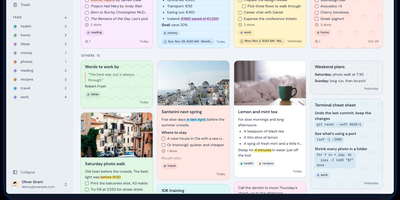
Anchor is a self-hosted note-taking app that keeps every note on your own server and on your devices, so your ideas stay searchable and editable even with no connection at all. Open the web app or the phone app and start typing; the rich text editor handles headings, checklists, highlights, and formatting from a slash menu, and everything saves locally first. When a connection comes back, changes sync automatically across your devices, so the thought you captured on a train is waiting on your desk. Organize with colored tags, pin the notes you live in, archive the ones you are done with, and set one-time or repeating reminders so a note resurfaces when it matters. Notes can carry image and audio attachments, custom backgrounds, and a full version history you can roll back. Share a note with another user as view-only or editable, search titles and body text across everything including the archive, and recover deleted notes from the trash during the recovery window. Bring an existing library with you through Markdown import, a full Anchor backup, or a Google Keep export, and take everything out again the same way. An admin panel controls registration and shows system statistics, and OpenID Connect sign-in through providers like Authelia or Keycloak can replace local passwords entirely. Running on a dedicated VPS on RepoCloud with guaranteed CPU, RAM, and SSD, full root SSH access, and a browser serial console. AGPL-3.0 licensed.
Nowen Note
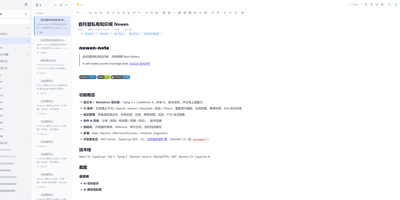
Nowen Note is a self-hosted knowledge base where your notes, tasks, daily journals, and mind maps live in one private workspace you control. One tree holds folders, rich-text documents, and Markdown notes side by side, with drag-and-drop ordering, unlimited nesting, colored tags, pinning, and full-text search across everything. Each note can switch between a rich-text editor and Markdown with live preview, split view, outlines, tables, code blocks, math formulas, diagrams, comments, and version history. Connect the AI provider you prefer, such as an OpenAI-compatible API, Gemini, DeepSeek, or local Ollama, to continue drafts, rewrite passages, translate, summarize, and ask questions answered from your own notes. Tasks get list, board, calendar, and timeline views with dependencies, recurring rules, reminders, and templates, while daily journals capture short entries, moods, and photos and roll them into AI weekly and monthly reviews. Teammates edit together in real time, and folder-level permissions, passwords, allow and deny rules, share links with expiry dates, and guest comments decide exactly who sees what. Imports arrive from Obsidian, SiYuan, Word documents, web pages, and plain Markdown, attachments can live on local disk or S3-compatible storage, and scheduled backups travel to email or WebDAV. Keep working offline with a cached workspace that syncs when you reconnect, clip pages from the browser extension, and connect other tools through the OpenAPI, SDK, webhooks, and MCP server. Running on a dedicated VPS on RepoCloud with guaranteed CPU, RAM, and SSD, full root SSH access, and a browser serial console. GPL-3.0 licensed.
Crumbs
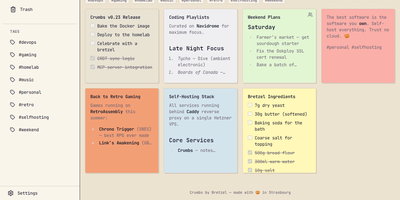
Capture a thought before it evaporates: Crumbs is a self-hosted, privacy-first alternative to Google Keep for notes you would rather keep on your own server. You write rich notes with Markdown, checklists, and image attachments, then give each one a personality from twelve color themes. Hashtags organize everything without folders, pinning keeps the important notes on top, and archive and trash clear the rest out of sight. Full-text search reaches across titles, content, and tags, so last month's idea is one query away. Every note keeps a version history you can browse and restore, which turns accidental deletions and bad edits into non-events. Notes can be shared with other users on your instance, with optional email notifications over SMTP for share alerts and account events. The installable PWA works offline through IndexedDB with last-write-wins CRDT sync, so a note captured on a plane reconciles when you land. Accounts are protected with Argon2 password hashing, and Google, GitHub, or any OIDC provider can handle sign-in instead. A built-in MCP server even lets AI assistants manage your notes on your behalf. Running on a dedicated VPS on RepoCloud with guaranteed CPU, RAM, and SSD, full root SSH access, and a browser serial console. MIT licensed.