Sim Studio
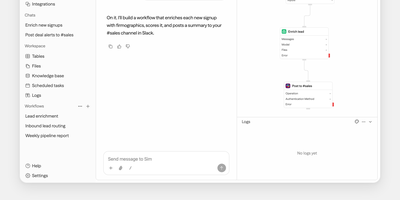
Sim Studio lets teams build, deploy, and monitor AI agent workflows by dragging blocks onto a visual canvas and wiring them into executable pipelines, backed by over 1,000 integrations. The React Flow editor represents each step as a node: LLM calls, tool invocations, conditional branches, and data transformations form directed acyclic graphs that run as complete agent pipelines. Every major LLM provider works natively, including OpenAI, Anthropic, Google Gemini, Groq, and Cerebras, plus local models through Ollama and vLLM. Integrations span Gmail, Slack, Microsoft Teams, Telegram, WhatsApp, Notion, Google Workspace, Airtable, GitHub, Jira, Linear, Perplexity, Firecrawl, PostgreSQL, Supabase, Pinecone, and Qdrant. Built-in tables provide a database layer, a file store offers shared team storage, and knowledge bases powered by PostgreSQL with pgvector enable retrieval-augmented generation. Finished workflows deploy as REST API endpoints, scheduled jobs, or Slack bots, with block-by-block execution traces for full observability. Real-time collaborative editing via Socket.io supports simultaneous multi-user construction. Alternatively, describe agent behavior in natural language and Sim assembles the workflow automatically. Built on Next.js App Router, Bun runtime, Drizzle ORM, and Tailwind CSS. 29,400+ GitHub stars and 100,000+ builders. Apache-2.0 licensed.
LangGraph GUI
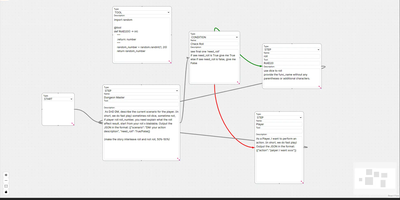
Building LangGraph agents in code means imagining the graph; LangGraph GUI turns that graph into something you draw, wire, and run from the browser instead. You place a start node, add step nodes, and drag edges between ports to define the flow, with cycles created by simply connecting nodes back toward each other. Condition nodes split execution into green true paths and red false paths, info nodes append context to stage output, and subgraph nodes run a whole named graph inside another one. Tool steps call real Python functions that you define in tool nodes with the familiar decorator style, so file saving, lookups, and custom logic sit inside the visual flow. Graphs save to JSON on your computer, load back for editing, and upload to the server as workflow files ready to execute. You configure which LLM to use and its API key in the panel, run against local models through Ollama or hosted APIs, then download every file the run produced in the workspace. Files upload to the server workspace as working environment, and a cache clean clears it between runs. Example graphs for role-playing loops, lottery branch switches, and tool-using flows show patterns you can copy and refine with your own prompts. Running on a dedicated VPS on RepoCloud with guaranteed CPU, RAM, and SSD, full root SSH access, and a browser serial console. MIT licensed.