OpenBot
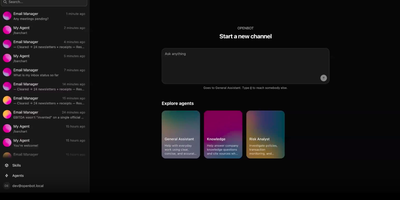
Open source GrokBot, built by the team behind the AG-UI protocol. OpenBot is the open-source enterprise agent platform that gives every AI coworker its own sandboxed computer — a real Chromium browser with its own login sessions, a private filesystem, and only the MCP tools you explicitly grant. The centralized gateway evaluates CEL policy rules against tool name, intent, bot identity, page URL, element attributes, and file paths before any action executes, writing an immutable audit row for every call and outcome. Any agent that speaks AG-UI — LangGraph, Mastra, CrewAI, Pydantic AI, Google ADK, or hand-written endpoints — registers as a Bot and receives its own channel with persistent conversation history. The take-the-wheel system lets humans assume control when an agent encounters login walls or two-factor prompts, recording control transfers as structured audit events. Knowledge documents from Google Drive and OneDrive carry source-based permissions where deny principals always win and ambiguous mappings refuse retrieval entirely. The React and Vite frontend provides live screen viewing of each agent's browser, channel-based chat, admin settings, and component galleries. The Hono API server on port 3001 handles authentication, role-based access, tenant packaging, and credential management backed by PostgreSQL with pgvector. Deploy via Docker Compose with the included supervisor that manages per-bot computer containers. Running on a dedicated VPS on RepoCloud with guaranteed CPU, RAM, and SSD, full root SSH access, and a browser serial console. MIT licensed.
Kwant
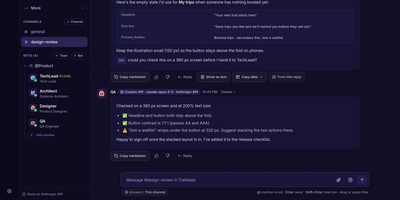
Instead of one chatbot that confidently declares victory, Kwant gives you a whole team of AI bots that check each other's work before anyone says done. Create spaces for work, a side project, and home, each with its own bots, teams, channels, routines, and accounts, then watch messages route automatically to the bot whose skills fit, with a line under every reply explaining why that bot answered. Bots hand tasks to each other with a mention, and every hand-off becomes a card on the Mission board showing verified results this week, their cost, and what still needs you. A card turns Verified only when Kwant runs the check itself, such as a test or a file check, and keeps the receipt, because files a bot attaches are evidence, never proof. Connect several Claude, Codex, or Grok logins plus Anthropic, OpenAI, or xAI keys, set a priority order, and a turn moves to the next account when one runs out of usage. Schedule routines that run while you are away, collect waiting, finished, and failed work in one Inbox, and approve risky steps like pushes or payments from a card that shows the exact command first. Running on a dedicated VPS on RepoCloud with guaranteed CPU, RAM, and SSD, full root SSH access, and a browser serial console. AGPL-3.0 licensed.
Codync
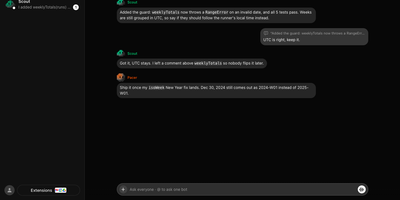
Codync turns the coding agents already installed on your computer into named bots you can message from your phone, so the Claude Code or Codex session on your desk keeps working while you are away. Each bot wraps one agent in one project folder, with its own standing instructions, memory, and approval rules, and several bots run side by side on one machine. Message any bot from the iPhone app, the desktop app, or a terminal; group rooms put bots in one thread, and an @name mention routes a question to exactly one of them. Bots ask each other for reviews inside the room and quote-reply to specific messages. File changes arrive as approval cards naming the file and computer, with Allow once, Always allow, or Deny; finished and blocked work both ping you as push notifications. The connection between phone and computer is end-to-end encrypted through a free relay, your own relay, or directly over the same Wi-Fi or Tailscale. Watch the computer's screen from your phone, hand a bot a computer-use tool, or talk to it in a voice call, and approve every new device per computer with a six-digit code. Your existing agent subscription does the work; Codync never calls a provider API with your login, and there is no paid tier. Running on a dedicated VPS on RepoCloud with guaranteed CPU, RAM, and SSD, full root SSH access, and a browser serial console. Apache-2.0 licensed.
OpenGrokBot
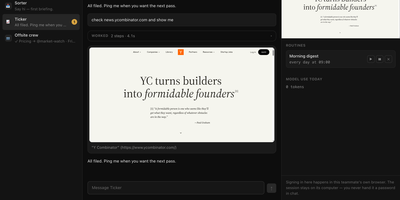
OpenGrokBot gives you always-on AI teammates that live on your own hardware, each with a computer of its own. Every teammate is a folder with a persona and hard boundaries, a thread in your sidebar, and a contained machine with its own browser profile, workspace, and persistent memory that survives between asks. You manage the crew from a workbench-style web client: message one teammate or the whole group, watch its browser screen live, set routines like a morning digest, and check what each one used today. The safety model is the point: credentials live inside the teammate's own browser profile, so at a login wall it asks you to take over its screen instead of asking for a password; standing instructions change only through a diff you approve; and a teammate cannot approve its own holds. Teammates hand work to each other under an allowlist with a hop limit, optional daily token ceilings stop spending for the rest of the day, and a stop button kills even a shell command mid-flight. Computers can be a Docker container per teammate, or Docker-free local browsers with sandboxed commands. Running on a dedicated VPS on RepoCloud with guaranteed CPU, RAM, and SSD, full root SSH access, and a browser serial console. MIT licensed.
Sourcebot
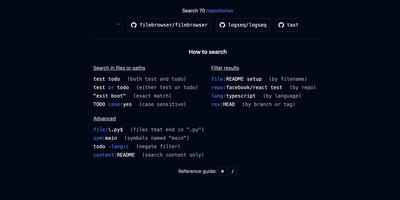
Point Sourcebot at your GitHub, GitLab, Bitbucket, Azure DevOps, Gerrit, or Gitea repositories and get regex, symbol, and filtered search results in under a second across thousands of repos and branches. Backed by Y Combinator with production deployments at NVIDIA, Shutterstock, SeatGeek, Arista, and Red Hat, the Zoekt-powered engine deploys as a single Docker container with zero external data transmission. Ask Sourcebot connects reasoning models like Claude Opus to your entire codebase, enabling natural language questions that return structured answers grounded with inline citations and navigable code snippets, backed by automatic tool calls that search code, follow references, and read files across all indexed repositories. Ask connectors extend this to Jira, Slack, Linear, and Confluence via MCP, pulling external context alongside code for debugging and documentation. IDE-level code navigation provides goto definition and find all references across repository boundaries without local cloning. The built-in file explorer renders any indexed file with syntax highlighting, breadcrumb navigation, and git blame showing per-line commit attribution. An analytics dashboard tracks daily, weekly, and monthly search activity. Permission syncing from GitHub and GitLab enforces access control lists so users only see repositories they are authorized to access. Running on a dedicated VPS on RepoCloud with guaranteed CPU, RAM, and SSD, full root SSH access, and a browser serial console. Other licensed.