WhoDB
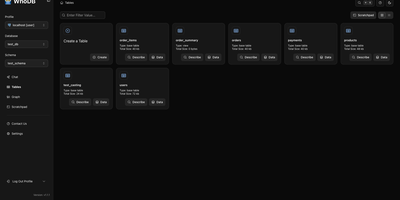
With nearly 5,000 GitHub stars earned in under two years, WhoDB has rapidly emerged as the lightweight alternative to heavyweight database clients like DBeaver and DataGrip by delivering a sub-50MB binary that starts in under a second and connects to 18+ database systems from a single interface. The Go backend serves the React and TypeScript frontend with table virtualization for efficient rendering of large result sets, lazy loading, and query result streaming that keeps the interface responsive even when browsing tables with millions of rows. The Community Edition connects to PostgreSQL, CockroachDB, YugabyteDB, MySQL, MariaDB, TiDB, SQLite, DuckDB, MongoDB, FerretDB, Redis, Valkey, Dragonfly, Elasticsearch, OpenSearch, ClickHouse, QuestDB, and Memcached through a unified credential selector that switches between databases with minimal configuration. Interactive schema diagrams render entity-relationship graphs showing table structures, foreign keys, and column types for visual database exploration. The Jupyter-style query scratchpad provides SQL autocomplete, syntax highlighting, and multi-statement execution with paginated results. AI integration optionally connects to Ollama, OpenAI, Anthropic, LM Studio, or any OpenAI-compatible provider for natural language database queries — ask questions in plain English and receive generated SQL. Data management includes inline row editing, CSV export, and filtered data views. Docker deployment runs a single container exposing port 8080. Running on a dedicated VPS on RepoCloud with guaranteed CPU, RAM, and SSD, full root SSH access, and a browser serial console. Apache-2.0 licensed.
CloudBeaver
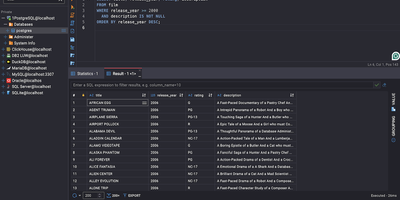
CloudBeaver puts a full-featured database management environment in your browser, connecting to PostgreSQL, MySQL, SQL Server, Oracle, ClickHouse, and over 100 additional engines through one unified interface that requires no desktop client installation. The Java server exposes a TypeScript/React frontend through a GraphQL API where teams can browse schemas, edit data, visualize relationships, and execute queries across all connected databases in a single workspace. The SQL Editor provides syntax highlighting, auto-completion with fuzzy search, AI-assisted SQL generation from natural language prompts, script management with save/download/upload capabilities, execution plan visualization, and multi-tab result display. The Data Editor enables direct cell editing, filtering, sorting, and bulk data modification with support for spatial GIS data rendering. Database administrators access a Navigator panel for browsing schemas, tables, views, foreign tables, triggers, dependencies, and stored procedures across all connected databases. ER Diagrams visualize table relationships and schema structure, while the Visual Query Builder constructs queries without hand-writing SQL. Multi-user administration provides role-based access control, connection sharing with configurable permissions, and session management. SSH tunneling secures remote database connections, and data can be exported or imported in multiple formats. Query History tracks all executed statements with timestamps and execution statistics. Running on a dedicated VPS on RepoCloud with guaranteed CPU, RAM, and SSD, full root SSH access, and a browser serial console. Apache 2.0 licensed.
db-ui
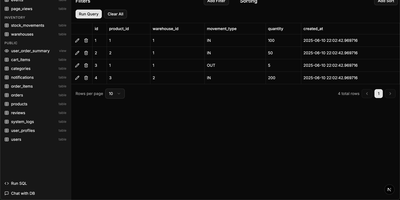
Traditional database management tools like pgAdmin and phpMyAdmin were built for DBAs, not for the rest of the team that just needs to look up a record or run a quick query. db-ui strips away the complexity and gives you a clean, modern interface that anyone can use. Browse tables in a paginated grid view with inline editing, filtering, and sorting built right into the column headers. The sidebar lists every table and view across all schemas with fuzzy search (Cmd+K to focus) that filters results as you type. Click any table to see its data, or switch to the schema introspection view to visualize columns, types, constraints, and relationships without writing a single query. The SQL editor provides syntax highlighting, result visualization in tabular format, and one-click CSV export for downstream analysis. For questions about your data model, the integrated AI chat assistant has full access to your database schema and can help you understand table relationships, write complex queries, suggest indexes, and provide optimization recommendations with streaming responses. Connect to PostgreSQL, MySQL, or Microsoft SQL Server through environment variables and deploy the whole application as a single Docker container. On RepoCloud, deploy db-ui on a dedicated VPS with root SSH access and direct connectivity to your database servers under the MIT license.