Wally
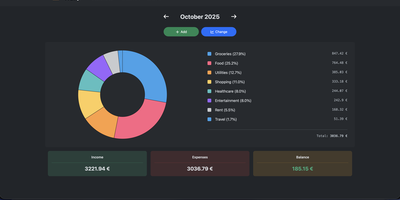
Started as an ExpenseOwl-inspired project, Wally grew into a lightweight, self-hosted expense tracker more capable in every direction its author touched. The backend is Python FastAPI over SQLite, which means every deployment ships a full REST API with interactive documentation at /api/docs - automating imports or wiring in external tools requires no reverse engineering, and when the optional login page is enabled you can mint scoped API keys from the Settings page for token-based integrations. The transactions view is built on AG Grid, bringing real search, column sorting, and per-column filtering to your ledger, with a footer totaling rows, income, and expenses for whatever slice you have filtered. Dashboards go beyond the usual monthly doughnut: a Change button swaps in year-scale line graphs so you can track a single category - restaurants, say - across time. Recurring transactions edit intelligently, letting you apply changes to all instances or only future ones. CSV import and export use a simple six-column format handled from Settings, the refined dark theme is genuinely easy on the eyes, and the interface is translated into more than ten languages. The whole thing runs from one small container with a single data volume.
Routerly
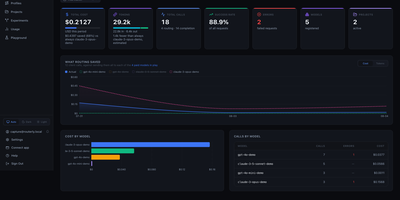
Routerly is the one front door for every AI model your apps use: point your OpenAI or Anthropic client at it, and it chooses the right model for each request, enforces your budget, and keeps the receipts. Nothing in your code changes except the base URL, and from that moment streaming chat completions and messages flow to OpenAI, Anthropic, Gemini, Mistral, Cohere, xAI or your own Ollama models behind a single token. Nine routing policies score every candidate in parallel: cheapest, fastest, healthiest, most capable, biggest context, least rate-limited, fairest, most budget left, and one that asks a small model to judge which model fits the task. When the winner errors or times out, the next candidate takes over automatically, and the recorded routing trace shows exactly why each model won or lost. Guardrails can block or log content that breaks your rules, and phone numbers, card numbers, SSNs, IBANs and emails can be scrubbed out before anything reaches a provider. Every call is logged with tokens, USD cost and latency, and hard limits per model, project and token reject overspending requests before a provider can charge for them. Projects keep separate tokens, model lists and budgets for each team or tool, role-based permissions decide who may change what, and alerts land in Slack, email, webhooks or PagerDuty when budgets or providers misbehave. Running on a dedicated VPS on RepoCloud with guaranteed CPU, RAM, and SSD, full root SSH access, and a browser serial console. AGPL-3.0 licensed.
DailyHub
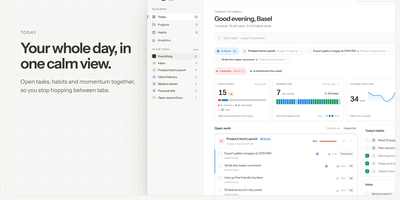
DailyHub is one calm page for a single person's whole day: today's open work grouped by project, the habits due this morning, and an inbox that catches everything that does not belong anywhere yet. The Today view greets you with a quick-add box, nudges about what is slipping, and a progress bar that fills as the day gets done. Focus mode pins the projects or tasks that matter and hides the rest until a date you pick or until you clear it, so the full list stops shouting. Projects carry status, due dates, and milestones, wear logos with accent colours derived from them automatically, and raise a banner when work stalls. Habits run on weekday schedules and report back with a 14-day consistency strip and a completion rate, so a streak is something you can see rather than guess. Analytics chart completions over time, break them down per project, and surface the weekday patterns that show when you actually get things done. A command palette jumps to any project, task, habit, or milestone from the keyboard, and light and dark themes keep long planning sessions easy on the eyes. An AI assistant can join through the built-in MCP endpoint: ask what is still open in the inbox, add a task to the website project for Friday, or mark today's workout done. Running on a dedicated VPS on RepoCloud with guaranteed CPU, RAM, and SSD, full root SSH access, and a browser serial console. MIT licensed.
DispatchSEO
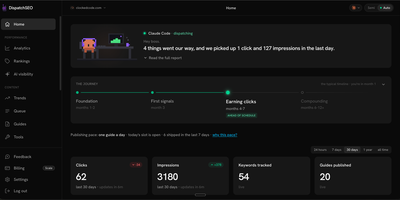
DispatchSEO runs an SEO program through your own AI agent: it researches keywords, queues ideas for your approval, and publishes a guide every morning. Connect Claude Code, Codex, Cursor, or the Claude app over MCP and the agent mines keywords from Search Console data and Google Autocomplete, then drops each idea into a queue showing volume, difficulty, and the reasoning behind it. Approve, reject, or drag to reorder, or switch on auto mode and skip the queue. Each morning the oldest approved idea becomes a real guide, delivered as a GitHub pull request or posted straight to a self-hosted WordPress site, checked against the live search results before it ships. Home greets you with a plain-language daily briefing, a journey tracker, publishing pace, and click and impression counters. Rankings charts daily positions with thirty-day sparklines, Search Traffic plots Search Console history, and an AI visibility page shows how often Claude cites your domain. A backlink playbook lists free and paid submissions with copy ready to paste. One deployment manages many sites, each with its own MCP token. Running on a dedicated VPS on RepoCloud with guaranteed CPU, RAM, and SSD, full root SSH access, and a browser serial console. AGPL-3.0 licensed.
lastGLANCE
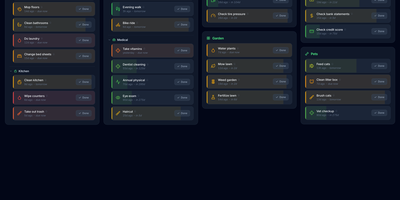
Green means handled, amber means soon, red means overdue: lastGLANCE turns recurring chores and neglected catch-ups into one recency dial you can read at a glance. Add a chore once, set how often it should happen, and its color ages from fresh green through amber to red as days pass, with overdue items floating to the top on their own. Mark a job done and the timer restarts; backdate the entry when you finished it yesterday but only remembered to log it today. Seasonal work hides outside its active months, categories and subcategories arrange into a masonry board, and reminders fire when something crosses its due line. Each chore keeps its own statistics, average interval against target, and a timestamped history with notes, and a contribution-style heatmap in the header charts your whole completion record. People get the same treatment: circles for family, friends, and work contacts show when you last reached out, who usually initiates, and which birthdays arrive in the next thirty days. Households share chores with assignments and a Mine view, everything works offline as an installable PWA, and optional WebDAV or Nextcloud sync merges changes without conflicts under optional end-to-end encryption, with hourly, daily, and weekly remote backups. Running on a dedicated VPS on RepoCloud with guaranteed CPU, RAM, and SSD, full root SSH access, and a browser serial console. MIT licensed.
GitArena
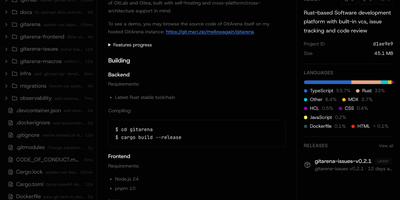
GitArena gives your team its own place to host code, combining repository hosting, issue tracking, and code review in one lightweight service you run yourself. Push and pull over HTTP or SSH, browse code in the browser with syntax highlighting, blame, and raw views, and follow commit history with diffs branch by branch. Repositories can be forked, archived, tagged, and released with downloadable assets, and every project gets an issue tracker with labels, milestones, assignees, and a kanban board. Issues are stored natively in Git using the git-bug format, so they travel with the repository and remain readable offline with the git-bug CLI. Merge requests collect changes for review before they land, while organizations and teams control who can see and change each project. Search spans code, repositories, issues, and users from one box, profiles show contribution graphs and activity, and sign-in supports passwords, SSH keys, passkeys, and OAuth single sign-on. A REST API exposes the platform to your own tooling, and the whole service runs from a single Docker Compose stack or a compiled binary with a separate frontend build. Running on a dedicated VPS on RepoCloud with guaranteed CPU, RAM, and SSD, full root SSH access, and a browser serial console. MIT licensed.
TidyQuest
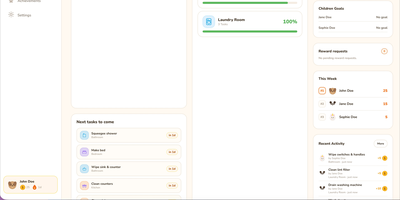
Whoever vacuums the living room this week should not be decided by whoever loses the argument, so TidyQuest turns household chores into quests with health bars, coins, and a family leaderboard. Every chore gets a health indicator that drains as its due date approaches, which makes overdue cleaning visible at a glance instead of festering in a group chat. Completing tasks pays coins into a personal wallet, builds daily and weekly streaks, and unlocks twelve milestone achievements from first chore to a thirty day run. Coins buy entries from a reward catalog your household defines, whether that is picking the Friday movie, extra game time, or sleeping in, and parents approve each redemption before it counts. Rooms organize work around the eight built-in spaces, from kitchen and bathroom to garage and garden, seeded with more than sixty predefined chores at realistic intervals. Assignment modes decide how credit lands: the first finisher takes everything, assignees split coins equally, or custom percentages reward whoever does the heavier share, while a strict mode requires admin approval before completions count. Reminders reach phones through web push, Telegram, ntfy, or Home Assistant, and vacation mode pauses decay for anyone away. A calmer couple mode strips the game layer away entirely, leaving plain shared tracking for households that just want the list. Running on a dedicated VPS on RepoCloud with guaranteed CPU, RAM, and SSD, full root SSH access, and a browser serial console. AGPL-3.0 licensed.
PayMe
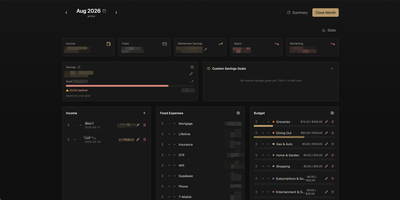
PayMe is a privacy-first personal finance dashboard that runs entirely on your own hardware with zero third-party service dependencies. The Rust backend compiled to a single binary serves a React 19 frontend built with Vite, TypeScript, and Tailwind CSS 4, storing all financial data in a local SQLite database that auto-migrates on startup. Monthly dashboards track income entries, fixed expenses like mortgage and utilities, and budget categories with real-time progress bars showing spending against configurable limits. The savings module includes goal tracking with percentage-based progress indicators, custom savings goals for targeted objectives, retirement savings projections with breakdown analysis, and projected savings calculations. Variance analysis compares actual spending against budgets across categories. Drag-and-drop reordering powered by dnd-kit lets you arrange income sources, expenses, and budget items to match your workflow. The interactive charts rendered by Recharts visualize spending trends, income patterns, and savings trajectories. Month-by-month navigation tracks financial history over time, while the Summary and Stats views aggregate data across periods. JWT-based authentication secures access, and the full OpenAPI Swagger documentation at the /swagger-ui endpoint exposes every API route for automation and integration. Docker Compose deployment creates a minimal image with the compiled Rust binary and static frontend assets, running on port 3001 behind nginx, Caddy, or Traefik reverse proxy with HTTPS. On RepoCloud, deploy PayMe on a dedicated VPS with persistent SQLite storage, root SSH access, and complete privacy over your household financial data, all under the MIT license.
Neohabit
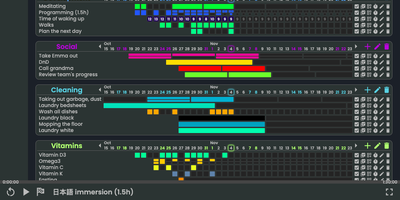
Most habit trackers punish a single missed day, so Neohabit lets you build routines that happen X times in Y days, like three workouts in five days or one deep-work session every three days, and adjust the target mid-streak as the habit gets easier. Your progress renders as GitHub-style contribution heatmaps in three styles: monochromatic grids for simple check-ins, numeric grids that record values such as calories, spending, reps, or hours up to two billion, and fractured grids that split each period into up to sixteen segments for habits done many times a day. Related habits group into projects with a one-dimensional daily view, and skill trees let you plan progressions, for example raising a reading target from twenty minutes to an hour in planned steps. You can ease into a new routine by starting at once in four days instead of daily, track things you want to reduce as well as build, hover any cell for period details, and rearrange projects and habits by dragging them. Multiple accounts, light and dark themes, keyboard shortcuts, and a polished mobile browser interface round out daily use, and a single command brings the whole thing up with prebuilt images ready to go. Running on a dedicated VPS on RepoCloud with guaranteed CPU, RAM, and SSD, full root SSH access, and a browser serial console. AGPL-3.0 licensed.
Hammond
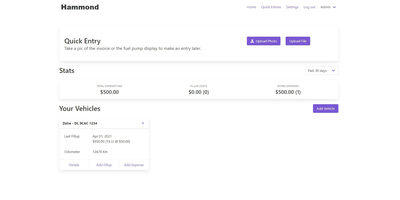
When Clarkson, the once-popular fuel logger, stopped receiving updates, Hammond stepped in as its logical successor - a self-hosted vehicle expense tracker. Written in Go with a Vue.js interface and SQLite storage - a single lightweight container, no external database - it tracks every cost your vehicles generate: fuel fill-ups with cost, volume, and odometer readings; maintenance and repairs; and arbitrary other expenses, each attachable with photos and documents stored against the vehicle. The multi-user, multi-vehicle design is what sets it apart from phone apps: a household or small business adds all its vehicles and all its drivers, shares vehicles across users, and every fill-up lands in one ledger no matter who was driving. The Quick Entries feature respects how expenses actually happen - snap a photo of the receipt or pump screen at the gas station, then complete the structured entry later when you have a minute. Reporting works at both the vehicle level (cost per distance, fuel economy trends) and across the whole fleet. Migration matters here: importers for Clarkson, Fuelly, and Drivvo bring years of fill-up history along, so switching does not mean starting your data over.
HabitSync
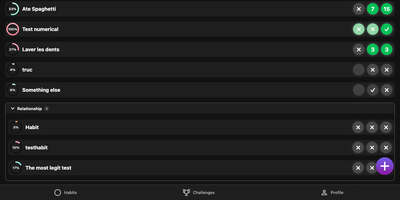
HabitSync treats habit tracking as a team sport, because willpower alone rarely survives February. Set each habit up the way life actually works: daily, weekly, monthly, on chosen weekdays, or at a custom interval, with a target value to reach or a ceiling to stay under for the habits you are trying to quit. Logging takes one tap, or a long press when today's effort deserves a custom number or a stopwatch. Share a habit with a partner, a sibling, or the whole household and everyone's progress sits side by side, which turns "did you go to the gym" into a question the dashboard answers. Monthly challenges raise the stakes with community voting, leaderboards, and medals for the top performers, while gentle automation watches your back: scheduled reminders when a habit goes unlogged, an alert when your completion slips under a threshold, and a quiet nudge when a friend overtakes you. Years of Loop Habit Tracker history import instead of being abandoned, and the installable web app keeps the streak one tap away on any device. Running on a dedicated VPS on RepoCloud with guaranteed CPU, RAM, and SSD, full root SSH access, and a browser serial console. BSD-3-Clause licensed.

Shortlink
Shortlink is a self-hosted platform for short links and live QR codes that keeps every printed, shared, or forwarded entry point under your control long after it leaves your hands. A code printed on ten thousand flyers cannot be recalled when the campaign page moves, so the destination behind it changes while the printed image stays exactly the same. Create short links with custom codes, a choice of 301, 302, 307, or 308 redirects, expiry dates, visit caps, and a fallback target for when the main destination is down. Build live QR codes backed by a pool of destinations that rotates by order, weight, random pick, or least-shown strategy, with transactional saves so a half-finished edit never goes live. Style each code in classic, rounded, or dot patterns with your own colors and a center logo, preview it in real time, and download print-ready SVG, PNG, or WEBP files. New links and codes land in an approval queue that an admin reviews before anything goes public, and every change is written to an audit log. Teammates sign in with an emailed magic link or GitHub, manage only the resources they own, and watch thirty days of visit trends, unique IPs, and device and browser breakdowns roll in. Running on a dedicated VPS on RepoCloud with guaranteed CPU, RAM, and SSD, full root SSH access, and a browser serial console. AGPL-3.0 licensed.
Moneat
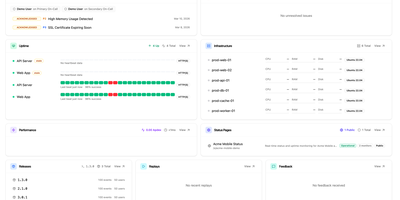
Moneat is the open-source observability platform that unifies error tracking, session replay, performance monitoring, logging, uptime checks, synthetics, product analytics, and AI observability into a single self-hosted application — replacing Sentry, Datadog, and Statuspage with one deployment. The Sentry SDK compatibility layer accepts data from @sentry/browser, @sentry/node, @sentry/react, @sentry/nextjs, sentry-sdk for Python, sentry-kotlin, sentry-java, sentry-android, sentry-cocoa, sentry-go, sentry-ruby, and Sentry.NET by updating one DSN endpoint. Datadog Agent compatibility redirects existing fleets by setting dd_url, and native OpenTelemetry OTLP ingestion accepts logs, traces, and metrics from any exporter or Collector. Error monitoring groups exceptions with smart deduplication, session replay records DOM-based user interactions linked to errors, distributed tracing visualizes transaction and span breakdowns with live service maps, and continuous profiling renders flamegraphs in pprof, JFR, and Sentry formats. Uptime monitoring runs HTTP, TCP, and ping checks with public status pages, while synthetics executes API tests, multi-step workflows, SSL checks, and DNS probes. Custom dashboards support drag-and-drop widgets with Grafana import, product analytics provides funnels and retention cohorts, release tracking surfaces crash-free rates with source map upload, and AI observability traces LLM calls end to end. Built on Kotlin and Java with ClickHouse for analytical storage, PostgreSQL for relational data, and Redis for caching, deployment uses Docker Compose with an interactive installer automating secrets and service orchestration. Running on a dedicated VPS on RepoCloud with guaranteed CPU, RAM, and SSD, full root SSH access, and a browser serial console. AGPL-3.0 licensed.
GlitchTip
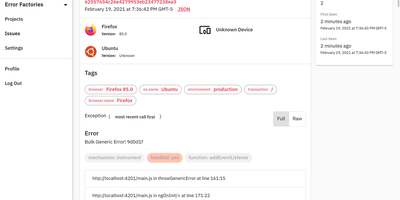
GlitchTip speaks Sentry's protocol without Sentry's operational weight - open-source error tracking that your existing SDKs already understand. The pitch is pragmatic: instrument your application with the official Sentry SDKs you already know - any language they cover - and point the DSN at your own GlitchTip instance instead. Errors, exceptions, log messages, and Content Security Policy violations flow into one place for triage, grouped into issues with stack traces, with alerts delivered by email or webhook the moment things break. Where self-hosted Sentry has ballooned into a docker-compose stack of twenty-plus containers, GlitchTip is a deliberately lean Django and PostgreSQL application a small team can actually run. Beyond errors, it bundles three more monitoring concerns: performance monitoring takes a works-out-of-the-box approach - no dashboard building, just your slowest web requests, database queries, and transactions surfaced automatically; uptime monitoring pings your sites and alerts on failures, or runs in reverse as a dead-man's-switch heartbeat for cron jobs that must check in on schedule; and log search puts application logs alongside errors for faster debugging. Unlimited projects and team members, MIT-licensed, built by Burke Software - your event volume is limited only by your own hardware.