NetMap
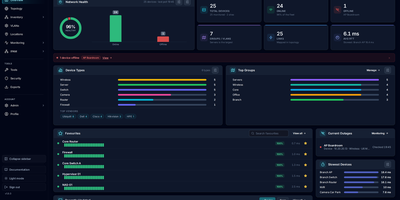
NetMap answers the four questions every homelab owner asks in four different tools: what is on my network, what address did it get, is it still up, and why is the firewall shouting about it. Devices you add appear automatically on a visual canvas where you can drag them into place, draw the links between them, and group them into VLANs or separate sites, and the layout is still there when you come back. Behind the map, every device is watched continuously: ping times graphed over history, service checks on the ports you care about, a heartbeat strip that betrays intermittent dropouts, and an uptime percentage that settles arguments. Address management stops being a spreadsheet: define subnets, import the leases your router already handed out, see used and free addresses as a grid, and get warned before a duplicate assignment causes a mysterious outage. Firewall logs stream in live and each entry links to the device it concerns, ready to search by address, port, or protocol. When something new appears, a network scan discovers hosts with their names, hardware addresses, and open ports for review before they join the inventory. Running on a dedicated VPS on RepoCloud with guaranteed CPU, RAM, and SSD, full root SSH access, and a browser serial console. GPL-3.0 licensed.
llamactl
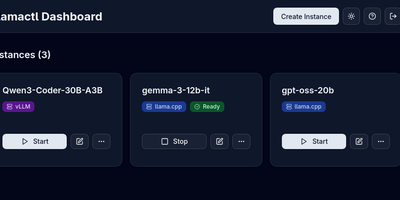
One dashboard and one API address for every local model you run, across llama.cpp, vLLM and MLX: that is llamactl. Create an instance in the web UI, pick a backend, and the server assigns ports and API keys, starts the model, and shows its health next to every other instance you run. Models download straight from HuggingFace inside the dashboard, in GGUF for llama.cpp or Safetensors for vLLM, so stocking a new model never means juggling command lines and file paths. Your applications keep talking to familiar endpoints, because llamactl exposes OpenAI chat completions and Anthropic messages routes and sends each request to the model named in the call. A llama.cpp router instance can serve several models from one process and load them on demand, and idle instances stop on a timer or make room through LRU eviction when the GPU gets crowded. Groups cap how many heavy models run at once, backends can live in Docker containers with GPU access, and instances on other machines appear in the same central dashboard with automatic routing. API keys minted in the UI guard both inference and management calls. Running on a dedicated VPS on RepoCloud with guaranteed CPU, RAM, and SSD, full root SSH access, and a browser serial console. MIT licensed.
dinkydash
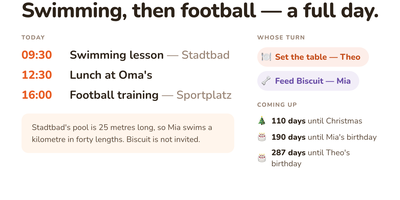
The family calendar nobody opens helps nobody, so DinkyDash puts it on a screen the household walks past. Paste in iCal links from Google, iCloud and Outlook calendars and the board merges them into one agenda in time order, big enough to read from across the kitchen, with tomorrow tucked underneath when the day leaves room. A personal calendar can share only the events marked for a partner and keep work and private appointments to itself. Chores answer the daily argument on their own: whose turn it is moves on with the date, so nobody ticks anything off. Birthdays, holidays and special dates count down in the corner, and once a day the board gets a fresh headline written about your actual day, with a useful note parked under the agenda. Light and dark themes come from the settings page, and that same settings page on your phone edits the configuration file directly, comments preserved. A preview page shows the board at Pi, TV and tablet sizes side by side before you mount anything. There is deliberately no login: it assumes your home network, rewards you with a board you never sign into, and asks to stay behind a VPN or an authenticated proxy if you view it away from home. Running on a dedicated VPS on RepoCloud with guaranteed CPU, RAM, and SSD, full root SSH access, and a browser serial console. MIT licensed.
HomeLabInfo
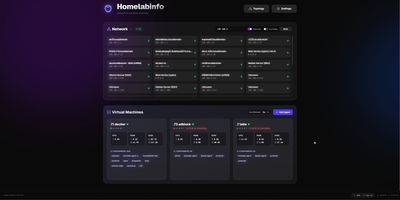
HomeLabInfo gives your homelab one dashboard where the network itself and everything running on it finally appear together, instead of scattered across router pages and terminal sessions. It watches for new devices the instant they ask the network for an address, identifies who made them, and can fire a webhook so you hear about a stranger joining your LAN before you notice it yourself. Scans keep track of which devices are online and which have gone quiet, and the interactive topology view lets you arrange the map of switches, access points, NAS boxes, and servers the way your rack actually looks. Lightweight agents installed on each machine report their containers back to the hub, so running and stopped containers, uptime, health, and host CPU, memory, and disk all show in one place without opening a separate tool per server. When an agent falls behind, its card tells you a newer version exists instead of leaving you guessing. You can add a username and password login before putting the dashboard anywhere beyond your desk, and arrange container layouts that stay put between visits. Running on a dedicated VPS on RepoCloud with guaranteed CPU, RAM, and SSD, full root SSH access, and a browser serial console. GPL-3.0 licensed.