Redd-Archiver
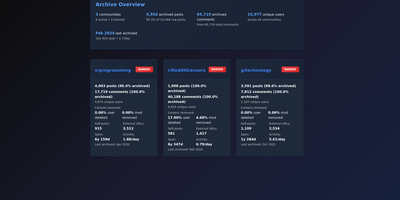
Redd-Archiver builds you a private, permanent copy of Reddit's history: feed it public data dumps and it returns a browsable, full-text-searchable archive of the communities you choose. The source material is enormous and already public: the full Pushshift and Arctic Shift Reddit datasets hold over 2.38 billion posts from 40,000 subreddits, the complete Voat archive adds 3.81 million posts, and Ruqqus contributes another half million, all importable by community instead of wholesale. One import into PostgreSQL becomes three possible websites: a static export that runs on any host down to a USB stick, the default hybrid of static pages plus a live search server, or a fully dynamic site that renders straight from the database with flair, domain, score and date filters. Search understands keywords, subreddit, author, date and score operators, and the same archive answers scripts and AI agents through thirty-plus REST endpoints and an MCP server with 29 tools. Monthly Arctic Shift dumps keep everything current: updates import only your tracked subreddits, skip themselves by checksum when re-run, refresh scores, and never let a later deletion overwrite text you preserved. Subreddit rules, descriptions and wiki pages ride along with the posts, eleven themes restyle the result, and the whole thing can hide behind a Tor hidden service or stand on HTTPS with its own domain. Running on a dedicated VPS on RepoCloud with guaranteed CPU, RAM, and SSD, full root SSH access, and a browser serial console. Unlicense licensed.
db-ui
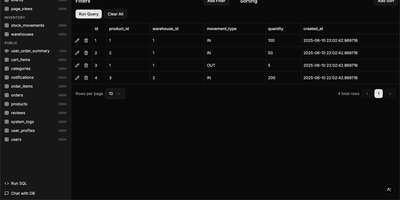
Traditional database management tools like pgAdmin and phpMyAdmin were built for DBAs, not for the rest of the team that just needs to look up a record or run a quick query. db-ui strips away the complexity and gives you a clean, modern interface that anyone can use. Browse tables in a paginated grid view with inline editing, filtering, and sorting built right into the column headers. The sidebar lists every table and view across all schemas with fuzzy search (Cmd+K to focus) that filters results as you type. Click any table to see its data, or switch to the schema introspection view to visualize columns, types, constraints, and relationships without writing a single query. The SQL editor provides syntax highlighting, result visualization in tabular format, and one-click CSV export for downstream analysis. For questions about your data model, the integrated AI chat assistant has full access to your database schema and can help you understand table relationships, write complex queries, suggest indexes, and provide optimization recommendations with streaming responses. Connect to PostgreSQL, MySQL, or Microsoft SQL Server through environment variables and deploy the whole application as a single Docker container. On RepoCloud, deploy db-ui on a dedicated VPS with root SSH access and direct connectivity to your database servers under the MIT license.