Fusion
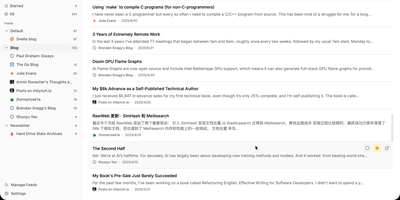
Follow every blog, newsletter, and news site you like from one distraction-free inbox with the self-hosted Fusion RSS reader, which has no AI features by design. A left sidebar lists feed groups with unread counts and jumps between Unread, Starred, and All, while the center list shows articles under filter tabs with read and star buttons on every card. Click a card and a right-hand drawer opens with the full sanitized article, a link to the original, and Previous and Next buttons. Press Cmd or Ctrl+K, or the slash key, to search feeds and articles from anywhere. Stay on the keyboard with Google Reader-style keys such as j and k to move, m to mark read, s to star, and g then u to jump to Unread; the question mark lists them all. Add a feed by entering a site address and letting auto-discovery find it, then pick its group, refresh frequency, and HTTP proxy, or suspend it to pause updates. OPML import and export bring subscriptions in or out. Starred articles are saved as snapshots that outlive their source feed. Fever API compatibility lets Reeder, Unread, and FeedMe read the same library. Sign in with a password or OIDC single sign-on, and install the interface as a PWA with Light, Dark, and System themes in eight languages. Running on a dedicated VPS on RepoCloud with guaranteed CPU, RAM, and SSD, full root SSH access, and a browser serial console. MIT licensed.
Deploy