RetroAssembly
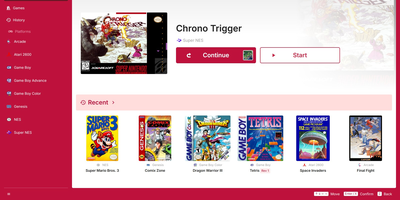
Want your ROM collection playable from any browser? RetroAssembly turns it into a retro arcade cabinet with box art, save states, and touch controls. Upload your own game files and the library detects box art and covers automatically, grouped by platform, with a Continue shelf that resumes your last session and a history view of recent games. More than two dozen systems run here, including NES, Super NES, Genesis, Game Boy, Game Boy Advance, arcade, Atari, PC Engine, and PlayStation 1. Save states can be created at any moment, synchronized, and resumed later, and some emulators can rewind gameplay after a mistake. Spatial navigation moves through games with a keyboard or gamepad, and an on-screen virtual controller makes touch devices playable without hardware. Retro-style shaders add visual effects. Each game page lists platform, release date, genres, developer, and publisher with screenshots and videos, and platform pages describe the console itself with its history and manufacturer. Running on a dedicated VPS on RepoCloud with guaranteed CPU, RAM, and SSD, full root SSH access, and a browser serial console. MIT licensed.
VodMax
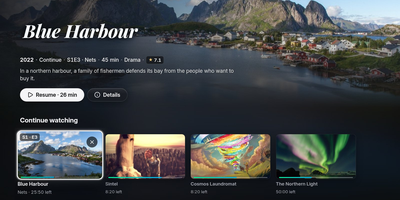
Live TV, movies, and series usually live in separate apps; VodMax gathers them in one home server with a set-top-box feel. Zap channels by number, browse a program guide grid, pause and rewind a live show, or start it from the beginning. Record from the guide or with rules, and even type a sentence like "record tonight's film" to the optional assistant. Playlists from M3U or Xtream Codes sit beside local folders of movies and series, and posters, plots, cast, continue watching, next episode, and skip intro work across all of them. Each person gets a profile with their own progress, favorites, and a kids mode, and TVs and phones pair with a short code or a home sign-in. Plex, Jellyfin, and Emby can see the server as a tuner, and TiviMate, Kodi, and VLC read its playlist and guide. A catalog filter keeps only your countries, years, and categories, and an optional built-in WireGuard tunnel keeps playlist traffic private. Encrypted backups, downloads for offline viewing, and an interface in six languages round it out. Running on a dedicated VPS on RepoCloud with guaranteed CPU, RAM, and SSD, full root SSH access, and a browser serial console. AGPL-3.0 licensed.

Suwayomi
Manga collections tend to get trapped on a single phone; Suwayomi moves the library, downloads, and reading progress onto a server you run, so every browser and device sees the same shelf. In the browser, a built-in reader handles single page, double page, continuous vertical, continuous horizontal, and webtoon layouts, adding image filters, custom keybinds, auto scrolling, and separate desktop and mobile views. Content comes from Mihon (Tachiyomi) extensions, which can be searched, browsed, and sorted into categories, with custom extension stores loaded from JSON or Protobuf indexes. Downloads save chapters as CBZ archives for offline reading, and the server checks the library for new chapters every 12 hours by default, fetching them automatically if you allow it. Progress follows you through MyAnimeList, AniList, and MangaUpdates, a Suwayomi extension and tracker for Mihon, SyncYomi servers, and KOReader. E-reader apps connect over OPDS feeds, scheduled Mihon-compatible backups protect the library, and FlareSolverr or Byparr support handles Cloudflare-protected sources. Public instances can be locked down with basic authentication, a simple login page, or JWT-based UI login, and a PostgreSQL backend, still in beta, can replace the default file store. Running on a dedicated VPS on RepoCloud with guaranteed CPU, RAM, and SSD, full root SSH access, and a browser serial console. MPL-2.0 licensed.
Cliparr
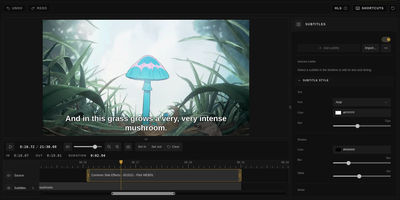
You are halfway through a film when a scene begs to be shared, and Cliparr is the self-hosted clip maker that turns moments from your Plex, Jellyfin, or local video library into shareable clips without opening a full video editor. Connect a media server and Cliparr follows live playback sessions automatically, so the scene you are watching is already loaded when you decide to keep it. Local video files open directly in the browser without being uploaded anywhere first. Mark the range, fine tune the start and end, then crop the frame freely or to a fixed aspect ratio with mouse or touch controls, which makes vertical clips for phones as easy as widescreen ones. Exports run entirely in your browser as video, audio only files, or GIFs, so the server never turns into a render box and the clip lands on the device you are using. Source details, artwork, and clip timing travel inside supported containers, keeping the exported file labelled with where it came from. Captions are a first class step: write your own subtitles, import an existing file, style the text, and burn it into the picture before export. Editor keyboard shortcuts, access control, and reverse proxy support round out a tool that fits into an existing media setup instead of replacing it. Running on a dedicated VPS on RepoCloud with guaranteed CPU, RAM, and SSD, full root SSH access, and a browser serial console. MIT licensed.
Kavita
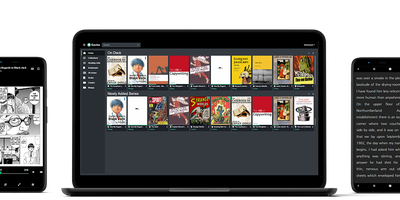
Manga, comics, ebooks, and light novels get a streaming-service-style home in Kavita - a fast, cross-platform reading server for the DRM-free collection you share with family and friends. It natively serves CBZ, CBR, CB7, ZIP/RAR/7z archives, raw images, EPUB, and PDF, with hand-crafted web readers per format: webtoon scrolling, single and dual-page spreads with advanced caching for the comic reader, and a book reader with adjustable fonts, spacing, margins, color themes, and column modes. Reading progress tracks per user, so everyone resumes exactly where they stopped on any device. Metadata parses from filenames, ComicInfo.xml, and EPUB fields, feeding index-backed search, smart filters, collections, reading lists with CBL import, and Want to Read queues. Role-based user management covers age restrictions, per-library access, and OIDC authentication. An OPDS feed connects third-party clients - Panels on iOS, Librera on Android, KOReader on e-ink devices - and a comprehensive REST API supports custom integrations. EPUB annotation and highlight support, custom theming, and full localization round it out. Built with .NET and Angular, it handles 50,000+ file libraries without strain; optional Kavita+ adds AniList scrobbling, recommendations, and external metadata.
OvenMediaEngine
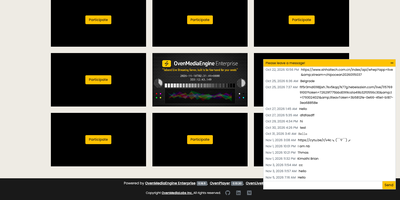
OvenMediaEngine ingests a broadcast feed once and delivers it to every viewer with sub-second delay over WebRTC and Low Latency HLS. Encoders push through WebRTC with WHIP, SRT, RTMP, or MPEG-2 TS, and the server can also pull RTSP sources and schedule pre-recorded files as live channels. The embedded transcoder converts incoming video to adaptive bitrate ladders in VP8, H.264, H.265, or AV1, so phones on weak signals and televisions on fiber each receive a rendition they can play. WebRTC delivery runs through an embedded signalling server and TURN server, with retransmission and forward error correction keeping pictures intact on imperfect networks. LLHLS streams carry DVR rewind, WebVTT subtitles, timed metadata, and DRM through Widevine, FairPlay, and PlayReady. Recordings dump finished streams to files for video on demand, thumbnails capture stills, and push publishing re-streams to other platforms over RTMP and SRT. Origin-edge clustering spreads a popular event across many servers, admission webhooks and signed policies control who may publish and watch, and a REST API plus monitoring endpoints keep the whole service observable. Running on a dedicated VPS on RepoCloud with guaranteed CPU, RAM, and SSD, full root SSH access, and a browser serial console. AGPL-3.0 licensed.

Reiverr
Finding something to watch, requesting it, downloading it, and pressing play all happen on one remote-friendly screen. Browse trending titles, genre rows, and streaming network shelves backed by TMDB, then open a series to pick the episodes to request. Download-ahead rules fetch the next few episodes as you watch, keep the last watched ones, and remove watched files after a chosen period, so the disk does not fill with finished shows. A built-in torrent client does the downloading through an indexer, and each user gets a storage quota that appears next to every request. The library page tracks unwatched and watched series and movies with filters for media type, files on disk, and sort order, plus an A to Z jump bar. A Downloads page lists what is fetching and what each request holds, and the Server page scans library folders, flags managed or external files, and shows logs. Existing media folders are discovered from disk and stay compatible with Jellyfin layouts. Direct playback supports audio track selection and sidecar subtitles. Apps for Samsung Tizen and Android TV talk to the same backend. Running on a dedicated VPS on RepoCloud with guaranteed CPU, RAM, and SSD, full root SSH access, and a browser serial console. AGPL-3.0 licensed.
Pinchflat NGX
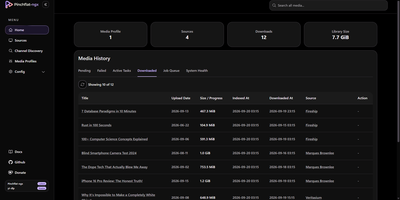
Pinchflat NGX is a self-hosted media manager that subscribes to YouTube channels and playlists, then downloads new videos into your own library automatically. Sources can be channels, playlists, or single videos, added by pasting a URL, searching in Browse, or importing a Google Takeout subscription list. Media profiles set quality, output templates, and retention, and each source can route its files to its own folder. The Sources page switches between a poster grid and a sortable table, with start, pause, and stop controls on every row. Channel Discovery suggests related channels with a score and evidence, and nothing is added until you accept it. A diagnostics page shows queue health, database size, and integrity checks, and notifications can use Discord embed formatting. Finished downloads trigger library refreshes on Plex, Jellyfin, and Emby, and an OPML feed serves podcast clients. OIDC single sign-on protects the web interface through providers like Authentik and Authelia. Running on a dedicated VPS on RepoCloud with guaranteed CPU, RAM, and SSD, full root SSH access, and a browser serial console. AGPL-3.0 licensed.
FileBrowser Quantum
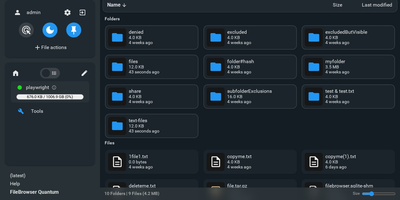
FileBrowser Quantum is an open-source, self-hosted web file manager that transforms any directory tree or mounted storage volume into a fast, searchable cloud drive accessible from any browser. You can mount multiple independent filesystem sources at once and apply custom include or exclude rules to keep sensitive system folders hidden from everyday browsing. A background indexing engine powers instant as-you-type search across millions of files, letting you filter results by file size, folder size, media type, or modification date in milliseconds. Rich media thumbnails render automatically for videos, office documents, audio album artwork, and interactive 3D models, while integrated OnlyOffice support lets you edit spreadsheets and word processing documents directly inside your browser tab. Built-in WebDAV server support allows desktop operating systems and mobile file apps to mount your remote directories as native network drives. Sharing files with external collaborators takes seconds through customizable public or private links with expiration timers, download limits, password protection, anonymous upload permissions, and custom branding themes. Administrators can authenticate users via OpenID Connect, LDAP, JSON Web Tokens, proxy headers, or local passwords with two-factor authentication, then enforce path-level read, write, and delete rules per user or group. Developers and automation engineers can generate long-lived API tokens and explore the interactive Swagger endpoint to script file transfers and directory provisioning. Running on a dedicated VPS on RepoCloud with guaranteed CPU, RAM, and SSD, full root SSH access, and a browser serial console. Apache-2.0 licensed.
Kima
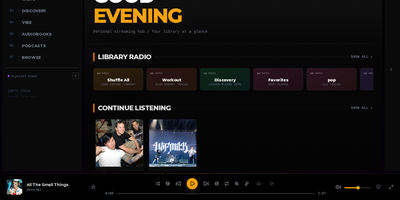
Streaming personal music collections with neural discovery and intelligent playlist curation is what Kima accomplishes as a modern self-hosted audio server that replaces Spotify and Apple Music. Listeners organize their FLAC, MP3, and AAC audio files into responsive grid layouts that scale up to eight columns on ultra-wide displays while automatically fetching album covers, artist biographies, and synchronized line-by-line lyrics. The built-in Vibe System utilizes CLAP neural network audio embeddings to map an entire music collection across two-dimensional clusters and three-dimensional interactive galaxy views, enabling users to explore acoustic relationships or queue smooth sonic paths between distant tracks. Music fans can import playlists directly from Spotify, Deezer, and YouTube using deterministic ISRC matching, while automated Made For You mixes generate era-specific playlists, workout stations, and discovery queues based on individual listening habits. Integrated podcast search pulls subscriptions from iTunes with automatic episode tracking across devices, while native Audiobookshelf connectors synchronize spoken-word chapter positions and playback progress directly into the unified web player. OpenSubsonic API endpoints allow mobile users to stream libraries through native clients like Symfonium and DSub using scoped authentication tokens, while administrators manage multi-user accounts with time-based two-factor authentication. Running on a dedicated VPS on RepoCloud with guaranteed CPU, RAM, and SSD, full root SSH access, and a browser serial console. GPL-3.0 licensed.
mhub
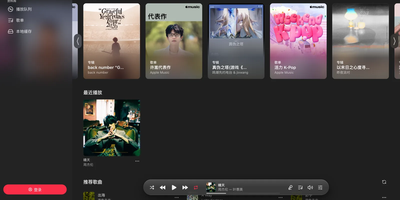
Apple Music, NetEase Cloud, and QQ Music stop being separate apps with MHub: one self-hosted player searches all three and lines their songs up in a single queue. Search any platform, import its playlists, and MHub matches tracks across services, then keeps imported lists following the originals with a daily sync. The queue takes appends, play-next picks, drag reordering, shuffle, and loop, and an AutoPlay radio built from your recent songs keeps playing when it runs dry. ALAC tracks decode losslessly right in the browser with sample-accurate scheduling, and everything else plays natively, with quality chosen at play time. Lyrics land character by character over a background tinted by the cover art, and they convert between Simplified and Traditional Chinese on request. Lock the phone or switch apps and playback rolls on with system media controls, the next track preloaded for a seamless handoff. Songs and lyrics cache on the device for offline listening, and the player installs as a PWA that behaves like a native app. Add a passkey account and your library syncs live between devices, so the playlist you built at your desk is waiting on your phone with your place kept. One Docker container runs it, bound to localhost by default behind your reverse proxy. Running on a dedicated VPS on RepoCloud with guaranteed CPU, RAM, and SSD, full root SSH access, and a browser serial console. AGPL-3.0 licensed.
Mydia
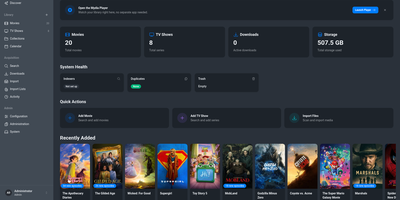
Mydia turns a folder full of movies and TV shows into a polished library that finds, ranks, and upgrades releases on its own. Poster grids, series pages with season and episode lists, and a release calendar keep every title organized with metadata from TMDB and TVDB. Monitored searches send requests to Prowlarr, Jackett, or the built-in indexer engine, then pass the best release to qBittorrent, Transmission, SABnzbd, NZBGet, or a debrid provider. A transparent ranking system explains why one release beat another, and quality profiles with custom formats decide when a better file should replace the old one. Guests can request titles through an approval workflow, and sign-in works with local accounts or OpenID Connect. Import lists pull from TMDB watchlists, popular, and trending charts, and a dashboard shows library size, downloads, duplicates, and storage at a glance. The built-in player streams the library from a browser at the /player path, with apps for desktop and phones that connect through an encrypted peer-to-peer link. Light, dark, and several color themes fit any screen. Running on a dedicated VPS on RepoCloud with guaranteed CPU, RAM, and SSD, full root SSH access, and a browser serial console. AGPL-3.0 licensed.
Subatic
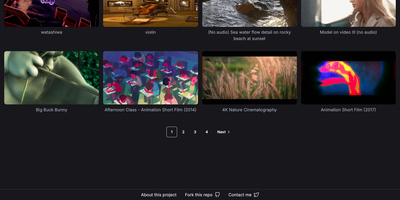
Your own video hosting site that behaves like the big platforms: upload a file, share a link, and anyone can press play. Subatic takes care of everything between those two moments. Drop in a raw video and the transcoding pipeline converts it into web-ready formats, stores the finished files in S3-compatible storage, and publishes a clean watch page with the title and an animated thumbnail that previews the content before a click. Playback streams directly from the storage bucket, so a Cloudflare R2 bucket with caching turns your little server into a video host whose delivery costs stay close to zero as views climb. A public homepage grid showcases your latest uploads with those moving thumbnails, and visitor counts can flow into Umami or Plausible if you want audience numbers without handing viewers to a third-party tracker. Creator accounts handle uploading, and one Docker Compose file brings up the whole stack: the app, the transcoder, MinIO for local object storage and PostgreSQL. A teacher can post course videos without platform rules, a band can share rehearsal footage, and a homelab can keep family clips on hardware in the closet. Running on a dedicated VPS on RepoCloud with guaranteed CPU, RAM, and SSD, full root SSH access, and a browser serial console. GPL-3.0 licensed.
Denpa
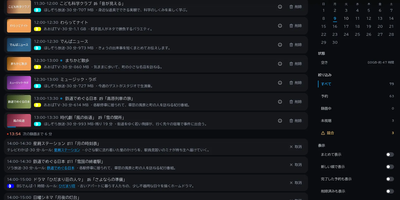
Denpa is a home TV recording server that turns a Linux machine and a TV tuner into a private recorder for Japanese terrestrial and satellite broadcasts, with reservations and browser playback. There are no configuration files: plug in a supported tuner and card reader, press scan, and the tuner type, channels, and program guide set themselves up. Reserve from the guide, or save a search as a rule and matching broadcasts record automatically; a repeated episode is ignored after its first airing is captured. Recordings encode to AV1 or H.264 MKV files (H.265 when a GPU is present) with captions exactly as broadcast, and detected commercials become chapters that playback skips entirely. Playback resumes where you stopped, runs at up to double speed, and clips save on the server with captions intact; programs also download to devices for offline viewing. Live viewing runs about a second behind the broadcast: pausing starts chase playback, alternate audio stays selectable, and BML data broadcasting works in the browser. The companion denpa-tv app reaches Android TV and Fire TV through QR pairing, and an API exposes channels, recordings, and audio-only feeds to Home Assistant and scripts. EPGStation and EDCB users can import rules, reservations, and recordings, and the interface stays closed until you open it to trusted networks or protect it with OIDC login. Running on a dedicated VPS on RepoCloud with guaranteed CPU, RAM, and SSD, full root SSH access, and a browser serial console. AGPL-3.0 licensed.
Deadair
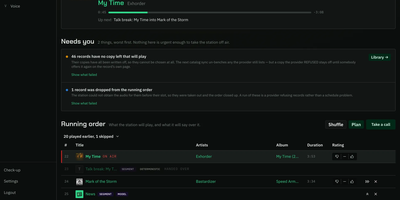
Somewhere in your house, a presenter is introducing the next record, and that presenter is a language model running on your own server. Deadair builds you a real radio station rather than another playlist: it picks records from your Navidrome, Jellyfin, Emby, or Plex library, or from Spotify, YouTube Music, Pandora, and Apple Music, writes what the host says between songs, speaks it in that host's own voice, and broadcasts the result as one shared live stream over Icecast, with no skip button and the same show for every listener. From the console you steer it in plain sentences: tell it "rap like Snoop Dogg" and the next hours programme themselves to that brief, or ask why the record on air was chosen and get an answer. The forward lineup runs several hours deep, visible and editable, and nothing reaches air until its audio is already on the machine, so the stream never stutters waiting on a download. Words and voice are separate choices, swapped live in Settings: break-writing can run on a hosted model while a local Kokoro or Chatterbox voice reads it, and a station with no model at all still talks. Twenty-seven bundled plugins cover music sources, metadata, news, weather, and speech, and third-party plugins install from the console. Running on a dedicated VPS on RepoCloud with guaranteed CPU, RAM, and SSD, full root SSH access, and a browser serial console. MIT licensed.

Kaloscope
Kaloscope manages your media library the way a flowchart thinks: search, download, scrape, rename, shelve, and play, each step a node you can see and rearrange. Drag HTTP requests, Python scripts, conditions, and loops onto the canvas to build the exact pipeline your sources need, then import community templates from GitHub when someone has already solved your problem. Global search aggregates multiple indexers at once, and finished finds flow straight into aria2, qBittorrent, Transmission, or OpenList for cloud downloading, with keyword rules and schedules automating the recurring hunts. Libraries for movies, series, and other media watch folders in real time, scrape rich metadata with custom naming rules, and read or write NFO files alongside the media. Press play in the same interface: FLV, HLS, and MP4 stream with on-demand transcoding, hardware acceleration, danmaku comments, and resume points that follow you between sessions. An AI assistant can draft workflows from plain language, inspect logs, and manage downloads, and external AI clients connect over MCP with token permissions you control. Per-library permissions, themes, and an installable PWA round out a server the whole household can use. Running on a dedicated VPS on RepoCloud with guaranteed CPU, RAM, and SSD, full root SSH access, and a browser serial console. GPL-3.0 licensed.
LibrePhotos
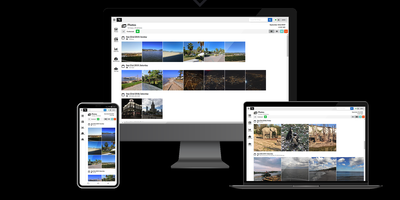
With over 8,000 GitHub stars and continuous development since 2020, LibrePhotos delivers the core intelligence of Google Photos — face recognition, object detection, semantic search, and automatic album generation — entirely on your own hardware without sending a single photo to a third-party server. The Django 5 backend processes uploaded media through a machine learning pipeline that runs face detection via the face_recognition library, clusters identified faces using scikit-learn and HDBSCAN, generates image captions through BLIP and Moondream 2, and classifies scenes using Places365 or Google's SigLIP 2 vision-language model with zero-shot classification against 900+ real-world tags. Semantic search lets you find photos by natural language queries like "sunset at the beach" without manual tagging, while metadata search filters by person, camera, lens, file type, and filesystem path. The React 18 frontend built with Vite presents a timeline view, fullscreen lightbox with slideshow mode, photo detail sidebar showing location and people, and a folder navigation view with breadcrumb paths. RAW files from any camera are converted via ImageMagick, videos processed through FFmpeg, and Live Photos paired with their RAW+JPEG counterparts as unified entries. Public album sharing via link provides fine-grained privacy controls, and duplicate detection uses perceptual hashing to identify near-identical images. Deployment runs as a single unified Docker container or via Docker Compose with Kubernetes manifests also available. Running on a dedicated VPS on RepoCloud with guaranteed CPU, RAM, and SSD, full root SSH access, and a browser serial console. MIT licensed.
Piwigo
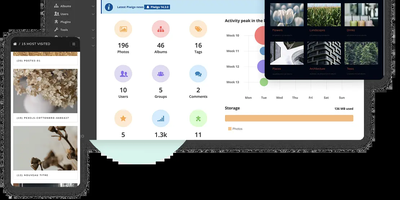
With over 3,800 GitHub stars and continuous development since 2002 spanning 24 years of active maintenance through version 16.4.0 released in May 2026, Piwigo has proven itself as one of the most battle-tested self-hosted photo gallery platforms available, trusted by professional photographers managing 150,000+ high-resolution images alongside small teams sharing event photos. The PHP backend with MySQL or MariaDB storage serves a responsive web interface that organizes photos into hierarchical albums with nested sub-albums, tag-based categorization, and smart albums generated dynamically from search criteria. Batch management tools handle bulk uploads, metadata editing, tag assignment, and album moves across thousands of images simultaneously. User permission controls define access at the album level with configurable public, private, and group-restricted visibility, while guest access allows public galleries without authentication. Image processing via ImageMagick or PHP GD generates multiple thumbnail sizes, watermarks, and responsive derivatives automatically. The plugin ecosystem with over 200 community-built extensions adds functionality from EXIF metadata display and GPS mapping to social sharing, download controls, and Lightroom synchronization for desktop workflow integration. The REST Web API with personal API key authentication enables programmatic album creation, photo uploads, and metadata queries from external applications. Mobile apps for iOS and Android provide on-the-go upload and browsing capability. Docker deployment via the official container or traditional LAMP installation on any hosting provider. Running on a dedicated VPS on RepoCloud with guaranteed CPU, RAM, and SSD, full root SSH access, and a browser serial console. GPL-2.0 licensed.