OliveTin
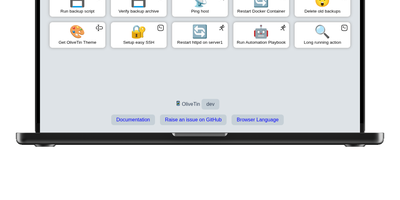
With over 3,600 GitHub stars and a philosophy of deliberate simplicity, OliveTin eliminates the need for SSH sessions, admin panels, and complex automation platforms by letting you define shell commands in a YAML config file and access them as clickable buttons through a clean browser interface. The Go binary consumes only a few megabytes of RAM, running on everything from tiny ARM and RISC-V devices through Linux VMs, containers, macOS, and Windows. Each button executes a predefined shell command with optional typed arguments that render as dropdowns, text fields, and validated inputs, preventing free-form command entry while giving users controlled access to server operations. Access control lists define exactly who can view or run each action — guests, family members, or junior administrators see only the buttons they are permitted to use. Entity templates generate actions dynamically from lists of hosts, containers, or other resources, creating one template that produces many buttons without manual duplication. Flexible triggers extend beyond browser clicks: cron schedules, webhooks, calendar file events, and filesystem watchers run actions automatically when conditions are met. Authentication supports OAuth2, JWT, and header-based methods for integration with reverse proxies and identity providers. Dashboards organize actions into folders and fieldsets for clear navigation across dozens of commands. No plugin system, no extension marketplace, no premium tiers — every feature ships in the single open-source release. Running on a dedicated VPS on RepoCloud with guaranteed CPU, RAM, and SSD, full root SSH access, and a browser serial console. AGPL-3.0 licensed.
Homebox
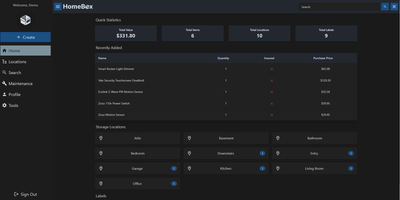
With over 7,000 GitHub stars and active community maintenance through version 0.26.0 released in June 2026, Homebox fills the gap between inadequate spreadsheets and overcomplicated enterprise asset management by providing a purpose-built inventory system designed specifically for home users, families, and small groups. The Go backend with SQLite storage deploys as a single Docker container consuming under 50MB of RAM at idle, running on hardware as modest as a Raspberry Pi while the responsive web interface adapts seamlessly across desktops, tablets, and smartphones. The entity-based architecture introduced in v0.26 unifies items and locations into a shared structure supporting custom fields, attachments, entity types, and reusable templates for consistent data entry across inventory categories. QR code generation creates printable labels that scan with any smartphone camera to instantly display item details, photos, serial numbers, and associated documents. Warranty tracking records purchase dates, prices, and expiration dates while maintenance scheduling sends reminders for recurring service tasks. Location hierarchies organize items spatially with nested sub-locations, and flexible label tagging enables cross-cutting categorization beyond physical placement. Multi-user support shares collections with family members or roommates with OIDC single sign-on integration for Active Directory, Okta, and other identity providers. CSV import and export handles bulk operations, while the full REST API enables automation and third-party integrations. Collection-level ZIP export packages complete inventories with attachments for backup or migration. Running on a dedicated VPS on RepoCloud with guaranteed CPU, RAM, and SSD, full root SSH access, and a browser serial console. AGPL-3.0 licensed.
GoatCounter
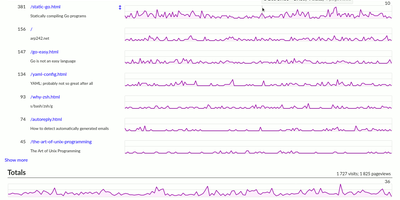
GoatCounter delivers meaningful web traffic insights — pageviews, referrers, browsers, screen sizes, country-level geolocation — without setting a single cookie, without collecting personal data, and without forcing GDPR consent banners on your visitors. Written entirely in Go and distributed as a single compiled binary consuming roughly 25MB of RAM, it adds just 3.5KB to your pages via the tracking script, with a JavaScript-free tracking pixel alternative for sites that avoid scripts entirely, plus backend middleware integration and log file import for server-side collection. The dashboard displays pageview counts per path with hourly resolution, referrer sources grouped by domain with full URL on hover, browser and OS version breakdowns, screen size distributions, and country-level location data derived from IP addresses that are immediately discarded after geolocation. Campaign tracking supports UTM parameters and custom data attributes. A public stats option exposes your dashboard at a shareable URL for build-in-public transparency. SQLite serves as the default database requiring zero administration, while PostgreSQL handles higher-traffic deployments with multi-site setups. Built-in ACME and TLS certificate management eliminates reverse proxy requirements for HTTPS — no Nginx or Caddy needed. The REST API provides programmatic access to all analytics data. Deploy as a single binary, via Docker with the official arp242/goatcounter image, or through native packages. Running on a dedicated VPS on RepoCloud with guaranteed CPU, RAM, and SSD, full root SSH access, and a browser serial console. EUPL-1.2 licensed.
WhoDB
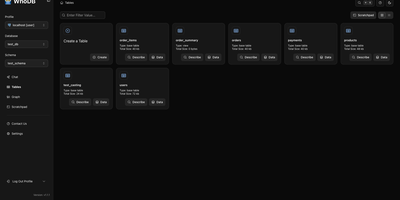
With nearly 5,000 GitHub stars earned in under two years, WhoDB has rapidly emerged as the lightweight alternative to heavyweight database clients like DBeaver and DataGrip by delivering a sub-50MB binary that starts in under a second and connects to 18+ database systems from a single interface. The Go backend serves the React and TypeScript frontend with table virtualization for efficient rendering of large result sets, lazy loading, and query result streaming that keeps the interface responsive even when browsing tables with millions of rows. The Community Edition connects to PostgreSQL, CockroachDB, YugabyteDB, MySQL, MariaDB, TiDB, SQLite, DuckDB, MongoDB, FerretDB, Redis, Valkey, Dragonfly, Elasticsearch, OpenSearch, ClickHouse, QuestDB, and Memcached through a unified credential selector that switches between databases with minimal configuration. Interactive schema diagrams render entity-relationship graphs showing table structures, foreign keys, and column types for visual database exploration. The Jupyter-style query scratchpad provides SQL autocomplete, syntax highlighting, and multi-statement execution with paginated results. AI integration optionally connects to Ollama, OpenAI, Anthropic, LM Studio, or any OpenAI-compatible provider for natural language database queries — ask questions in plain English and receive generated SQL. Data management includes inline row editing, CSV export, and filtered data views. Docker deployment runs a single container exposing port 8080. Running on a dedicated VPS on RepoCloud with guaranteed CPU, RAM, and SSD, full root SSH access, and a browser serial console. Apache-2.0 licensed.
Cusdis
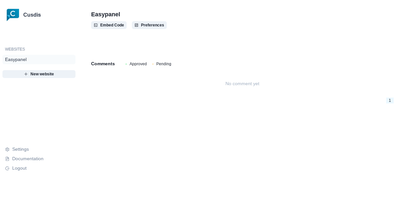
Comments for small sites without Disqus's baggage: Cusdis is a lightweight, privacy-first, open-source comment system for embedding under blog posts and articles. The embedded JavaScript SDK is about 5 KB gzipped (Disqus is roughly 24 KB), sets no cookies, runs no tracking, and does not require readers to create an account or sign in before commenting. Integration is two lines: a container div with your app ID and an async script tag, with ready-made adapters for common frameworks and static site generators. Moderation is approval-based - new comments stay hidden until you approve them from the dashboard, and email notifications include a Quick Approve link that approves or replies to a comment from your phone without logging in. A webhook fires on every new comment for integrations like Telegram notifications. The widget ships with built-in i18n and dark mode. The stack is TypeScript and Next.js with a Prisma data layer, deployable via Docker with PostgreSQL. Deliberately minimalist: no ads, no reader profiling, and your comment data lives in your own database.
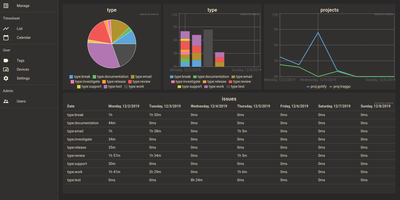
Traggo
With over 1,600 GitHub stars and a design philosophy that fundamentally rethinks how time tracking should work, Traggo abandons the traditional project-task hierarchy that forces your work into rigid categories and instead lets you tag time spans with arbitrary key-value pairs — project:website, type:coding, client:acme, billable:yes — enabling cross-dimensional analysis that conventional trackers cannot replicate. The Go backend compiles into a single binary that runs alongside a SQLite database and embedded web UI in under 10MB total, consuming approximately 50MB of RAM at runtime and starting in seconds on even the smallest VPS. Tags are the fundamental data model: create any tag key with any set of values, then apply multiple tags to each time span simultaneously to track by project, client, task type, energy level, or any other dimension your workflow demands. Customizable dashboards render pie charts, bar charts, and line graphs from tag-aggregated data, letting you visualize time distribution across any combination of dimensions over configurable date ranges. The calendar view displays time spans as colored blocks across days and weeks, while the list view provides chronological entry browsing with inline editing. Multiple themes including light and dark modes adapt the interface to personal preference, and simple user management with role-based access supports small team deployments. Docker deployment runs a single container exposing port 3030 with multi-architecture support for amd64, arm64, and arm v7. Running on a dedicated VPS on RepoCloud with guaranteed CPU, RAM, and SSD, full root SSH access, and a browser serial console. GPL-3.0 licensed.