ANX Calibre Manager
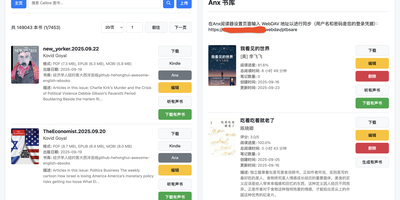
ANX Calibre Manager puts your Calibre library in your pocket, with a phone-friendly interface for the collection that used to require sitting down at the big machine. Browse and search the whole library from the sofa, open a book in the browser previewer, and have it read aloud when your eyes are done for the day. Any EPUB can become a proper audiobook with chapter markers, playable right in the app with your listening position saved, and ready for dedicated audiobook servers too. Your e-reader stays in the loop: reading progress and time sync back from KOReader devices, books push straight to Anx-reader folders, and sending to Kindle quietly converts to the right format first when the book you have is not the format Kindle wants. Every account gets its own WebDAV library for compatible readers, invite codes keep registration to people you actually know, and roles decide who may edit whose books. Reading statistics build themselves into a year heatmap with your current and finished lists, shareable or private as you choose, and you can even ask a book questions and get answers drawn from its pages. Running on a dedicated VPS on RepoCloud with guaranteed CPU, RAM, and SSD, full root SSH access, and a browser serial console. GPL-3.0 licensed.
BookHeaven Server
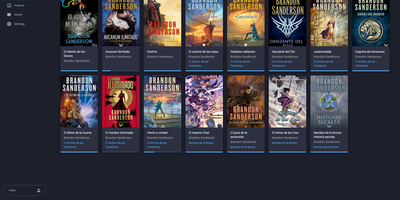
BookHeaven Server turns a scattered folder of EPUB files into a proper library you can browse, organize and read from anywhere, with your progress following you between devices. Import books by copying them into a watched folder or uploading them, and the server reads metadata straight from each file, grouping everything by author, series, collection and tag. When a title, author or cover is wrong, you fix it in the browser and the correction is written back into the EPUB itself, so edits survive even if the file moves elsewhere; missing covers can be fetched from the internet. Each person gets a profile with its own reading progress, including start date, last read date, percentage, elapsed time and finished date, and progress can also be corrected manually. Any OPDS reader app can browse and download from the built-in catalog at /opds/v1, while KOReader devices sync progress by pointing at your server and signing in with a profile name. Upload your favorite fonts once and every connected device can download them, with styles and weights mapped per file or split from a single font. The companion Android reader, built for e-ink screens, discovers the server automatically on your network and downloads books for offline reading. Running on a dedicated VPS on RepoCloud with guaranteed CPU, RAM, and SSD, full root SSH access, and a browser serial console. GPL-3.0 licensed.