Usermemos
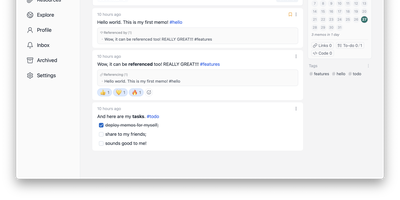
Memos, the lightweight open-source note service from the usememos project, packaged as a containerized deployment for multi-architecture Docker hosts (x86-64 and arm64): that is Usermemos. The model is frictionless capture: no folders or titles, just a chronological stream of Markdown notes with code blocks, task lists, tables, and file attachments, organized by #hashtags pulled automatically from the text. Per-memo visibility - private, protected for logged-in users, or public - lets a single instance serve as a personal journal, a shared team log, or a public microblog simultaneously. Multi-user support with authentication makes it workable for small teams, and full REST and gRPC APIs open capture and retrieval to CLIs, bots, and automation tools. The runtime is a single Go binary with a React frontend that idles around 50 MB of memory and stores content as plain Markdown in SQLite by default, with MySQL and PostgreSQL available for heavier deployments. Configuration happens through environment variables, access works over HTTP or HTTPS behind a reverse proxy, and there is no telemetry - notes stay on your server in a portable format.
Memos
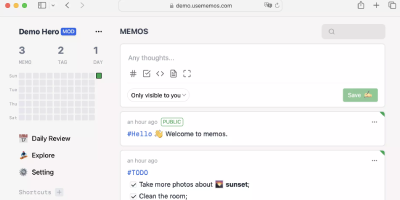
Open the page, write a Markdown note, move on - Memos is a lightweight, self-hosted service built for quick capture. Instead of folders, notebooks, and titles, it presents a timeline: open the page, write a Markdown note, and move on. Notes support headings, code blocks with syntax highlighting, task lists, tables, and file attachments, with tags auto-extracted from #hashtags in the text. Each memo carries a visibility level, private, protected (logged-in users), or public, so one instance works as a personal log, a small team wiki, or a lightweight microblog. The backend is a single Go binary with a React frontend, around 50 MB of memory at runtime and a ~20 MB Docker image, so it fits comfortably on the smallest instance size with near-zero maintenance. SQLite is the default store, with MySQL and PostgreSQL supported for multi-user deployments needing more concurrency, and full REST and gRPC APIs - Connect RPC for browsers, gRPC-Gateway for external tools - make capture scriptable from CLIs, bots, and automation platforms. Fast full-text search spans all memos, pinned notes keep references handy, and a masonry view suits visual browsing. MIT-licensed with zero telemetry; content is stored as plain Markdown in a database you control, so notes remain readable, exportable, and free of proprietary formats.
Journiv
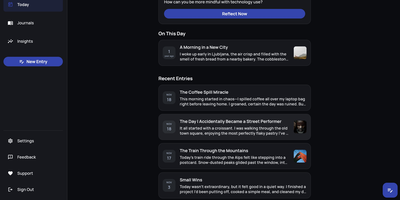
A Day One alternative that keeps your most personal writing on your own server: Journiv is journaling purpose-built for self-hosters. The FastAPI backend runs on SQLite by default with optional PostgreSQL, Redis, and Celery for background work, behind a clean, minimal web UI. Unlike general note-taking apps, it ships the features journaling actually needs: customizable moods and mood groups, activity tracking, goals with automated progress from logged activities, and daily writing prompts filterable by category and difficulty so a blank page never stalls you. Quick Log captures a moment in seconds and expands into a full entry later; "On This Day" resurfaces entries from past weeks, months, and years. Multiple journals separate work, gratitude, and personal writing, with tags and full-text search across everything, plus media uploads with automatic thumbnails and an Immich integration for linking photo-library memories. Analytics chart mood trends and writing patterns over time. Data portability is taken seriously: native import of Day One exports, JSON/Markdown/HTML export, and a standalone HTML viewer that opens your archive in any browser with no server running. OIDC single sign-on works with Authentik or Keycloak, and multi-arch images cover amd64 and arm64.
Coral
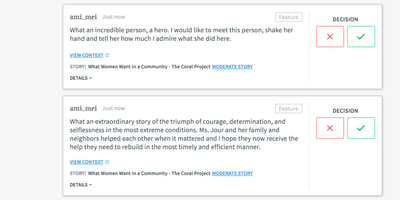
Comment sections at the Washington Post, the Wall Street Journal, and newsrooms across 30 countries run on Coral (also known as Talk) - the platform built by journalists' technologists, started under the Mozilla Foundation and now stewarded by Vox Media as an Apache-2.0 project serving 23 languages. Its founding premise is that online comments are broken and moderation is the fix. Moderators get a full queue system - reported comments, system-held pending comments, and configurable pre-moderation - backed by AI toxicity scoring that warns commenters before posting and holds high-scoring comments for review, Akismet spam detection, banned and suspect word lists, and automatic repeat-offender handling that pre-moderates users whose rejection rate crosses a threshold. Readers get features designed for healthier conversation: journalist badges in threads, muting of annoying voices, notifications, instant new-comment alerts, and timeouts rather than just bans. For publishers the economics are the point - no ads, no trackers, no hidden pixels anywhere in the code, full ownership of audience data, and GDPR compliance beyond requirements. Integration is one embedded script; SSO connects existing registration, and a GraphQL API supports customization and extension.
Logseq
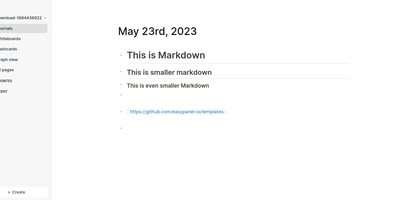
Every line an indentable bullet, every bullet a first-class block that can be referenced, embedded, and queried anywhere: Logseq is a privacy-first, local-first knowledge platform built around the block outliner. The daily journal is the system's beating heart - each day opens a fresh date-stamped page where tasks, meeting notes, and fleeting ideas land as blocks without filing decisions, then connect later through [[wikilinks]] with automatic bidirectional backlinks and ((block references)) that transclude any bullet into any page. Everything persists as plain Markdown or Org-mode files on disk - git-friendly, greppable, and owned forever, with sync via iCloud, Dropbox, Syncthing, Git, or an optional end-to-end encrypted service. Built-in tooling goes beyond notes: TODO/DOING task states with scheduling, native PDF annotation with area highlights, spaced-repetition flashcards, whiteboards for visual thinking, Zotero integration for researchers, and Datalog-powered queries that build dynamic views across the entire graph. A marketplace of hundreds of community plugins and themes adds AI chat, Ollama local-model integration, and custom workflows. Written in Clojure/ClojureScript, AGPL-3.0 licensed with 320+ contributors, and completely free - the local-first Roam for people who refuse subscriptions and lock-in.
Trade Journal
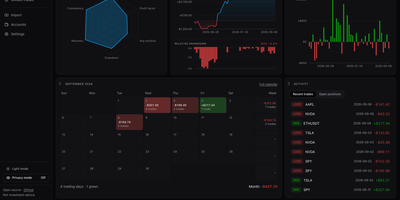
A trading journal you host yourself, Trade Journal rebuilds broker fills and statement exports into round-trip trades, a profit and loss calendar, and daily notes that show what actually works. Read-only sync covers more than twenty brokers and exchanges, including Alpaca, Binance, Coinbase, Kraken, and IBKR Flex. Statement import auto-detects TradingView, MetaTrader, NinjaTrader, Tradovate, and thinkorswim files, handles TradeZella and Tradervue CSV migrations, and maps columns for anything else. Trades can be matched first-in-first-out, last-in-first-out, or by weighted average, with partial fills, scale-ins, and futures multipliers handled. The dashboard offers gauges, cumulative and daily P&L, an Edge Score radar, and cards you can rearrange into named layouts, while Reports break results down by symbol, tag, mistake, playbook, weekday, and time of day. Each trade page charts entries and exits and can replay candles you load, with estimated MAE and MFE. Daily journal pages hold Markdown notes, templates, attachments, and voice dictation, and optional AI recaps use your own Anthropic or OpenAI key or a local Ollama model. Playbook checklists score rule adherence, a prop firm ledger tracks costs and payouts, and privacy mode masks every amount. Running on a dedicated VPS on RepoCloud with guaranteed CPU, RAM, and SSD, full root SSH access, and a browser serial console. MIT licensed.
LifeGLANCE
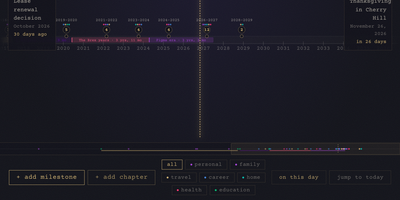
Birthdays, graduations, house moves, weddings, and the trip you keep promising yourself for next year all belong on the same line, and LifeGLANCE draws that line as one zoomable timeline of your life, past and future. Pan smoothly from a single week out to multiple decades, then zoom back in when a dense year needs room; cluster badges keep crowded stretches readable, and a minimap scrubbar jumps you across decades without endless scrolling. Each milestone carries a title, a date at day, month, or year precision, a category, a note, and a link, and you can attach photos, audio, and video directly to the moments they belong to. Birthdays and anniversaries repeat annually with an end year you set. Switch between All, Past, and Future views, search titles and notes in full text, or open On This Day to see what happened on this date in earlier years. A stats panel and summary modal turn the line into counts and patterns. Import calendar events from an ICS file, export the whole timeline as a high-resolution PNG, or back everything up and restore it as JSON. Running on a dedicated VPS on RepoCloud with guaranteed CPU, RAM, and SSD, full root SSH access, and a browser serial console. MIT licensed.