Blockbusterr
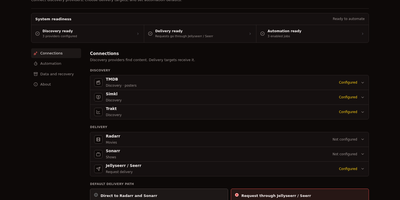
Your Radarr and Sonarr libraries only grow when someone remembers to add titles, and Blockbusterr removes that chore by discovering movies and shows on a schedule and delivering the ones that pass your rules. Jobs pull trending, popular, anticipated, box-office, and list feeds from TMDB, Simkl, Trakt, and MDBList, with experimental Letterboxd lists available when enabled. Every job applies one reusable rule set: content-rating limits, blocked and allowed titles, genre, year, runtime, language, and vote boundaries decide what qualifies before anything reaches your stack. Weighted scores blend IMDb, Trakt, TMDB, and Metacritic ratings, and Smart Popular adjusts its threshold against the feed it reads. Preview mode shows accepted, rejected, and skipped titles with the reason for each decision, so a new job can be tuned safely before it runs unattended. Delivery sends movies straight to Radarr and shows to Sonarr, or creates Jellyseerr and Seerr requests when you prefer an approval queue. Per-job caps and a rolling global budget keep a busy feed from flooding disk space, and an instance-wide dry run tests the whole setup without touching your library. Activity entries and job-run history record scores, decisions, and outcomes with posters. Running on a dedicated VPS on RepoCloud with guaranteed CPU, RAM, and SSD, full root SSH access, and a browser serial console. MIT licensed.
AutoXpose
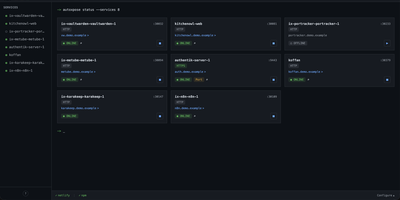
Tag a Docker container with two labels, and AutoXpose turns it into a published service with a DNS record, a reverse proxy route, and HTTPS, without you opening a single provider dashboard. From the web dashboard you connect one of six DNS providers, Cloudflare, Netlify, DigitalOcean, Porkbun, Aliyun, or Tencent DNSPod, and point it at the Nginx Proxy Manager or Caddy instance you already run. It watches your containers continuously after that: a new label creates the record, propagation is verified before the service shows as live, and removing the container removes its public entries too. Auto-expose mode publishes containers the moment they appear, while manual mode stages them in the dashboard for approval first. Color-coded service tags sort what you run into web, database, and media groups at a glance, and dashboard warnings flag misconfigurations before they become broken links. Nginx Proxy Manager access lists attach by label, so an admin panel stays reachable only from the networks you trust. When containers vanish, orphaned cleanup hunts down the stale DNS records and proxy hosts they left behind. Settings and state live inside the same single container, so the publishing pipeline for a homelab or a small fleet stays one compose service you can back up as a unit. Running on a dedicated VPS on RepoCloud with guaranteed CPU, RAM, and SSD, full root SSH access, and a browser serial console. MIT licensed.
dinkydash
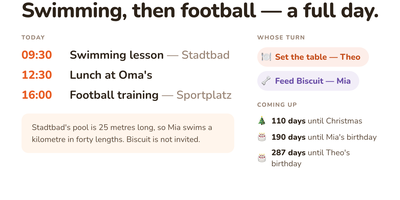
The family calendar nobody opens helps nobody, so DinkyDash puts it on a screen the household walks past. Paste in iCal links from Google, iCloud and Outlook calendars and the board merges them into one agenda in time order, big enough to read from across the kitchen, with tomorrow tucked underneath when the day leaves room. A personal calendar can share only the events marked for a partner and keep work and private appointments to itself. Chores answer the daily argument on their own: whose turn it is moves on with the date, so nobody ticks anything off. Birthdays, holidays and special dates count down in the corner, and once a day the board gets a fresh headline written about your actual day, with a useful note parked under the agenda. Light and dark themes come from the settings page, and that same settings page on your phone edits the configuration file directly, comments preserved. A preview page shows the board at Pi, TV and tablet sizes side by side before you mount anything. There is deliberately no login: it assumes your home network, rewards you with a board you never sign into, and asks to stay behind a VPN or an authenticated proxy if you view it away from home. Running on a dedicated VPS on RepoCloud with guaranteed CPU, RAM, and SSD, full root SSH access, and a browser serial console. MIT licensed.
Docker Updater
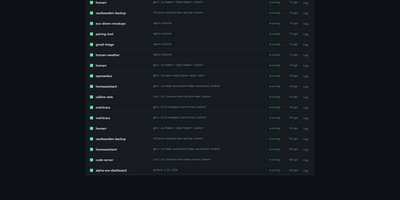
Docker Updater puts you back in charge of container updates: it watches your registries for newer images, and nothing updates until you approve it, so no database restarts itself at dinner. Polls run on a schedule you set, and each container card shows the newer image waiting before anything is pulled. The check costs nothing: it compares the digest your container runs against the registry manifest without pulling a byte, across Docker Hub, GHCR and other Bearer-token registries. Read the last five GitHub releases for an image before committing, update one container or a batch, and watch the pull percentage, layer count and recreation step stream live on the card. If the new container fails to start, the old one returns automatically, and you can keep a backup even after a clean update. Not ready? Defer an update for 7, 14, 30 or 90 days, or indefinitely, and it leaves your notifications alone until then. Several Docker hosts join the same dashboard over SSH or TCP with health indicators, and Compose stacks restart together so services find new addresses. Notifications arrive through an auto-generated ntfy topic or your own Apprise URL, every update keeps a persistent log, and a reclaimable-images view shows what disk space old images hold. The dashboard serves on port 9090 in English or Simplified Chinese, with optional login. Running on a dedicated VPS on RepoCloud with guaranteed CPU, RAM, and SSD, full root SSH access, and a browser serial console. MIT licensed.
VolumeVault
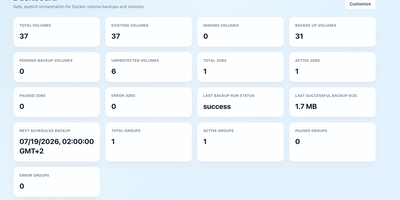
VolumeVault turns Docker volume backups into a routine you can prove: it schedules them, stores them off the box, and restores them into brand-new volumes so original data is never the test subject. A guided web dashboard discovers every Docker volume on the host and shows backup coverage per volume or per Compose and Swarm stack, including the size of the latest known backup, so gaps are visible before they matter. Each job runs on an hourly, daily, weekly or cron schedule with retention by days or archive count, include and exclude filters, and a choice of whether containers stop during the run. Archives land where you keep them: AWS S3, Cloudflare R2, any S3-compatible store, WebDAV, SFTP, Azure Blob, Dropbox, Google Drive or a local path, with credentials encrypted at rest. Restores download and verify the archive first, then unpack it into a new volume by default; overwriting the original demands an explicit confirmation. Several volumes can ride one grouped schedule that reports once for the whole set, and containers can volunteer themselves for backup through Docker labels. Small agent containers extend the same jobs to other Docker hosts, including encrypted cross-host restores into fresh volumes, while API tokens let scripts and dashboards drive everything the UI can. Running on a dedicated VPS on RepoCloud with guaranteed CPU, RAM, and SSD, full root SSH access, and a browser serial console. Apache-2.0 licensed.
Netmon
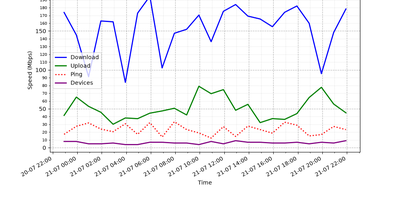
Every half hour, Netmon speed-tests your internet connection, counts the devices on your local network, and reports to your Telegram or Discord with charts and a sarcastic AI-written verdict. Each cycle measures download, upload, ping, ISP, and test server with a single-connection test that mimics one real download, then scans the subnet to tally phones, laptops, and mystery gadgets. Results land in a local SQLite database, building the trend history behind every report. Every four hours you get the full picture: a 24-hour speed graph plus an AI analysis that notices the evening drop, counts the new devices, and names the likely bandwidth hog in plain language. Between reports, short status alerts keep you posted with a simple all-good or line-is-dying. The AI commentary can run on a cloud model or a local one through Ollama or LM Studio, graphs and alerts convert cleanly between Telegram formatting and Discord embeds, and the whole bot runs unattended as a background service. Running on a dedicated VPS on RepoCloud with guaranteed CPU, RAM, and SSD, full root SSH access, and a browser serial console. MIT licensed.
HomeLabInfo
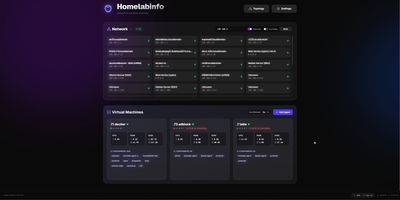
HomeLabInfo gives your homelab one dashboard where the network itself and everything running on it finally appear together, instead of scattered across router pages and terminal sessions. It watches for new devices the instant they ask the network for an address, identifies who made them, and can fire a webhook so you hear about a stranger joining your LAN before you notice it yourself. Scans keep track of which devices are online and which have gone quiet, and the interactive topology view lets you arrange the map of switches, access points, NAS boxes, and servers the way your rack actually looks. Lightweight agents installed on each machine report their containers back to the hub, so running and stopped containers, uptime, health, and host CPU, memory, and disk all show in one place without opening a separate tool per server. When an agent falls behind, its card tells you a newer version exists instead of leaving you guessing. You can add a username and password login before putting the dashboard anywhere beyond your desk, and arrange container layouts that stay put between visits. Running on a dedicated VPS on RepoCloud with guaranteed CPU, RAM, and SSD, full root SSH access, and a browser serial console. GPL-3.0 licensed.