AliasVault
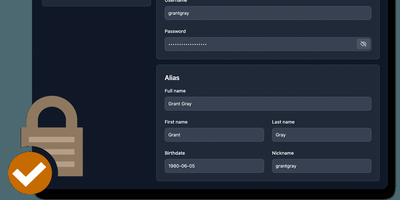
Sign up for a new service and you face a familiar choice: hand over your real email and get spam-listed forever, or generate a throwaway alias that dies when you close the tab. AliasVault eliminates that trade-off by combining a password manager with a built-in email server, so every website gets a unique identity (random email, generated name, strong password) and incoming emails land directly in your encrypted vault rather than your primary inbox. Creating a new alias takes one click: the system generates a random address on your configured domain, a fake identity with name and birthdate, and a cryptographically strong password, all stored in a zero-knowledge encrypted vault that even the server administrator cannot read. Browser extensions for Chrome, Firefox, Edge, Safari, and Brave detect login forms and autofill credentials or prompt you to create a new alias on the spot. Native iOS and Android apps with biometric unlock provide mobile access to your vault and integrate with the operating system's autofill framework. The built-in TOTP authenticator generates time-based one-time codes without needing a separate app. Import existing credentials from other password managers through standard export formats, and export your vault data at any time for full portability. Self-hosting via Docker with your own email domain gives you complete control over where alias mail is received and stored, with no third-party dependencies. Running on a dedicated VPS on RepoCloud with guaranteed CPU, RAM, and SSD, full root SSH access, and a browser serial console. AGPL-3.0 licensed.
Duplicati
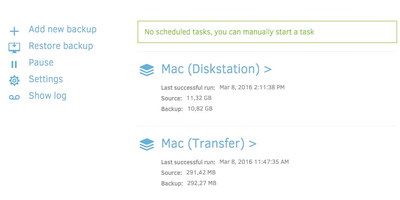
Encrypted, incremental, compressed backups on storage you already have - Amazon S3, Backblaze B2, Google Drive, Azure, OneDrive, Dropbox, MEGA, Storj, WebDAV, SFTP, FTP, SMB, or a plain local disk - is what the MIT-licensed Duplicati has quietly done for years. Its security model is Trust No One: every block is encrypted with AES-256 (or a local GPG instance) before leaving the machine, and the passphrase never travels, so the storage provider holds only ciphertext. The block-based storage engine gives the best of both backup worlds: after one initial full backup, only changed data blocks upload - modify a tiny part of a huge file and only that part transfers - yet every backup version restores like a full backup in a single operation, with no incremental chains to replay. Deduplication and compression keep remote storage growth slow even across years of versions. A web interface manages everything: the built-in scheduler keeps backups current automatically, flexible filters select folders, file types, or custom patterns, retention policies prune old versions, and an integrated updater flags new releases. On compatible object-lock backends, immutable (WORM) storage protects backup data from ransomware that reaches the credentials. Runs on Windows, macOS, and Linux, free even for commercial use.

Peergos
Peergos is a peer-to-peer encrypted drive, messenger, email client, and private social network where your files and friendships stay unreadable to the server that stores them. You browse, upload, and organize files in a familiar web drive, then share a folder with a friend or send anyone a secret link whose key never travels to the server, so the link itself cannot leak what it opens. The built-in messenger handles private conversations, an encrypted email client with a bridge reaches the outside mail world, and the social feed shows posts only to the people you chose, with even the friend graph hidden from the operator. Web apps run from Peergos inside a sandbox and see only the data you grant them, which turns the drive into a private place to run tools rather than a folder other services reach into. Because encryption happens on your machine before anything is stored, a compromised server yields ciphertext and no file names, sizes, or sharing relationships. Host it at home and the same account gives your household storage plus its own communication platform; log in from any browser without carrying keys, because your password rebuilds them. Running on a dedicated VPS on RepoCloud with guaranteed CPU, RAM, and SSD, full root SSH access, and a browser serial console. AGPL-3.0 licensed.
CyberChef
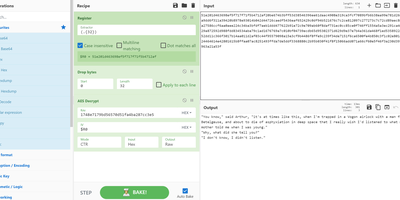
GCHQ open-sourced its "Cyber Swiss Army Knife", and CyberChef became the web app security analysts, incident responders, and CTF players reach for when data needs decoding, decrypting, or dissecting. Its interface is four panes: paste or drag input (files up to 2GB), search a categorized library of hundreds of operations, drag them into a recipe with arguments, and read the output. Operations span Base64, hex, and XOR encoding; AES, DES, and Blowfish encryption; classical ciphers from Caesar to Railfence; hashes and checksums; compression; regex and string extraction of IPs, domains, and URLs; timestamp conversion; and parsers for IPv6, X.509 certificates, and more. Recipes chain arbitrarily - convert from a hexdump then decompress, decrypt AES pulling the IV from the cipher stream, or let the Magic operation auto-detect several layers of nested encoding. Auto Bake re-runs the recipe live as input or arguments change, Step executes one operation at a time for debugging, and flow control (forks, subsections, registers) applies different operations to different parts of the data. Recipes save to files or share as URLs encoding the full pipeline. Crucially, CyberChef is entirely client-side JavaScript - nothing uploads anywhere - and self-hosting guarantees an unmodified copy inside your own network, where malware artifacts belong.
Infisical
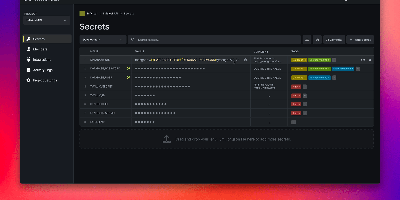
API keys hardcoded in repos, database passwords pasted into CI variables, .env files emailed between developers - Infisical, the open-source platform for secrets, certificates, and privileged access management, is the answer to all three. Secrets live in versioned stores scoped by project, environment, and path, with fine-grained identity-aware access control and full audit logging on every read and change. Delivery covers every consumption pattern: CLI injection into local dev, SDKs for Go, Node.js, and Python, an HTTP API, agents, a Kubernetes Operator, and secret syncs that push to GitHub, GitLab, AWS Secrets Manager, and Vercel. Automatic rotation replaces credentials for PostgreSQL, MySQL, MSSQL, LDAP, AWS IAM, and Azure on a rolling schedule - new credentials issue while old ones stay temporarily valid, so nothing breaks mid-rotation. Dynamic secrets go further, generating ephemeral, time-bound database credentials on demand, and SSH access replaces static keys with short-lived CA-signed certificates that expire automatically. Secrets scanning catches hardcoded credentials in code and pipelines, certificate management automates X.509 issuance and renewal, and a built-in KMS handles encrypt/decrypt with central key control. Self-hosting keeps the keys to everything else on your own infrastructure.
LastSignal
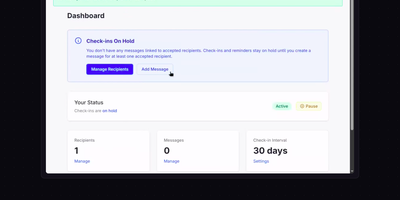
Write the messages today that the people you love would need if you suddenly could not send them, and LastSignal holds them encrypted until silence says it is time. The system emails you a check-in on a schedule you set; answer it and nothing happens, which is exactly the point. Miss one and reminders follow at fixed intervals, and the final reminder can ping a trusted contact who is able to pause the countdown, buying time when a hospital stay or a lost phone is the real story. If nobody responds, your messages are delivered by email to each recipient, who decrypts them with their own passphrase; the server never holds plaintext, so even the person running it cannot read what you wrote. You can stagger access with a per-recipient delay, so one person reads their message the day it arrives while another waits the number of days you chose. Automations can report in through a keep-alive token endpoint instead of email, for machines that prove you are around by staying alive themselves. Timings for check-ins, reminders, and the trusted-contact pause are all configurable per account. Running on a dedicated VPS on RepoCloud with guaranteed CPU, RAM, and SSD, full root SSH access, and a browser serial console. MIT licensed.
Synch
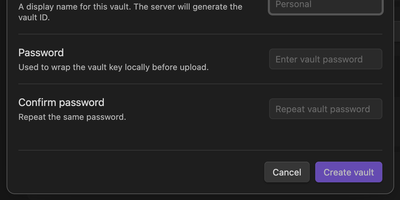
Synch keeps your Obsidian vault in step across desktop and mobile with end-to-end encryption, on a sync server you host yourself. Every note is encrypted on your device before upload, so the server stores sealed blobs and cannot read your notes, your file paths, or your vault keys. Edits travel between devices in seconds over a realtime connection, and the encrypted version history brings back earlier drafts and deleted files when a cleanup goes too far. When the same note changes on two devices, a three-way merge combines edits that do not overlap and keeps a conflict copy when they do, so work is never silently overwritten. Markdown, images, audio, video, and PDFs sync by default, and folder exclusions keep big or private corners of the vault at home. Run the server with Docker Compose or as a systemd service, point the plugin at your own API address, and allow only the email addresses you invite. Each vault gets its own database file on your disk, and blob storage can move to any S3-compatible bucket when the vault outgrows local storage. Running on a dedicated VPS on RepoCloud with guaranteed CPU, RAM, and SSD, full root SSH access, and a browser serial console. MIT licensed.
Standard Notes
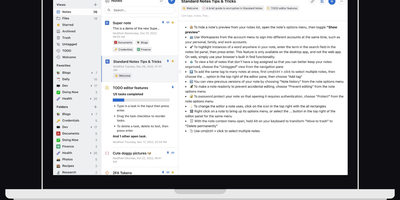
Standard Notes keeps your notes, files, and tags encrypted on your device before anything touches the network, meaning the server stores only ciphertext it cannot read. Cross-platform sync across desktop, mobile, and web delivers fast, conflict-free updates on unlimited devices with the same zero-knowledge guarantee that only your password can decrypt your content. The V2 server architecture condenses everything into four Docker containers consuming roughly 570MB RAM total (down from 13 containers and 1.7GB in the legacy setup), with startup under one minute. Revision history automatically preserves every version of every note, so recovering deleted text or reverting to a previous state never depends on manual backups. A nested tag system organizes thousands of notes with hierarchical categorization that goes well beyond flat folder structures, while search operates entirely on client-side decrypted content. File attachments of any type encrypt and sync alongside notes with identical end-to-end protection. Multiple editor options span plain text, Markdown with preview, and rich formatting to fit different writing workflows. Two-factor authentication via TOTP with email backup codes adds a second barrier beyond your password. An optional separate container serves the web frontend, providing browser access to your encrypted vault without depending on standardnotes.com infrastructure. With 5,500+ GitHub stars and active development, the project continues expanding editor plugins and sync improvements.
Paaster
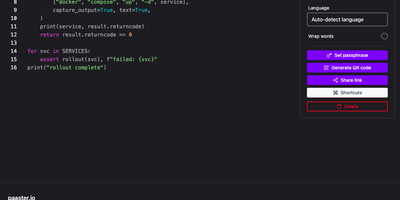
Paaster is the pastebin for snippets too sensitive for a public paste site: every paste is encrypted in your browser before upload, so the server only ever stores ciphertext it cannot read. Paste code or logs and the text is sealed with libsodium the moment you stop typing, with the secret riding in the link fragment that browsers never send to a server. Share the link and only its holder can open the paste; share it as a QR code, or beam it to your other device with a five-minute code using Send to device. Set a paste to delete after its first view or after a chosen time, protect it with an access code, and let automatic language detection syntax-highlight the result. Your own pastes stay browsable in a local history, themes and keyboard shortcuts keep the editor fast, and drag-and-drop file sharing works the same encrypted way. Upload from the terminal with the companion CLI or the REST API, and store everything in MongoDB with MinIO, S3, or Cloudflare R2 holding the encrypted blobs. Running on a dedicated VPS on RepoCloud with guaranteed CPU, RAM, and SSD, full root SSH access, and a browser serial console. AGPL-3.0 licensed.