DeepTutor
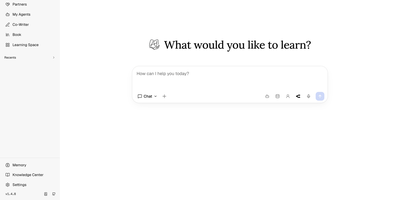
With 34,000+ GitHub stars and a v1.5 release driven by 36 merged community pull requests, DeepTutor from Hong Kong University's Data Science Lab delivers a full agent-native learning workspace that goes far beyond chatbot wrappers. Eight integrated surfaces — Chat, Deep Solve, Quiz Generation, Deep Research, Math Animator, Co-Writer, Book generation, and Mastery Practice — share a unified context so the objective follows the learner, not the tool. The platform's three-layer memory architecture (L1 working, L2 session, L3 long-term) makes personalization inspectable rather than opaque, letting users see exactly what the system remembers and why. Knowledge retrieval operates across five pluggable engines — LlamaIndex with FAISS vectors, PageIndex for page-level citations, GraphRAG for knowledge-graph traversal, LightRAG for local or server-offloaded retrieval, and linked Obsidian vaults — with document parsing via MinerU, Docling, markitdown, or PyMuPDF4LLM. Partners extend the tutoring brain to 15+ messaging platforms including Slack, Discord, Telegram, Matrix with E2EE, and Mattermost, each carrying private memory with branch, resume, and replay capabilities. Subagent integration brings Claude Code, Codex, Gemini, and Kimi directly into learning sessions. The system supports 30+ LLM providers from OpenAI and Anthropic to Ollama for fully local operation, with multi-user isolation, admin controls, and a full CLI interface. Running on a dedicated VPS on RepoCloud with guaranteed CPU, RAM, and SSD, full root SSH access, and a browser serial console. Apache 2.0 licensed.
BigBlueButton
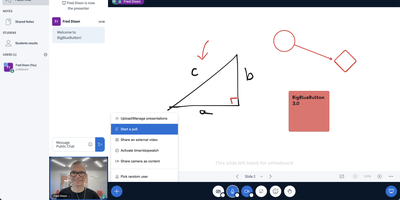
Used daily by millions of educators and learners in over 65 languages and embedded as the default virtual classroom in Moodle Cloud, Canvas, Sakai, D2L, Jenzabar, and Schoology — together comprising more than 75% of the worldwide learning management system market — BigBlueButton has been the leading open-source web conferencing platform for education since its creation at Carleton University in 2007. The platform delivers WebRTC-based real-time audio, video, and screen sharing with a tldraw v2-powered multi-user whiteboard featuring infinite canvas support, allowing multiple participants to annotate slides and draw simultaneously. Breakout rooms support up to eight concurrent groups with collaborative whiteboards enabled by default, and polling with customizable response types lets instructors assess understanding in real time. The built-in Learning Analytics Dashboard answers three questions at a glance: who is attending, who is participating, and who is learning based on poll responses, providing actionable engagement metrics without requiring webcam surveillance. Session recording captures audio, video, slides, chat, and whiteboard annotations for asynchronous playback on any device. The plugin architecture introduced in version 3.0 enables custom extensions, while IMS LTI 1.0 compliance allows integration with Blackboard, Desire2Learn, Pearson Learning Studio, and any conformant platform without custom code. The REST API enables programmatic session management, user authentication, and recording access for custom frontends like the included Greenlight application. Version 4.0 introduces LiveKit-based media and a redesigned interface. Running on a dedicated VPS on RepoCloud with guaranteed CPU, RAM, and SSD, full root SSH access, and a browser serial console. LGPL-3.0 licensed.

Frappe LMS
Frappe LMS is a learning management system built on the same Frappe Framework that powers ERPNext. The 3-level course hierarchy organizes content into courses, chapters, and lessons supporting videos, PDFs, SCORM packages, and rich HTML content with heading, code block, and list formatting through the redesigned inline lesson editor. Batch management groups learners by course and duration with scheduled instructor-led live sessions through integrated Zoom and Google Meet, where learners see upcoming classes on their batch dashboard. The assessment engine supports single-choice, multiple-choice, and open-ended quiz questions alongside assignment submissions as PDFs or documents, with progress tracking monitoring completion rates and quiz performance across all enrolled courses. Certificate generation uses built-in templates or custom designs to validate course completion, while the job board connects certified learners with opportunities. Course monetization integrates payment processing to transform courses into revenue streams with financial tracking. Role-based access controls assign Instructor, Learner, Admin, and Manager permissions, while course package import and export enables sharing structured content between instances. The platform integrates with ERPNext HR and CRM modules through the Frappe ecosystem with RTL language support and notification slide-overs. Running on a dedicated VPS on RepoCloud with guaranteed CPU, RAM, and SSD, full root SSH access, and a browser serial console. AGPLv3 licensed.
CTFd
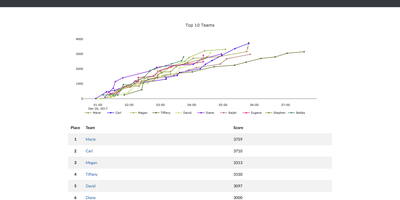
Starred by over 6,500 users on GitHub and trusted by organizations including Toyota, CTFd has been the leading open-source platform for hosting cybersecurity competitions since 2015, providing everything needed to run professional Capture The Flag events through a clean web-based administration panel without touching a database query. The framework supports both individual and team-based competitions with automatic tie resolution, configurable score freezing, and scoregraphs comparing the top teams with detailed progress tracking. Challenge creation offers static and regex-based flags, dynamic scoring that adjusts point values based on solve count, unlockable hints purchasable with points, file attachments uploaded to local storage or Amazon S3-compatible backends, and challenge attempt limits with automatic bruteforce protection. Version 3.8 introduced challenge logic fields controlling flag submission behavior with any, all, and team modes, integrated dynamic scoring into the standard challenge type, participant ratings and reviews on challenges, and admin-stored challenge solutions viewable after competition. The Markdown-based content management system enables custom pages for rules, FAQs, and resources, while SMTP and Mailgun integration handles email confirmation and password recovery. The plugin architecture supports custom challenge types, flag validators, and scoring algorithms, while the theme system provides complete visual customization. Import and export functionality preserves entire competition configurations for archival and reuse across events. Running on a dedicated VPS on RepoCloud with guaranteed CPU, RAM, and SSD, full root SSH access, and a browser serial console. Apache 2.0 licensed.

LearnHouse
LearnHouse delivers a modern open-source learning platform that replaces proprietary course builders with a self-hosted alternative shipping a rich feature set out of the box. The Tiptap-powered block editor supports videos, documents, embeds, quizzes, and file uploads in a Notion-like interface with real-time co-editing powered by Hocuspocus and Yjs CRDT synchronization over WebSocket. AI tutoring integrates Google Gemini and LlamaIndex for RAG-powered context-aware assistance that adapts to course content, while interactive Playgrounds use AI to generate simulations, diagrams, and learning exercises. The platform handles the full course lifecycle: chapters and activities organize into collections and learning paths, assignments support automated and manual grading, and code blocks execute student submissions in 30+ languages with auto-grading. Analytics dashboards track learner engagement, progress, and completion rates in real time. The backend runs on FastAPI with SQLModel and Alembic migrations against PostgreSQL 16 with pgvector for AI embeddings, while Redis handles caching and session management. The frontend builds on Next.js 16 with React 19 and Tailwind CSS v4. Deployment uses an interactive CLI wizard that configures domain, database, admin account, SSL via Let's Encrypt, and optional features like email via Resend, S3 storage, and Google OAuth, then generates a Docker Compose stack ready to start. On RepoCloud, deploy LearnHouse on a dedicated VPS with root SSH access, persistent PostgreSQL storage for your course data, and complete control over AI provider keys and branding customization, all under the AGPL v3 license.
ClassroomIO
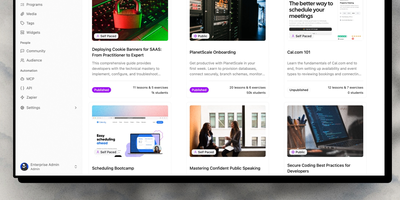
Turn company knowledge into structured courses in minutes: ClassroomIO's AI course builder takes your documents, policies, or topic outlines and generates complete lessons with exercises using Gemini, GPT-4o, or Claude — then an in-lesson AI tutor helps employees study the material at their own pace. The SvelteKit 5 and Hono API architecture backs a platform purpose-built for employee compliance training, customer education, and partner certification programs. Programs group courses into cohorts with team management, progress tracking, and goal setting. Live Kahoot-style quizzes drive real-time engagement during training sessions with automatic scoring and leaderboards. Exercises support multiple question types with automatic grading for multiple choice and AI-assisted evaluation for open-ended responses — teachers review and override all AI decisions. Branded certificates with custom IDs reward course completion. Custom domain mapping through Cloudflare lets organizations serve their learning portal under their own brand. MinIO provides S3-compatible storage for documents and video uploads. The REST API and signed webhooks enable programmatic enrollment and completion tracking, while an MCP server on npm supports AI-native authoring workflows. An embeddable widget drops the course catalog onto any website. Better Auth handles sessions and OAuth with optional SSO. Running on a dedicated VPS on RepoCloud with guaranteed CPU, RAM, and SSD, full root SSH access, and a browser serial console. AGPL-3.0 licensed.
Etherpad
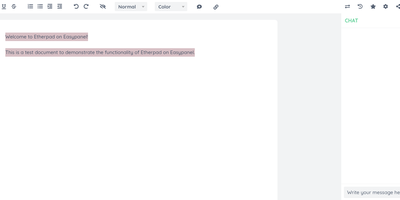
In continuous open-source development since 2009, Etherpad is the original really-real-time collaborative editor - used by Wikimedia, governments, EU public-sector institutions, and tens of thousands of self-hosters. Its core idea is visible authorship: every keystroke is attributed with author colors, every revision preserved, and the timeslider lets you scrub through a document's entire history character by character. Multiple people type into the same pad and see each other's changes instantly - it scales to thousands of simultaneous editors per pad. The base install is deliberately lightweight; capability comes from roughly 290 plugins installable from the admin web UI: comments, images, tables, drawing, video chat via WebRTC, math rendering, code highlighting, and authentication via OAuth, LDAP, or OpenID. AI is pointedly a plugin, not a default - you choose the model and infrastructure, or never turn it on. There is no telemetry. For integrators, an HTTP API (with OpenAPI definitions at /api/openapi.json) manages pads, users, and groups for embedding in your own applications, and the ueberDB abstraction layer supports PostgreSQL, MySQL, Redis, MongoDB, and SQLite backends. Full data export is built in, the format is open, it is translated into 105 languages, and it runs on anything from a Raspberry Pi to a server farm. Apache 2.0 licensed, Node.js based.
OpenMAIC
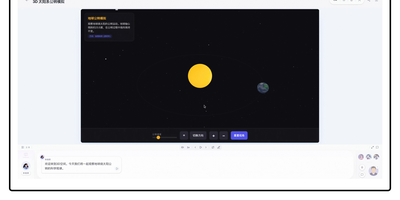
Developed by Tsinghua University researchers and validated across more than 700 students, OpenMAIC converts raw prompts, PDFs, Office documents, audio, and video into complete, multi-agent virtual learning environments. The platform leverages Next.js, LangGraph state machines, and a pluggable `@openmaic/storage` layer to orchestrate autonomous AI professors and student avatars that lecture, debate at roundtables, answer inquiries, and illustrate complex equations on a real-time SVG whiteboard. Its Pro Agent Workbench features durable PostgreSQL-backed sessions, twenty specialized curriculum-building skills, and granular JSON Patch slide editing with full `.pptx` import fidelity. OpenMAIC supports rich scene modalities including automated quiz grading, Project-Based Learning milestones, and Deep Interactive Mode offering in-browser code execution, interactive mind maps, and Three.js 3D physics simulations. Built-in audio pipelines connect with VoxCPM2 for zero-shot voice cloning, Azure STT, and FunASR for speech recognition, alongside a dedicated Chromium-FFmpeg rendering microservice for one-click MP4 video exports. Flexible model routing interfaces seamlessly with OpenAI, Anthropic Claude, Google Gemini, Amazon Bedrock, DeepSeek, and local Ollama or Lemonade instances, while OpenClaw integration enables direct classroom generation from Slack, Discord, Feishu, and Telegram. Running on a dedicated VPS on RepoCloud with guaranteed CPU, RAM, and SSD, full root SSH access, and a browser serial console. MIT licensed.

WBO
A Node.js server, a large shared canvas, and a URL - WBO (Whiteboard Ophir) is collaborative whiteboarding reduced to its essence. There are no accounts and no setup - to collaborate, you send someone the board's link, and every stroke appears for all connected users in real time over WebSockets, with cursor positions shared so you can see where collaborators are working. Board state persists automatically and continuously, so a diagram drawn in today's lesson is still there next week at the same URL. Boards come in three flavors: a public free-for-all, private boards with random unguessable names, and named boards with custom URLs shared by anyone who knows the name. The tools cover teaching and brainstorming needs - pencil, straight lines, rectangles, ellipses, text annotations, eraser, a full color palette with brush sizes - and boards export as SVG or PNG. Despite the simplicity, the server is production-minded: JWT authentication gates board access with granular capabilities (open, edit, and clear as separate permissions), rate limiting caps per-client message volume, reverse-proxy and subpath deployment are supported, and OpenTelemetry provides metrics, logs, and traces. It works on tablets and touch devices, speaks multiple languages, and consumes minimal resources. AGPL-licensed.
Whiteboard
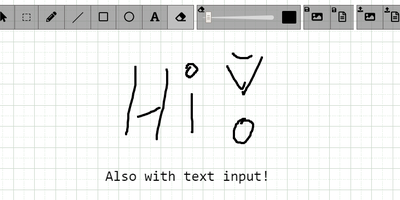
The drawing surface inside WebRTC conference tools like Meetzi and the LAMS online-learning platform is Whiteboard (by cracker0dks) - a lightweight Node.js collaborative sketchboard built to be embedded and customized, which also slots into Nextcloud via the External Sites app. Everyone opening the same whiteboardid URL parameter draws on the same board, with remote user cursors visible live, per-user undo/redo, and an indicator showing the smallest participating screen so nobody draws outside a colleague's view. Content handling goes beyond pen strokes: drag-and-drop or paste images and PDFs from any PC or browser, then resize, rotate, and draw over them on canvas or background; add text and sticky notes; hold Shift for angle-snapped lines and perfect squares. Every function has a keybinding - deliberately friendly to pen displays like Wacom and XP-Pen whose hardware buttons map to shortcuts. Boards save to image or JSON (with reload), export directly to Nextcloud via WebDAV, and persist across restarts with the file-database option. A REST API with bundled interactive docs allows full programmatic control, an optional access token locks down uploads, and YAML configuration tunes behavior and performance. MIT-licensed and reverse-proxy friendly.
ScribeWizard
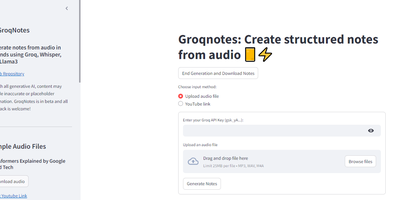
Audio lectures become structured, Markdown-formatted notes in about a minute with ScribeWizard (also known as GroqNotes). Upload an MP3, WAV, or M4A file - or paste a YouTube link - and the app runs a three-stage pipeline on Groq's LPU inference hardware: Whisper Large v3 transcribes the audio, a larger Llama model drafts a comprehensive outline of the material, and a faster Llama model fills each section with detailed content. This scaffolded prompting strategy is the core idea: the strong model handles structure where quality matters most, the fast model handles volume, and Groq's 1200+ tokens-per-second inference keeps the whole process near real time. Output renders as clean Markdown with support for tables and code blocks, and finished notes download as text or PDF. Model selection is configurable - swap in other Groq-hosted open models like Mixtral or Gemma to trade speed against quality or work around rate limits. Built as a single Streamlit app by Benjamin Klieger at Groq, it needs only a Groq API key to run, making it one of the simplest self-hosted AI tools to operate.