Pixelle Video
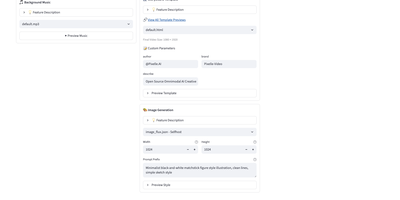
Backed by Alibaba's AIDC team and carrying over 27,700 GitHub stars, Pixelle-Video turns a single text prompt into a publish-ready short video in approximately three minutes — handling scriptwriting, image generation, voice narration, music selection, subtitle overlay, and final MP4 export in one automated pipeline. The engine supports multiple LLM backends for script generation including GPT-4, Qwen, DeepSeek, and local Ollama deployments, while image and video creation routes through either self-hosted ComfyUI workflows, cloud-based RunningHub pipelines, or direct API connections to DashScope Wan, OpenAI, Seedream, Seedance, and Kling AI. Text-to-speech synthesis uses Edge-TTS, Index-TTS, and other mainstream engines with multi-language voice profiles. Five distinct pipelines cover Quick Create, Standard, Digital Human Avatar broadcasting, Image-to-Video transformation, and Motion Transfer from reference video. The Streamlit web UI on port 8501 provides a visual workflow builder with template selection across portrait (1080x1920), landscape (1920x1080), and square formats, while the FastAPI server on port 8000 exposes a REST API with endpoints for async video generation, task polling, content scripting, TTS and image generation, template listing, and health checks. History persistence tracks all completed generations. HTML-based visual templates support static, image-overlay, and AI-video styles with customizable prompt prefixes. The modular architecture lets operators swap any atomic capability — image model, video model, TTS engine, or VLM — by editing a workflow JSON file without touching Python code. Running on a dedicated VPS on RepoCloud with guaranteed CPU, RAM, and SSD, full root SSH access, and a browser serial console. Apache 2.0 licensed.
OpenMontage
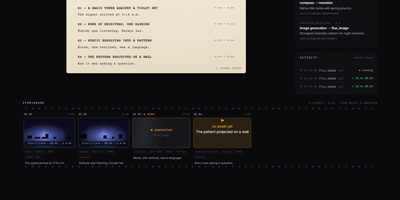
Reaching #1 on GitHub Trending with over 48,000 stars, OpenMontage is the first open-source agentic video production system — transforming AI coding assistants like Claude Code, Cursor, Copilot, Windsurf, and Codex into complete video studios that handle research, scripting, scene planning, asset generation, editing, and final rendering through natural language prompts. Twelve production pipelines cover animated explainers, cinematic trailers, documentary montages, talking heads, screen demos, podcast repurposing, character animation, localization and dubbing, avatar spokesperson videos, hybrid productions, clip factory batch processing, and animation workflows. Over 100 registered Python tools connect to 60+ providers including Kling, Runway Gen-4, Google Veo 3.1, FLUX, Google Imagen 4, ElevenLabs, and Suno AI for cloud generation, plus Piper TTS, WAN 2.1, Hunyuan, and CogVideo for fully local GPU rendering — while free footage from Archive.org, NASA, Wikimedia Commons, Pexels, and Unsplash powers the documentary montage pipeline's CLIP-indexed retrieval system for real-motion video without paid generation APIs. Two composition engines — Remotion for React-based programmatic video and HyperFrames for HTML/GSAP motion graphics — render final output with spring animations, word-level captions, kinetic typography, and SVG character rigs. A seven-dimension scored provider selector, pre-compose validation gates, post-render ffprobe self-review, slideshow risk scoring, configurable budget caps with per-action approval thresholds, and the Backlot live web dashboard for visual production monitoring enforce production-grade quality at every stage. Running on a dedicated VPS on RepoCloud with guaranteed CPU, RAM, and SSD, full root SSH access, and a browser serial console. AGPL-3.0 licensed.
OpenPost
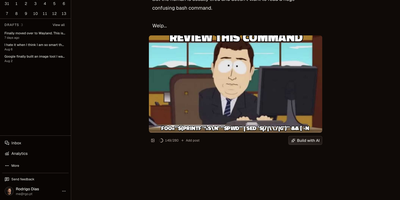
OpenPost is an open-source content creation and publishing suite that unifies multi-platform social scheduling, graphic design, and video editing into a single self-hosted control center. Creators can compose one primary announcement and tailor bespoke copy, media attachments, and thread structures across sixteen distinct networks including Bluesky, Mastodon, X, Threads, LinkedIn, YouTube, and Discord. The integrated browser canvas lets you design multi-slide carousels with custom typography, layer ordering, and automated background removal without juggling external design software. A built-in multitrack video suite allows you to trim footage, render subtitle captions, insert transitions, and slice clips directly by highlighting spoken words in generated transcripts. Social managers can organize campaigns through an interactive visual calendar, stagger deliveries across automated queues, and monitor unified comment streams to answer incoming audience inquiries directly from a single inbox. Teams can organize multiple independent client brands into partitioned workspaces with role-based permissions, automated repost policies, and programmable scheduling webhooks via native REST and Model Context Protocol endpoints. Running on a dedicated VPS on RepoCloud with guaranteed CPU, RAM, and SSD, full root SSH access, and a browser serial console. AGPL-3.0 licensed.
Moocup
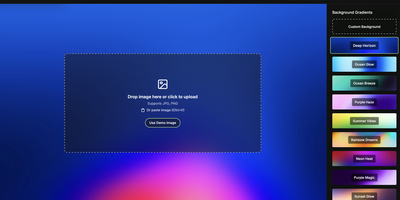
Drop your screenshot, a base style is applied, style it however you wish, and export - "that's basically it," says Moocup's own author, and the description holds. The workflow is genuinely seconds long. Drag an image in and it lands on an attractive backdrop immediately; from there you adjust backgrounds, gradients, padding, borders, shadows, and framing with live preview until it matches your taste, then export a high-quality image ready for a portfolio page, README, blog post, tweet, or slide deck. There are no accounts, no watermarks, and no upload to anyone's cloud - as a self-hosted static app, your screenshots never leave your infrastructure, which matters when the screenshot shows a proprietary dashboard or unreleased product. It runs entirely in the browser from a tiny nginx container, works on any device, and requires zero design skill: the smart defaults do the heavy lifting, and everything else is optional tinkering.
Animockup
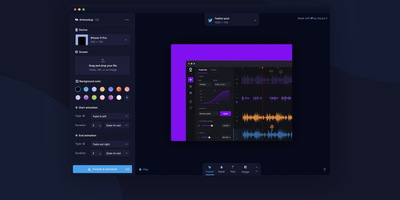
Product Hunt's Maker of the Year: Animockup delivers an alternative to expensive motion graphics tools for creating animated product teaser videos entirely in the browser. The FabricJS canvas engine provides a fully interactive editing surface where you import product videos or screenshots, place them inside device mockups ranging from iPhones and MacBooks to browser windows and smartwatches, and customize everything from background gradients to overlay text positioning. Anime.js powers the animation system with configurable start and end transitions, easing curves, and duration controls that produce smooth entrance and exit effects without timeline editors or keyframe knowledge. The built-in FFMPEG.wasm pipeline handles all video processing client-side — no server-side rendering required — exporting finished teasers to WebM, MP4, or GIF at custom framerates and resolutions up to 4K. The crop and reposition tool lets you precisely fit product footage into any device screen regardless of aspect ratio differences. Twenty-plus device frames cover phones, tablets, laptops, desktops, watches, and generic browser windows for maximum versatility. Firebase authentication handles user sessions while the optional Paddle integration manages subscriptions — or remove both for a fully free deployment. Self-hosting requires only a static web server with optional PHP for the payment webhook endpoint. Running on a dedicated VPS on RepoCloud with guaranteed CPU, RAM, and SSD, full root SSH access, and a browser serial console. MIT licensed.