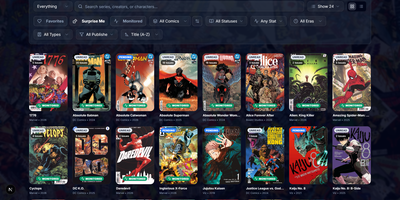
Omnibus
Omnibus runs your whole comic habit from one shelf: discover a series, request the missing issues, and read them in the browser when they land. Discovery starts with ComicVine or Metron metadata (high-resolution covers, synopses, and creator credits) and a release calendar that flags what you own and what is still missing across your monitored series. Requests are one click for a single issue or a whole run; Omnibus searches your indexers, hands the release to qBittorrent or SABnzbd, then imports, renames, and shelves the file with metadata embedded into the archive itself. Loose files that match nothing meet the Smart Matcher, which proposes the right series and applies every confident match in one pass. The built-in reader opens CBZ, natively read CBR and EPUB files in left-to-right, right-to-left manga, or continuous webtoon modes, with double-page spreads, brightness and contrast controls, page preloading, and preferences remembered per series; an offline button caches a full issue for the road. Reading lists assemble themselves from a pasted event ID or arrive by import from CBL files, League of Comic Geeks CSVs, AniList, or MyAnimeList, always showing how far through them you are. Everyone gets their own account, reading progress, follows, and an Updates feed, while OPDS, KOReader sync, and a Komga-compatible endpoint feed Panels, Mihon, and Paperback on the side. Running on a dedicated VPS on RepoCloud with guaranteed CPU, RAM, and SSD, full root SSH access, and a browser serial console. GPL-3.0 licensed.
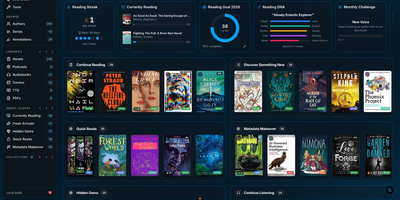
BookOrbit
Consolidate your entire digital library into a self-hosted reading sanctuary with BookOrbit, an open-source media platform that organizes ebooks, audiobooks, comic archives, and research PDFs within a personal private cloud. Readers can enjoy multi-format media directly through responsive browser readers that support EPUB, CBZ, and M4B formats without external browser extensions. The platform synchronizes reading bookmarks, highlights, and completion statuses across web interfaces, Kobo ereaders, and KOReader devices. An automated metadata enrichment engine queries fourteen upstream bibliographic indexes, downloading cover artwork, chapter breakdowns, author biographies, and series taxonomies. The staging workspace allows librarians to inspect incoming files, review suggested metadata revisions, and embed updated tags directly into physical storage archives before shelving. Custom reading dashboards track annual book goals, calculate daily streaks, and plot reading habit radar charts. Multi-user configurations support distinct per-user collections, granular content permissions, and single sign-on authentication through OpenID Connect providers. Power users can export private OPDS feeds to external mobile reading applications or push books directly to connected Kindle hardware. Running on a dedicated VPS on RepoCloud with guaranteed CPU, RAM, and SSD, full root SSH access, and a browser serial console. GNU AGPL v3.0 licensed.
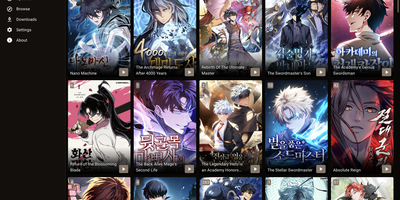
Suwayomi
Manga collections tend to get trapped on a single phone; Suwayomi moves the library, downloads, and reading progress onto a server you run, so every browser and device sees the same shelf. In the browser, a built-in reader handles single page, double page, continuous vertical, continuous horizontal, and webtoon layouts, adding image filters, custom keybinds, auto scrolling, and separate desktop and mobile views. Content comes from Mihon (Tachiyomi) extensions, which can be searched, browsed, and sorted into categories, with custom extension stores loaded from JSON or Protobuf indexes. Downloads save chapters as CBZ archives for offline reading, and the server checks the library for new chapters every 12 hours by default, fetching them automatically if you allow it. Progress follows you through MyAnimeList, AniList, and MangaUpdates, a Suwayomi extension and tracker for Mihon, SyncYomi servers, and KOReader. E-reader apps connect over OPDS feeds, scheduled Mihon-compatible backups protect the library, and FlareSolverr or Byparr support handles Cloudflare-protected sources. Public instances can be locked down with basic authentication, a simple login page, or JWT-based UI login, and a PostgreSQL backend, still in beta, can replace the default file store. Running on a dedicated VPS on RepoCloud with guaranteed CPU, RAM, and SSD, full root SSH access, and a browser serial console. MPL-2.0 licensed.
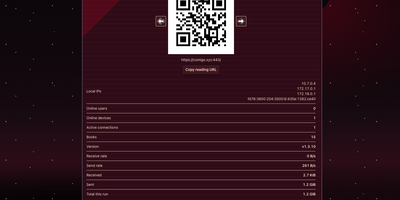
Comigo
Your comic and manga collection becomes one tidy library with Comigo, readable in any browser on any device in the house. Point it at a folder and it indexes image folders plus zip, rar, tar, cbz, cbr, and epub archives, then serves pages in scroll or page-turning layouts. Pages arrive cropped and compressed for the screen in front of you, and modern heic and avif files read beside plain jpg and png. A QR code on the server screen brings phones and tablets straight into the same library, and reading position follows you between devices mid-chapter. Your history is tracked automatically, so a series paused last month reopens at the exact page where you stopped. The built-in player handles audio and video stored beside your books, which covers drama CDs and anime extras in the same shelves. Plugins add automatic page turning and an on-screen clock, and you can write your own to change how reading sessions behave. Libraries can live on another Comigo server across the network, whole image folders download in batches, and epub files convert for dedicated e-readers. The offline mode reads archives directly inside the browser with nothing uploaded, which suits borrowed machines and locked-down networks. Running on a dedicated VPS on RepoCloud with guaranteed CPU, RAM, and SSD, full root SSH access, and a browser serial console. MIT licensed.