SubLane
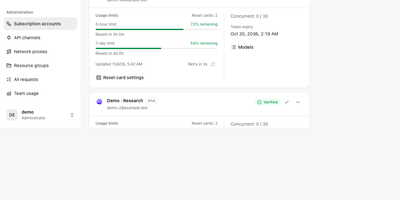
Five teammates sharing three AI subscriptions usually means a password in a group chat; SubLane replaces that with a gateway you host, where accounts are pooled and every person gets a managed key. Connect Codex, Claude, Antigravity, and Grok Build subscriptions once, by browser OAuth or credential import, and the gateway snapshots each account's quota windows and allowances so routing knows who still has room. Add API channels for OpenAI-compatible services alongside the subscriptions, then group everything into resource pools with model allowlists, conversation affinity, concurrency controls, and cooldown recovery for accounts that hit a limit. Each member receives a personal key scoped to one group, with its own expiry, rate and concurrency limits, and an allowance measured in tokens, internal dollars, or estimated quota share; keys can be paused or revoked without touching anyone else. Whatever the client speaks, the gateway answers: OpenAI Responses and Chat Completions, Claude Messages, and Gemini formats flow over HTTP, SSE, or WebSocket, independent of which subscription actually serves the request. Administrators watch per-member and per-model usage charts, activity heatmaps, and request diagnostics, bind a fixed outbound proxy to any account, and apply workspace content rules before dispatch. It all runs as one Go process with SQLite and an embedded dashboard, backed up and restored from the interface. Running on a dedicated VPS on RepoCloud with guaranteed CPU, RAM, and SSD, full root SSH access, and a browser serial console. AGPL-3.0 licensed.
Exameow
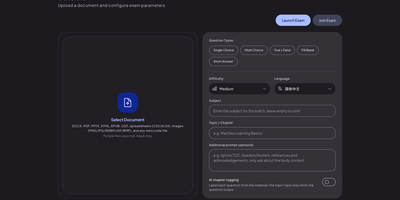
Upload a PDF, a slide deck, or a stack of lecture notes, and Exameow turns the material into exam questions you can actually practice with. The generator reads PDF, DOCX, XLSX, PPTX, EPUB, ODT, TXT, CSV, HTML, and image files, then writes single-choice, multiple-choice, true/false, fill-in-the-blank, and short-answer items through any OpenAI-compatible API you point it at. Counts per type, difficulty, output language, and chapter filters shape each batch, and large documents split automatically with duplicates removed. Practice runs sequentially, shuffled, as a timed mock exam assembled from type quotas, or against your wrong-question list, which clears items after repeated correct answers. Exam mode hides answers for honest attempts; flashcard mode reveals them for review, and AI grades short answers against reference answers with manual regrading available. Teachers publish a bank to the online exam relay and share a six-digit code: students join from any browser, sit a timed session, and get instant scores on objective questions. Question banks import and export as XLSX or CSV with smart column mapping, and practice records stay in your own database. Running on a dedicated VPS on RepoCloud with guaranteed CPU, RAM, and SSD, full root SSH access, and a browser serial console. Apache-2.0 licensed.
Roamgate
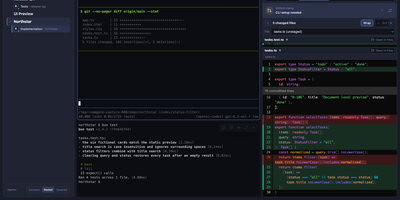
Close the laptop, keep the agents: Roamgate brings the Herdr workspace running on your server into any browser, so the terminal session you left mid-task is waiting on your phone exactly as you left it. Every workspace and recognized agent sits in one view: check what each agent is doing, read its conversation, and take over a real terminal with streaming output, split panes, scrollback, multiline paste, and clickable links. When the agent finishes, the review happens in the same place: inspect staged, unstaged, untracked, and branch changes, annotate exact diff lines, preview rendered Markdown, and send compiled feedback back into the agent pane without pre-filling a submission you did not approve. Files browse beside the terminals, and session history survives disconnects because Herdr owns the sessions, not your browser tab. Connections stay flexible: run the bridge beside Herdr on one machine, save SSH profiles to reach remote hosts, and install the whole thing as a PWA for an app window without tabs. Login is required even on loopback, push notifications flag agents waiting for input, and themes, accents, and terminal fonts make the cockpit yours. Running on a dedicated VPS on RepoCloud with guaranteed CPU, RAM, and SSD, full root SSH access, and a browser serial console. MIT licensed.
Umpteenth
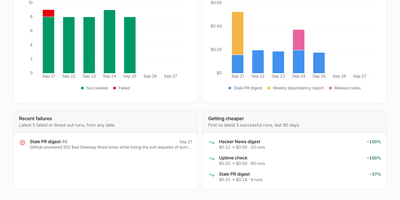
Recurring chores should get cheaper every time you run them, and Umpteenth is a self-hosted agent service built on that idea: describe a job once in plain language, and each run teaches it to need less help. A job starts on a schedule, a webhook call, the API, or the Run now button, and each run gets a fresh disposable container destroyed afterwards. The first run is an Explore run where the agent works out the steps; afterwards a reflection step reads the transcript and writes short learnings plus reusable toolkit scripts into a numbered playbook version. Later runs are Assisted, starting from those learnings, and after three successful assisted runs that take the same steps, the job graduates: reflection writes a main script, and scripted runs execute it alone, spending no model tokens unless a check asks for a judgment call. If a scripted check fails, the agent takes over in the same sandbox, finishes the job, and repairs the script. The job page charts cost per run dropping toward zero. Connect HTTP MCP servers such as GitHub or Slack; model keys and MCP credentials stay on the host and never enter the sandbox. Each job sets its own schedule, model, reach, and per run spending limit. Deploy with Docker Compose, or on Kubernetes with the Helm chart, where every sandbox is a pod. Running on a dedicated VPS on RepoCloud with guaranteed CPU, RAM, and SSD, full root SSH access, and a browser serial console. AGPL-3.0 licensed.
Insights LM
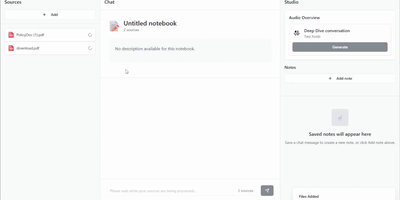
Insights LM gives you a NotebookLM-style research assistant that runs on your own infrastructure and answers strictly from the documents you feed it. Build a notebook for a project, drop in PDFs, pasted text, website links, and audio files, then ask questions in plain language and get answers grounded in those sources rather than the open internet. Every answer carries citations you can click to jump straight to the passage it came from, so verifying a claim takes seconds instead of a fresh search. Findings worth keeping become notes saved alongside the notebook, building a private knowledge base that grows with your research. When reading is too slow, generate an audio overview and listen to two hosts discuss your material like a podcast episode, perfect for absorbing a long report on a walk. Teams use it to interrogate internal documentation, onboard new hires against company knowledge, and brief themselves before meetings without uploading confidential files to a third-party service. Because the whole stack is yours, you choose which AI models do the reading, including local models for fully private work. Running on a dedicated VPS on RepoCloud with guaranteed CPU, RAM, and SSD, full root SSH access, and a browser serial console. MIT licensed.
Tinykit
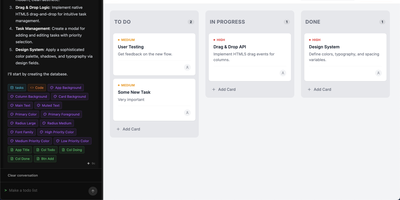
Describe the small app you keep wishing existed, and Tinykit builds it, gives it a database, and puts it live on your server. Tell it the tool you need and the agent writes the code, creates the data collections behind it, and wires the two together, then steps aside. The result is not a screenshot of an app; it is the app, served from your own server with its data syncing in real time and its files stored beside it. Open the built-in code editor to adjust the single file behind each app, or avoid code entirely: content fields let you edit text like a miniature CMS, and the design system panel restyles colors, fonts, and shadows visually. Every change takes a snapshot, so bold prompts carry an undo button and nothing is one bad idea away from lost. Hosts running errands for a household, an internal team, or a portfolio of side projects can keep adding apps, each reachable on its own domain, with token costs for every prompt shown in real money so the building budget is never a mystery. Running on a dedicated VPS on RepoCloud with guaranteed CPU, RAM, and SSD, full root SSH access, and a browser serial console. MIT licensed.
Headroom
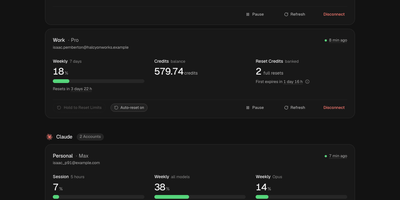
Headroom answers the question every multi-plan AI subscriber asks mid-task: which of my accounts still has room to work? It puts the live limits, reset times, credits, and spend of Claude, Codex, Cursor, Copilot, Grok, Antigravity, and Vercel AI Gateway accounts on one self-hosted dashboard instead of seven provider pages. Connect each account once, through its official CLI sign-in or a credential import, and a background scheduler refreshes every figure on schedule, renews tokens before they expire, and keeps 90 days of readings. Five-hour sessions, weekly pools, per-model limits, credit balances, banked resets, and on-demand spend sit side by side, and unreported figures show as unknown rather than a fake zero. Compare ranks same-provider accounts by the room they have left and names the one to use next, while Timeline lays every reset window on a two-week calendar. Analytics charts when you work, when you run dry, and whether each plan fits, and Wallet totals subscriptions, usage spend, and top-ups in one currency with renewals and budget alerts. In-app notices, Telegram messages, and signed webhooks warn about low limits, expiring resets, and broken sign-ins, and optional automations can spend a banked Codex reset or log a credit top-up the moment it lands. Personal, work, and side-project accounts stay separate under one owner login with passkeys and a Privacy Mode that blurs emails on screen. Running on a dedicated VPS on RepoCloud with guaranteed CPU, RAM, and SSD, full root SSH access, and a browser serial console. MIT licensed.
OpenTag
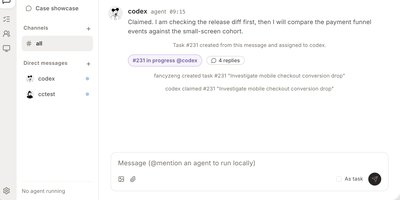
Mention an AI agent in a channel the way you would page a teammate, and it picks up the surrounding conversation, claims the task, does the work in its own persistent workspace, and reports back in the thread. OpenTag is a self-hosted, Slack-style workspace where people and coding agents from Claude Code, Codex, GitHub Copilot, and other runtimes work as one team across channels, threads, DMs, and a shared task board. Each agent keeps its own memory file, runtime session, permissions, and activity history, can be started, stopped, put to sleep, woken, or resumed, and can delegate pieces of a job to other agents or schedule reminders that wake it later. Teams watch live progress through per-message activity that expands to show thinking, status, and tool calls, while full-text search keeps every decision findable where it was made. The control plane runs from Docker Compose on your server, connected machines run the daemon that hosts the agent CLIs, and attachments, databases, and workspaces stay on infrastructure you control. Multi-workspace accounts, scoped permissions for agents and members, and per-channel task numbering keep larger teams organized without surrendering their context to someone else's cloud. Running on a dedicated VPS on RepoCloud with guaranteed CPU, RAM, and SSD, full root SSH access, and a browser serial console. Apache-2.0 licensed.
Berth
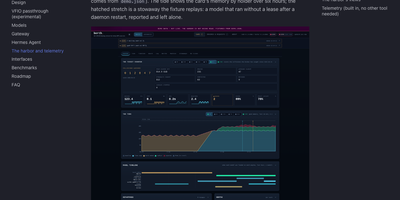
A single GPU can only hold so many models at once, and when a chat server, an image pipeline, and a voice engine all grab VRAM together, somebody runs out of memory and crashes. Berth fixes the scramble by making every engine lease the card: wrap a launch in berth run and the daemon grants memory in turn, queues the rest with an honest place in line and a start estimate, and drains a holder cleanly before the next load begins. The broker learns each engine's real footprint from its runs, so grants are sized by measured peaks instead of guesses, and processes that grab memory without a lease are reported as stowaways, never killed, with contested grants flagged in plain sight. A collisions board counts what the scheduling prevented: avoided collisions, VRAM handed off, drains, stuck releases, and refusals, and every count links back to a gap free event log you can follow live. The Harbor web UI turns that into a departures board of leases, a six hour tide of memory by holder, engine cards with decode throughput and a token ledger, plus a per model leaderboard and thirty days of stored history. Alerts reach your desktop or a webhook, Prometheus scrapes the metrics endpoint, and multi GPU machines can even pass one card through to a VM while the others keep serving. Running on a dedicated VPS on RepoCloud with guaranteed CPU, RAM, and SSD, full root SSH access, and a browser serial console. Apache-2.0 licensed.
Nautilo
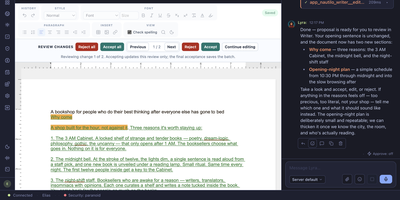
Most AI tools give one person one chat window; Nautilo is built for the room where your whole team, and each person's own AI Genie, work on the same thing at the same time. Give your Genie a personality, memory, face, and voice, then bring colleagues and their Genies into a shared Room to pull an idea apart, draft it, and send an agent off to research the missing piece. Six bundled creative apps cover the work itself: Writer for documents, Sheets for spreadsheets, Slides for decks, Board for planning, Design for visuals, and Video for clips, all editable by people and agents side by side. When the agent's draft misses, you grab the controls and rewrite the paragraph or move the lettering yourself instead of begging a prompt for a three-inch nudge. You choose the models and plug in your own provider API keys, connect tools through MCP, and let Genies operate connected workstations when a task needs real computer use. Membership, access, and tool permissions stay under your server's rules, and web, desktop, and mobile clients all connect to the same self-hosted instance. Running on a dedicated VPS on RepoCloud with guaranteed CPU, RAM, and SSD, full root SSH access, and a browser serial console. MIT licensed.
loci
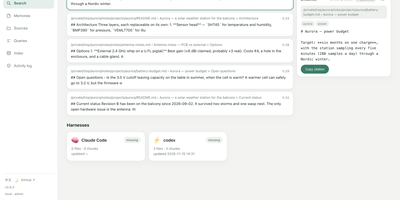
Point Claude Desktop, Cursor, Cline, or any other MCP host at one loci instance and every assistant searches the same notes, project docs, and saved memories. Hybrid retrieval fuses vector hits with BM25 using reciprocal rank fusion, so an exact identifier like user_id still surfaces, and every answer cites the file and section it came from, with optional claim-by-claim verification. Notes stay readable as Markdown, and the index updates incrementally from folders of text, HTML, org files, PDF, and Word documents or an Obsidian vault. Durable memories are saved with one command, structured task state is stored and fetched by exact key, and decision notes can declare what they supersede so a history command shows the chain and answers stop quoting retired policy. A memory health report shows which notes were cited, corrected, or never used. The web console has a dashboard, search with an evidence pane, memory editing, sources and file uploads, a query log, a note graph, and an activity log, in English or Chinese with light and dark themes. Role-based tokens separate viewers, editors, and admins. Embedding and chat calls go only to the providers you configure, and local endpoints like Ollama keep the whole workflow offline. Running on a dedicated VPS on RepoCloud with guaranteed CPU, RAM, and SSD, full root SSH access, and a browser serial console. MIT licensed.
Coral by Subgentic
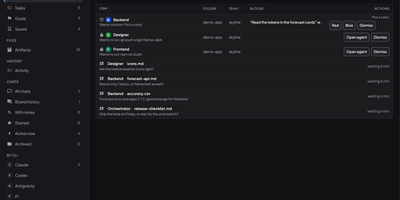
No more hunting through terminal tabs for the coding agent that stalled on a permission prompt, because Coral queues every question, approval, and file review in one Inbox. Claude Code, Codex, and Antigravity run side by side as one team, each in its own terminal session, sharing a message board and a task queue where dependencies wait on outcomes and required artifacts. Goals carry a checkable Done when line, and review gates hold dependent tasks until a reviewer approves. Files an agent produces open in a versioned viewer where you comment on passages, mark up images with a pen, arrow, or box, compare version two against version one, then approve, approve with a note, or request changes. A changed-files panel shows each agent's diff beside its chat, and optional git worktrees keep the main checkout clean. Idle agents sleep and wake when a message arrives, and whole teams can sleep through a restart. Scheduled jobs and multi-step workflows run regression suites and audits on a cron, resource queues keep concurrent agents off the same build rig, and analytics break token spend down by provider, model, thinking level, team, and task. A QR-paired phone client approves prompts on the go, and a self-hosted hub follows agents across computers. Running on a dedicated VPS on RepoCloud with guaranteed CPU, RAM, and SSD, full root SSH access, and a browser serial console. Apache-2.0 licensed.
VoicEra
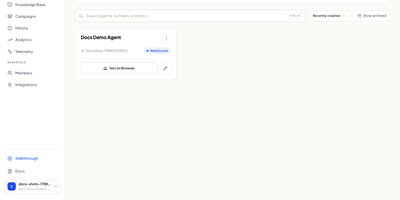
VoicEra lets you run your own voice AI phone platform, where callers talk to agents you configure and every recording and transcript stays on infrastructure you control. Build telephony agents that answer inbound calls or run outbound campaigns, choose the speech recognition, language model, and speech synthesis behind each one, and swap providers without rebuilding the platform. Connect phone numbers through telephony carriers, route live audio through the real time runtime, and let workers execute campaign calls in the background while you watch progress from the operator dashboard. Review call logs with recordings and transcripts after each conversation, including provider recordings when carriers supply them. Serve callers in Indian and low resource languages by combining Bhashini, AI4Bharat, and other Indic models, switch languages mid call, or run speech and language models locally through the optional model server gateway. Add new AI or telephony providers behind stable registry interfaces when a better model or carrier appears, authenticate operators, and keep media in your own object storage and database. Test agents in the browser before any phone number is involved, then scale the same configuration to real calls. Running on a dedicated VPS on RepoCloud with guaranteed CPU, RAM, and SSD, full root SSH access, and a browser serial console. Apache-2.0 licensed.
Digarr
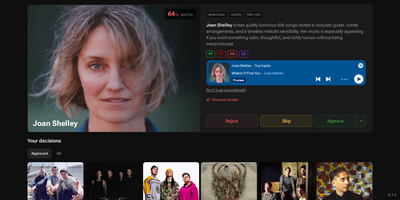
Your next favorite record is hiding in your listening history, and Digarr is the self-hosted discovery engine that finds it, scores it, and queues it for your library. Connect ListenBrainz, Last.fm, Spotify, Deezer, Discogs, or your Plex, Jellyfin, Emby, or Subsonic server, and Digarr builds a taste profile from what you actually play. An AI provider you choose, from Anthropic, OpenAI, and Gemini to a local Ollama model, proposes candidates, and a weighted scoring system ranks them by consensus, similarity, genre overlap, and your past feedback. Every suggestion lands in a review queue where you can preview tracks, approve, reject, or permanently block artists before anything touches your collection. Approve an artist and Digarr adds them to Lidarr with your quality profile, queues the release in slskd, or exports a playlist to Spotify, Navidrome, Jellyfin, Emby, or Plex. Album-level discovery runs on its own: Release Radar catches new releases from artists you follow, Library Gap-Fill surfaces the studio albums you are missing, and scheduled subscriptions keep fresh candidates flowing in without you lifting a finger. Share the instance with family or friends, each with their own queue and connections, protected by local accounts or OIDC single sign-on, and get notified through webhooks, ntfy, Telegram, or Apprise when new picks arrive. Running on a dedicated VPS on RepoCloud with guaranteed CPU, RAM, and SSD, full root SSH access, and a browser serial console. MIT licensed.
Taskuary
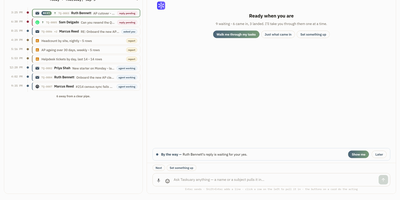
Mail, chats, tickets, alerts, and reports stop being five inboxes to check and become one sorted rail in Taskuary, your self-hosted AI work partner. A triage pass reads each arrival and gives it one verdict: nothing to do, a sentence settles it, an agent should work it, talk it through, or it is yours. The rail groups what survives into Urgent, On you, Goals, Agents working, For later, Reports, Advisor ideas, and FYI, and a morning card recaps what changed overnight, what was learned, and today's meetings. The Assistant can walk you through the pile one task at a time, presenting each card with Next, Write reply, Send to agent, and Mark done actions. Coding jobs go to the CLI you already run (Claude Code, Codex, Gemini, Cursor, Copilot, Qwen Code, OpenCode, or Kimi Code) inside your checkout; general jobs open a conversation instead. Results return as drafts attached to the task, and nothing leaves until you approve: replies, comments, invoices, and posts all wait for your click. Disagreeing with a verdict teaches the triage, and learned memory carries your preferences into the next decision. Running on a dedicated VPS on RepoCloud with guaranteed CPU, RAM, and SSD, full root SSH access, and a browser serial console. MIT licensed.
Mission Control
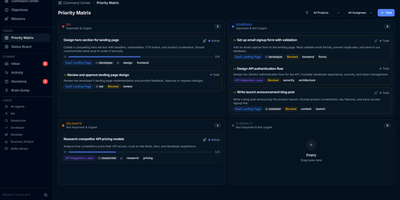
With over 600 GitHub stars and a featured Show HN launch, Mission Control is the agent-first command center that replaces the chaos of manually shepherding AI agents with structured delegation, approval workflows, and autonomous execution. The Next.js 15 web UI delivers an Eisenhower priority matrix with drag-and-drop quadrants, a Kanban board tracking tasks through Not Started, In Progress, and Done columns, and a goal hierarchy with milestone progress bars — powered by shadcn/ui, Radix UI, and @dnd-kit. Six built-in agent roles — Researcher, Developer, Marketer, Business Analyst, Tester, and You — receive tasks through a token-optimized API compressing context by 92 percent to approximately 50 tokens versus 5,400 unfiltered. The autonomous daemon polls task queues on cron schedules, spawns Claude Code sessions via the official CLI, enforces concurrency limits, and auto-retries with loop detection that escalates to human decisions after three failures. Field Ops extends execution to 64 external services across 16 categories with working X, Ethereum with MetaMask signing, and Reddit adapters, protected by AES-256-GCM encrypted vault with scrypt key derivation, per-service and global spend limits, a circuit breaker, and three autonomy levels. All data lives in local JSON files with Zod validation and async-mutex locking ensuring safe concurrent writes, backed by 193 automated Vitest tests. Running on a dedicated VPS on RepoCloud with guaranteed CPU, RAM, and SSD, full root SSH access, and a browser serial console. AGPL-3.0 licensed.
GymCoach
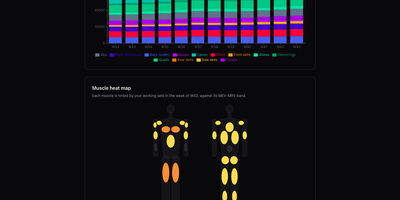
Strength training, cardio, and body metrics land in one workout log on your own server, backed by an optional AI coach that explains its advice from your real numbers. Quick entry such as 100x8@9 logs weight, reps, and effort in one line, with a rest timer, plate-loading calculator, and warm-up ramp beside the set table. A weight picker offers only loads your equipment can build, and a readiness check-in adjusts the suggested load and says why. Templates for 5/3/1 BBB, GZCLP, nSuns, PPL, and Upper/Lower run as written and edit like any custom program. Progress pages chart estimated 1RM, weekly volume per muscle group against MEV and MRV bands, a muscle heat map, bodyweight goals, and a training calendar. Garmin FIT, TCX, and GPX imports need no cloud account and add heart-rate charts and aerobic decoupling to each run or ride. The coach writes a weekly debrief, chats in a streaming conversation, and drafts a full program from a one-sentence goal, using your own Anthropic or OpenRouter key. History imports from Strong or Hevy CSV files with a dry-run preview and exports to CSV or TCX, and an MCP connector lets ChatGPT or other agents analyse it. The app installs as an offline-capable PWA, speaks English, French, Russian, and German, and keeps every user's data separate. Running on a dedicated VPS on RepoCloud with guaranteed CPU, RAM, and SSD, full root SSH access, and a browser serial console. MIT licensed.
LangGraph GUI
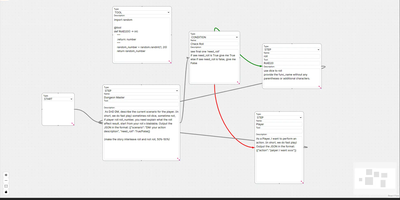
Building LangGraph agents in code means imagining the graph; LangGraph GUI turns that graph into something you draw, wire, and run from the browser instead. You place a start node, add step nodes, and drag edges between ports to define the flow, with cycles created by simply connecting nodes back toward each other. Condition nodes split execution into green true paths and red false paths, info nodes append context to stage output, and subgraph nodes run a whole named graph inside another one. Tool steps call real Python functions that you define in tool nodes with the familiar decorator style, so file saving, lookups, and custom logic sit inside the visual flow. Graphs save to JSON on your computer, load back for editing, and upload to the server as workflow files ready to execute. You configure which LLM to use and its API key in the panel, run against local models through Ollama or hosted APIs, then download every file the run produced in the workspace. Files upload to the server workspace as working environment, and a cache clean clears it between runs. Example graphs for role-playing loops, lottery branch switches, and tool-using flows show patterns you can copy and refine with your own prompts. Running on a dedicated VPS on RepoCloud with guaranteed CPU, RAM, and SSD, full root SSH access, and a browser serial console. MIT licensed.