WGDashboard
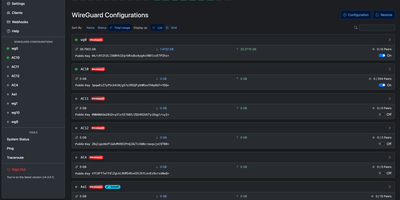
Managing WireGuard and AmneziaWG servers no longer means SSH sessions and typing wg show, because one browser dashboard covers every configuration and peer. WGDashboard finds existing configurations under /etc/wireguard and /etc/amnezia/amneziawg, so a running server appears right after installation. The home screen shows CPU, storage, memory, and swap meters above each configuration with its usage totals, peer count, and an on and off switch. Open a configuration for live data usage charts and a peer grid with search, sorting, tags, and bulk selection. Peers can be added one at a time or in bulk with generated keys and the next free addresses, then edited, restricted, deleted, or shared as a QR code, link, or email. Scheduled jobs restrict or delete peers when set conditions are met. Built-in ping and traceroute tools plot their results on a map. Settings add optional TOTP multi-factor sign-in, API keys, webhooks, light and dark themes, and a language selector. A remote server list connects one dashboard to others. Installation works on bare-metal Linux or in Docker. Running on a dedicated VPS on RepoCloud with guaranteed CPU, RAM, and SSD, full root SSH access, and a browser serial console. Apache-2.0 licensed.
Deploy