Garage
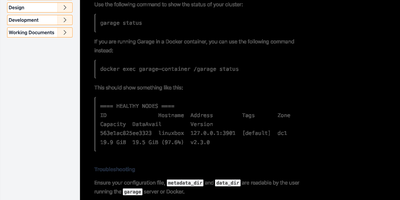
Picture your object storage scattered across a home server, a friend's rack, and a cheap VPS in another country, still answering S3 requests like nothing happened: that is exactly the deployment Garage was built for. Every object is replicated to three zones, so losing a node, a disk, or an entire site degrades the cluster instead of destroying your data. Applications talk to it with the standard S3 API: create buckets, upload objects in multiple parts, list and copy them, and hand out access keys that are scoped per bucket. A separate web endpoint serves static websites straight from buckets with CORS support, which covers personal sites, documentation, and release downloads without another server in the chain. The whole system ships as one dependency-free binary that asks for about a gigabyte of RAM and any x86-64 or ARM CPU from the last decade, second-hand hardware very much included. There is deliberately no consensus protocol to babysit: nodes gossip their cluster layout, tolerate 200-millisecond links, and keep serving reads while parts of the fleet are unreachable. Deuxfleurs runs it in production for their own hosting, and common pairings include restic or rclone backup targets, Matrix media storage, and Nix binary caches. Running on a dedicated VPS on RepoCloud with guaranteed CPU, RAM, and SSD, full root SSH access, and a browser serial console. AGPL-3.0 licensed.
XBackBone
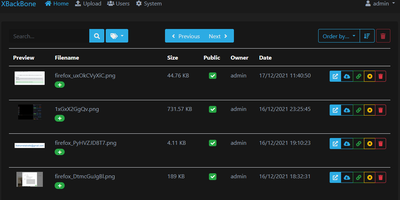
XBackBone is a self-hosted file and media sharing platform that turns your own server into a tidy home for screenshots, clips, and PDFs, giving each file a clean short link with rich embeds for chat and social apps instead of expiring file-transfer links. Capture tools plug straight in: generate a ready-made uploader config for ShareX, ScreenCloud, ishare, Spectacle, Xerahs, the macOS Share sheet, or a CLI script, and new screenshots land on your instance with the link copied. The dashboard previews images, video, audio waveforms, PDFs, and syntax-highlighted code in the browser, and pastes plus link shortening cover text and URLs. Make any upload public or private, add a password, or set an expiration date, and identical files are stored once thanks to content fingerprinting. Storage stays flexible across local disk, Amazon S3 and compatible services, FTP, and SFTP. Admins manage users with roles, disk quotas, and usage statistics, review a searchable activity timeline, and toggle registrations or themes without redeploying. Accounts support email verification, password resets, two-factor codes, and passkeys. A guided web installer handles first setup, and admins can apply updates from the browser. Running on a dedicated VPS on RepoCloud with guaranteed CPU, RAM, and SSD, full root SSH access, and a browser serial console. Apache-2.0 licensed.
Pelican Panel
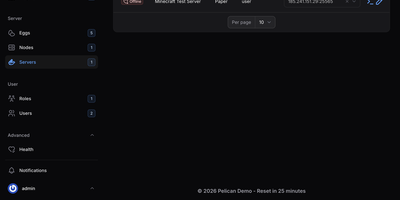
Pelican Panel is an open-source game server management platform that enables gaming communities and hosting providers to deploy, configure, and operate multiplayer servers for titles like Minecraft, Palworld, and Counter-Strike within secure, containerized environments. Administrators can provision dedicated game servers in seconds using modular configuration eggs, allocating precise CPU cores, memory thresholds, and disk quotas to prevent resource contention across noisy neighbors. Players and server operators access an interactive web console featuring live terminal output, instant power state toggles, and direct command execution over secure WebSockets. An integrated file browser enables operators to upload server modifications, edit configuration scripts with syntax highlighting, and decompress archives without opening an external terminal. Built-in scheduling pipelines automate recurring tasks such as world backups, daily server restarts, and mod updates based on custom cron expressions. Multi-tenant permission controls allow guild leaders to invite co-administrators and grant granular privileges for restarting daemons, reviewing console logs, or managing database credentials without exposing the host system. Operators can also provision external SFTP endpoints, attach secondary IP allocations, and trigger webhook alerts whenever container health anomalies occur. Running on a dedicated VPS on RepoCloud with guaranteed CPU, RAM, and SSD, full root SSH access, and a browser serial console. AGPL-3.0 licensed.
SCM-Manager
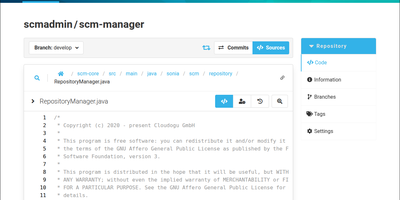
SCM-Manager puts Git, Mercurial, and Subversion repositories behind one web interface, so modern projects and legacy archives live on the same server under the same accounts and permissions. Create or import repositories into namespaces, then browse code, commits, branches, tags, and diffs in the browser instead of cloning just to look around. Central user and group management applies fine-grained permissions per namespace and repository, so contractors see the one project they joined and nothing else. Everything in the interface can also be driven through a Level 3 REST API, which makes bulk repository creation, permission audits, and migration scripts ordinary HTTP calls. Plugins installed from the built-in plugin center add pull-request style code review, build status from your CI, links into issue trackers, and extra authentication providers. Configuration happens entirely in the web interface, with no config files to edit and no separate database or web server to install first. Old Subversion and Mercurial repositories keep working beside new Git projects, which ends the usual two-server split during a long migration. The embedded account system works on its own, and authentication plugins take over when accounts already live in another directory your organization runs. Running on a dedicated VPS on RepoCloud with guaranteed CPU, RAM, and SSD, full root SSH access, and a browser serial console. AGPL-3.0 licensed.