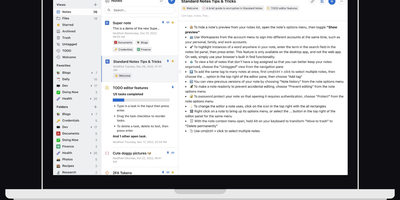
Standard Notes
Standard Notes keeps your notes, files, and tags encrypted on your device before anything touches the network, meaning the server stores only ciphertext it cannot read. Cross-platform sync across desktop, mobile, and web delivers fast, conflict-free updates on unlimited devices with the same zero-knowledge guarantee that only your password can decrypt your content. The V2 server architecture condenses everything into four Docker containers consuming roughly 570MB RAM total (down from 13 containers and 1.7GB in the legacy setup), with startup under one minute. Revision history automatically preserves every version of every note, so recovering deleted text or reverting to a previous state never depends on manual backups. A nested tag system organizes thousands of notes with hierarchical categorization that goes well beyond flat folder structures, while search operates entirely on client-side decrypted content. File attachments of any type encrypt and sync alongside notes with identical end-to-end protection. Multiple editor options span plain text, Markdown with preview, and rich formatting to fit different writing workflows. Two-factor authentication via TOTP with email backup codes adds a second barrier beyond your password. An optional separate container serves the web frontend, providing browser access to your encrypted vault without depending on standardnotes.com infrastructure. With 5,500+ GitHub stars and active development, the project continues expanding editor plugins and sync improvements.
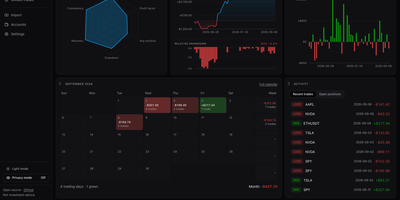
Trade Journal
A trading journal you host yourself, Trade Journal rebuilds broker fills and statement exports into round-trip trades, a profit and loss calendar, and daily notes that show what actually works. Read-only sync covers more than twenty brokers and exchanges, including Alpaca, Binance, Coinbase, Kraken, and IBKR Flex. Statement import auto-detects TradingView, MetaTrader, NinjaTrader, Tradovate, and thinkorswim files, handles TradeZella and Tradervue CSV migrations, and maps columns for anything else. Trades can be matched first-in-first-out, last-in-first-out, or by weighted average, with partial fills, scale-ins, and futures multipliers handled. The dashboard offers gauges, cumulative and daily P&L, an Edge Score radar, and cards you can rearrange into named layouts, while Reports break results down by symbol, tag, mistake, playbook, weekday, and time of day. Each trade page charts entries and exits and can replay candles you load, with estimated MAE and MFE. Daily journal pages hold Markdown notes, templates, attachments, and voice dictation, and optional AI recaps use your own Anthropic or OpenAI key or a local Ollama model. Playbook checklists score rule adherence, a prop firm ledger tracks costs and payouts, and privacy mode masks every amount. Running on a dedicated VPS on RepoCloud with guaranteed CPU, RAM, and SSD, full root SSH access, and a browser serial console. MIT licensed.
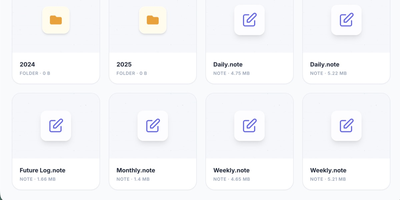
Supernote
Your Supernote tablet fills with handwritten journals, meeting notes, and sketches, and this server gives that handwriting a private home: Supernote is a self-hosted sync cloud for Ratta Supernote tablets that stores notebooks on your own hardware and can transcribe, summarize, and search them with AI. Point the tablet at your server under its Private Cloud sync setting and notebooks upload automatically, ready to browse in the web interface alongside your task lists and AI insights. Turn on the intelligence layer and each synced page is transcribed by a vision model, either Google Gemini or a local model served by Ollama or another OpenAI-compatible endpoint, so notes never leave your network. Analyzers then read your journals to surface tasks, themes, and Daily, Weekly, and Monthly summaries. Every word is indexed for semantic search, which understands concepts: searching for budget also finds pages about expenses or money, even when that exact word never appears. Tasks discovered in your handwriting export as calendar feeds that drop into Home Assistant, Apple Calendar, Google Calendar, and Outlook. An MCP server lets assistants such as Claude, Gemini, and ChatGPT answer questions against your notebooks, and notebooks convert to PDF, PNG, SVG, or plain text for use anywhere else. The hub idles at about 160 MB of memory, or roughly 135 MB in bare sync mode. Running on a dedicated VPS on RepoCloud with guaranteed CPU, RAM, and SSD, full root SSH access, and a browser serial console. Apache 2.0 licensed.
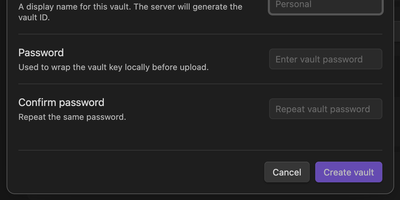
Synch
Synch keeps your Obsidian vault in step across desktop and mobile with end-to-end encryption, on a sync server you host yourself. Every note is encrypted on your device before upload, so the server stores sealed blobs and cannot read your notes, your file paths, or your vault keys. Edits travel between devices in seconds over a realtime connection, and the encrypted version history brings back earlier drafts and deleted files when a cleanup goes too far. When the same note changes on two devices, a three-way merge combines edits that do not overlap and keeps a conflict copy when they do, so work is never silently overwritten. Markdown, images, audio, video, and PDFs sync by default, and folder exclusions keep big or private corners of the vault at home. Run the server with Docker Compose or as a systemd service, point the plugin at your own API address, and allow only the email addresses you invite. Each vault gets its own database file on your disk, and blob storage can move to any S3-compatible bucket when the vault outgrows local storage. Running on a dedicated VPS on RepoCloud with guaranteed CPU, RAM, and SSD, full root SSH access, and a browser serial console. MIT licensed.
SyncTube
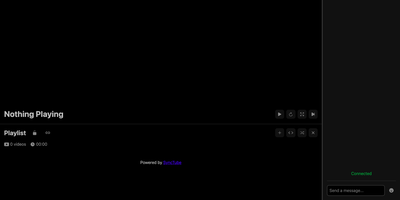
SyncTube turns any browser into a shared movie room where one link opens a synchronized player and live chat for the whole group. Paste a YouTube, Twitch, Vimeo, or PeerTube URL, or a direct mp4 or m3u8 link, and the room watches the same frame at the same moment. A leader takes global control of play, pause, seeking, and playback rate, and smaller groups can open pausing or resuming to everyone. Local files start playing for the room while they upload, and external subtitle files plus separate audio tracks cover voiceovers and fan translations. Chat doubles as a remote control: timed commands jump the whole room forward or back, skip a sponsored segment, boost quiet audio, or return to the moment before an accidental rewind. Playlists accept ranged link patterns for episode batches, viewers vote to skip, and keyboard shortcuts drive fullscreen, refresh, and sync toggles without leaving the player. Operators can cache supported site videos on the server, restyle every front-end file, and extend subtitle rendering or quality switching through plugins. Admins moderate with bans and kicks from chat, and the whole service runs from one small server that fits a private friends-only room or a public community channel. Running on a dedicated VPS on RepoCloud with guaranteed CPU, RAM, and SSD, full root SSH access, and a browser serial console. MIT licensed.
Cozy Cloud
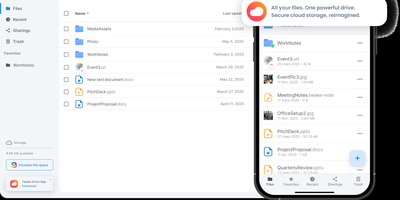
With over 1,200 GitHub stars, 12,000+ commits, and more than a decade of active development distributed under the AGPL-3.0 license, Cozy Cloud operates as a comprehensive personal data hub that goes far beyond file storage by connecting your documents, contacts, calendars, banking transactions, energy bills, and productivity tools into a single self-hosted platform where no third party profiles you. The cozy-stack Go binary handles file storage, CouchDB document management, job scheduling, app serving, and the REST API in a single process consuming approximately 150MB of RAM idle. Sandboxed konnectors import data from 50+ external services — banks, utility providers, telecom operators, cloud drives — running as isolated jobs via nsjail to prevent untrusted code from accessing other user data. The built-in app store serves web applications in subdomain-isolated environments with Content Security Policy headers, each app communicating exclusively through the documented REST API. Real-time synchronization via PouchDB replication and WebSocket keeps files, contacts, and documents consistent across desktop clients, mobile apps for iOS and Android with automatic photo backup, and the web interface. Security features include automatic Let's Encrypt TLS certificates, Argon2id password hashing, optional TOTP two-factor authentication, and GDPR-compliant data export via the CLI. Each user receives their own isolated instance with independent storage, database, and application configuration. Running on a dedicated VPS on RepoCloud with guaranteed CPU, RAM, and SSD, full root SSH access, and a browser serial console. AGPL-3.0 licensed.
Kresus
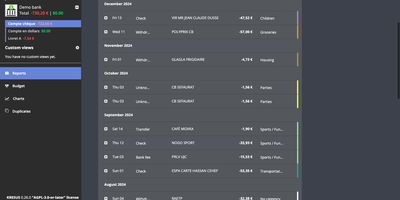
Kresus is a self-hosted personal finance manager that fetches your bank transactions overnight and turns them into categorized history, budgets, and charts, with no third-party aggregator holding your bank login. Banks with an open-source Woob connector sync automatically (mostly French ones), and each night Kresus re-reads the previous month so late postings are not missed; everything else works through manual accounts or OFX and JSON imports. Transactions can be renamed, sorted into color-coded categories, and moved to the previous or following budget month, and auto-categorization rules handle repeat merchants. The Budget page compares planned amounts with actual spending per category. Charts plot spending by category, balance over time, and monthly money received, spent, and saved. Recurring transactions like rent appear every month to preview your future balance. The Duplicates page lists suspected double imports for manual merging. Search by period, category, amount, or date, and group same-currency accounts into custom views. Email reports, balance and transaction alerts, and Apprise notifications to Telegram, Slack, or Gotify switch on once your administrator enables them. The interface comes in English, French, Spanish, and Turkish. The whole instance exports as JSON without bank passwords or, when enabled, as a password-encrypted file. Running on a dedicated VPS on RepoCloud with guaranteed CPU, RAM, and SSD, full root SSH access, and a browser serial console. AGPL-3.0-or-later licensed.
Sake
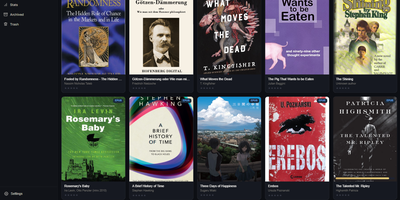
Your e-reader knows exactly where you stopped reading, and Sake makes your whole library know it too, with a self-hosted web library that syncs KOReader progress, notes, and highlights across every device you own. Browse your collection in a clean web app with covers, metadata, shelves, ratings, and reading state, and organize it with rule-based shelves that file new books automatically according to conditions you define. Pair a KOReader device once and progress uploads in the background when the reader sleeps, new books download on request, and highlights land in a searchable annotations hub where you can edit notes inline and export them as Markdown or JSON. An existing on-device library can be exported back into the web app complete with its sidecar data, so years of reading history move with you. Search providers including Open Library, Project Gutenberg, and Anna's Archive (through Libgen mirrors) put new books one query away from your shelves, and metadata lookups enrich them from Google Books, Open Library, or Hardcover. OPDS and WebDAV endpoints serve any compatible reader app with optional separate Basic-auth passwords, the built-in plugin updater keeps the KOReader plugin current without manual file copying, and reading statistics chart your habits across the library. The installable progressive web app keeps the library one tap away on phones and tablets. Running on a dedicated VPS on RepoCloud with guaranteed CPU, RAM, and SSD, full root SSH access, and a browser serial console. AGPL-3.0 licensed.