ProductFlow
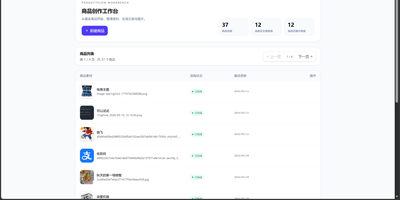
ProductFlow turns a product photo and a few facts into finished selling material, giving solo merchants and small teams one workspace for copy, posters, and repeatable image generation. You start by creating a product record, attaching original and reference images, then arranging product data, copy nodes, and image nodes on a zoomable canvas with drag, pan, multi-select, and connections. Copy nodes generate editable structured text that you can review, confirm, and keep in history before downstream image nodes read it. Poster generation runs in template mode with local rendering or generated mode through an image provider, and completed results can be downloaded, saved as product references, or promoted to the main product image slot. A separate image session view supports text-to-image and image-to-image runs with base image selection, candidate comparison, queue position, progress, cancel, and retry. Every finished image can move into the gallery with its source session, linked product, prompt, size, and model recorded for later reuse. Runtime settings cover provider profiles, model bindings, image tool parameters, prompt templates, upload limits, and concurrency, guarded by a separate settings token. The built-in help pages document the canvas, gallery, image sessions, and configuration in searchable sections. Running on a dedicated VPS on RepoCloud with guaranteed CPU, RAM, and SSD, full root SSH access, and a browser serial console. MIT licensed.
ChartDB
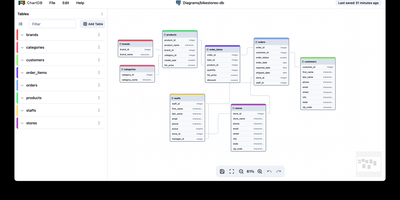
Paste one SQL query result into a browser and get an interactive entity-relationship diagram instantly, with no installations, no credentials, and no account required. ChartDB's "Smart Query" runs a single statement in your existing database client that exports table definitions, relationships, indexes, and column types as JSON metadata, meaning the application never touches your database passwords. The canvas renders draggable entities with cardinality markers, collapsible grouping areas, and sticky notes for documentation. AI-powered DDL export generates migration scripts between dialect pairs like PostgreSQL to MySQL or SQLite to CockroachDB, analyzing your schema to produce target-specific DDL with correct type mappings and constraint translations. Import paths cover Smart Query JSON, raw DDL scripts, and DBML files from tools like dbdiagram.io. The AI layer connects to OpenAI or any compatible inference server including local vLLM instances running models like Qwen2.5-32B. Database coverage includes PostgreSQL (with Supabase and Timescale extensions), MySQL, SQL Server, MariaDB, SQLite (with Cloudflare D1), CockroachDB, ClickHouse, and Oracle. Exports to SVG with inline styles or SQL DDL in any target dialect. Ships as a React/Vite frontend behind Nginx in Docker, deployable on RepoCloud with dedicated VPS resources under the AGPL-3.0 license.
Codel
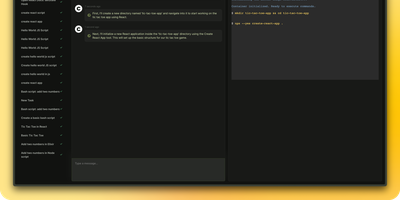
Meet your new digital sidekick, the Fully Autonomous AI Agent! This isn't just any AI; it's like having a superhero in your terminal, browser, and editor. Ready to tackle complex tasks and projects with a single command, this AI Agent is your go-to for making tech magic happen. And with RepoCloud, you're not just saving on costs, you're also joining a league of extraordinary users harnessing the power of open-source collaboration. Get ready to elevate your productivity to legendary levels!
Design Studio AI
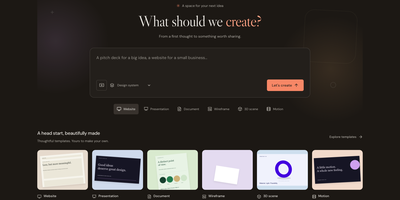
Describe a website, slide deck, document, 3D scene, or animation, then shape it with chat and a full visual editor in your own workspace. Templates give every project a head start, and a short brief about the goal and audience steers the first draft. The editor offers layers, flex and grid layouts, reusable design systems with palettes and fonts, component libraries, and live human and agent editing on one versioned document. The 3D mode handles materials, lighting, camera, rigging, and morph targets, and the motion tools animate bones, skins, and clips. Bring your own keys for OpenAI, Anthropic, Gemini, OpenRouter, or DeepSeek to generate text, images, speech, music, and video. Finished work exports as HTML, SVG, PNG, PDF, PowerPoint, WebM, GLB, or a React prototype, and snapshots can be shared publicly. Agents connect through REST, an authenticated MCP endpoint, or a command line tool, and an activity view records provider calls and usage. Accounts use email and password, with optional GitHub sign-in. Running on a dedicated VPS on RepoCloud with guaranteed CPU, RAM, and SSD, full root SSH access, and a browser serial console. MIT licensed.
KiCAD Prism
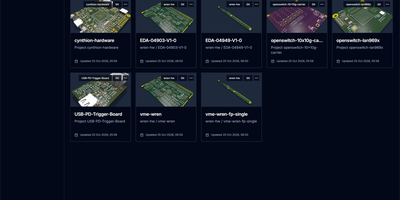
KiCAD Prism gives hardware teams the review and release layer that KiCad and Git leave out, hosted on your own hardware with no proprietary ECAD cloud. Import projects from SSH or HTTPS Git remotes, monorepos included, and every revision opens in the browser across schematic, PCB, 3D, BOM, and stackup views. Cross-probing links the views together, insets open a live view of the other document from any pin or pad, and selecting a net highlights it across schematic, PCB, and 3D with its routed length, layers, tracks, and vias. Reviewers comment on any sheet, part, or area with rich text, pasted snips, and attachments anchored to the exact revision, optionally publishing the discussion to GitHub or GitLab issues. Design Comparison lines two revisions up and lists what changed across schematic, PCB, BOM, stackup, and fabrication outputs, highlighted on the sheet beside the review thread. Release Studio then walks a committed revision through source, identity, manufacturing, build, outputs, and publish, building fabrication and assembly files, showing Gerbers in the browser, recording DRC and ERC evidence and designer and QA sign-off, and publishing the approved package to GitHub or GitLab Releases. Library Manager governs components as a catalog of immutable revisions with symbol, footprint, 3D, and SPICE assets and a QA release flow, delivered into desktop KiCad through the Remote Symbol Provider. Running on a dedicated VPS on RepoCloud with guaranteed CPU, RAM, and SSD, full root SSH access, and a browser serial console. Apache-2.0 licensed.
KaletaCMS
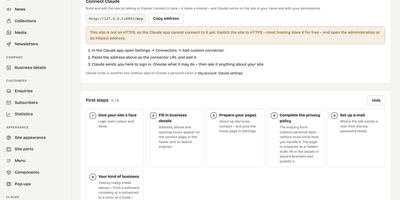
Kaleta is a business-website CMS where the page you edit is the page your visitors get, not a preview of it. The visual builder works on the live canvas: add sections, drag elements, edit text in place, and style every element separately for desktop, tablet, phone, and hover before you publish. Forty-six elements and forty ready-made sections cover pricing tables, timelines, before-and-after sliders, galleries, accordions, carousels, maps, and mega menus. Consistency comes from a design-token system: change one colour, font, spacing, or radius token and the whole site follows, with a WCAG contrast check on every colour pair and export in the W3C token format. Blocks you reuse become components edited once and updated everywhere, and each page carries its own search title, sharing image, and visibility, with the last twenty publications kept as versions. Moving in is a first-class feature: importers take WordPress exports including WooCommerce products and Polylang or WPML translations, plus Ghost, Blogger, Joomla, Drupal, and Webflow, creating a redirect from every old address so rankings survive. An optional AI assistant connected through MCP builds pages and handles chores only as drafts you approve. Forms, booking, enquiries, media folders with focal-point cropping, multilingual publishing, and GDPR duties such as automatic personal-data deletion are built in rather than bolted on. Running on a dedicated VPS on RepoCloud with guaranteed CPU, RAM, and SSD, full root SSH access, and a browser serial console. GPL-2.0 licensed.
Moocup
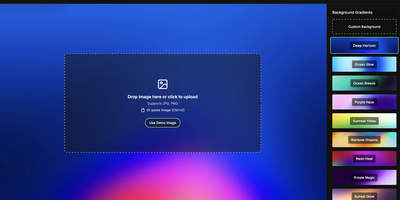
Drop your screenshot, a base style is applied, style it however you wish, and export - "that's basically it," says Moocup's own author, and the description holds. The workflow is genuinely seconds long. Drag an image in and it lands on an attractive backdrop immediately; from there you adjust backgrounds, gradients, padding, borders, shadows, and framing with live preview until it matches your taste, then export a high-quality image ready for a portfolio page, README, blog post, tweet, or slide deck. There are no accounts, no watermarks, and no upload to anyone's cloud - as a self-hosted static app, your screenshots never leave your infrastructure, which matters when the screenshot shows a proprietary dashboard or unreleased product. It runs entirely in the browser from a tiny nginx container, works on any device, and requires zero design skill: the smart defaults do the heavy lifting, and everything else is optional tinkering.